
Quick Answer: GLB and glTF are two ways of packaging the same glTF 2.0 format. GLB stores everything in a single file, while glTF uses separate JSON, binary and texture files. This guide explains their differences, use cases, performance and which format is best for your project.
So this GLB vs glTF comparison reflects real production experience, not just spec reading. Pixlnexs builds and delivers production-ready GLB and glTF 3D models for ecommerce, AR and web use, optimized for fast loading on Shopify, WooCommerce and Magento stores.
The Pixlnexs Animation Studio team works with GLB and glTF daily, producing AI video and 3D content and running store.pixlnexs.com
GLB vs glTF: What’s the Difference?
Although people often compare GLB vs glTF as if they were different 3D formats, they actually use the same glTF 2.0 specification. The real difference is how the files are packaged and delivered.
- GLB stores everything geometry, materials, textures, animations and scene data in a single binary file.
- glTF (.gltf) separates the model into a JSON file, one or more .bin files and external texture images.
Because of this, GLB is generally the preferred format for websites, eCommerce stores, AR experiences and game engines, while glTF is better suited for development workflows where files need to be edited, inspected or managed in version control.
Comparison
| Feature | GLB | glTF |
|---|---|---|
| File Structure | Single binary file | JSON + .bin + texture files |
| Easy to Share | Yes | Multiple files |
| Human Readable | No | Yes |
| Best for Web | Excellent | Good |
| Editing | Limited | Easy |
| Git Version Control | Poor | Excellent |
| Loading Speed | Faster | Slightly slower |
| Risk of Missing Textures | None | Possible |
| Supports Animation | Yes | Yes |
| Supports PBR Materials | Yes | Yes |
| Supports Draco & Meshopt | Yes | Yes |
What glTF actually is: “the JPEG of 3D”
glTF means GL Transmission Format. This format originated from Khronos Group the same standards organization responsible for OpenGL Vulkan and WebGL and the latest version (glTF 2.0) was released in 2017. In order to understand what the goals of the format are, one needs only to take a look at the nickname that industry bestowed upon it “the JPEG of 3D”. Just as JPEG is an ubiquitous delivery format for pictures that practically any device is capable of rendering, glTF is an open royalty free format specifically designed for efficient transmission and fast loading of 3D scenes and models at runtime.
The important thing about glTF is that the word “transmission” is crucial for it. glTF is not an authoring/editing format like Blender .blend file or a Zbrush project. glTF is a delivery format, the one that you would export your model to after the process of modeling and before it will be loaded by engine/browsers/AR viewers with minimum processing.
Here’s the part that trips people up: GLB and glTF are not two different formats. They’re two container layouts of one format. Both describe the exact same glTF 2.0 data model. Choosing between them is choosing how the bytes are packaged on disk, not choosing a different feature set or a different quality level.
glTF (.gltf): JSON plus separate files
The “plain” glTF layout is multi-file. When you export it you typically get:
- gltf: The file is essentially a JSON text file containing information about the scene, including the node tree, what meshes there are, what materials are assigned to them and animation channels/pointers to the actual binary data.
- bin: One or multiple files containing the actual numerical data in raw form, such as vertex position, normals, texture coordinates, index information and animation frames.
Texture images, in .png .jpg, KTX2 or Basis format.
Because the .gltf file is plain JSON, you can open it in any text editor and read it. You can see material names, tweak a metallic value by hand or inspect the animation list. That transparency is the format’s superpower for developers and technical artists.
The catch is file management. A single model is now three, five or ten files that have to travel together with their relative paths intact. Move the .gltf without its .bin and textures and it breaks. Email it as one file and the recipient gets a broken asset. This is exactly the friction GLB was built to remove.
GLB (.glb): everything in one binary file
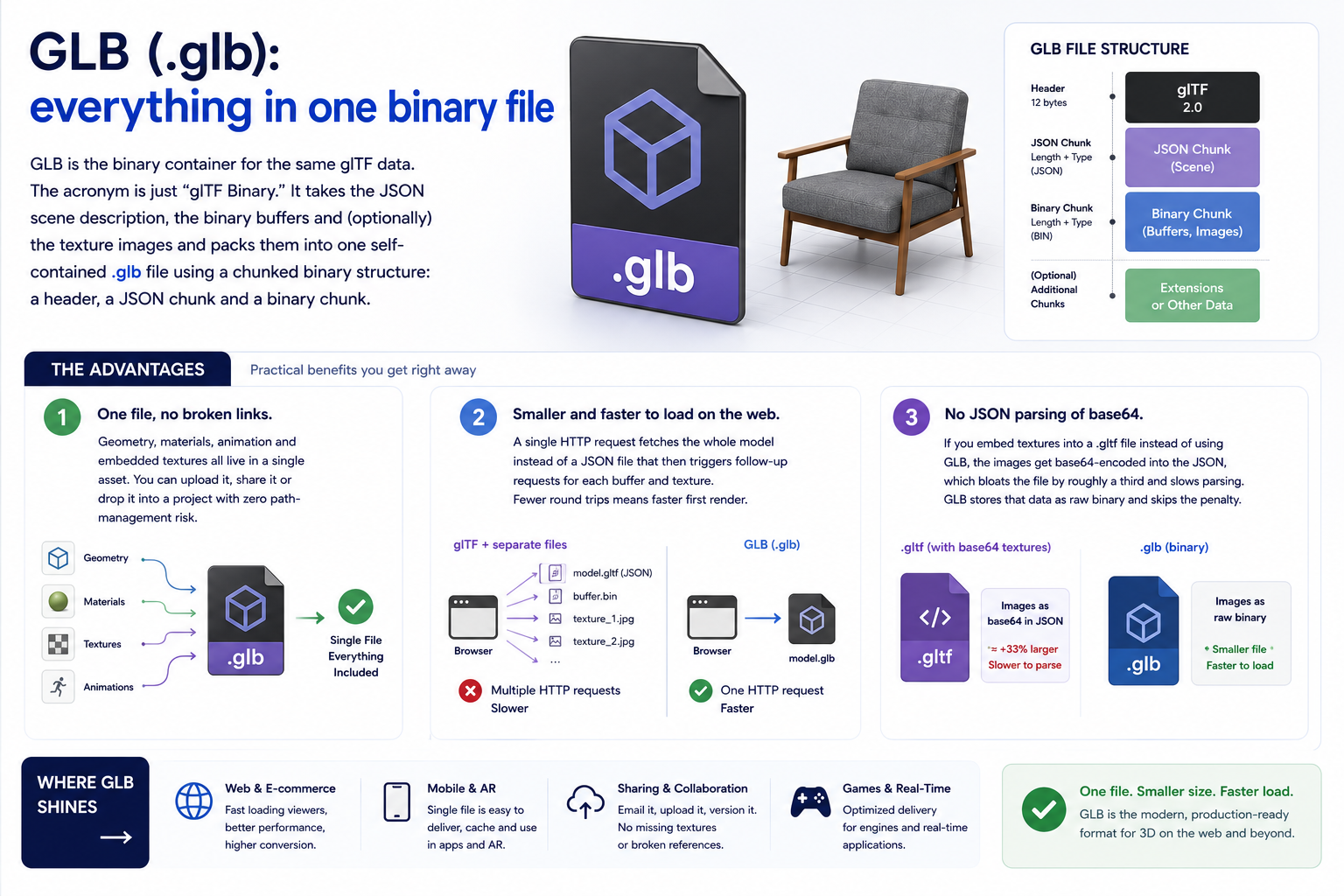
The GLB format is the binary packaging format for glTF scene data. This format is simply “glTF Binary.” The JSON scene description along with the binary buffers (and optionally the textures) is packed into a single .glb file with a chunked binary format consisting of a header, JSON chunk and binary chunk.
The advantages are practical and immediate:
- One file, no broken links. Geometry, materials, animation and embedded textures all live in a single asset. You can upload it, share it or drop it into a project with zero path-management risk.
- Smaller and faster to load on the web. A single HTTP request fetches the whole model instead of a JSON file that then triggers follow-up requests for each buffer and texture. Fewer round trips means faster first render (see web.dev on reducing network payloads).
- No JSON parsing of base64. If you embed textures into a
.gltffile instead of using GLB, the images get base64-encoded into the JSON, which bloats the file by roughly a third and slows parsing. GLB stores that data as raw binary and skips the penalty.
The trade-off is editability. A .glb is binary, so you can’t open it in a text editor and read or tweak it directly. To change anything you load it into a tool (Blender, a glTF editor or a command-line utility). And because it’s a binary blob, it doesn’t diff or merge cleanly in Git the way a text .gltf does.
Here’s what actually bites teams in practice: someone exports a GLB, the client asks for “just a quick color change three weeks later” and nobody kept the source .blend or the unpacked glTF. You can still re-pack and edit a GLB but you’re working blind against a binary instead of reading the JSON. The habit worth keeping is shipping GLB but archiving the source alongside it.
What both formats support (identical feature set)
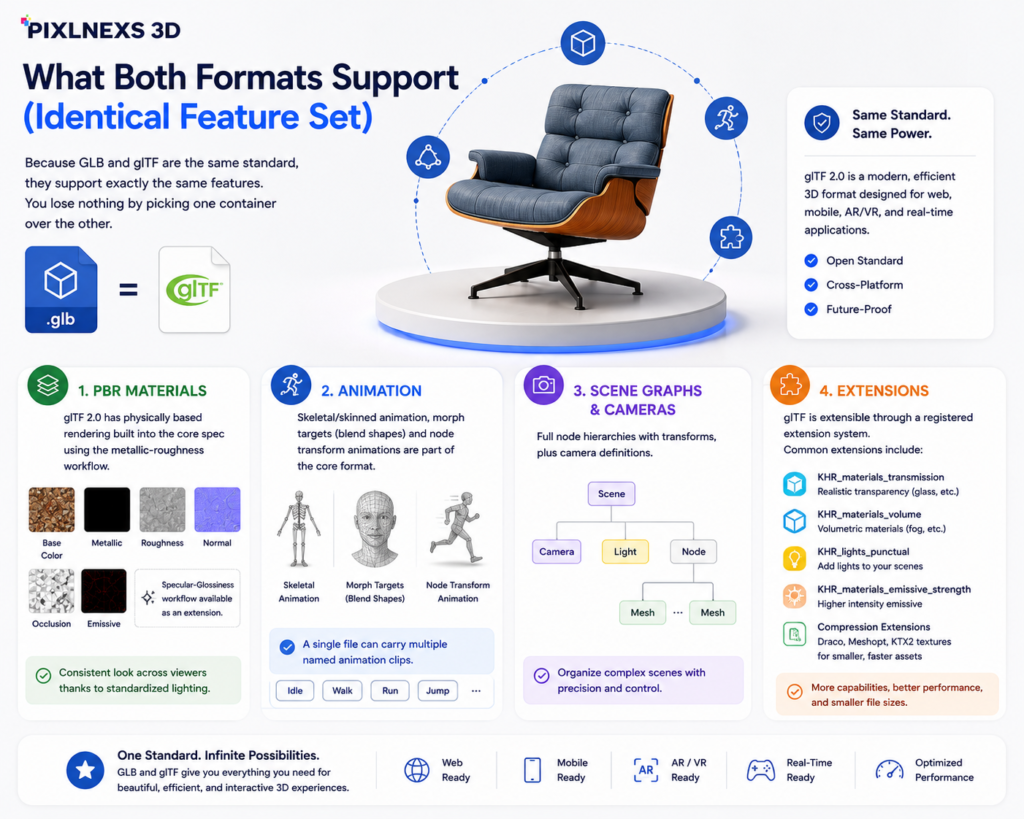
Because GLB and glTF are the same standard, they support exactly the same features. You lose nothing by picking one container over the other.
- PBR materials. glTF 2.0 has physically based rendering built into the core spec using the metallic-roughness workflow (base color, metallic, roughness, normal, occlusion and emissive maps). That’s why glTF models look consistent across viewers; the lighting math is standardized. A specular-glossiness workflow exists as an extension.
- Animation. Skeletal/skinned animation, morph targets (blend shapes) and node transform animations are all part of the core format. A single file can carry multiple named animation clips.
- Scene graphs and cameras. Full node hierarchies with transforms, plus camera definitions.
- Extensions. glTF is extensible through a registered extension system. Common ones include
KHR_materials_transmissionandKHR_materials_volumefor glass,KHR_lights_punctualfor lights,KHR_materials_emissive_strengthand the compression extensions below.
Compression: Draco and Meshopt
The two formats provide the same compression techniques and they play a critical role in web optimization:
Draco (KHR_draco_mesh_compression) compresses geometry meshes, i.e., vertices and indices and allows for reducing significantly geometry data. It requires a decoder for the format to be loaded, which is associated with the minor loading overhead.
Meshopt (EXT_meshopt_compression) another technique allowing for compressing geometry and other buffers with the extremely fast decompression process. It goes perfectly along with the general-purpose GZIP format.
KTX2 / Basis Universal (KHR_texture_basisu) equivalent technique for the texture side. It provides GPU-compressed textures that remain compressed in the video memory, thus allowing for decreasing download time and GPU memory usage.
How GLB/glTF compare to USDZ, FBX and OBJ
glTF doesn’t exist in a vacuum. Here’s how it sits next to the other formats you’ll run into, briefly:
- OBJ, ancient, simple, universal. Stores geometry and UVs, with materials in a sidecar
.mtlfile. No animation, no PBR, no scene graph. Great for static geometry interchange, obsolete for anything modern. - FBX, the long-time industry interchange workhorse, rich with animation and rigging support. But it’s a proprietary Autodesk format with a closed, versioned spec, which makes it a poor fit for the open web and it isn’t natively loadable in browsers.
- USDZ, Apple’s AR delivery format, a zipped USD package. It’s the native format for AR Quick Look on iOS/iPadOS. On the web and Android, GLB is the equivalent AR delivery format. In practice you often ship both. We cover this in depth in GLB vs USDZ.
The short version: glTF/GLB is the open, runtime-delivery standard for the web, AR and most modern engines. FBX is the heavyweight authoring-interchange format. OBJ is the lowest-common-denominator static format. USDZ is the Apple AR sibling you pair with GLB.
Comparison table
| Aspect | GLB (.glb) | glTF (.gltf) |
|---|---|---|
| Underlying format | glTF 2.0 | glTF 2.0 |
| Packaging | Single binary file | JSON + .bin + texture files |
| Human-readable | No (binary) | Yes (JSON is editable text) |
| File count | One | Multiple, must stay together |
| Web loading | Best, one request, no base64 bloat | Multiple requests or bloated if textures embedded |
| Editing by hand | Requires a tool | Open in any text editor |
| Version control (Git) | Binary blob, no clean diffs | Diffs and merges cleanly |
| Sharing / handoff | Trivial, one file | Risk of broken paths |
| PBR materials | Yes | Yes |
| Animation / skinning | Yes | Yes |
| Draco / Meshopt / KTX2 | Yes | Yes |
| Best for | Web stores, AR, game engines, sharing | Editing pipelines, debugging, source control |
Which should I use?
Match the container to the job:
- Web store / product viewer → GLB. One file, one request, fastest load. This is what powers
<model-viewer>and most 3D commerce on the web. - AR (web or Android) → GLB. It’s the standard delivery format for Scene Viewer and
<model-viewer>AR. For iOS AR Quick Look you’ll also want USDZ. - Game engine import (Unity, Unreal, Godot) → GLB is clean and self-contained and both work. Engines re-import into their own internal format anyway.
- Sharing a model with a client or teammate → GLB. Nothing to lose, no broken texture links.
- Active editing / a build pipeline you want to inspect → glTF, so you can read the JSON, script changes and diff revisions.
- Storing source in Git → glTF if you need meaningful diffs, otherwise store GLB with Git LFS.
How to convert and export
You almost never write these files by hand. You export them. The most common routes:
- Blender, with its built-in glTF 2.0 exporter (File → Export → glTF 2.0). It offers three packaging choices in one dialog: glTF Binary (.glb) glTF Separate (.gltf + .bin + textures) and glTF Embedded (.gltf with everything base64’d in). Pick
.glbfor delivery. - glTF-Transform, a capable open-source command-line tool and JavaScript library for inspecting, optimizing and converting glTF/GLB. It’s the go-to for batch-applying Draco/Meshopt/KTX2 and for converting between the two layouts.
- FBX2glTF, a converter for bringing legacy FBX assets into the glTF world.
- Online converters and DCC exporters. Most 3D apps (Maya, 3ds Max, Substance) and many web tools can export glTF/GLB directly.
Converting between GLB and glTF is lossless and trivial because the data model is identical. Tools like glTF-Transform let you “pack” a glTF into a GLB or “unpack” a GLB back into separate files at any time.
How to optimize and compress for fast web loading
A raw export is rarely web-ready. The biggest wins, in order of impact:
- Compress textures with KTX2/Basis. Textures are usually the heaviest part of a model. KTX2 cuts download size and GPU memory.
- Compress geometry with Draco or Meshopt. Shrinks vertex and index data significantly. Choose Meshopt for fastest decode, Draco for maximum geometry shrink.
- Reduce resolution sensibly. Cap textures at the size you’ll actually display (say 2K or 1K) and decimate over-dense meshes.
- Serve as GLB with GZIP/Brotli over HTTP and lazy-load models below the fold.
One thing the budget numbers don’t tell you: Draco saves bytes on the wire but costs you decode time on the client and on a mid-range phone that decode can show up as a visible hitch before the model appears. If your model is geometry-light but texture-heavy, KTX2 alone often gets you most of the win without paying that decode tax. Measure on a real device, not your desktop. We walk through the full workflow, tooling and target budgets in How to optimize 3D models for fast web loading.
Frequently asked questions
Related guides
- What is a GLB file?
- GLB vs USDZ: which to use for AR
- How to optimize 3D models for fast web loading
- 3d product visualization platform
Ready to put this into practice? Browse the Pixlnexs 3D model store for production-ready GLB and glTF assets across 13 categories, fully PBR-textured, animation-ready where applicable and optimized for fast web and AR loading. Every model downloads in web-friendly formats so you can drop it straight into your store, app or AR experience.
Want to check a GLB file yourself? Open it in the free online GLB viewer to rotate, zoom and inspect any .glb model in your browser.










Leave a Reply