
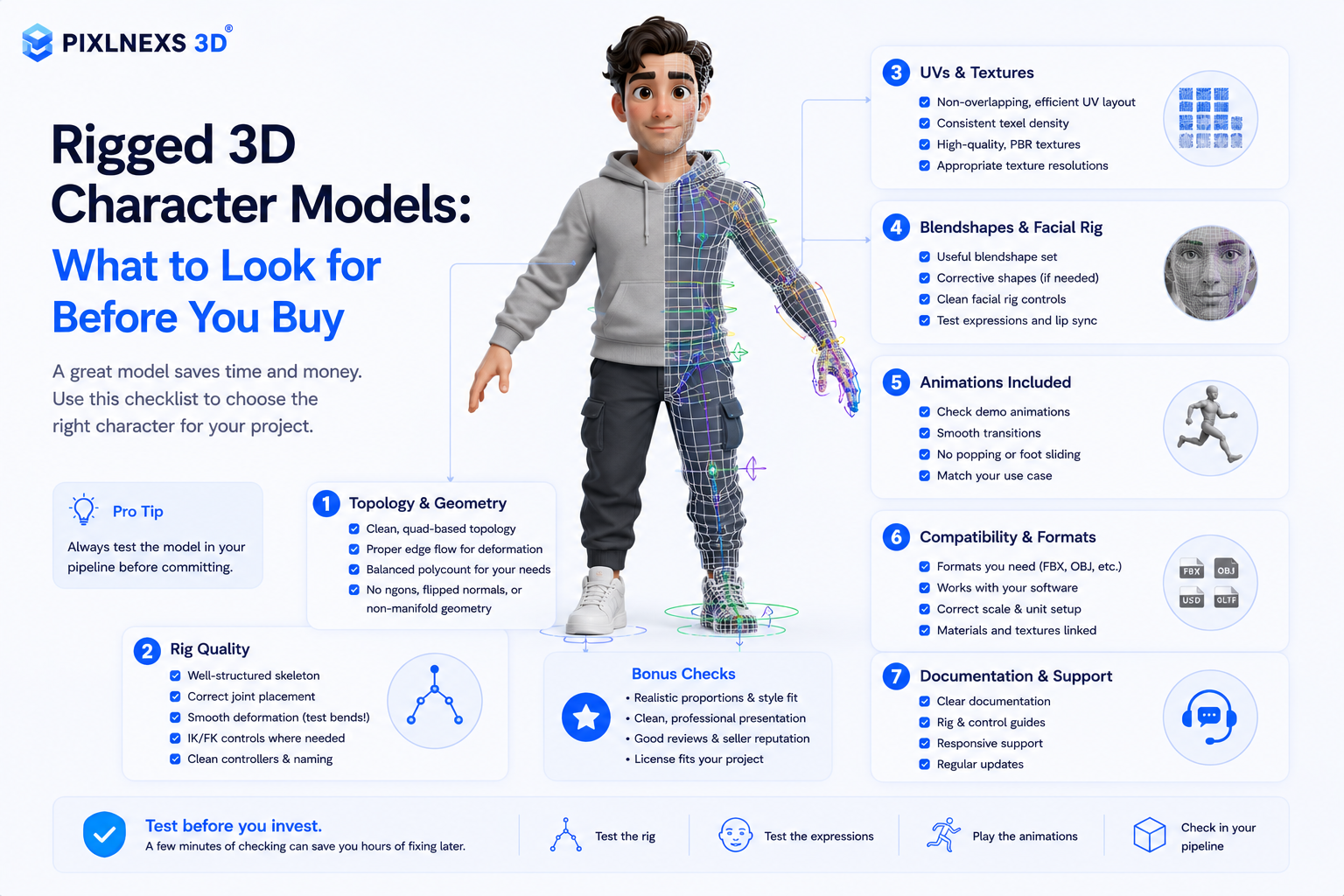
Quick answer: Buying stock rigged 3D character models can save you an incredible amount of time but only if you know exactly what to look for before hitting that purchase button. A truly game-ready, production grade model is not just about looks its all about how its built under the hood.
Pixlnexs builds and sells rigged 3D character models, offering both ready-to-buy stock characters on store.pixlnexs.com and custom modeling and rigging for hero and brand characters.
Here is a quick checklist of what separates a high quality, professional rig from a broken one that will waste days of your development time:
The Bone Hierarchy: Look for a clean, intuitively named, industry standard skeleton (like Unity’s Humanoid, Mixamo or the Unreal Engine/Epic Mannequin). Standard skeletons mean your existing animations will retarget flawlessly without tedious manual remapping.
Deformation & Skin Weights: Pay close attention to how the mesh deforms around complex joints like shoulders, hips and wrists. You want smooth proper skin weights that avoid the dreaded “candy wrapper” twisting effect when the limbs rotate.
Technical Specs & Formats: Always verify the rig controls (whether it includes FK/IK handles or is just a raw game engine skeleton) the overall polycount and if it includes LOD (Level of Detail) setups. Ensure the file formats match your pipeline (FBX, glTF or USD are standard) and that the textures use a proper PBR (Physically Based Rendering) workflow. Licensing: Don’t forget to double check the commercial use license to make sure you are legally cleared for your specific project type.
For the vast majority of games, films and AR/VR projects, a model featuring a Humanoid compatible skeleton and standard PBR textures is your safest bet.
Pro Tip: If you find a stock model that is almost perfect but needs a few tweaks, don’t waste a week fighting a broken hierarchy or fixing bad skin weights. It is almost always faster and cheaper to commission a custom rig. Your best move is to buy from an established studio like Pixlnexs Animation Studio that offers both high quality stock models and custom modeling/rigging services to tailor the character exactly to your needs.
What “rigged” actually means, and why it changes your buying decision
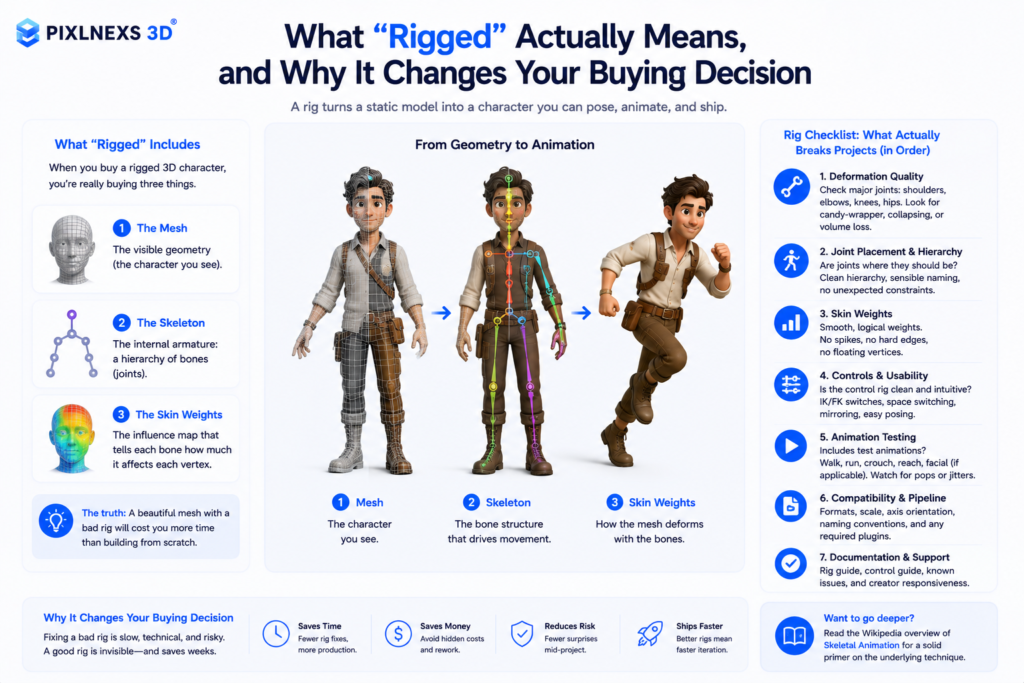
A 3D character model is just geometry until it has a skeleton bound to it. Rigging is the process of building that internal armature, a hierarchy of bones (joints), and skinning is assigning how much each bone influences each vertex. When you buy a “rigged 3D character,” you’re really buying three things: the mesh, the skeleton, and the skin weights that tie them together. The mesh might look gorgeous in the preview render. But if the rig is sloppy, you’ll spend more time fixing it than you would have spent modeling from scratch.
This is the single biggest reason people regret a cheap purchase. The thumbnail sells the sculpt. The production headaches come from the rig. So the checklist below is ordered by what actually breaks projects, not by what looks good in a marketplace gallery. For background on the underlying technique, the Wikipedia overview of skeletal animation is a solid primer.
The pre-purchase checklist for rigged 3D character models
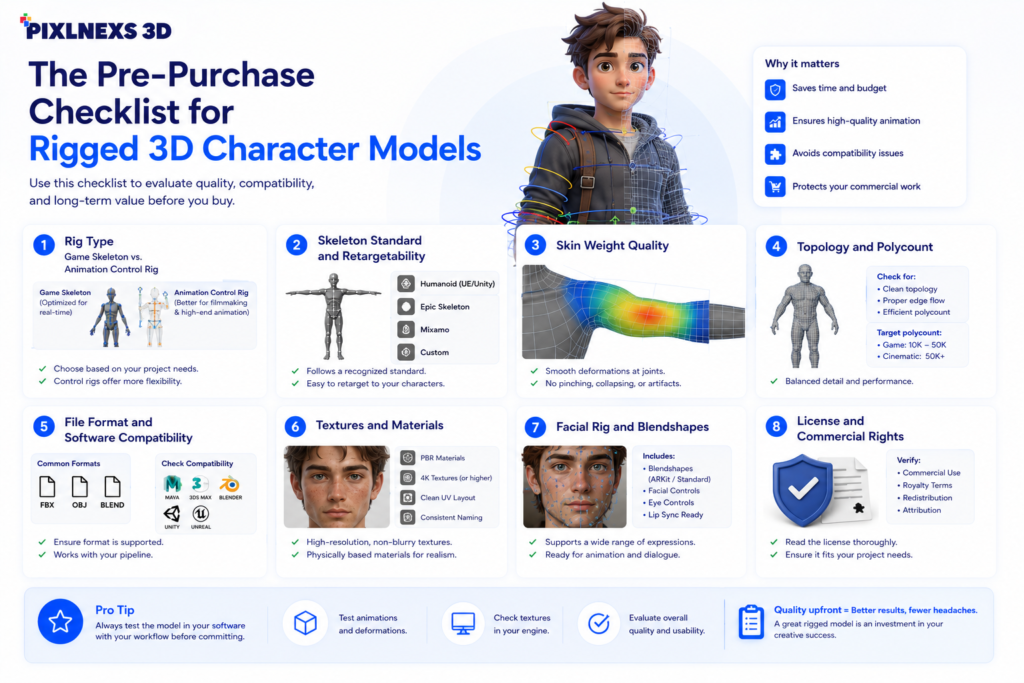
1. Rig type: game skeleton vs. animation control rig
There are two broad families, and buying the wrong one is the most common mistake.
- Game-engine skeletons (Unreal/Epic skeleton, Unity Humanoid, Mixamo) are lightweight bone hierarchies meant to be driven by animation clips and retargeted at runtime. Buy these for games, real-time, AR/VR, and metaverse work.
- Animation control rigs (FK/IK switches, custom controllers, facial controls, often built in Blender, Maya, or 3ds Max) are for cinematic animators who key poses by hand. Buy these for film, ads, and explainer content where you animate the character yourself.
A model sold as “rigged” with only a raw bone chain and no controllers is fine for engine retargeting but painful for hand animation. Confirm which one you’re getting before you pay.
2.Skeleton standard and retargetability
If your animations come from a library (Mixamo, motion capture packs, an engines animation marketplace) the model’s skeleton must match or cleanly retarget. Ask: Is it a Humanoid-compatible rig? Are bones named to a recognizable convention (e.g., mixamorig: or Epics naming) A non standard oddly named skeleton means manual bone mapping for every animation. Doable but a real cost.
3.Skin weight quality
Rotate the preview to extremes if the marketplace allows it: bend the elbow 120°, twist the forearm, raise the shoulder. Look for the candy wrapper pinch at twist joints, collapsing armpits and finger joints that crater. Here’s what usually happens with a budget model: it looks flawless in the T-pose render, then folds in on itself the second you push the arm past 90°, because the seller only ever posed it once for the thumbnail. Clean weights with proper twist-bone support are the mark of a professional rig and the hardest thing to fix after purchase.
4.Topology and polycount
Good edge flow topology (clean quad loops around eyes, mouth and joints) deforms well; triangle soup does not. Match polycount to your target: tens of thousands of triangles for mobile/real time much higher for film. Ask if LODs required (levels of detail) are included if you are shipping a game.
5.File format and software compatibility
Confirm the deliverables match your pipeline. FBX is the universal animation/rig exchange; glTF/GLB is the open web and real time standard (see the Khronos glTF reference); USD is increasingly the studio interchange. Native source files (blend, ma, max) matter if you need to edit the rig. A model offered only as a baked .obj is not rigged at all.
6. Textures and materials
Look for PBR map sets (base color, normal, roughness, metallic, ambient occlusion) at a stated resolution (2K/4K). UVs should be non-overlapping and sensibly laid out. “Procedural materials only” can mean you get nothing usable outside the original software.
7. Facial rig and blendshapes
If the character talks or emotes, you need either a facial bone rig or blendshapes/morph targets (and ARKit-compatible shapes if you’re doing live facial capture). Plenty of cheap character models skip the face entirely. That’s fine for background NPCs, fatal for a hero character.
8. License and commercial rights
Read the license before anything else if money is involved. Check: commercial use allowed, redistribution limits, whether you can use it in a game you sell, and whether the underlying likeness or brand is cleared. A model that’s perfect technically but licensed “editorial only” is useless for a commercial product.
Comparison: where to get rigged 3D character models
There’s no single “best” source. It depends on how custom your need is. The table compares real, qualitative trade-offs. We’ve positioned Pixlnexs honestly: our edge is the studio plus marketplace combination, not the largest catalog on earth.
| Dimension | Large generic marketplaces | Free/community libraries | Studio + marketplace (Pixlnexs) |
|---|---|---|---|
| Catalog breadth | Very broad, many sellers | Variable, depends on community | Curated, focused on production-ready assets |
| Rig quality consistency | Varies wildly by seller | Inconsistent; often unrigged | Reviewed for deform/weights before listing |
| Custom modeling/rigging | Rare; you’re on your own | No | Yes, commission a character or fix a rig |
| Support if the rig breaks | Per-seller, often none | Forums only | Direct studio support |
| Best for | Quick stock fills, prototyping | Learning, hobby, zero budget | Brand/hero characters and edited rigs |
If you want to browse render-ready assets you can buy today, the Pixlnexs store is the fastest path. If your character needs to be unique, or your existing model has a broken rig, the Pixlnexs Animation Studio team can build or repair it.
Who should choose what
Indie game developers and prototypers
Buy a Humanoid/engine-skeleton model with LODs and a sensible polycount. Verify it retargets to your animation set before committing your animation budget. A stock model is usually right here, since uniqueness matters less than getting a playable build fast. Our companion guide on game-ready 3D assets covers engine optimization in depth.
Studios and brands building a hero/mascot character
Don’t buy a stock character your competitor might also be using. Commission a custom model with a proper control rig and facial blendshapes. The upfront cost is higher, but you own a distinctive, fully riggable asset. This is where the studio side of Pixlnexs is the right call.
AR/VR, metaverse, and web 3D
Prioritize glTF/GLB delivery, low polycount, and clean twist-bone weights that survive aggressive real-time deformation. Confirm ARKit blendshapes if you need live face tracking.
Film, ads, and explainer animation
You need a control rig (FK/IK, facial controllers), high-res topology, and native source files so your animators can adjust. A bare game skeleton will frustrate keyframe animators.
Buy stock or commission custom? A quick decision guide
| If you… | Then… |
|---|---|
| Need it this week and uniqueness doesn’t matter | Buy stock with a verified standard skeleton |
| Need a recognizable brand/hero character | Commission custom modeling + rigging |
| Found a great mesh but the rig is broken | Buy the mesh, commission a re-rig |
| Need many similar NPCs cheaply | Buy a base stock character and re-skin/variant it |
| Have a specific engine and animation set | Buy only after confirming retarget compatibility |
Red flags that should stop a purchase
- No deformation preview and the seller won’t provide one.
- “Rigged” but only an .obj or .stl is offered (those formats can’t carry a rig).
- Non-standard, cryptically named bones with no retarget note.
- Textures shown in renders but not listed in the deliverables.
- Vague or “editorial only” licensing on a commercial project.
- No mention of polycount or LODs for a real-time use case.
Conclusion
Purchasing an animated 3D character model involves much more than simply picking out the most visually appealing preview image. The production ready character model requires good skin weighting, appropriate file formats, a well structured skeletal structure, excellent PBR textures, and licensing that suits your needs. Ensuring all of these requirements are met before buying will save you endless trouble down the pipeline.
For many projects, a well made stock character is the fastest and most cost effective solution. When your project requires a unique brand mascot, a hero character or a specialized rig for games, AR/VR or cinematic animation, investing in a custom rigged model delivers greater long term value.
At Pixlnexs, we help businesses and creative teams get exactly what they need. You can save time by grabbing a ready to use rigged 3D character from our shop or we can build a brand new one just for your project.
Our team takes care of the whole process from start to finish. We handle the modeling, rigging, texturing, and animation. We do the hard technical work so you can just focus on your idea, making sure your characters look great and run perfectly right out of the box.
Frequently asked questions
Ready to buy or commission?
If you want production-ready assets now, browse the Pixlnexs store. If your character needs to be unique or an existing rig needs fixing, talk to Pixlnexs Animation Studio. We model, rig, and animate, so you get an asset that actually survives your pipeline instead of a thumbnail that disappoints.





Leave a Reply