
Quick answer:3D product visualization for furniture and home decor refers to the creation of an interactive 3D model out of a sofa, table, lamp or carpet. Through AR technology, customers are able to rotate, zoom, change color and virtually place the item within their own room. In ecommerce, the 3D/AR viewer becomes a replacement or addition to photos.
Engagement and buyer confidence is heightened; returns due to “it didn’t look like the picture” is reduced while making it possible to make as many variations of angles, finishes and room visualizations from one single file. Workflow involves creating the model (or scanning the model) optimizing the model for the web and exporting it to glTF/glb format. This guide covers the full pipeline, costs, formats and the tradeoffs that actually matter for furniture and decor catalogs.
By the Pixlnexs Animation Studio team, we produce AI video and 3D content and run the marketplace at store.pixlnexs.com, so this reflects real production experience.
Why 3D Visualization for Furniture and Decor Matters
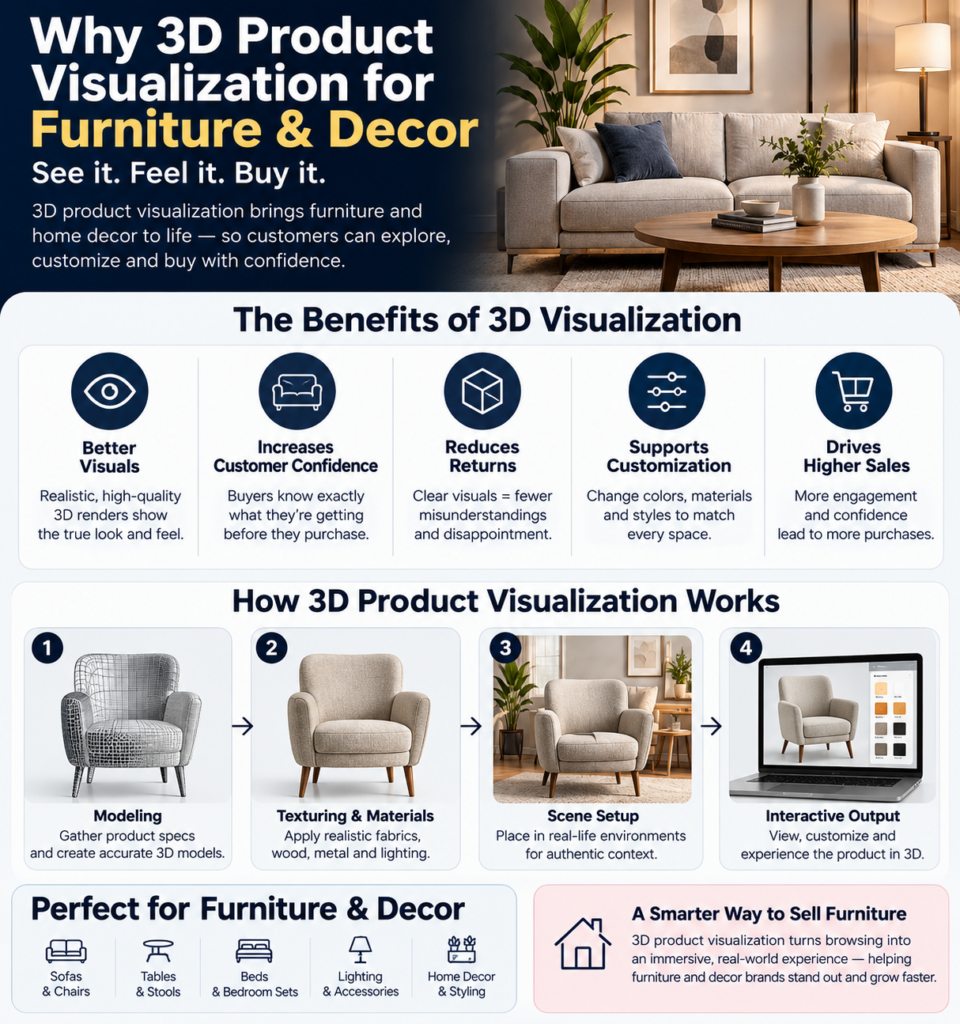
Furniture and home decor sit among the hardest categories to sell online. Furniture and home decor sit among the hardest categories to sell online. The products are large, the purchase is considered, the price is high and the customer is trying to imagine an object in a space they cannot photograph it in. Flat photography forces shoppers to fill in the gaps with imagination and when imagination and reality drift apart, you get returns. For bulky items, those returns are brutally expensive.
3D product visualization closes that gap. The customer is not shown three or four images taken in stages but rather a model which they are able to rotate in whichever direction they choose, zoom in on the stitches or grain of the wood and swap between fabric and finish choices (and this is where it really scores) and place inside their very own living room at life-size proportions via augmented reality.
What the experience replaces
A single well built 3D asset can generate an entire library of marketing collateral: hero renders at any angle, lifestyle room scenes, exploded views for assembly, animated turntables for social and the interactive viewer itself. For a catalog with many SKUs and finish variants, this is where 3D pays for itself. You stop re shooting every color of every product and start re rendering from one source of truth.
How the Furniture Product Visualization Pipeline Works
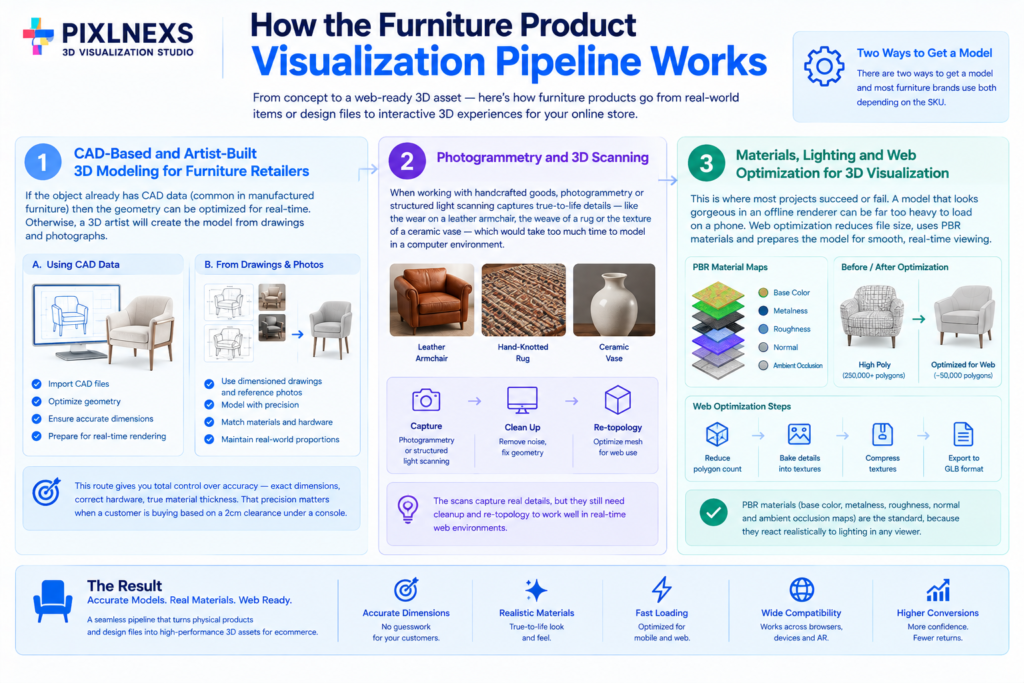
There are two ways to get a model and most furniture brands use both depending on the SKU.
1. CAD-Based and Artist-Built 3D Modeling for Furniture Retailers
If the object already has CAD data for its engineering (common in manufactured furniture) then the geometry can be optimized for real-time. Otherwise, the 3D artist will create the model from dimensioned drawings and photographs. This route gives you total control over accuracy: exact dimensions, correct hardware, true material thickness. That precision matters when a customer is buying based on a 2cm clearance under a console.
2. Photogrammetry and 3D scanning
When talking about handcrafted goods, consider a leather armchair worn out, a rug made from hand-knotted strings, a vase made from ceramics and photogrammetry or structured light scanning allows capturing true to life details of such products, which would take too much time modeling in a computer environment. The scans have to be cleaned up and re-topologized for web use but still they capture the real wear and weave.
3. Materials, Lighting and Web Optimization for 3D Visualization Furniture Assets
This is where most projects succeed or fail. A model that looks gorgeous in an offline renderer can be far too heavy to load on a phone over a slow connection. The web-optimization step means reducing polygon count, baking lighting and detail into texture maps, compressing those textures and exporting to a web native format. Physically based rendering (PBR) materials (base color, metalness, roughness, normal and ambient occlusion maps) are the standard, because they react realistically to lighting in any viewer. In practice, this step is also where a lot of the schedule goes. The fun modeling work finishes fast; the unglamorous optimization pass is what makes or breaks the launch.
File Formats and 3D Furniture Visualization Software: What to Actually Use
For the Web, the de facto standard is glTF/GLB, an open standard created by the Khronos Group for fast delivery and loading of 3D scenes at runtime. GLB is the binary version of glTF packed into one file with geometry, materials and textures inside – that’s what you need for a product page. On Apple platforms, USDZ powers AR Quick Look feature, thus a furniture company will deliver two formats: GLB for Web/Android AR and USDZ for iOS AR.
| Format | Best for | Notes |
|---|---|---|
| GLB / glTF | In-browser 3D viewer Android AR | Open standard, compact, broadly supported; the default web export |
| USDZ | iOS AR Quick Look | Apple’s AR format; usually generated alongside GLB |
| FBX / OBJ | Authoring and exchange between tools | Great for production handoff, not for shipping to a browser |
| Native CAD (STEP, etc.) | Source geometry | Must be retopologized and optimized before web use |
For embedding, a web component such as <model-viewer> handles loading a GLB, rendering it with realistic lighting and launching AR on supported devices with almost no custom code. More advanced builds use a WebGL/WebGPU engine for custom configurators, branded environments and tight integration with cart and inventory logic.
Costs and timelines (honest ranges)
We will not invent a precise per-model price, because it genuinely depends on complexity, finish variants and whether usable CAD exists. As realistic qualitative ranges from production work:
- Single-item decoration (simple vase, lamp, cushion, simple table): quickest and cheapest with clean geometry and minimal materials.
- Upholstered or detailed furniture (sofa, sectional sofa, tufted bed): middle-of-the-road, as modeling and material work are necessary for soft surfaces, joints and draping fabrics.
- Configurable products (modular sofas, multi-finish casegoods): highest cost, as one needs a base item and an additional layer of logic for interchangeable parts, fabrics and finishes.
What determines the cost driver and shifts the cost number: number of variants of finishes/fabrics, necessity of AR capabilities, photorealism of materials and necessity of lifestyle rooms along with interactive viewer. Pragmatically one would start with best-selling and high-grossing SKUs, measure lift and scale up from there. The economics of scale come from using the same base asset for rendering, social videos and interactive viewer.
Implementation: Product Visualization for Interiors on Your Store
Hosting and delivery
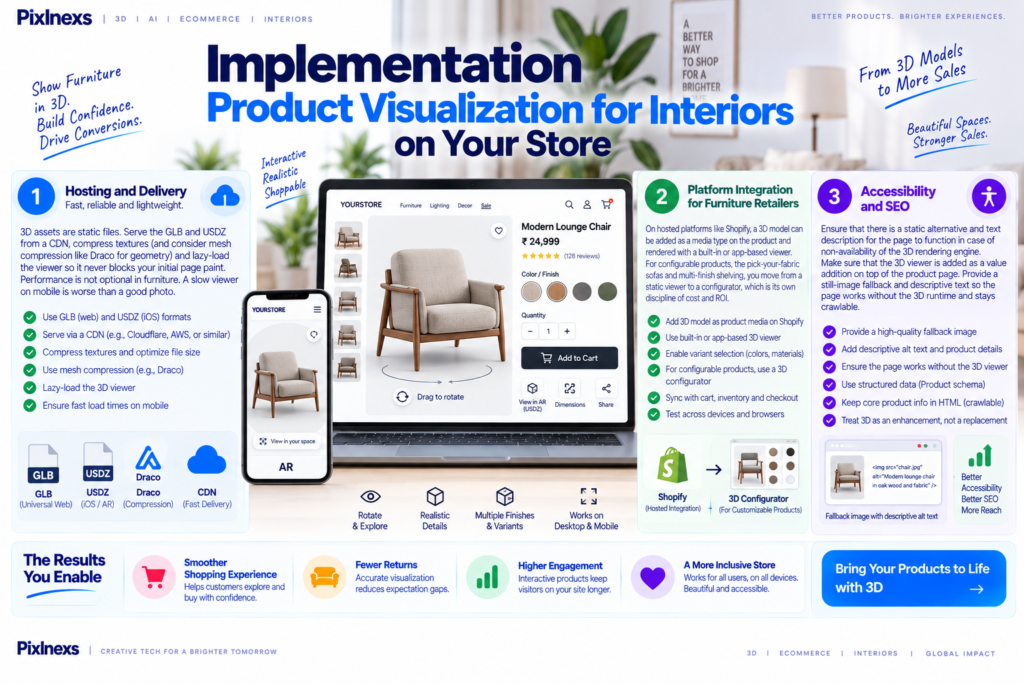
3D assets are static files. Serve the GLB and USDZ from a CDN, compress textures (and consider mesh compression like Draco for geometry) and lazy-load the viewer so it never blocks your initial page paint. Performance is not optional in furniture. A slow viewer on mobile is worse than a good photo.
Platform Integration for Furniture Retailers
On hosted platforms like Shopify, a 3D model can be added as a media type on the product and rendered with a built-in or app-based viewer; there’s more on that in our guide to adding interactive 3D viewers to Shopify. For configurable products, the pick-your-fabric sofas and multi-finish shelving, you move from a static viewer to a configurator, which is its own discipline of cost and ROI covered in our 3D configurators and conversion guide.
Accessibility and SEO
Ensure that there is a static alternative and text description for the page to function in case of non-availability of the 3D rendering engine. Make sure that the 3D viewer is added as a value addition on top of the product page.Provide a still-image fallback and descriptive text so the page works without the 3D runtime and stays crawlable. Treat the 3D viewer as an enhancement layered over a solid, accessible product page, not a replacement for one.
Furniture specific pitfalls we see most
- Wrong scale in AR. If real-world dimensions are off, a customer places a “fits perfectly” piece that arrives too big. Verify scale against the spec sheet before shipping. What actually happens when scale is wrong is quiet but costly: the AR preview looks convincing, the customer commits and the return that follows is the kind a bulky-goods business can least afford.
- Fabric that reads as plastic. Upholstery needs proper roughness and normal detail or velvet looks like vinyl. This is the most common material failure.
- Overweight assets. A 50 MB sofa that takes ten seconds to load on mobile will hurt, not help. Budget your polygon and texture counts up front.
- Finish variants modeled as separate files. For multiple colorways, swap materials on one base model rather than maintaining many near-duplicate files.
If you want a head start with ready-made, web-optimized 3D assets and a place to manage them, explore the marketplace at store.pixlnexs.com.
Conclusion
AI product videos have changed what’s possible for ecommerce brands. Instead of relying on expensive photoshoots for every campaign, businesses can now create product demos, social ads, 360° turntables and lifestyle videos from a single product photo or, even better, a professionally built 3D model. The biggest advantage isn’t just lower production costs. It’s the ability to create new content quickly while keeping every product presentation consistent across marketing channels.
The most successful ecommerce brands don’t treat AI as a replacement for quality. They use AI to accelerate production while building everything on accurate product assets, thoughtful motion design and platform specific creative. A production-ready 3D model can be considered as a long-term digital asset for use in the production of videos, 3D viewers, AR experiences, advertisement campaigns and all future marketing efforts from one single source.
At Pixlnexs, we make it easier for you to create this entire process. By making high quality 3D models of your products and creating videos, motion graphics and other marketing assets through them, we enable you to make your product visually appealing and convert more customers into sales.
Frequently asked questions
What is 3D product visualization for furniture?
It involves converting products of furniture and interior design into 3D digital models that customers can play around with by rotating, zooming in/out and even coloring and viewing them in real life settings with augmented reality, all through the ecommerce website itself.
Does 3D visualization reduce furniture returns?
It is designed to. Returns in furniture are frequently driven by mismatched expectations of size, color and material. Letting a buyer check true scale in AR and inspect finishes up close addresses those exact causes. The size of the effect varies by catalog and category, so treat it as a directional improvement to validate with your own before/after data rather than a fixed guaranteed percentage.
What file format should I use for 3D furniture on my website?
GLB, which is the binary version of glTF, should be used for the 3D viewer in the browser, Android AR and creation of USDZ files simultaneously for iOS AR Quick Look. This is because glTF is an open specification developed by Khronos Group designed for web-based fast delivery.
How long does it take to create a 3D model of a piece of furniture?
It depends on complexity. A simple decor item is fast; an upholstered sofa with realistic fabric takes longer; a configurable, multi-finish product takes the most because of the logic layer for swappable parts. Having usable CAD geometry shortens timelines significantly versus modeling from scratch.
Do I need 3D scanning or can the model be built from scratch?
Both work. Scanning (photogrammetry) is ideal for organic, hand-finished or heavily textured pieces where capturing real wear matters. Built from-scratch modeling is better when you need exact engineered dimensions or when no physical sample exists yet. Many catalogs mix the two by SKU.
Will a 3D viewer slow down my product pages?
Only if the assets are not optimized. Compress textures and geometry, serve from a CDN, lazy-load the viewer so it does not block the first paint and budget polygon counts for mobile. Done correctly, the 3D experience loads after the core page and enhances it rather than dragging it down.
How Does 3D Visualization in Product Configuration Handle Multiple Fabric and Finish Options?
Yes and it should. Rather than maintaining a separate file per colorway, build one base model and swap PBR materials at runtime. This keeps file management sane and is the foundation of a true product configurator.










Leave a Reply