
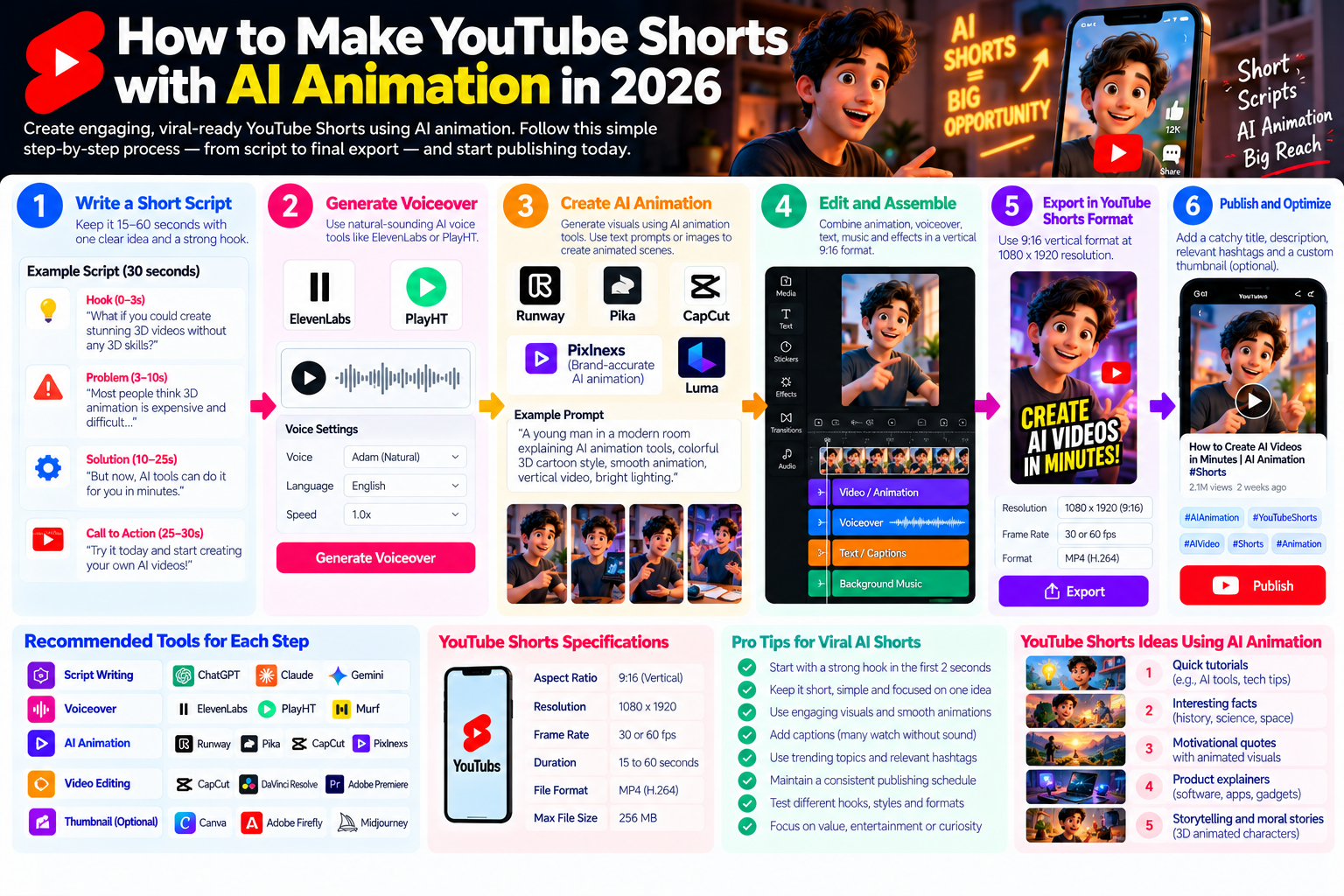
Quick Answer: How to make YouTube Shorts with AI animation in 2026, you need a tight 15 to 60 second script (one clear idea, one clear hook) a text-to-voice tool for narration (ElevenLabs or PlayHT) an AI animation or video generation tool for visuals (Runway, Pika, CapCut’s AI features or a purpose-built AI animation platform like Pixlnexs for brand-accurate content) and a mobile or desktop editor to assemble and export in vertical 9:16 format at 1080×1920 resolution. The fastest beginner path is CapCut’s AI Shorts feature, which can assemble a draft vertical short from a text prompt. The highest-quality path is a specialist pipeline AI animation from a professional tool combined with scripted audio and tight editing.
Shorts success depends less on production budget and more on hook strength, topic relevance and publishing consistency.
By Bali Balaji, Pixlnexs Studio. Pixlnexs produces AI animated video and short-form content for brands, EdTech platforms and ecommerce businesses and our team has tested every major AI Shorts production tool in live content pipelines. This guide reflects direct production experience, not a features list compiled from landing pages.
Key Takeaways: How to Make YouTube Shorts with AI Animation
- YouTube Shorts in 2026 is one of the fastest paths to channel growth for new creators the algorithm actively distributes Shorts content beyond existing subscribers, giving new channels organic reach that long-form content rarely achieves in its early months.
- AI animation makes Shorts production accessible without on-camera filming, animation skills or studio equipment but the quality ceiling varies significantly between tools and pipelines.
- The hook (the first 1 to 2 seconds of a Short) is more important than any other production element a compelling hook determines whether the viewer swipes away or stays and staying through the full Short signals quality to the algorithm.
- Script length for Shorts is brutally constrained: 15 to 60 seconds of audio content at a natural narration pace is approximately 40 to 180 words. Every word has to earn its place.
- AI animation is particularly effective for Shorts topics that benefit from visual demonstration of abstract ideas, product features, educational concepts, process visualization and brand storytelling all of which are hard to film but easy to animate.
- Publishing consistency drives Shorts growth more than individual video quality the algorithm rewards channels that publish regularly, not channels that publish one exceptional video and wait.
- For brands that need animated Shorts with product accuracy, character consistency and brand standards, a professional AI animation studio produces significantly more reliable output than self-service tools and the cost per Short is lower than most brands assume when total in-house production time is honestly counted.
Why YouTube Shorts with AI Animation Is a High-Growth Opportunity
How the YouTube Shorts Algorithm Works in 2026
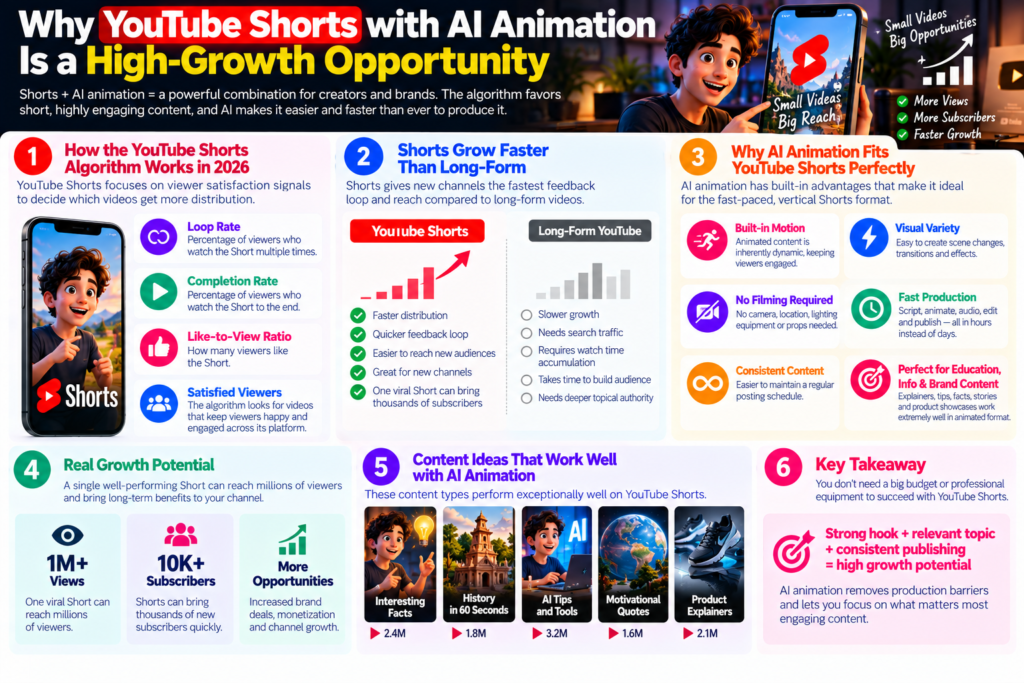
YouTube Shorts operates on a different algorithmic logic from long-form YouTube content. Where long-form YouTube rewards watch time, topical depth and search ranking, YouTube Shorts rewards loop rate (the percentage of viewers who watch the Short multiple times) completion rate (the percentage of viewers who watch the Short to the end) like-to-view ratio and the absolute number of satisfied viewers the algorithm can identify across its distribution.
The critical implication is that a Shorts video distributed to 10,000 viewers with a 65% completion rate tells the algorithm something strong about that content’s quality and earns further distribution. A long-form video needs months of search traffic and watch-time accumulation to achieve equivalent algorithmic signal. For new channels and new content formats, Shorts is the fastest feedback loop available.
Why AI Animation Fits the YouTube Shorts Format
YouTube Shorts requires vertical 9:16 video at high visual dynamism cuts, motion and visual variety are more important in the compressed Shorts format than in long-form video because the viewer is scrolling through a feed of competing content and will disengage faster if the visual experience is static.
AI animation is inherently dynamic animated content has motion, transitions, visual emphasis and environmental changes built into its production. Unlike a talking-head video that requires deliberate editing decisions to create visual variety, animated content starts with motion as a default. This makes animation a natural format advantage for Shorts, particularly for educational, informational and brand content where the creator does not want to appear on camera.
Additionally, AI animation for Shorts does not require location, props, lighting equipment or filming which removes the logistical barriers that make consistent Shorts production difficult for individual creators and small brand teams. The pipeline is script, animate, audio, edit, publish achievable in hours per Short rather than days per video.
Step 1: Planning Your YouTube Shorts with AI Animation Niche and Format
Choosing a Niche That Works for AI Animated Shorts
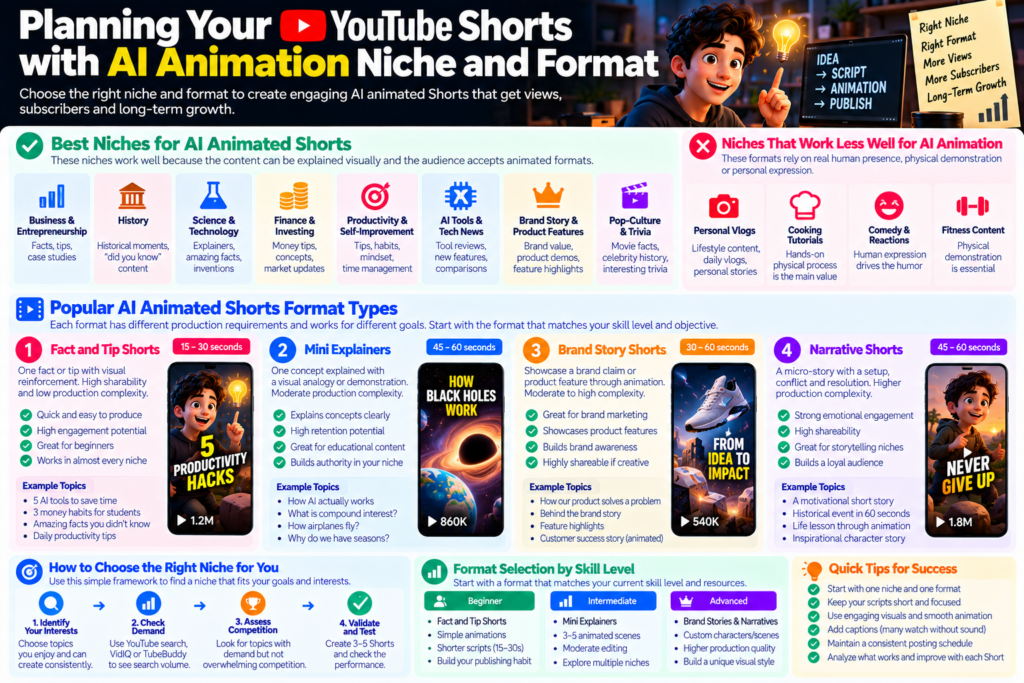
Not every content niche works equally well for animated Shorts. The niches where AI animated Shorts perform best are those where: the content can be communicated visually without requiring a human face or physical demonstration, the format is informational, educational or narrative and the target audience expects or accepts animated visual presentation.
High-performing niches for AI animated Shorts in 2026: business and entrepreneurship facts and tips, historical moments and “did you know” content, science and technology explainers, finance and investing concepts, productivity and self-improvement tips, AI tools and tech news, brand story and product feature content and pop-culture history and trivia. These topics share a common property: the value is in the information or the story, not in the creator’s physical presence.
Niches that work less well for animated Shorts: personal transformation and lifestyle vlogs, cooking and hands-on tutorial content where the physical process is the value, comedy and reaction formats where human expression drives the humor and fitness content where body demonstration is central to instruction.
Short Format Types for AI Animation
Different Shorts format types have different production requirements and algorithmic behaviors.
Fact and tip Shorts: 15 to 30 seconds, one fact or tip presented with visual reinforcement, animated text overlay, high sharability. Low production complexity one or two animated scenes plus text animation.
Mini explainers: 45 to 60 seconds, one concept explained with a visual analogy or demonstration. Moderate production complexity three to five animated scenes with narration.
Brand story Shorts: 30 to 60 seconds, one brand claim or product feature demonstrated through animation. Moderate to high production complexity requires product-accurate animation for credibility.
Narrative Shorts: 45 to 60 seconds, a micro-story with a setup, conflict and resolution. High production complexity requires consistent character or scene design across the clip.
For beginners, fact and tip Shorts are the lowest-friction starting point they require the least script development, the least visual complexity and the least editing while building the publishing habit and the algorithmic data that inform later format development.
Step 2: Scripting YouTube Shorts with AI Animation That Hooks
The Anatomy of a High-Performing Shorts Script
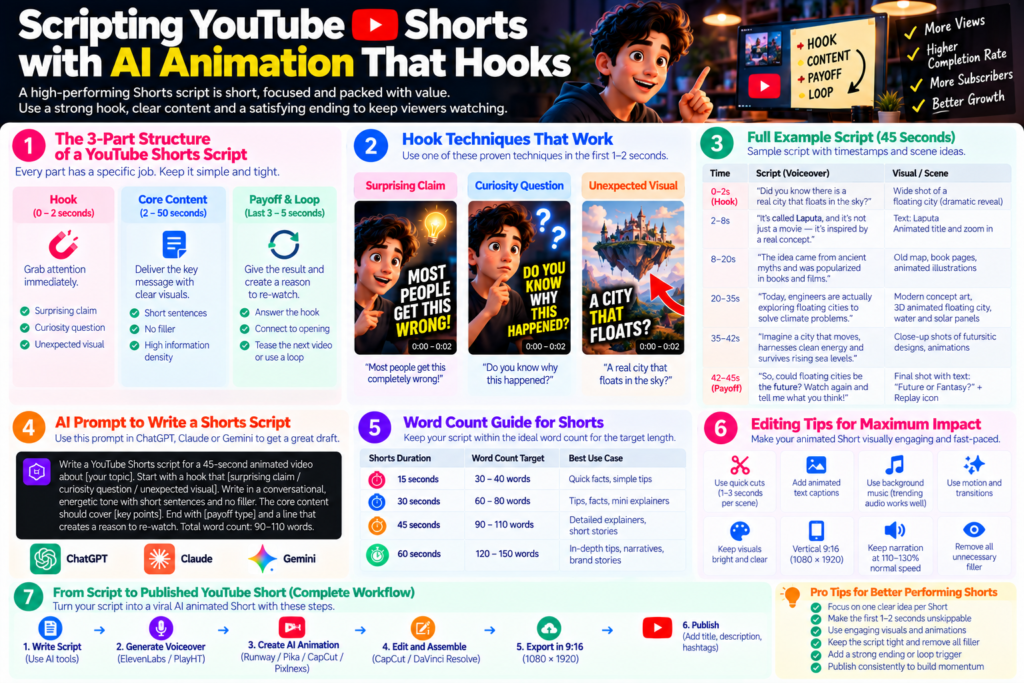
A YouTube Shorts script is structurally simpler than a long-form script but harder to execute well because every second has to justify its existence. The structure is: Hook (0 to 2 seconds) Core Content (2 to 50 seconds) Payoff and Loop Trigger (final 3 to 5 seconds).
The hook is the single most important element. In the Shorts feed, the viewer is swiping and will continue swiping unless something in the first one to two seconds gives them a reason to stop. Effective Shorts hooks do one of three things: make a surprising claim that demands explanation (“Most people get this completely wrong”) ask a curiosity question the viewer immediately wants answered (“Do you know why this happened?”) or show a visual that is immediately unexpected or visually striking.
The core content delivers on the hook’s promise directly and without filler. Every sentence in a Shorts script should be tested against the question: “Does removing this sentence make the Short worse?” If the answer is no, cut the sentence.
The payoff and loop trigger is the ending that either delivers the promised resolution (in a fact Short, the answer) and/or creates a reason for the viewer to re-watch (an ending that connects back to the opening in a way that rewards a second view). Loop rate is a direct algorithmic signal Shorts that get rewatched are distributed more widely by YouTube.
Using AI to Write YouTube Shorts Scripts
ChatGPT, Claude and Gemini can all draft Shorts scripts but require specific prompting to produce output usable without significant editing.
Effective AI Shorts script prompt: “Write a YouTube Shorts script for a 45-second animated video about [specific topic]. Start with a hook that [specific technique surprising claim / curiosity question / unexpected visual description]. Write in a conversational, energetic tone short sentences, direct language, no filler. The core content should cover [specific points]. End with [payoff type] and a line that creates a reason to re-watch. Total word count: approximately [50 to 150 words depending on target length].”
After AI generation, read the script aloud at a slightly faster than natural pace (Shorts audio typically runs at 110 to 130% of normal conversational speed) and cut any phrase that does not survive this test. The final script should feel energetic but not rushed every word audible, no sentence too long to speak in a single breath.
Word Count Targets for Different Shorts Lengths
At a natural narration pace of approximately 130 to 150 words per minute, the word count targets for different Shorts durations are: 15 seconds 30 to 40 words; 30 seconds 60 to 80 words; 45 seconds 90 to 110 words; 60 seconds 120 to 150 words. These are tight constraints that force ruthless editing and that ruthless editing is what produces the high information density that Shorts audiences respond to.
Step 3: AI Animation Tools for YouTube Shorts Full Breakdown
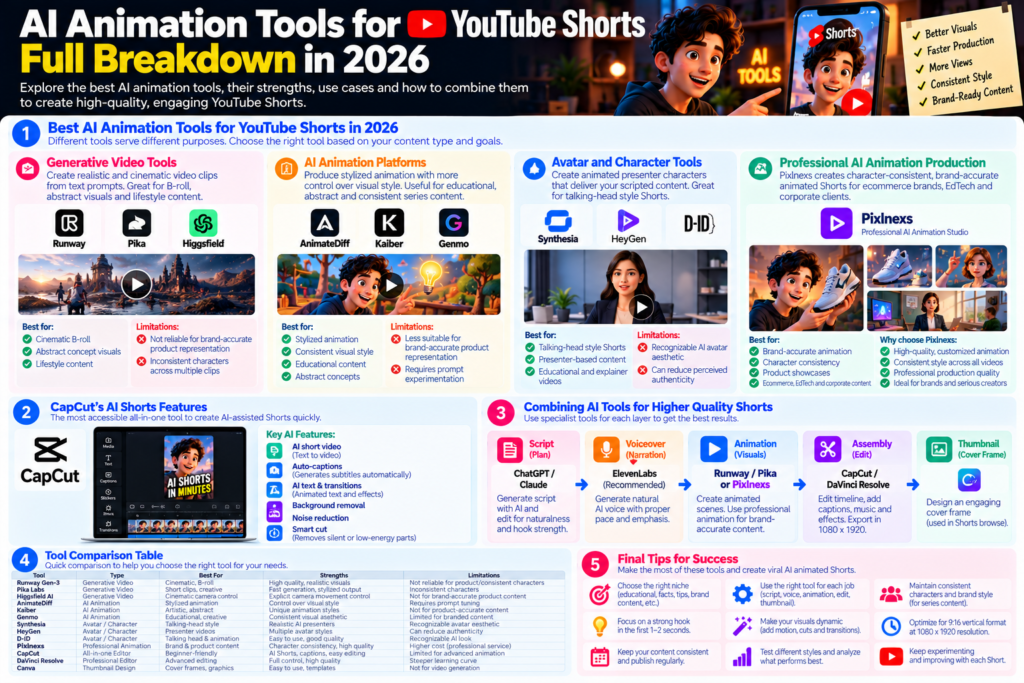
Best AI Animation Tools for YouTube Shorts in 2026
The AI animation tool landscape for Shorts production in 2026 has several distinct categories, each with different strengths and use cases.
Generative video tools (Runway Gen-3, Pika Labs, Higgsfield AI): these tools generate short video clips from text prompts, producing cinematic footage of subjects, environments and abstract visuals. They are best suited for atmospheric B-roll, abstract concept visualization and lifestyle content. They are not reliable for brand-accurate product representation or consistent character appearance across multiple clips which are the two requirements most commonly needed for brand Shorts content.
AI animation platforms (Animate Diff, Kaiber, Genmo): these tools produce stylized animation from prompts or images, offering more control over visual style than raw video generation. They are useful for creating a consistent visual aesthetic across a series of Shorts and for abstract and educational content.
Avatar and character tools (Synthesia, HeyGen, D-ID): these tools produce animated presenter characters that deliver scripted content in a video format. They are appropriate for talking-head style Shorts where a visible presenter adds authority, without requiring on-camera filming. The limitation is that avatar aesthetics are recognizable across platforms and can reduce the perceived authenticity of the content.
Professional AI animation production (Pixlnexs): for brands and creators that need character-consistent, brand-accurate animated Shorts where the animation style, product representation and character design need to be consistent across every video in the series a professional AI animation studio produces results that self-service tools currently cannot match. Pixlnexs produces animated Shorts for ecommerce brands, EdTech platforms and corporate clients where the quality bar is above what generative tools reliably deliver at this stage of the technology.
CapCut’s AI Shorts Features
CapCut is the most accessible tool for producing AI-assisted Shorts in a single platform. Its “AI short video” feature takes a text prompt or script and assembles a draft vertical video with stock footage, auto-generated captions and basic music in minutes. The output requires customization but provides a structural starting point that beginners can edit into a publishable Short in under an hour.
CapCut’s additional AI features relevant to Shorts production: auto-captions (generates subtitles from the audio track automatically) AI text-to-video (generates simple animated text and transition sequences) background removal, noise reduction and the “smart cut” feature that identifies and removes silent or low-energy sections from audio automatically.
Combining AI Tools for Higher Quality Shorts
The highest quality AI animated Shorts in 2026 are produced by combining specialist tools for each production layer rather than relying on a single all-in-one platform.
Script: AI-assisted (ChatGPT or Claude) then human-edited for naturalness and hook strength.
Voiceover: ElevenLabs (the most natural AI voice tool currently available) with script-level direction for pace and emphasis.
Animation: Runway or Pika for atmospheric and abstract visual layers, professional animation for any brand-accurate or character-consistent elements.
Assembly: CapCut or DaVinci Resolve for timeline editing, caption placement and final export at 1080×1920.
Thumbnail/cover frame: Canva for cover frame design, as Shorts uses the first frame or a designated cover image in browse.
This specialist pipeline requires more setup time than a single platform but produces output that is visually distinctive rather than template-recognizable.
Step 4: AI Voiceover for YouTube Shorts Speed, Clarity and Energy
Why Shorts Voiceover Is Different From Long-Form
Shorts voiceover has different requirements from long-form YouTube narration. Long-form voiceover can sustain a measured, authoritative pace because the viewer has already committed to watching. Shorts voiceover needs to be: energetic enough to maintain attention in a swiping-feed context, fast enough that the word density rewards the viewer’s time and clear enough that it is comprehensible at the viewer’s likely playback position (often the first few seconds before they decide whether to stay).
The practical target for Shorts narration is approximately 130 to 160 words per minute slightly faster than a comfortable conversational pace. At this speed, 60 seconds of narration covers 130 to 160 words, which corresponds to the target word count for a 60-second Shorts script.
Configuring ElevenLabs for Shorts Voiceover
ElevenLabs produces the most natural-sounding AI voiceover currently available and is the recommended tool for Shorts narration. For Shorts specifically, the configuration choices that matter most are: voice selection (choose a voice that feels energetic and engaging ElevenLabs labels voices by personality type and speaking style) speaking pace (increase to 110 to 115% of default pace in the voice settings) and stability setting (lower stability produces more natural variation in the voice; higher stability produces a more even but potentially monotonous delivery).
After generating the voiceover, listen to the output and check: does the emphasis fall on the words that carry the most meaning in each sentence? Does the energy level remain consistent through the end of the track or does it decay in the final quarter? Are there any pronunciation errors in technical terms or brand names that need to be corrected with phonetic spelling in the script?
Adding Subtitles and Sound Design for Shorts
Subtitles are essential for Shorts a significant proportion of YouTube Shorts is consumed with sound off or at low volume in public contexts. Auto-captions from CapCut or from YouTube Studio’s automatic subtitle generation provide a starting point that requires light correction for accuracy.
For Shorts-native subtitles, the visual style that performs best is large, high-contrast text in the center or lower-center of the frame visible enough to be readable even on a small phone screen in bright ambient light. Word-by-word or phrase-by-phrase caption reveal (where the current word is highlighted or the next phrase appears with the narration) produces higher engagement than a static block of text.
Background music for AI animated Shorts should be at approximately 5 to 10% of the voiceover volume in the mix present enough to fill the audio space but not competing with the narration. Use royalty-free or creative commons music from licensed sources to avoid copyright claims.
Step 5: Editing and Formatting YouTube Shorts with AI Animation
The Technical Specifications for YouTube Shorts
YouTube Shorts must meet specific technical requirements to be displayed in the Shorts feed rather than being treated as standard vertical video: aspect ratio must be 9:16 (vertical) resolution must be at minimum 1080×1920 pixels, duration must be 60 seconds or less (videos longer than 60 seconds are not classified as Shorts) and the video must be uploaded or created in a way that YouTube identifies as Shorts (typically through the YouTube Shorts creation flow on mobile or by uploading a vertical video under 60 seconds on desktop).
Export settings in CapCut for YouTube Shorts: resolution 1080×1920, frame rate 30fps (24fps is acceptable but 30fps is more common in the Shorts feed context) format MP4 with H.264 encoding, audio at 192kbps AAC or higher.
Editing Pace and Cut Rhythm for Animated Shorts
Animated Shorts tolerate longer shot holds than live-action Shorts because the animation itself has motion even a “held” animated scene typically has character movement, particle effects, camera motion or animated text overlays that maintain visual interest without a hard cut. However, scene changes at key narrative beats (the transition from hook to content, from one point to the next, from content to payoff) should correspond with visual cuts that reinforce the structural shift.
A practical cut rhythm for AI animated Shorts: a new visual scene or significant visual change every 4 to 8 seconds, with animated text overlays reinforcing key words or phrases from the narration. This rhythm maintains visual dynamism without cutting so frequently that the viewer cannot process what they are seeing.
Animated Text Overlays and Visual Emphasis
Animated text overlays words or phrases that appear with the narration, animated into view with a reveal effect are one of the highest-engagement elements in Shorts. They serve three purposes: accessibility (viewers who cannot hear the audio can follow the content through text) emphasis (visual text reinforces the most important words in the narration) and retention (animated text creates micro-moments of visual interest that can prevent the viewer from swiping away during transitions between scenes).
In CapCut, animated text presets are available in the text library. The most effective styles for Shorts are word-by-word reveals that follow the narration timing, bounced or slide-in text that draws the eye without distracting from the visual content and highlighted or colored emphasis on the key word in each phrase.
What does professional AI animated video actually cost?
Before you decide between self-service tools and a studio, read our full breakdown of AI video pricing real ranges by project type, what drives cost and how to compare your options honestly.
Read: AI Video Generation Cost Guide →Step 6: Publishing and Growing Your AI Animated YouTube Shorts Channel
Title and Description Optimization for YouTube Shorts
YouTube Shorts titles appear in the Shorts feed under the video’s view count and creator name in a smaller, lower-emphasis position than long-form video titles. Despite this reduced visibility in the feed, titles are indexed by YouTube for search and influence discovery in YouTube’s standard search results.
Effective Shorts title structure: the exact keyword phrase the target audience would search + a benefit or curiosity element that earns the click in search results. Length: 40 to 50 characters is the practical target long enough to include the keyword, short enough to display fully in mobile search results.
Descriptions for Shorts: a 2 to 3 sentence description that includes the primary keyword, describes the video’s content and links to a related long-form video or playlist (Shorts can function as a discovery mechanism for long-form content and including this link creates a pathway from Shorts discovery to full-channel engagement).
Shorts Publishing Schedule: Why Consistency Beats Quality in the Early Stage
YouTube’s Shorts algorithm rewards channels that publish consistently not channels that publish one exceptional Short and wait. In the early stage of a Shorts channel (the first three months) publishing 3 to 7 Shorts per week is more effective for channel growth than publishing one exceptionally produced Short per week.
The reasoning is algorithmic: each Short generates data about your channel’s content category, audience response and quality signals. More data, gathered faster, helps the algorithm understand where to distribute your content and which audience to show it to. A channel that publishes 5 Shorts per week for 12 weeks has generated 60 data points about its content. A channel that publishes 1 Short per week for 12 weeks has generated 12.
AI animation makes this publishing frequency achievable for a solo creator or small team. With an efficient pipeline (a repeatable script-voice-animate-edit-publish workflow) producing 3 to 5 Shorts per week is a realistic production target.
Cross-Promoting Shorts With Long-Form YouTube Content
Shorts and long-form YouTube content work best as a complementary pair rather than as competing formats. Shorts drive discovery and subscriber growth through the algorithm’s wide distribution; long-form content builds depth, watch time and advertiser-valuable engagement that monetizes the audience Shorts delivers.
The cross-promotion strategy: produce Shorts that preview, summarize or tease concepts covered in depth in long-form videos and link from the Shorts description to the corresponding long-form video. A viewer who discovers the channel through a 30-second Shorts fact and clicks through to a 10-minute explainer on the same topic has completed a high-value channel entry journey that Shorts alone does not provide.
AI Animation Styles That Work Best for YouTube Shorts
Motion Graphics and Typography Animation
Motion graphics animated text, geometric shapes, charts and data visualization are one of the most effective animation styles for educational and informational Shorts. They communicate information clearly, scale well to the vertical format and do not require character modeling or complex scene generation. Tools like Adobe After Effects, CapCut’s motion graphics templates and AI-assisted tools like Jitter and Motionarray produce motion graphics Shorts efficiently.
For creators without motion graphics experience, CapCut’s text animation presets and automated scene transitions provide a starting point that looks professional without requiring manual keyframing. The output is template-driven but can be customized through font, color and content choices to create a channel-specific visual identity.
AI Character Animation for Shorts
AI character animation where a consistent animated character delivers or accompanies the narration creates a strong channel identity across a Shorts series and builds viewer recognition that motivates subscription. The challenge is consistency: each Short needs to feature the same character in the same visual style, which is difficult to achieve reliably with prompt-based generation tools that produce different output from the same description.
Avatar-based tools (HeyGen, Synthesia) provide consistent character appearance through a pre-built avatar system. Custom animated character production (through a professional studio like Pixlnexs) produces the highest-quality and most brand-specific character consistency but requires upfront investment in character design and animation.
Cinematic AI B-Roll Animation
For Shorts content where the visual layer is atmospheric and environmental rather than character-driven or information-graphic travel content, historical documentary-style content, science and nature content AI video generation tools like Runway Gen-3, Pika Labs and Higgsfield AI produce cinematic footage that serves as high-quality animation B-roll.
The workflow for this style: generate 5 to 8 short clips from prompts that describe the visual environment corresponding to each section of the narration, select the best variant from each generation, assemble in the editing timeline under the voiceover audio and add text overlays and music. The output is closer to AI-enhanced documentary presentation than to traditional animation and it works particularly well for content types where atmospheric visual richness supports the narration.
YouTube Shorts AI Animation Tools Comparison
| Tool | Category | Free Tier | Best For Shorts | Key Limitation |
|---|---|---|---|---|
| CapCut | All-in-one editor + AI | Yes full features | Fastest beginner pipeline, auto-captions, AI text animation | Template-driven aesthetic; limited visual distinctiveness |
| ElevenLabs | AI voiceover | Yes 10k chars/mo | Most natural Shorts narration; voice cloning | Volume cost scales; cloning requires paid plan |
| Runway Gen-3 | AI video generation | Yes 125 credits | Cinematic B-roll, atmospheric and abstract animation | Credits deplete quickly; no character consistency |
| Pika Labs | AI video generation | Yes limited gens | Accessible B-roll generation; good vertical crop | Lower fidelity than Runway for complex scenes |
| HeyGen | AI avatar presenter | Yes trial only | Consistent presenter character for educational Shorts | Avatar aesthetic recognizable; reduced perceived authenticity |
| Higgsfield AI | Camera-controlled AI video | Yes limited daily gens | Product-adjacent B-roll with controlled camera moves | Short clips (2 to 4 sec); product accuracy not reliable |
| Pixlnexs Studio | Professional AI animation | Quote-based | Brand-accurate, character-consistent animated Shorts at scale | Not self-service production partnership model |
Common Mistakes When Making YouTube Shorts with AI Animation
Hooks That Start With Context Instead of Capture
The most common scripting mistake in AI animated Shorts is opening with context “today we’re going to talk about…” or “in this video I’ll explain…” instead of a hook that captures attention immediately. By the time the creator has finished the context-setting sentence, a significant proportion of the Shorts audience has already swiped to the next video. Every word spoken before the hook’s core claim or question is words spoken to a shrinking audience.
Animation That Is Too Slow for the Shorts Format
AI-generated animation and motion graphics intended for long-form video often move at a pace designed for a viewer who has already committed to watching. In the Shorts format, the same animation pace reads as slow and risks the viewer swiping. Cut transitions, text reveal animations and scene changes should all be configured at 1.2 to 1.5 times the pace that feels appropriate for long-form video.
Inconsistent Visual Style Across the Channel
Using a different animation tool, a different visual template or a different color palette for each Short produces a channel that looks like a collection of unrelated videos rather than a cohesive brand. Viewers who find one Short and enjoy it subscribe because they expect future Shorts to look similar. Developing a consistent visual template same font, same primary color, same animation style for text overlays, same intro motion and applying it across every Short creates the visual identity that drives subscriber loyalty.
Ignoring Shorts Analytics
YouTube Studio provides Shorts-specific analytics including completion rate, swipe-away rate, impression count and audience interaction. Most new Shorts creators check view counts and ignore these deeper metrics and as a result miss the data that tells them which hooks, topics and formats are working versus underperforming. After each batch of Shorts is published, review the completion rate (target: above 60%) and swipe-away point (where in the timeline most viewers leave) and use this data to adjust the corresponding production elements in the next batch.
Conclusion
Making YouTube Shorts with AI animation in 2026 is one of the most accessible and highest-growth content strategies available to creators, brands and businesses. The format rewards the combination of strong scripting, consistent publishing and visual energy that AI animation tools are specifically well-suited to deliver.
The pipeline is clear: a tight script with a compelling hook, AI voiceover at energetic Shorts pace, AI animation for the visual layer, tight editing in vertical format with animated captions and consistent publishing on a frequency that generates the algorithmic data that drives growth.
The creative leverage points that separate channels that grow from channels that plateau are not the tools they are the hook quality, the topic-audience fit, the visual consistency and the willingness to analyze performance data and iterate. AI tools make production faster. Content strategy and iteration make the channel grow.
For brands that need animated Shorts at professional quality standards consistent character design, brand-accurate product representation, production-quality animation Pixlnexs produces the animated Shorts that self-service tools currently cannot match at the quality bar that brand contexts require.
Need animated YouTube Shorts that match your brand not just a template?
Pixlnexs produces AI animated Shorts for brands, ecommerce stores and EdTech platforms character-consistent, brand-accurate and production-quality, delivered at a cost that makes consistent Shorts publishing sustainable.
See Our AI Animation Services Get a Shorts Production QuoteFrequently Asked Questions
Do I need to be an animator to make AI animated YouTube Shorts?
No. AI animation tools from generative video platforms like Runway to all-in-one editors like CapCut handle the animation production without requiring the creator to have any animation skills. The creative input is the script and the content direction; the tools handle the visual output.
How long should an AI animated YouTube Short be?
The YouTube Shorts format allows up to 60 seconds and the algorithmic evidence from 2025 to 2026 suggests that Shorts in the 30 to 55 second range achieve the best completion rate balance long enough to deliver meaningful content, short enough that the completion rate can reach the 65 to 80% threshold that drives algorithmic distribution. Very short Shorts (under 15 seconds) can achieve extremely high completion rates but may deliver too little value for the viewer to subscribe or return.
What resolution and format should AI animated YouTube Shorts be?
1080×1920 pixels, 9:16 aspect ratio, 30fps, MP4 H.264, under 60 seconds. These are the specifications for a Short to display in the Shorts feed rather than being treated as standard vertical video.
Can AI animated YouTube Shorts be monetized?
Yes. YouTube Shorts are eligible for the YouTube Partner Program’s Shorts monetization once a channel meets the threshold requirements (500 subscribers and 3,000 watch hours or 3 million Shorts views in the last 90 days). AI-generated content is not excluded from monetization provided it meets YouTube’s community guidelines, advertiser-friendly content policies and copyright requirements.
What is the best AI tool for creating YouTube Shorts for free?
CapCut’s AI video feature provides the most complete free path from script to published Shorts. Combined with ElevenLabs’ free tier (10,000 characters per month of AI voice generation) and Pika Labs’ free tier (limited monthly generations) a functional AI Shorts pipeline is achievable at zero cost, with the expectation that paid plans become worthwhile once volume and revenue justify the investment.
How many YouTube Shorts should I post per week to grow?
For a new channel in the first three months, 3 to 7 Shorts per week is the recommended publishing frequency. This volume generates enough algorithmic data for the YouTube recommendation system to understand and distribute the channel’s content effectively. After three months, the data from performance analytics will show which topics and formats resonate with the audience and publishing can become more targeted and potentially lower frequency as individual Shorts quality improves.
How do I get YouTube Shorts to go viral with AI animation?
Virality in Shorts is primarily driven by hook strength and topic-audience fit rather than production quality. A Short that captures a large proportion of viewers in the first two seconds and maintains completion rates above 70% will be distributed widely by the algorithm regardless of whether the animation is AI-generated or professionally produced. Focus on script and hook quality before production quality, particularly in the early stages of channel growth.
Can Pixlnexs produce animated YouTube Shorts for my brand?
Yes. Pixlnexs produces AI animated Shorts for ecommerce brands, corporate clients and EdTech platforms that need character consistency, product accuracy and brand-standard visual quality across a Shorts series. For brands where self-service AI tools produce output that does not meet their quality bar, Pixlnexs’ production pipeline combines AI-assisted generation with professional direction, quality review and delivery at a per-Short cost that compares favorably against the total time cost of in-house production.
Related Guide
AI Animation vs Traditional Studio Animation which is better in 2026
Runway vs Sora vs Veo vs Pika: The 2026 AI Video Tool Showdown
How to Use Higgsfield AI Video Generator (Full Guide)in 2026










Leave a Reply