
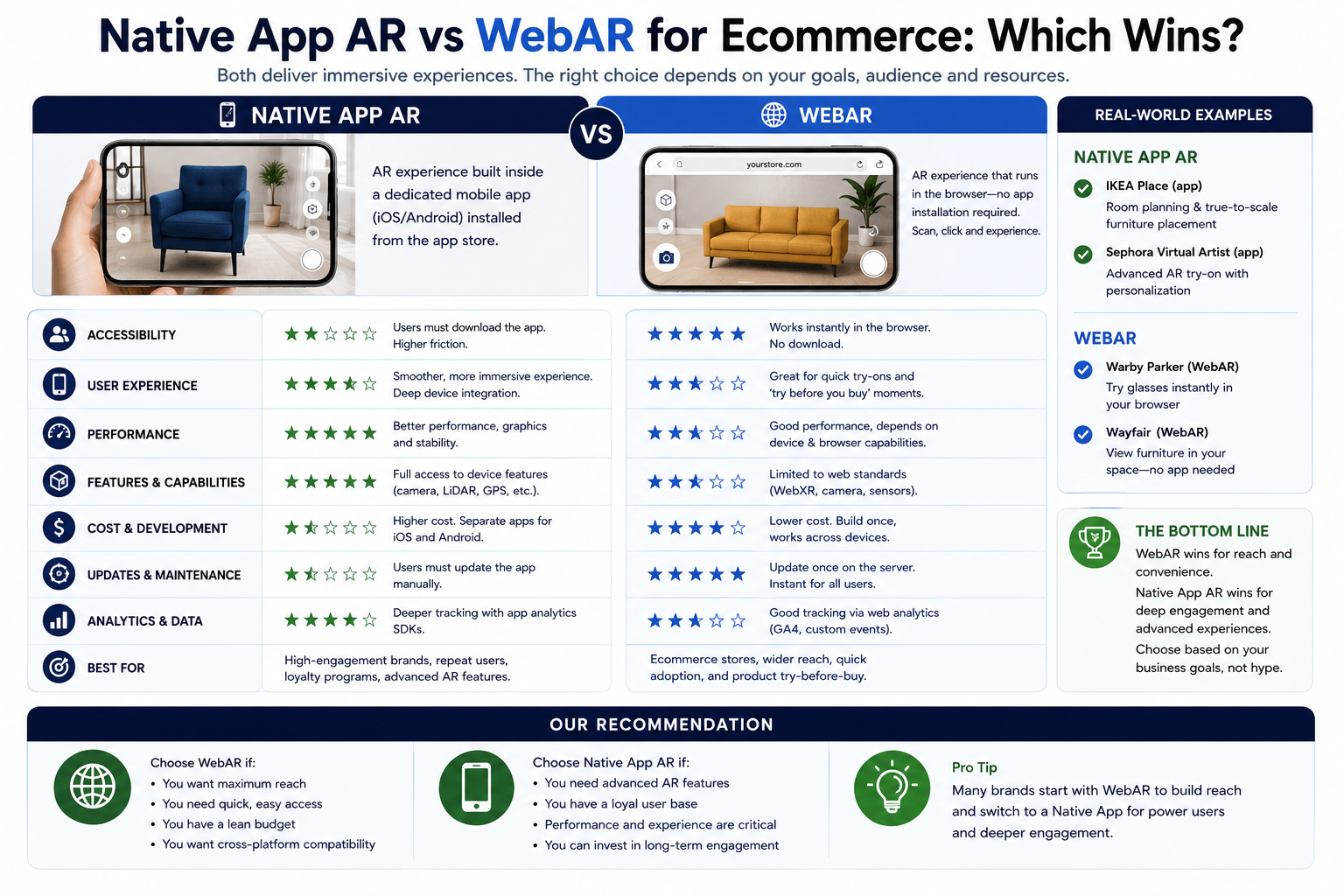
Quick Answer: Native app vs WebAR, The most ecommerce stores, WebAR is the better default because shoppers can tap “View in your space” straight from the product page with no app to download. Native app AR still has a place for high-end or persistent experiences but the friction of an install usually cancels out its advantages at the point where a customer is deciding whether to buy. Below we compare native app AR and WebAR across reach, friction, capability, cost and maintenance, so you can pick the approach that fits your catalogue and your conversion goals.
Pixlnexs builds and ships WebAR and native 3D/AR experiences for ecommerce brands, handling model optimization, GLB/USDZ delivery and cross-device testing.
Key takeaways
- WebAR removes the biggest barrier there is no app to install, so shoppers can preview a product in their room directly from the browser.
- Native app AR is more capable on raw performance and persistent features but only reaches people who have already downloaded your app.
- Reach and friction usually decide it: for storefront conversion, lower friction beats marginally higher fidelity.
- You need both 3D formats GLB/glTF for Android Scene Viewer and USDZ for iOS AR Quick Look to cover the whole audience.
- Native suits niche cases: branded apps, repeat use or experiences that depend on installed-app capabilities.
What native app vs WebAR actually mean
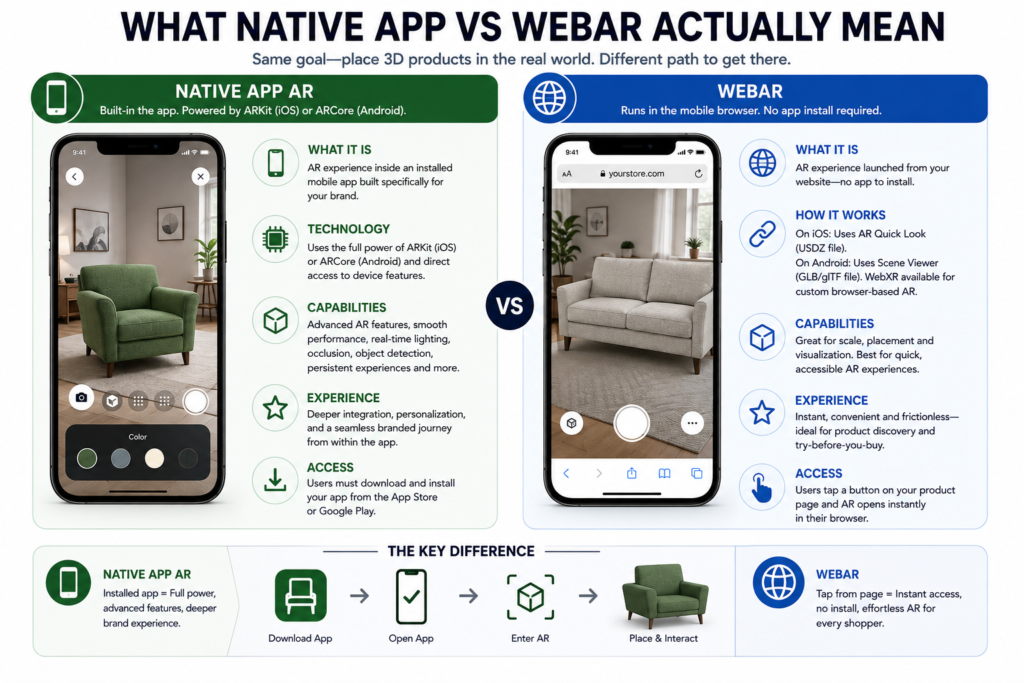
Both approaches let a customer place a true-to-scale 3D model of your product into their physical space but they get there very differently. Native app AR runs inside an installed mobile application built on Apple’s ARKit (iOS) or Google’s ARCore (Android). Because it lives in a dedicated app, it can use the device’s full graphics and sensor stack.
WebAR runs in the mobile browser with no app required. On iOS it launches AR Quick Look from a USDZ file; on Android it opens Scene Viewer from a GLB/glTF file, with WebXR available for more custom browser-based experiences. The shopper taps a button on your product page and the phone’s native AR viewer takes over. That difference installed app versus a tap from the page is what drives almost every trade-off that follows.
Reach and friction: where WebAR pulls ahead
The single biggest factor for ecommerce is how many shoppers can actually use the feature. Native app AR is gated behind a download. Even motivated buyers rarely install an app just to see whether a lamp fits a side table, so your effective reach is limited to existing app users. Every extra step between “interested” and “in AR” loses people.
WebAR collapses that path. The shopper is already on your product page; one tap opens the AR view. There is no store listing, no install, no account. For a first-time visitor arriving from an ad or search result, this is the difference between trying the feature and ignoring it. When the goal is helping someone decide on the page they landed on, lower friction directly supports conversion. If you want the underlying mechanics, see our explainer on what interactive 3D in ecommerce is and how it influences buying decisions.
Capability and performance: where native app AR pulls ahead
Because a native app talks directly to ARKit or ARCore, it can support more advanced behaviour: tighter tracking, richer interactions, persistent state between sessions and effects that benefit from the device’s full processing budget. If your experience needs a shopper to return repeatedly, save configurations or combine AR with other app features, native gives you more room.
WebAR is intentionally more constrained. It leans on the system viewers AR Quick Look and Scene Viewer which are excellent at the core ecommerce job of placing a well-made model at correct scale but offer a narrower feature set than a custom-built app. Performance and availability also depend on the device and browser. The practical takeaway: for “see it in my room,” WebAR is more than enough; for deeply interactive, repeat-use experiences, native earns its cost.
Why model quality matters more than the AR method
Whichever path you choose, the asset does most of the work. A clean, correctly scaled, web-optimised model looks convincing in either viewer, while a heavy or sloppy model disappoints in both. Smooth loading on WebAR in particular depends on file weight, so it pays to optimise your 3D models without losing quality before publishing. Strong interactive 3D on the page also lifts engagement, as we cover in how interactive 3D products improve sales.
Native app AR vs WebAR at a glance
| Factor | Native app AR | WebAR |
|---|---|---|
| Reach | Limited to people who installed the app | Anyone on a supported phone and browser, straight from the page |
| Friction | High requires app download and setup | Low one tap, no install or account |
| Capability | Highest full ARKit/ARCore feature set, persistent state | Solid for “view in your space”; narrower than custom native |
| Cost | Higher separate build and upkeep per platform | Lower one web integration, two model formats |
| Maintenance | Ongoing app updates and OS compatibility work | Mostly managing assets; viewers maintained by Apple/Google |
| Best use cases | Branded apps, repeat use, advanced or persistent AR | Storefront product preview, ads, broad catalog try-in-room |
Cost, maintenance and the two formats you can’t skip
Native app AR carries the cost of building and maintaining an app often two codebases for iOS and Android plus the work of keeping up with OS releases. That is justified when AR is a recurring part of the product, less so when it is a pre-purchase preview. WebAR concentrates the cost on producing good models and a single web integration, while Apple and Google maintain the underlying viewers.
One requirement applies regardless of approach: to cover both major platforms you need your products in two formats. Android Scene Viewer expects GLB/glTF and iOS AR Quick Look expects USDZ. Ship only one and half your audience loses AR. We break down the difference in GLB vs USDZ for your online store and explain the workhorse format in what a GLB file is for ecommerce.
Which approach should your store use?
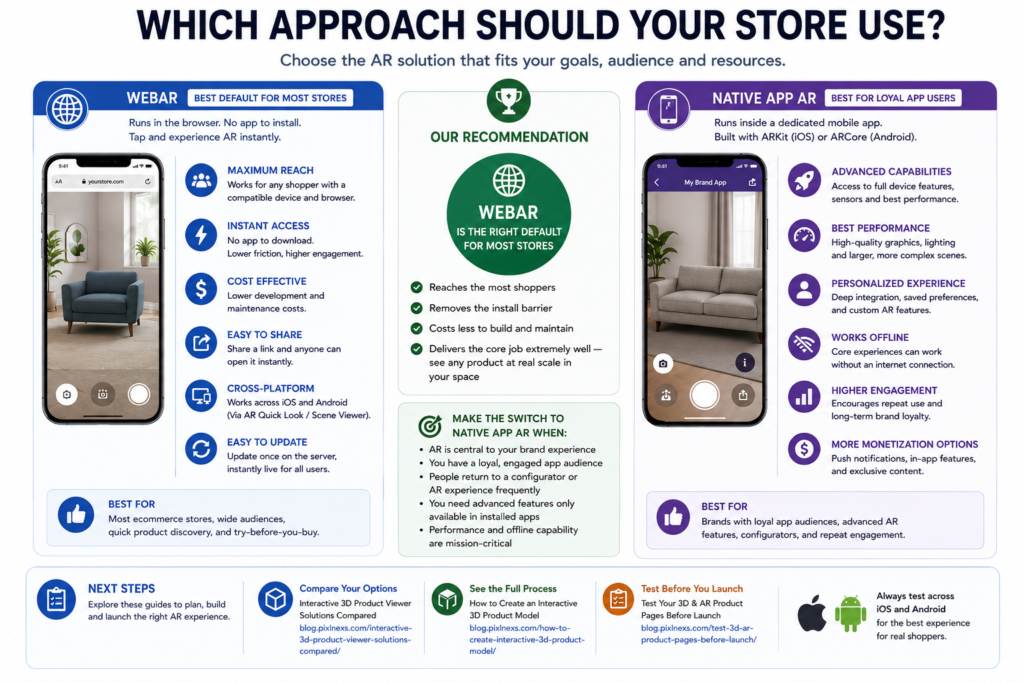
For the majority of ecommerce stores, WebAR is the right default. It reaches the most shoppers, removes the install barrier, costs less to run and handles the core job letting someone see a product at real scale in their space extremely well. Native app AR makes sense when AR is central and recurring: a brand with a loyal app audience, a configurator people return to or an experience that genuinely needs installed-app capability.
If you are still mapping options, our comparison of interactive 3D product viewer solutions is a useful next step and the full process to create an interactive 3D product model shows what production looks like. Before you go live, test your 3D and AR product pages before launch across both iOS and Android so nothing breaks for real shoppers.
Want a “View in your space” button on your product pages?
Pixlnexs builds WebAR-ready 3D models optimized, correctly scaled and delivered in both GLB and USDZ.
Talk to us about AR for your storeFrequently asked questions
Does WebAR really need no app at all?
Correct. WebAR runs in the mobile browser and hands off to the phone’s built-in AR viewer AR Quick Look on iOS, Scene Viewer on Android so the shopper never leaves your page to install anything.
Is native app AR more accurate than WebAR?
Native can support more advanced tracking and interaction because it uses the full ARKit/ARCore feature set. For standard product placement at correct scale, though, the system viewers WebAR relies on are accurate enough that most shoppers won’t notice a difference.
Do I need both GLB and USDZ files?
Yes. Android Scene Viewer uses GLB/glTF and iOS AR Quick Look uses USDZ. Providing both ensures shoppers on either platform get the AR experience instead of falling back to flat images.
When is a native AR app worth the investment?
When AR is a recurring, central part of the experience a configurator customers return to, a loyal app audience or features that depend on installed-app capabilities. For one-off pre-purchase previews, WebAR almost always delivers better return.
Does WebAR work on all phones?
Most modern phones support WebAR iOS needs Safari for AR Quick Look and Android needs a browser with Scene Viewer support (Chrome covers most devices).
an I offer both native app AR and WebAR?
Yes. Many brands start with WebAR for broad storefront reach, then add a native app later if they build a loyal repeat-use audience.
Written by the Pixlnexs 3D team, who build and ship WebAR and 3D product experiences for ecommerce brands. Want a “View in your space” button on your product pages? Talk to us about interactive 3D and AR for your store.










Leave a Reply