

Quick answer: The best 3D character model for your project is the one that matches your pipeline, not just your eye.For real-time projects such as games and AR/VR, it is desirable to have a character that is game-ready, has a well-rigged model with clean quad topology and a good poly budget (about 10k-60k triangles) as well as PBR textures, LODs and ability to export as GLB/glTF or FBX. Always confirm the model is rigged (if you need animation) correctly scaled and, above all, comes with a clear royalty-free commercial license. Stock marketplaces are fast and cheap. Custom models are best when the character is your brand. You can browse rigged, game-ready characters in the Pixlnexs store (Characters & Creatures).
By the Pixlnexs Animation Studio team we produce AI video and 3D content and run store.pixlnexs.com, so this reflects real production experience.
Buying a 3D character looks simple until you import it and the elbows collapse mid-animation, the face can’t smile, the model turns out to be 400,000 triangles in a mobile game or worst of all, you discover the license doesn’t actually cover commercial use. This guide walks through every decision that matters so you buy once and ship, instead of buying twice. It pairs with our broader 3D models buying guide hub, which covers props, environments and vehicles too.
What to look for in a 3D character model
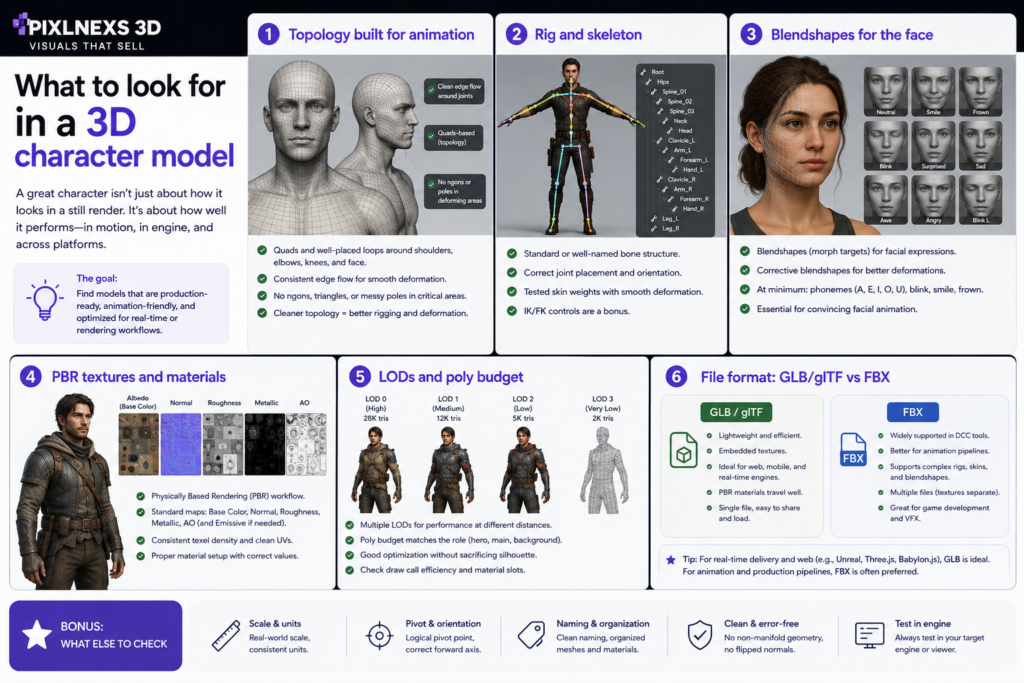
A character model is not a single thing. It’s a bundle of mesh, rig, textures and metadata that all have to be production-quality. Here’s what separates a usable asset from a frustrating one.
Topology built for animation
Topology is how the polygons are arranged across the surface. Whatever needs to be distorted and whatever needs to be modeled will require clean, quad-based topology and edge loops that follow the contours of the face and the articulation points of the body. Edge loops on the eyes, mouth, elbows, knees and shoulders allow the mesh to bend correctly rather than pinch or tear.
Red flags: long thin triangles (slivers) n-gons (faces with five or more sides) on deforming areas and stretched polygons across joints. Triangulated meshes are normal for final game export but if you plan to retarget animation or edit the rig, source-quad topology gives you far more control.
Rig and skeleton
The rig is the skeleton plus the weighting that binds the mesh to the bones.For a character to have a decent rigging setup, it needs to have a logical hierarchy for bones, sensible naming conventions and clean weighting on the bones such that when an arm moves, it does not affect random vertices of the chest region. For video games, having a humanoid rig that conforms to the standard skeleton structure is a godsend. It allows you to recycle animations.
Ask: Is it rigged at all? Is the rig humanoid-standard or a custom skeleton? Are there control rigs (IK/FK) for animators or just a deform skeleton for runtime? See the “rigged vs unrigged” section below before you assume.
Blendshapes for the face
Faces don’t animate well with bones alone. Blend shapes, or morph targets and shape keys, allow you to store sculpted expressions, such as blinks, visemes for lip syncing and brow lifts, that are used in combination with the rig. When your character will be talking or reacting to the camera, blend shapes are indispensable. For lip sync and facial rigging in general, find yourself some models that have a viseme or ARKit compatible blend shape set.
PBR textures and materials
Physically Based Rendering (PBR) is the modern standard. Expect a coherent texture set: base color/albedo, normal map, roughness, metallic (or the specular/gloss equivalent) plus ambient occlusion and sometimes emissive. Check the resolution (2K is common, 4K for hero characters) that UVs are non-overlapping and efficiently packed and that maps are authored for the workflow your engine expects (metal-rough is the glTF/Unreal default). Bad UVs and mismatched texture conventions are a quiet source of “why does this look wrong” hours. The painful part is that nothing throws an error. The model imports fine, it just renders muddy or plasticky and you can lose an afternoon before you realize the maps were authored for the wrong workflow.
LODs and poly budget
Levels of Detail (LODs) are progressively simpler versions of the mesh swapped in as the character moves away from the camera. Real-time scenes with many characters lean on LODs to keep frame rates up. Poly budget depends entirely on the target:
- Mobile / AR / VR: lean, often single-digit thousands to around 20K triangles per character, because you’re rendering at high frame rates on constrained hardware.
- Desktop / console games: mid-range hero characters commonly run tens of thousands of triangles, with LODs below them.
- Cinematic / film-grade: the mesh can be far heavier, hundreds of thousands of polygons or subdivision surfaces, because you render offline and frame time isn’t a live constraint.
Don’t buy a film-grade character for a mobile game and expect to optimize it down for free. Retopology is real work.
File format: GLB/glTF vs FBX
Format determines how smoothly the asset drops into your tool. glTF/GLB is the open, web-and-engine-friendly standard, maintained by the Khronos Group. It’s self-contained (GLB bundles mesh, textures and animation in one file) PBR-native and ideal for web, AR/VR and real-time. FBX remains the workhorse for DCC-to-engine exchange (Maya/Blender/3ds Max into Unity/Unreal) and carries rigs and animation reliably. OBJ is fine for static, unrigged geometry only. If you’re choosing between the web-native formats, our dedicated breakdown on GLB vs glTF covers exactly when to use each.
Rigged vs unrigged
An unrigged model is geometry only. Great if you need a static prop, a background statue, a print or you intend to rig it yourself. A rigged model includes the skeleton and skin weights, so it’s ready to pose and animate.
If your character needs to move, buy it rigged unless you have an animator who’d rig it anyway. Rigging a humanoid well is hours-to-days of skilled work and “I’ll rig it later” is the most common way a cheap model becomes an expensive one. On the flip side, if you have a strict in-house rig standard, an unrigged clean-topology mesh can be the better buy, because you avoid fighting someone else’s skeleton.
Stylized vs realistic
It is a decision that impacts production from an art direction point of view. Stylized characters (with exaggerated features, hand-painted or stylized PBR, lower polygons) on the other hand are more forgiving, performant, consistent among a group of characters and timeless. Realistic characters require highly detailed sculptures, highly detailed PBR or texture scans, proper subsurface scattering for skin and are costly
The practical rule: pick the style your whole cast can sustain consistently and that your target hardware can render. A single photoreal hero among flat-shaded NPCs reads as broken. Consistency beats peak fidelity.
Game-ready vs film-grade
“Game-ready” and “film-grade” describe two different optimization targets and the words on a product page should be backed by the actual files.
| Attribute | Game-ready (real-time) | Film-grade (cinematic) |
|---|---|---|
| Poly count | Optimized, budgeted, with LODs | High to very high; subdivision surfaces |
| Topology | Clean, often triangulated for export | Dense quads, edit-friendly |
| Textures | Baked PBR, atlased, power-of-two sizes | High-res, often multi-tile (UDIM) |
| Rig | Runtime deform skeleton, engine-standard | Full control rig, IK/FK, facial system |
| Render target | Real-time engine at frame rate | Offline renderer, frame-by-frame |
| Best for | Games, AR/VR, web, interactive | Trailers, VFX, pre-rendered cinematics |
A genuinely game-ready character should import into your engine and run without you rebuilding it. If a “game-ready” asset is 300K triangles with no LODs, it isn’t game-ready. It’s a film mesh with a misleading label. For the deeper engine-side workflow, see our guide to 3D models for game development.
Licensing: the part people skip and regret
Licensing is where a great-looking purchase quietly becomes a legal liability. The mesh quality means nothing if you can’t legally ship it.
- Royalty-free means you pay once and owe no per-use or per-sale fees afterward. It does not mean free and it doesn’t automatically grant every right.
- Commercial license is what you need to use the model in a product you sell or monetize. “Editorial only” or “personal use” licenses will not cover a shipped game or a client deliverable.
- Redistribution and resale are usually prohibited. You can use the character in your product but you can’t resell the model file itself or include it in an asset pack.
- Attribution may be required by some licenses; know before you ship.
- Scanned likenesses and brands carry extra risk. A model based on a real person or a trademarked character can expose you even if you “bought” it.
Read the actual license text, not the marketing copy and keep a copy of the license with your project files. The version that bites you is the bundle sale, where a marketplace pack relicenses or pulls a model after you’ve already shipped and your saved copy is the only proof of what you were granted. When in doubt, choose marketplaces that state a clear, royalty-free commercial license up front.
Where to get character models: stock vs custom
Stock marketplaces give you immediate delivery, low cost and the ability to evaluate the exact asset (poly count, format, rig) before paying. Ideal for NPCs, crowds, prototyping and projects where the character doesn’t need to be unique. The tradeoff: someone else may ship the same character and quality varies, so vet every file.
Custom commissions cost more and take longer but you get a unique character built to your exact spec: your topology standard, your rig, your style, your IP. This is the right call when the character is the brand, like a game’s protagonist, a studio mascot or a recognizable AR avatar. Many teams do both, using stock for the supporting cast and custom for the hero.
The Pixlnexs store sits in the stock lane with game-ready, rigged characters under a clear commercial license and as a studio we also take custom character work. So you can start with stock and commission when a model needs to be one-of-a-kind.
How to use character models in Unity, Unreal and on the web
Unity: import FBX (or glTF via a plugin) set the rig to Humanoid if it maps to a standard skeleton so you can reuse Mecanim animations, assign materials to the URP/HDRP/Built-in shaders you’re using and confirm import scale (Unity is 1 unit = 1 meter).
Unreal Engine: import FBX or use the glTF importer; bring in the skeletal mesh, create or reuse a skeleton asset and use the retargeting system to share animations across characters. Watch the metal-rough material setup and the unit scale (Unreal is centimeters by default).
Web / AR / VR: prefer GLB. It loads in <model-viewer>, three.js, Babylon.js and WebXR with PBR intact and the whole asset in one file. Keep poly counts and texture sizes lean; web and headset rendering punish heavy assets harder than desktop.
The buyer’s checklist
Before you click buy, confirm:
- Topology is clean (quads, edge loops at deform areas, no slivers/n-gons where it bends)
- Rig is present and matches your need (humanoid-standard for animation reuse; control rig if you’ll animate by hand)
- Blendshapes exist if the face must emote or lip-sync
- PBR textures included at adequate resolution, with clean non-overlapping UVs
- Poly count fits your target (real-time budget vs cinematic) and LODs are included if you need them
- Format matches your pipeline (GLB/glTF for web/AR/VR, FBX for engines, with rig and animation preserved)
- Scale and orientation are correct (real-world units, facing the expected axis)
- License is explicitly royalty-free commercial, with redistribution terms you understand
- Preview the wireframe and a turntable, not just a beauty render
Common pitfalls (and how to avoid them)
- Bad topology: looks fine in the thumbnail, pinches the moment it animates. Always inspect the wireframe.
- No rig (or a broken one): an “animated preview” can be baked, not riggable. Confirm a usable skeleton and skin weights ship with the file.
- Wrong scale: a character imported at 100× or 0.01× wrecks physics, collisions and animation. Check units before building around it.
- Texture/material mismatch: spec-gloss maps in a metal-rough engine look off. Match the workflow your engine expects.
- No commercial license: the most expensive mistake of all, shipping with a model you don’t have the right to monetize.
- Overweight for the target: a 250K-triangle character in a mobile or VR scene tanks frame rate. Budget first, buy second.
Frequently asked questions
What’s a good poly count for a game character?
It really varies depending on the platform and the number of characters rendered on screen. Mobile, AR and VR characters are always optimized for fewer poly counts, usually in the single-digit thousand range up to 20K triangles, desktop and console hero characters often end up with poly counts in the tens of thousands and cinematic characters can be much larger because they are rendered off-line. It’s all about matching the budget to the target platform and the number of characters in your scenes.
Do I need a rigged model or can I rig it myself?
If the character needs to move and you don’t have an animator who’d rig it anyway, buy it rigged, because rigging a humanoid well is skilled, time-consuming work. If you have a strict in-house rig standard, a clean unrigged mesh can actually be the better buy so you’re not fighting someone else’s skeleton.
What’s the difference between GLB and FBX?
GLB is the binary version of glTF, a format that’s open-source, self-contained and designed for PBR. FBX is the long-used format to exchange rigged and animated models between DCC software and game engines. Use GLB for web and real-time workflows; use FBX for the standard workflow from Maya/Blender/3ds Max to Unity/Unreal engine. Check out our GLB vs glTF comparison post for more details.
Does “royalty-free” mean I can use it in a game I sell?
Normally yes, but check. Royalty-free indicates there are no charges for each usage after the purchase but you will have to buy the license, which will specifically state you can use it commercially and that you cannot resell or redistribute the file of the model.
Stylized or realistic, which should I choose?
Select a style that both your cast of characters can pull off and your hardware can render. Characters with a stylized approach are easier to work with and better performance-wise while characters who are more realistic look amazing once you have everything figured out, but they are difficult to create.
Related guides
- The 3D Models Buying Guide (hub)
- GLB vs glTF: Which Format Should You Use?
- 3D Models for Game Development
Ready to find your character? Browse rigged, game-ready models in the Pixlnexs store under Characters & Creatures. Each one is built with clean topology, PBR textures and a clear royalty-free commercial license, with formats ready for Unity, Unreal and the web. Need a one-of-a-kind hero or a custom creature for your IP? Our studio takes custom character commissions too.










Leave a Reply