
Quick answer: The best places to find game ready 3D assets are dedicated marketplaces and asset stores that publish geometry already optimized for real-time engines: clean topology, sane polycounts, PBR textures, LODs and engine-ready formats like FBX and glTF. For one off props, browse a large general marketplace. For a consistent art style or a specific look you can’t find off the shelf, commission a studio.
Match the source to your need. Marketplaces win on volume and speed; a studio like Pixlnexs Animation Studio (and our store at store.pixlnexs.com) makes sense when you need optimized, on-style or custom low-poly and VR/AR assets that drop straight into Unity or Unreal. And whatever you pick, verify topology, texture format and license before you buy.
By the Pixlnexs Animation Studio team, we produce AI video and 3D content and run store.pixlnexs.com so this reflects real production experience.
What “game-ready” actually means (and why most assets aren’t)
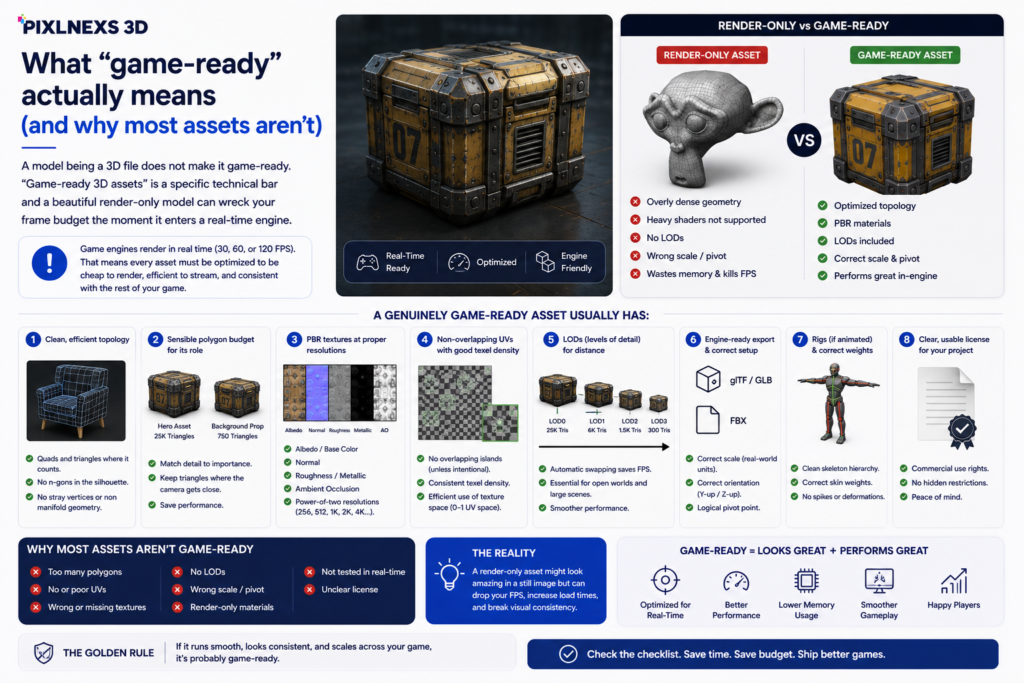
A model being a 3D file does not make it game-ready. “Game ready 3D assets” is a specific technical bar and a beautiful render-only model can wreck your frame budget the moment it enters a real-time engine. Before you spend money, know what you’re checking for.
A genuinely game-ready asset usually has:
- Clean, efficient topology: quads and triangles where it counts, no n-gons hiding in the silhouette, no stray vertices or non manifold geometry.
- A sensible polygon budget for its role. A background prop should not carry the same triangle count as a hero character.
- PBR textures (albedo/base color, normal, roughness/metallic, AO) at consistent, power of two resolutions.
- Non-overlapping UVs with reasonable texel density so textures look sharp without wasting memory.
- LODs (levels of detail) for anything seen at distance so the engine can swap to cheaper meshes.
- Engine-ready export: FBX or glTF/GLB, correct scale and orientation and a logical pivot point.
- A clear, usable license for your project (more on this below).
glTF in particular has become the practical interchange standard for real-time and web 3D. It’s an open specification maintained by the Khronos Group. If you’re targeting WebGL, WebXR or want a future proof format, see the glTF overview for what the format guarantees.
Where to find game ready 3D assets: the main source types
There’s no single “best” source. There’s the right source for your constraint. Here are the categories that matter, with the honest trade offs of each.
1. Engine-native asset stores
Stores tied directly to an engine (the kind built into Unity and Unreal workflows) are the lowest friction option when you’re building in that engine. Assets are usually pre-configured for the target pipeline so import is fast and predictable. The trade-off: you’re somewhat locked to that engine’s ecosystem and quality still varies by publisher. Engine native does not guarantee optimized.
2. General 3D marketplaces
Large multi-format marketplaces carry enormous catalogs across every category: props, vehicles, environments, characters. Great for finding something fast and cheap. The catch is that “game-ready” is a filter, not a promise. You’ll find render-only models, scanned meshes with millions of triangles and inconsistent texturing sitting right next to truly optimized assets. You have to vet each one. Here’s what actually happens if you skip that step: the model looks fine in the listing thumbnail, imports without errors and then tanks your frame rate on a mid-tier phone because someone shipped a 2-million-triangle photoscan as a “low-poly barrel.”
3. Free and open libraries
Free libraries (including CC0 collections) are excellent for prototyping, learning and filler geometry. Watch two things: licensing nuance (CC0 is genuinely free; other Creative Commons tiers require attribution or forbid commercial use) and optimization, which is often weaker than paid assets. The Creative Commons framework is worth understanding before you ship anything commercial. The Creative Commons license overview explains the differences.
4. Specialist and studio sources (custom + curated)
When you need a consistent art direction across dozens of assets, a specific style that doesn’t exist off the shelf or VR/AR-grade optimization where every triangle matters, a studio is the right call. You pay more per asset but you get assets built to your spec, your engine and your performance budget and you own the result cleanly. This is where store.pixlnexs.com and our custom production service fit: optimized, on-style and ready to drop in.
Honest comparison: which source for which job
Below is a qualitative comparison on the dimensions that actually affect your project. We’ve deliberately avoided inventing prices or stats, since those change constantly and vary per publisher. Judge on the real, durable trade-offs.
| Dimension | Engine-native store | General marketplace | Free / open library | Studio / Pixlnexs |
|---|---|---|---|---|
| Speed to first asset | Fast | Fast | Fast | Lead time (it’s custom) |
| Optimization guaranteed | Usually, varies by publisher | No, must vet each | Often weak | Yes, built to your budget |
| Style consistency across many assets | Hard | Hard | Hard | Strong, single art direction |
| Engine fit (Unity / Unreal / WebXR) | Best for its own engine | Depends on listing | Depends on file | Targeted to your engine |
| VR/AR-grade low-poly precision | Sometimes | Rare | Rare | Core strength |
| Customization to your spec | None | None | None | Full |
| License clarity for commercial use | Generally clear | Read carefully | Varies a lot | Clear, project-scoped |
| Best when… | You live in one engine | You need volume cheaply | You’re prototyping | You need it right and on-style |
How to vet a “game-ready” asset before you buy
Whichever source you choose, run the same checklist. This is the difference between a smooth import and an afternoon lost to cleanup.
- Check the polycount against the role. Ask whether the triangle count fits a hero, mid or background asset for your platform. Mobile and standalone VR budgets are far tighter than desktop.
- Confirm LODs exist if the asset will be seen at varying distances. No LODs means you do that work later.
- Inspect the UVs and textures. Look for non-overlapping UVs, consistent texel density and a full PBR set at power-of-two resolutions. Ask for texture map previews if they aren’t shown.
- Verify the format and scale. FBX and glTF/GLB import most reliably. Confirm real-world scale and a sane pivot. Wrong scale is a silent time-sink and the kind of thing you only notice after you’ve placed forty props and the doorways are suddenly the size of a parking garage.
- Read the license, twice. Editorial-only, no-redistribution, attribution-required and per-seat terms all exist. Make sure it covers your distribution model.
- For animated assets, check the rig. A character that isn’t rigged or skinned cleanly will animate badly. We cover this in depth in our rigged 3D character models buying guide.
Who should choose what
Match the recommendation to your situation rather than chasing the “best” source in the abstract.
Solo developers and prototypers
Start with free/open libraries and a general marketplace. You need to validate the game loop, not ship final art. Keep a list of which placeholder assets you’ll replace later and avoid building a final look around CC-licensed assets you can’t legally ship.
Indie teams shipping a commercial title
Use an engine-native store as your spine for common assets, supplement from general marketplaces and commission a studio for hero assets and anything that defines your art direction. Mixing scavenged assets of clashing styles is the most common reason an indie game looks “asset-flippy.”
VR/AR and mobile teams
Optimization isn’t optional here. The frame budget is brutal. Prioritize sources that prove their polycounts and provide LODs. This is exactly where a studio earns its fee: assets built to a strict triangle and draw-call budget for your target headset or device. Our VR/AR and low-poly work at store.pixlnexs.com is built around that constraint.
Studios and brands needing a consistent catalog
If you need 30, 50 or 200 assets that look like they belong together, commission them. The per-asset cost is higher than a marketplace but the alternative, fixing style mismatches one by one, costs more in time and looks worse. This is also true for product-adjacent 3D like 3D furniture models for configurators and render-ready 3D jewelry models, where consistency and accuracy directly affect conversion.
Why teams work with Pixlnexs for game ready 3D assets
We’re a production studio, not a stock dump. When optimization, art direction or a custom spec matters, that distinction is the whole point. With Pixlnexs Animation Studio you get assets built to a defined polygon and texture budget, exported for your specific engine and platform, with clean topology and LODs where they’re needed, plus the option to keep one consistent style across an entire catalog. Either way, you get a clearly scoped license and a real team you can actually speak to whenever something requires tweaking.
If you are considering the “build vs buy” dilemma when trying to fit a VR or mobile game into a tight budget, we’ve been discussing exactly this question every single week since the beginning. You give us your engine and your platform and triangle budget and we’ll be completely honest about whether a marketplace asset can be used or whether custom development is worthwhile.
Frequently asked questions
What file format should game ready 3D assets use?
FBX and glTF/GLB are the most reliable for real-time engines. FBX is ubiquitous across Unity and Unreal pipelines; glTF/GLB is the open standard and the best choice for web and WebXR targets. OBJ works for static geometry but carries no animation or rich material data so it’s rarely ideal on its own.
How many polygons should a game ready 3D asset have?
There’s no universal number. It depends on the asset’s role and your platform. A background prop on mobile might be a few hundred triangles; a hero character on desktop can be tens of thousands. The right question isn’t “how low” but “what fits my frame and memory budget for this asset’s importance and screen size.”
Are free 3D assets safe to use commercially?
Not always. CC0 assets are totally free to be used commercially without any need for attribution. There are other licenses of Creative Commons which will make you give attribution or cannot be used commercially at all. Some free assets come with their own custom license. So, make sure to read the license itself before using anything.
What’s the difference between game-ready and render-ready models?
Rendered Models are built with very high polygons and very detailed textures that look great when static, but they don’t run well in real time engines. Game models have fewer polygons and LODs, as well as baked normal maps and better materials to run at frame rate.
Should I buy stock assets or commission custom?
Buy stock when you need common, generic props quickly and on a budget. Commission custom when you need a specific style, a consistent catalog, VR/AR-grade optimization or something that simply doesn’t exist off the shelf. Most shipped games use a mix: stock for filler, custom for hero and brand-defining assets.
Can Pixlnexs deliver assets optimized for Unity, Unreal or WebXR?
Yes. We build to your target engine and platform, export in the right format with correct scale and pivots and tune polycounts, LODs and textures to your performance budget. You can start from our store or commission custom work at pixlnexs.com.










Leave a Reply