

Quick answer: The best free AI video generators in 2026 are the free tiers of established platforms (Runway, Pika, Luma Dream Machine, Kling, Haiper and Google’s offerings) plus open-source options you run yourself. Each is genuinely usable for short clips, testing and learning. But the free tiers all share the same hard limits and you hit them fast: watermarks, low resolution, short clip durations (often 4 to 10 seconds) monthly credit caps, slow queue priority and restrictive commercial-use terms.
For a one-off social clip or a prototype, free is fine. For client-grade or commercial work, you’ll almost always need a paid tier or a production studio. Below we break down which free tool fits which job and exactly where the walls are.
By the Pixlnexs Animation Studio team, we produce AI video and 3D content and run the marketplace at store.pixlnexs.com, so this reflects real production experience.
Why “free” AI video is real, but narrower than it looks
Most major AI video platforms run a freemium model. They hand you a small monthly credit allowance so you can test the model before paying. That allowance is real value. You can generate watchable clips for zero dollars. But it’s engineered to convert you and understanding the levers vendors pull is the difference between getting useful output and burning an afternoon on failed renders.
From hands-on production, four levers matter most on any free tier: clip length (how many seconds per generation) resolution (480p to 720p free vs 1080p+ paid) credits (how many generations per month before you wait or pay) and rights (whether you can legally use the output commercially). Watermarks and queue priority are secondary annoyances. We’ll map every tool below against those four.
The best free AI video generators in 2026
These are the tools we reach for when we want a quick test or a throwaway clip without spending. We’re deliberately describing capability ranges rather than exact credit numbers, because free-tier quotas change constantly. Always check the live pricing page before you commit a project to one.
1. Runway (free tier)
Runway is the workhorse of the category and its free tier is a sensible first stop. You get a starter pool of credits, access to its text to video and image to video models and a mature editor with extras like inpainting and motion brush. The catch: free output carries a watermark, resolution is capped and credits don’t refill fast. It’s excellent for learning the craft of prompting and for storyboarding shots before you commit budget.
2. Pika (free tier)
Pika leans into fast, stylized, social-friendly clips and the free experience is generous and approachable. Its strengths are quick iteration and fun effects. Free clips are short and watermarked and the highest-fidelity features sit behind paid plans. Good for memes, B-roll experiments and testing whether image-to-video suits your asset.
3. Luma Dream Machine (free tier)
Luma’s Dream Machine produces notably coherent motion and camera moves for a free product. Expect a small daily or monthly free allowance, watermarks and queue waits at peak times. We like it for naturalistic camera moves and for animating a single still image into a living shot.
4. Kling (free tier)
Kling earned attention for strong motion realism and longer achievable clip lengths than many rivals. Free access typically comes with a daily credit drip. Sign-up and regional availability can be fiddly and the terms around commercial use are worth reading carefully before any client work.
5. Haiper (free tier)
Haiper is a friendly entry point with a usable free tier for short generations and quick experiments. It isn’t the highest-fidelity option, but the low friction makes it good for absolute beginners testing the text to video idea for the first time.
6. Google’s AI video (free access points)
Google’s video models (the Veo line) show up inside consumer products and trials, sometimes with limited free access. Quality is high, but free access is gated and inconsistent across regions and plans. Treat any free Google access as a preview, not a dependable pipeline.
7. Open-source models you run yourself
If you have a powerful GPU (or access to cloud computing services) then such models become “free” from the licensing perspective, i.e., there is no fee per video clip and no watermark. Instead, the cost of ownership shifts to hardware, power consumption, initial setup effort and your knowledge. It is the only unlimited option, yet it is an engineering task rather than some sort of ready-made tool. What you are actually facing is the need to spend the whole first day resolving dependency version issues before generating a single frame.
Free tier comparison at a glance
The table below summarizes typical free-tier characteristics. Treat every cell as a qualified range, because vendors change quotas often and your mileage depends on region and account age.
| Tool | Best for | Typical free clip length | Watermark on free? | Commercial use on free? |
|---|---|---|---|---|
| Runway | All-round + editing tools | ~4–10s | Yes | Usually restricted |
| Pika | Stylized social clips | ~3–5s | Yes | Usually restricted |
| Luma Dream Machine | Camera moves, image-to-video | ~5s | Yes | Usually restricted |
| Kling | Motion realism, longer shots | ~5–10s | Often | Check terms carefully |
| Haiper | Beginners, quick tests | ~2–8s | Yes | Usually restricted |
| Open-source (self-host) | Unlimited, no watermark | Depends on hardware | No | Per model license |
The hidden limits you hit fast
The marketing says “free AI video.” The reality, once you start a real project, is a sequence of walls. Here’s the order we typically hit them in.
Clip length and the “it cuts off” problem
Free generations are short, often 4 to 10 seconds. So a 30-second social ad isn’t one render. It’s several clips you have to stitch and grade for consistency. Character and lighting drift between clips, so longer pieces get exponentially harder. This single constraint quietly defeats most “I’ll make a whole video for free” plans.
Resolution and the delivery ceiling
Free tiers frequently cap you at 480p or 720p. That’s fine for a phone-first social test, but it falls apart on a TV, a trade-show screen or anywhere a client will pixel-peep. Upscaling helps a little, never fully.
Credits, queues and waiting
Free credits run out and when they do you either wait for the monthly reset or get bumped to the back of the render queue. During peak demand, free generations can take meaningfully longer. For deadline work, the wait alone justifies a paid tier. We’ve watched a “quick” free render sit behind paying users for the better part of an hour, which is exactly when you stop calling it free.
Commercial-use rights, the limit that bites hardest
This is the one people miss. Many free tiers either forbid commercial use outright or grant it only on paid plans and ownership terms vary widely between vendors. Before you put any AI clip in a paid ad, a client deliverable or a product page, read that specific tool’s terms of service. Don’t assume. When in doubt, license-clean assets (or commissioned production) are the safe path.
Watermarks and the trust tax
A vendor watermark instantly signals “this was a free experiment.” Fine for internal review and learning, fatal for anything client-facing.
For a deeper method to work within these limits, see our full script to screen AI video workflow and if you’re deciding between generation methods, our guide to text to video vs image to video vs avatar will save you wasted credits.
How to choose a free AI video generator (a quick decision path)
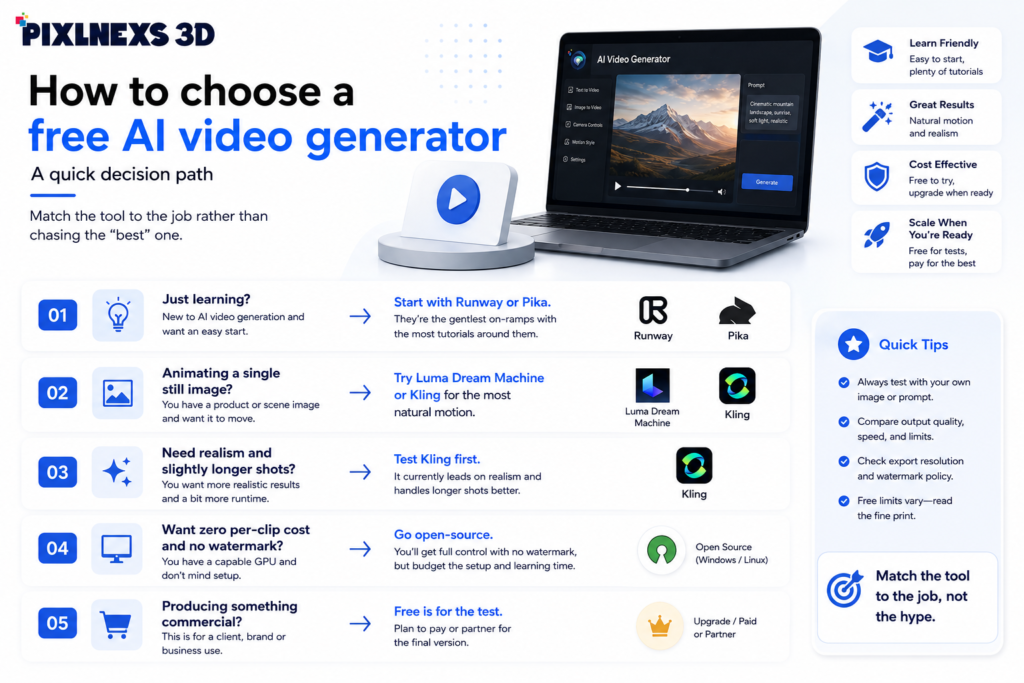
Match the tool to the job rather than chasing the “best” one:
- Just learning? Start with Runway or Pika. They’re the gentlest on-ramps with the most tutorials around them.
- Animating a single still image? Try Luma Dream Machine or Kling for the most natural motion.
- Need realism and slightly longer shots? Test Kling first.
- Want zero per-clip cost and no watermark and you have a GPU? Go open-source, but budget the setup time.
- Producing something commercial? Free is for the test. Plan to pay or partner for the final.
If you want a head-to-head on the flagship paid models, our Runway vs Sora vs Veo vs Pika showdown covers where each one wins and our breakdown of AI video vs traditional production helps you decide when free tools are genuinely enough versus when they cost you more in rework.
When free stops being free
Free AI video is a brilliant sandbox. It’s the wrong foundation for revenue-critical work. The moment a project needs reliable length, full resolution, clean rights, no watermark and consistent characters across shots, the cheapest path is usually a paid plan or a studio that already owns the pipeline. That’s exactly the gap we built Pixlnexs around: production-grade AI video plus a marketplace of license-clean 3D assets at store.pixlnexs.com so your final deliverable is safe to ship.
For background on how generative media and 3D formats actually work under the hood, the Khronos glTF standard is the reference for 3D assets and Wikipedia’s overview of generative AI is a solid, neutral primer on the underlying models.
Frequently asked questions
What is the best free AI video generator overall?
There’s no single winner. It depends on the job. Runway is the strongest all-rounder for learning and editing, Luma Dream Machine and Kling lead on natural motion and self hosted open source models are the only truly unlimited route. Pick by task, not by reputation.
Are free AI video generators actually free?
Yes, in that you can generate watchable clips at zero cost. But “free” means a limited monthly credit allowance, short clips, capped resolution, watermarks and usually restricted commercial rights. It’s a trial, engineered to convert you to a paid plan.
Can I use free AI video clips commercially?
Usually not part of the free offering. Rights for commercial use differ considerably from one vendor to another. It is important to check the terms of service of each individual tool before using a video in your advertisement, client work, or product page.
Why are free AI videos so short?
Compute cost. Each second of generated video is expensive to render, so vendors cap free clip length (commonly 4 to 10 seconds) to control their costs and to nudge you toward paid tiers. Longer pieces require stitching multiple clips together.
How do I get higher resolution without paying?
You mostly can’t. Free tiers are usually capped at 480p or 720p. Third-party upscalers can help a little, but they can’t fully recover detail the model never generated. For true 1080p or 4K, you generally need a paid plan.
Are open-source AI video models a better free option?
They can be, since there’s no per-clip charge and no watermark. But you need a capable GPU (or rented cloud compute) technical setup skill and time. The cost moves from money to hardware and effort. For non-technical users, a hosted free tier is usually more practical.
When should I stop using free tools and go paid or hire a studio?
The moment you need reliable clip length, full resolution, clean commercial rights, no watermark and consistent characters across shots, which is typically any client or revenue-facing deliverable. At that point a paid plan or a production partner is cheaper than the rework free tools force.
Related guides
- Pixlnexs AI Video & 3D Content Hub
- How to Make an AI Video in 2026: The Complete Script-to-Screen Workflow
- Text-to-Video vs Image-to-Video vs Avatar Video: Which AI Method to Use
- Runway vs Sora vs Veo vs Pika: The 2026 AI Video Tool Showdown
- AI Video vs Traditional Video Production: Cost, Speed and Quality Compared










Leave a Reply