

Quick answer: In 2026, there is no single “best” AI video generator. The right pick depends on the shot you need. Runway wins for creative control, editing and director-style camera moves. Sora (OpenAI) leads on long, coherent, physically believable scenes and storyboard-driven sequences. Veo (Google DeepMind) is strongest on prompt accuracy plus native synced audio and it’s the easiest to reach through Google’s ecosystem. Pika is the fastest, most affordable option for short social clips and playful effects. Most professional teams don’t standardize on one tool. They route each shot to whichever model handles it best.
By the Pixlnexs Animation Studio team, we produce AI video and 3D content and run the marketplace at store.pixlnexs.com, so this reflects real production experience.
If you’ve spent any time researching Runway vs Sora vs Veo (and Pika) you’ve probably noticed every comparison reads like a spec sheet. That’s not how these tools behave on a real production day. Below is how the four stack up when you’re actually trying to ship a finished video, not just generate a pretty five-second clip. We render with all four regularly, so the trade-offs here come from output we’ve had to color-match, re-cut and deliver to clients.
Best AI Video Generators 2026: Runway, Veo, Sora, Pika (and Where Kling Fits)

Each of these models comes from a different lineage and that lineage shapes what it’s good at. Runway is built by a creative-tools company, so it thinks like an editing suite. Sora comes from OpenAI’s research into world simulation. Veo is Google DeepMind’s video model, wired into Gemini and the broader Google stack. Pika started as a nimble, community-driven generator focused on speed and fun. Those origins explain almost every difference you’ll feel in practice.
A fifth name worth knowing is Kling, a fast-growing Chinese-market video model that’s increasingly compared alongside these four we haven’t included it in the table below since our production testing has focused on the four tools we ship client work through but it’s on our radar for a future benchmark pass.
Comparison table Runway vs Sora vs Veo vs Pika
| Dimension | Runway | Sora | Veo | Pika |
|---|---|---|---|---|
| Best for | Creative control, editing, VFX | Long coherent narrative shots | Prompt accuracy + native audio | Fast short social clips |
| Typical clip length | Short to medium | Longer, more sustained | Short to medium | Short |
| Native audio | Limited / add separately | Improving | Yes (synced dialogue/SFX) | Limited |
| Camera & motion control | Excellent (motion brush, director mode) | Strong via storyboard | Good | Good for effects |
| Ecosystem | Standalone creative suite | OpenAI / ChatGPT | Google / Gemini | Standalone app |
| Learning curve | Moderate (most controls) | Low to moderate | Low | Lowest |
| Cost posture | Mid, credit-based | Subscription tiers | Subscription / Google plans | Most affordable |
Treat the table as a starting map, not gospel. All four ship new model versions frequently and a capability that’s weak this quarter can be solid next quarter. We re-test our defaults roughly every release cycle for that reason.
Runway: the editor’s tool
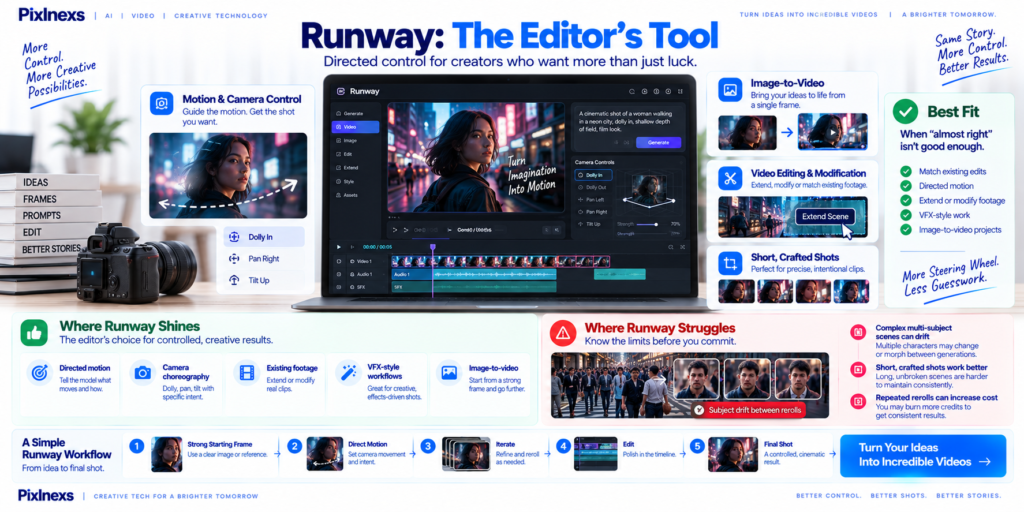
Runway feels like it was designed by people who actually cut video. Its standout features are the ones that give you directed control instead of pure luck: motion brush (paint where motion should happen) camera-direction controls and a deepening set of editing utilities around the generator itself. If your shot needs a specific dolly-in, a controlled pan or an element that has to move a particular way, Runway gives you the most steering wheel of the four.
The trade-off is that this control has a learning curve and Runway’s strength is in shorter, crafted shots rather than long unbroken sequences. We reach for Runway when a clip needs to match an existing edit, when we need to extend or modify real footage or when “almost right” isn’t good enough and we want to nudge motion deliberately. For VFX-flavored work and image-to-video where you’re starting from a strong frame, it’s often our first call.
Where Runway struggles
Long, complex scenes with many interacting subjects can drift and you may burn credits iterating to hold consistency. Here’s what actually happens on a deadline: you re-roll the same crowd shot six times chasing a hand that keeps morphing and by the seventh you’ve spent more credits than a coherence-tuned model would have cost in one pass. For those shots, reach for a model built to hold the scene together.
Sora: the coherence and storytelling engine

Sora’s research heritage shows up as scene coherence. It tends to hold object permanence, character consistency and believable physics across longer durations better than the others closer to short movie-style footage than a single generated clip which matters enormously the moment you go past a single quick cut. Its storyboard-style workflow, where you describe a sequence of beats rather than one prompt, is genuinely useful for narrative work.
If you’re building anything with a story arc, say a product explainer with a beginning, middle and end or a short scene where the same character has to look like the same character, Sora is usually where we start. It’s the closest of the four to “describe the scene and trust it to stay consistent.”
Where Sora struggles
You get less frame-by-frame manual override than Runway’s motion tools provide. When you need a precise, specific camera move on a specific element, Sora’s “trust the model” approach can feel less surgical.
Veo: prompt accuracy plus native audio

Veo’s two headline strengths are how faithfully it follows a prompt and that it can generate synchronized audio (dialogue, ambient sound, effects) natively rather than forcing you to add a soundtrack in post. For a lot of social and marketing work, “video with usable sound, in one pass” is a real time-saver. Add tight integration with Google’s ecosystem (Gemini and Google’s creative tooling) and Veo is often the lowest-friction option for teams already living in Google’s stack.
We lean on Veo when prompt fidelity matters. When the brief says “a red sedan, rainy night, neon reflections” and we need exactly that, not a creative reinterpretation and when native audio saves a sound-design pass. One caveat worth knowing before you rely on it: that one-pass audio is a draft, not a final mix. We still re-level dialogue and swap ambient beds half the time but starting from synced sound beats starting from silence. Google publishes ongoing detail on Veo through Google DeepMind, which is worth checking for current capabilities.
Where Veo struggles
You trade some of the hands-on, paint-the-motion control that Runway offers. It’s excellent at delivering what you describe, slightly less of a fine-grained manual instrument.
Pika: speed, affordability and effects
Pika is the one we reach for when speed and cost beat everything else. It’s fast, approachable, the cheapest to experiment with and it has a fun library of effects and transforms that are great for short-form social content. If you’re testing twenty concepts before lunch or pumping out vertical clips for social, Pika’s iteration speed is a genuine advantage and the price means you can fail cheaply.
Where Pika struggles
It’s not the tool for long, high-stakes, broadcast-grade narrative shots. It trades top-tier coherence and fidelity for speed and accessibility, which is exactly the right deal for its use case and the wrong one for a hero brand film.
Ready to put Runway, Veo, Sora or Pika to work for your brand?
Pixlnexs produces AI video and 3D content end to end routing each shot to the right model, then editing, grading and delivering a finished, brand-consistent video.
Start Your AI Video ProjectRunway, Veo, Pika or Sora: So Which Should You Actually Use?
Here’s the honest operator’s answer: match the tool to the shot, not the project. A single 60-second video can legitimately use all four. Sora for the consistent narrative middle, Runway to fix and direct a tricky shot, Veo for the talking segment with synced audio and Pika for the fast B-roll fillers. Standardizing on one model is convenient but you leave quality on the table. The hidden tax of mixing four tools, for the record, is color: each model has its own look, so budget time to grade everything back to one palette before delivery or the cut will read as four different videos stapled together.
- Need long, consistent storytelling? Start with Sora.
- Need precise creative/camera control or to edit real footage? Runway.
- Need prompt-accurate clips with built-in audio? Veo.
- Need fast, cheap, social-first volume? Pika.
If you want the full pipeline that ties these tools together (script, shot list, generation and edit) see our complete script-to-screen workflow guide. And if you’re weighing whether to start from text, an image or an avatar, our breakdown of text-to-video vs image-to-video vs avatar video will save you a lot of wasted renders.
How we test these tools at Pixlnexs
Our internal benchmark is boringly practical. We run identical prompts through all four, then judge on five things: prompt adherence (did it make what we asked?) temporal coherence (does it hold together across the clip?) motion realism, controllability (can we fix it without re-rolling 30 times?) and cost-per-usable second. That last metric matters more than raw quality. A model that’s 95% as good but costs a third as much and renders in half the time often wins the production budget.
For deeper background on how generative video models work and where the field is heading, the broadly maintained overview at Wikipedia’s text-to-video model article is a reasonable neutral primer. For web-delivery and performance considerations once your video exists, web.dev has solid, vendor-neutral guidance on serving media efficiently.
Want to see the kind of finished work this pipeline produces or need ready-made 3D assets to drop into your scenes? Browse our 3D model marketplace at store.pixlnexs.com. It’s built for exactly this kind of AI-assisted production.
Frequently asked questions
Related guides
- Pixlnexs AI Video & 3D content hub
- How to Make an AI Video in 2026: The Complete Script-to-Screen Workflow
- Text-to-Video vs Image-to-Video vs Avatar Video: Which AI Method to Use
- AI Video vs Traditional Video Production: Cost, Speed and Quality Compared
- Best Free AI Video Generators (and the Hidden Limits You Hit Fast)
See how Pixlnexs produces AI & 3D product videos. Go now →
Related guide: AI video production guide.










Leave a Reply