

Quick answer: To turn a blog post into an AI video, paste your post URL or text into an AI video generator like Pixlnexs, choose a template and voice, let the tool auto match visuals to each section, then export in 16:9 or 9:16. It takes under 10 minutes no camera, editor or script rewrite needed.
To turn blog post into ai video, start by trimming the article down to a tight 120-180 word script that keeps only the hook, the three or four core points and one call to action. Feed that script into an AI video tool using one of three methods: text-to-video for B-roll scenes, image-to-video to animate your existing product shots or screenshots or an AI avatar to deliver the words on camera.
Generate the visuals in short clips, drop them into a timeline with on-screen captions and a voiceover, then export in the aspect ratio your channel needs. Once your template is set the whole pipeline runs in well under an hour and a product page converts even faster because the copy and images already exist.
By the Pixlnexs Animation Studio team, we produce AI video and 3D content and run the marketplace at store.pixlnexs.com, so this reflects real production experience.
Most teams sit on a library of high-quality written content that never gets a second life. A blog post that took a writer two days ranks on page one, then quietly collects dust while the same audience scrolls video on YouTube, Instagram and LinkedIn. Turning that text into video is one of the highest use moves in content marketing, because the hard part (the research, the angle, the proof) is already done. This guide walks through the exact production process we use, the trade-offs between AI methods and the mistakes that make repurposed video look cheap.
Why repurpose written content into video at all
The case is mostly about distribution, not novelty. Search-optimized articles win on Google. Video wins attention on social and on-page engagement. When you turn a blog post into video you are not replacing the article. You are giving the same idea a second front door. A few practical reasons it works:
- The thinking is finished. Your post already has a defensible point of view, a structure and supporting detail. Scripting becomes editing, not writing from scratch.
- Product pages already have assets. A product page ships with photography, specs and benefit copy. The raw material for a 30-second explainer is sitting right there.
- One source, many cuts. A single article can become a 90-second YouTube explainer, three vertical shorts and a silent autoplay clip for the top of the page.
- Embedded video helps the page itself. A relevant video on the article can increase time-on-page, which is a healthy engagement signal.
The honest caveat: repurposing does not magically create demand. If the original post gets little traffic, the video version will not rescue it. Pick posts and pages that already earn attention or sit on a commercial keyword.
The script-to-screen process for repurposing
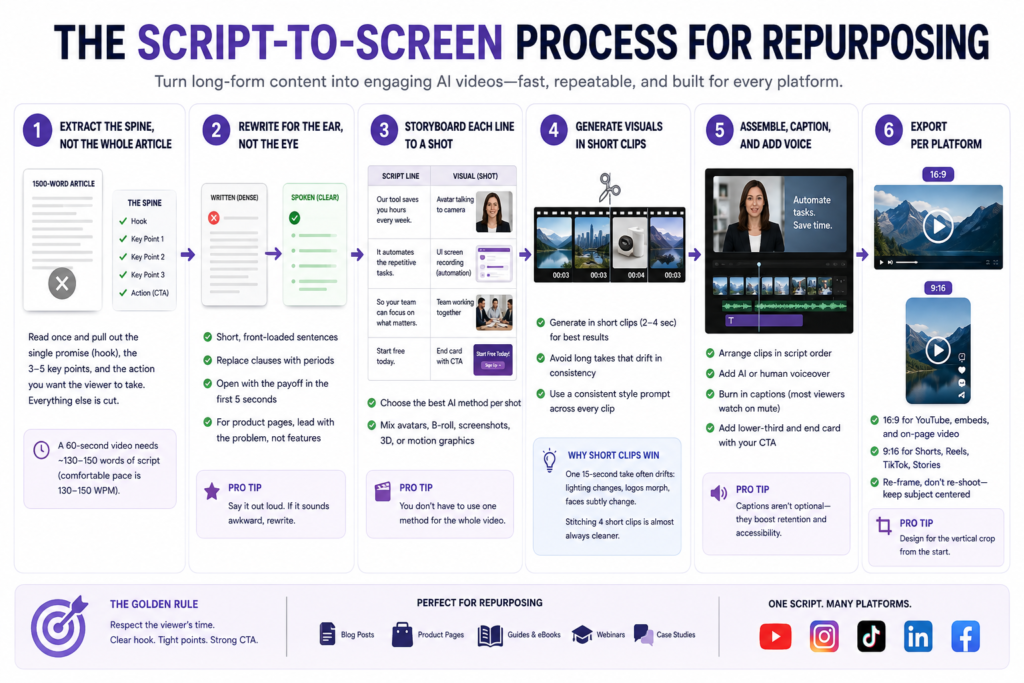
Here is the repeatable pipeline. It is the same backbone whether you are converting an evergreen guide or a product page and it maps closely to our broader script-to-screen AI video workflow.
Step 1, Extract the spine, not the whole article
A 1,500-word post is far too long to narrate. Read it once and pull out the single promise (the hook), the three to five points that deliver on it and the action you want the viewer to take. Everything else is cut. A useful constraint: a comfortable spoken pace is roughly 130-150 words per minute, so a 60-second video needs about 130-150 words of script in total. If your draft is longer, you are still writing an article, not a script.
Step 2, Rewrite for the ear, not the eye
Written sentences are dense. Spoken sentences are short and front-loaded. Replace clauses with periods. Open with the payoff in the first five seconds, because that is where viewers decide to stay or scroll. For a product page, lead with the problem the product solves, not the feature list.
Step 3, Storyboard each line to a shot
Next to every sentence, write what the viewer sees: a generated B-roll scene, an animated screenshot, a 3D product turntable or an avatar on camera. This is where you choose your AI method per shot. You do not have to pick one method for the whole video.
Step 4, Generate visuals in short clips
AI video models are most reliable in short bursts. Generate in clips of a few seconds each rather than asking for one long continuous shot, which tends to drift in consistency. Keep a consistent style prompt across every clip so the look holds together. What actually happens when you ask for a single 15-second take: the model starts confident, then a third of the way in the lighting shifts, a logo morphs and a face subtly changes. Stitching four short clips is almost always cleaner than fighting one long one.
Step 5, Assemble, caption and add voice
Drop the clips onto a timeline in script order, add an AI or human voiceover and burn in captions. A large share of social video is watched on mute, so on-screen text is not optional. Add a simple lower-third or end card with your CTA.
Step 6, Export per platform
Export 16:9 for YouTube and on-page embeds and 9:16 for Shorts, Reels and TikTok. Re-frame rather than re-shoot: keep the subject centered so a vertical crop still works.
Choosing the right AI method for each shot
The three core methods each fit a different job. Most strong repurposed videos mix all three. For a deeper breakdown see our guide on text-to-video vs image-to-video vs avatar video.
| Method | Best for | Strengths | Watch-outs |
|---|---|---|---|
| Text-to-video | Conceptual B-roll, mood, abstract ideas in a blog post | No assets needed; fast variety; great for atmosphere | Less control over exact details; can look generic without strong prompts |
| Image-to-video | Product pages, screenshots, existing photography | Animates your real assets; keeps brand accuracy; highly on-message | Motion can feel limited; quality depends on source image |
| AI avatar | Explainers, talking-head delivery, thought leadership | A clear human presenter; strong for direct narration | Can feel uncanny; lip-sync and gestures need a quality tool |
For a product page, image-to-video usually carries the bulk of the work, because the product photos and screenshots already exist and have to stay accurate. For a thought-leadership blog post, a short avatar intro plus text-to-video B-roll often reads best. Tool choice matters too. If you are comparing the major generators, our Runway vs Sora vs Veo vs Pika showdown covers the current landscape.
Turning a product page into a converting video
Product pages are the easiest and most lucrative thing to convert, because they are already built to sell. The structure writes itself:
- Hook (0-5s): the problem or the result, stated plainly.
- Proof (5-20s): animate two or three product shots showing it in use; one specific benefit per shot.
- Differentiation (20-30s): the one thing only this product does.
- CTA (last 3-5s): a clear next step and the URL.
Pull the exact benefit copy from the page so the messaging stays consistent with what shoppers read. If your product is physical or has a 3D component, a rotating model beats a flat photo every time. A turntable render or an animated 3D asset (the kind we sell at store.pixlnexs.com) lets buyers see the object from every angle, which is exactly what a static page cannot do.
Turn your blog post into a video with Pixlnexs →
Common mistakes that make repurposed video look cheap
- Narrating the whole article. The number-one failure. Cut ruthlessly to the spine.
- Style drift between clips. Different lighting, palette or render style across shots breaks the illusion. Lock one style prompt.
- No captions. Muted autoplay is the default; un-captioned video is invisible to most viewers.
- Burying the hook. A slow logo intro loses the audience before the value lands.
- Wrong aspect ratio. A 16:9 video squeezed into a vertical feed wastes most of the screen.
- Inaccurate product visuals. Never let a generative model invent product details for a real SKU. Use image-to-video on the real asset.
How fast and how much: an honest range
Once you have a template and a style locked in, converting a single post into a polished 60-90 second video is realistically a sub-hour task, much of which is rendering and minor edits. Costs vary widely by tool tier and clip count, so we will not quote a fake figure. The controllable cost is your time and repurposing collapses it because the writing already exists.
Here is the part nobody warns you about: the time sink is not generation, it is re-rolls. You will regenerate the same five-second clip four or five times before one looks right and that variance is what makes “an hour” stretch into an afternoon on a bad day. Compared with traditional shoots the savings are real but quality still depends on direction. We cover that trade-off in AI video vs traditional video production.
For best practices on web video performance (file formats, lazy-loading and not tanking your page speed when you embed) the web.dev guidance from Google is a reliable reference and Google Search Central’s video documentation explains how to make embedded video eligible for video rich results. For background on the underlying generative techniques, Wikipedia’s overview of text-to-video models is a solid primer.
Pixlnexs builds AI video generation software that turns written content blog posts, product pages and scripts into finished videos with voiceover, captions and matched visuals.
Frequently asked questions
How long should a video made from a blog post be?
Shorter than you think. For social, aim for 30-90 seconds; for an on-page explainer, 60-120 seconds. The script should be one tight idea per video. If a post has several distinct sections, make several short videos rather than one long one.
Can I turn a product page into a video automatically?
Partly. You can pull the copy and images automatically but the best results still need a human to choose the hook order the benefits and direct the visuals. Treat automation as a fast first draft, not the final cut, especially when product accuracy matters.
Which AI method is best for a blog post versus a product page?
Blog posts usually do well with a short avatar or voiceover plus text-to-video B-roll for atmosphere. Product pages lean on image-to-video so your real photos and screenshots stay accurate. Most strong videos mix methods shot by shot rather than committing to one.
Do I need a voiceover or can I use captions only?
Captions alone can work for fast social clips, since most feeds autoplay on mute. A voiceover (AI or human) adds clarity and personality and is worth it for explainers and product videos. Captions are non-negotiable regardless of whether you add voice.
Will an AI video hurt my page speed if I embed it?
It can if you embed a heavy file directly. Host the video on a platform or CDN, lazy-load the embed and serve a lightweight poster image so the page renders fast. Follow established web performance guidance for media to avoid slowing your Core Web Vitals.
Is repurposing content into video good or bad for SEO?
It is generally positive when done well. A relevant embedded video can improve engagement on the page and a properly marked-up video can qualify for video rich results in search. It does not replace the article, it complements it. Avoid auto-generating low-effort video at scale, which adds no value for users.
How do I keep the video looking consistent across clips?
Use one fixed style prompt (same palette, lighting and render style) across every generated clip and generate in short bursts to reduce drift. Keep the subject centered so you can re-frame to vertical without re-shooting. A consistent caption style and end card tie everything together.
Related guides
- Pixlnexs AI Video & 3D Content Hub
- How to Make an AI Video in 2026: The Complete Script-to-Screen Workflow
- Text-to-Video vs Image-to-Video vs Avatar Video: Which AI Method to Use
- Runway vs Sora vs Veo vs Pika: The 2026 AI Video Tool Showdown
- AI Video vs Traditional Video Production: Cost, Speed and Quality Compared










Leave a Reply