
Quick answer: A faceless video generator turns scripts, images or prompts into finished short form or long form video without you ever appearing on camera. For most creators in 2026 the right pick comes down to your goal. Template and stock workflows are fastest for talking points content, AI avatar tools suit explainers and prompt to video models suit cinematic b-roll. If you want a distinctive, branded look that competitors cannot copy with the same off the shelf templates, a studio assisted approach wins. That’s where Pixlnexs Animation Studio fits, combining AI video creation with custom 3D content and a stock model marketplace. Below we compare the real categories honestly and tell you who should choose what.
By the Pixlnexs Animation Studio team, we produce AI video and 3D content and run store.pixlnexs.com, so this reflects real production experience.
What a “faceless video generator” actually is
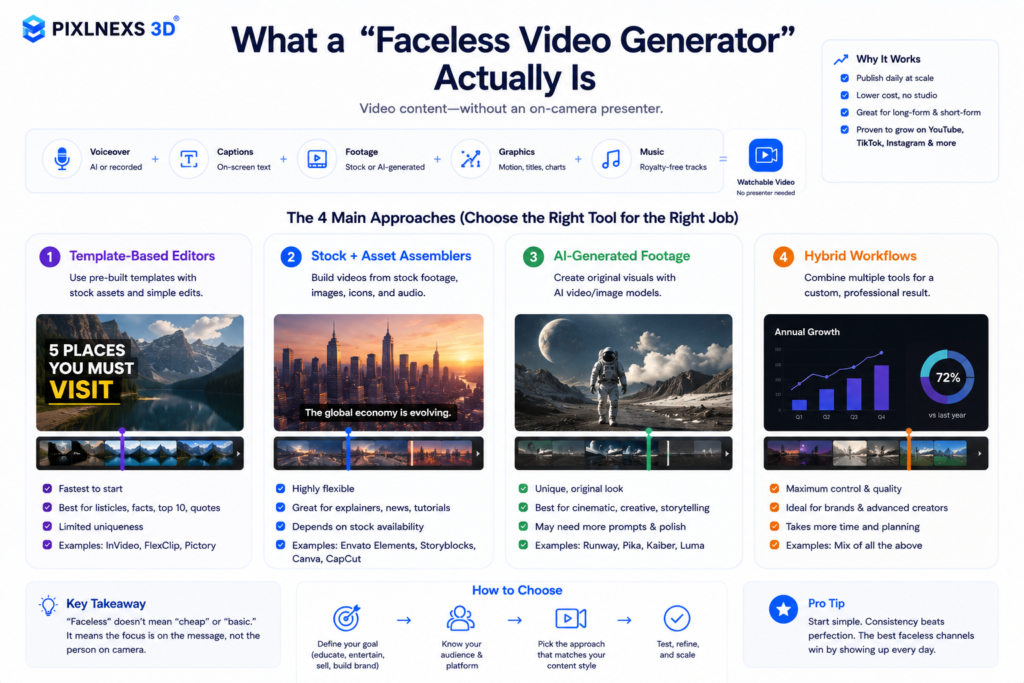
A faceless video generator is any tool or workflow that produces watchable video without an on camera presenter. Instead of filming yourself, you assemble the video from generated voiceover, captions, stock or AI footage, motion graphics and music. The category exploded because the format works. Faceless channels on YouTube and short form platforms can publish daily without a studio, a presenter, or expensive gear.
But “faceless” isn’t one thing. The tools cluster into four genuinely different approaches, and most buyer confusion comes from comparing a stock template app against a cinematic prompt to video model as if they were rivals. They aren’t. Picking well means matching the tool category to the kind of video you actually need to ship.
The four real categories
- Template + stock assemblers. You write or paste a script, the tool adds AI voiceover, auto captions, and stock clips. Fastest path to a daily faceless channel. Output looks polished but generic, because everyone draws from the same stock libraries.
- AI avatar / talking-head tools. A synthetic presenter reads your script. Technically “faceless” in that it isn’t you but a face is still on screen. Strong for training, explainers and localized versions.
- Prompt to video models. You describe a shot and a generative model renders it. Best for cinematic b-roll, surreal visuals and concept pieces. Quality is improving fast but consistency across shots remains the hard part.
- Custom animation / 3D studios. A team (often AI-assisted) builds branded characters, motion graphics and 3D scenes. Slowest and highest-investment but the only route to a look no template can reproduce. This is the lane Pixlnexs works in.
Honest comparison: faceless video approaches in 2026
We deliberately compare on qualitative, verifiable dimensions rather than quoting competitor prices or feature counts that change weekly. Always confirm current pricing and limits on each vendor’s own site before you buy.
| Dimension | Template + stock assemblers | AI avatar tools | Prompt to video models | Custom 3D / animation studio (e.g. Pixlnexs) |
|---|---|---|---|---|
| Speed to first video | Fastest (minutes) | Fast | Fast per clip, slower to stitch | Slowest (project-based) |
| Truly faceless | Yes | No (synthetic face on screen) | Yes | Yes |
| Visual uniqueness | Low (shared stock) | Low–medium | Medium high | Highest (bespoke + branded) |
| Shot-to-shot consistency | High | High | Still challenging | High (art-directed) |
| Best for | Daily faceless channels, listicles, news recaps | Explainers, training, localization | Cinematic b-roll, concept and mood pieces | Brand films, product 3D, signature channel identity |
| Ongoing cost model | Low subscription | Low–mid subscription | Usage/credit based | Per-project (with reusable assets) |
| Who controls the look | The template | The avatar library | The prompt + model | You + an art director |
The honest takeaway: no single category is “best.” Template assemblers win on speed and volume. Prompt to video wins on novel visuals. A studio approach wins when the look itself is part of your competitive moat, and increasingly it is, because the cheap end of the market is flooded with interchangeable stock montages. Here’s what actually happens once a niche fills up: the algorithm keeps serving the same b-roll of the same drone over mountains clip to viewers who’ve already scrolled past it twice, and your watch time quietly sinks even though your script got better.
Where Pixlnexs Animation Studio fits (and where it doesn’t)
We’ll be straight with you. If your only goal is to pump out three stock-montage shorts a day on the lowest possible budget, a template assembler is the rational choice and you do not need a studio. We’d tell you that on a call.
Where Pixlnexs Animation Studio earns its place is when a faceless channel or brand needs a look that doesn’t dissolve into the sea of identical AI shorts. Our genuine strengths:
- AI video creation plus real 3D production. We combine generative AI for speed with hand directed 3D and motion graphics for the parts that need to look intentional: title sequences, recurring characters, product turntables, branded transitions.
- A 3D model marketplace. Through store.pixlnexs.com you can license ready-made 3D assets to drop into your faceless videos instead of commissioning everything from scratch, which keeps a custom look affordable.
- Reusable brand assets. A studio project gives you a kit (characters, lower-thirds, scene templates) that you reuse across hundreds of videos. The per-video cost falls every time you publish.
- Art direction, not just generation. Someone owns whether the video is actually good, which prompt-only workflows still struggle to guarantee.
And the honest limitation: we are not the fastest path to your first video this afternoon. Studio work is project based. If speed to publish today is the only metric that matters, start with a template tool and bring us in when uniqueness starts to matter for growth.
Who should choose what
Choose a template + stock assembler if…
You’re building a high volume faceless channel (daily news recaps, listicles, motivational shorts), you need polished enough output in minutes, and you’re comfortable with a look similar to other channels in your niche. This is the right starting point for most solo creators testing whether a format works.
Choose an AI avatar tool if…
You need a presenter-led feel for software tutorials, course modules, internal training, or the same explainer localized into many languages, but you don’t want to be on camera yourself. Remember this is “presenter-free,” not strictly faceless.
Choose a prompt to video model if…
You want cinematic, surreal or concept-driven visuals that stock libraries can’t provide and you can tolerate some inconsistency between shots and iterative re-prompting. Great for mood pieces, ads and b-roll layered under voiceover. Budget for the re-rolls, though. In practice you’ll burn three or four generations to land one usable five second clip and those credits add up faster than the monthly fee on a template tool.
Choose a custom 3D / animation studio (like Pixlnexs) if…
Your channel or brand has proven the format and now needs to stand out: a signature visual identity, recurring 3D characters, product visualization, or brand films where quality and uniqueness drive conversion. Talk to Pixlnexs Animation Studio, and browse store.pixlnexs.com to license 3D assets that make a custom look cheaper to maintain.
A practical hybrid workflow
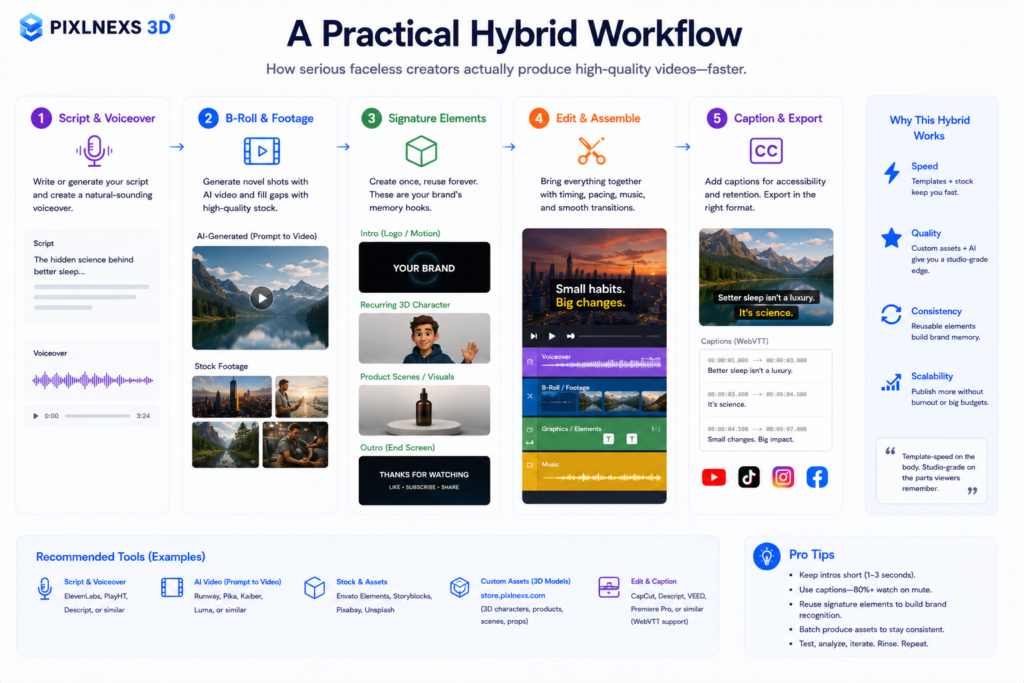
In real production we rarely use a single tool. Here’s a workflow many serious faceless creators settle on:
- Script and voiceover via a fast assembler or AI voice tool.
- B-roll from a prompt to video model for novel shots, plus stock where it’s fine.
- Signature elements (intro, recurring 3D character, product scenes, outros) produced once as custom assets, then reused. Licensed models from store.pixlnexs.com speed this up.
- Edit and caption in your assembler or editor.
This is how you get template-speed on the body of the video and studio-grade distinctiveness on the parts viewers remember. For a deeper look at the caption layer that makes faceless video accessible and watchable on mute, the W3C WebVTT specification is a useful primer.
Conclusion
The best faceless video generator depends on what you are trying to create. Template based tools are ideal for publishing content quickly. AI avatar platforms work well for presenter-led explainers and training videos. Prompt to video models unlock creative visuals that aren’t possible with stock footage. When your goal is to build a recognizable brand instead of another generic AI channel a custom animation and 3D workflow offers the greatest long term value.
As your content strategy grows the focus should shift from simply producing more videos to creating videos that people remember. A consistent visual identity high quality assets and a repeatable production process help your content stand out in increasingly competitive feeds.
At Pixlnexs, we combine AI powered video production with custom animation 3D product visualization motion graphics and reusable branded assets to help businesses and creators produce faceless videos that look professional and stay unique. you are launching a new YouTube channel building marketing campaigns or creating educational content we help you move beyond templates and create videos that strengthen your brand over time.
Frequently asked questions
What is the best faceless video generator for beginners?
For a true beginner who wants a video today, a template and stock assembler is the most forgiving starting point: paste a script, get voiceover, captions and footage automatically. Once your format is working and you want to look different from competitors, layer in prompt to video b-roll and custom branded elements.
Are faceless videos allowed to be monetized on YouTube?
Yes, faceless videos can be monetized, but platforms reward original, value-adding content over low-effort reuploads. Generic AI montages with no original commentary or transformation risk being flagged as repetitive. A distinctive look and genuine script are what keep faceless channels safely monetizable.
Is an AI avatar tool the same as a faceless video generator?
Not really. The AI avatar places a synthetic person in front of the screen, which means a face is indeed present; it just is not your own. In case you want to be absolutely sure that there is no face at all appearing on the screen, go for an assembler, prompt to video model or studio solution.
Can AI video generators keep characters consistent across shots?
This is the hardest problem in prompt to video today. Pure prompt-based models still drift between shots. Consistent recurring characters are far more reliable when built as designed 3D assets or hand directed animation, which is one reason creators commission a custom kit once and reuse it across many videos.
How does Pixlnexs Animation Studio differ from a one-click app?
One-click apps optimize for speed and volume using shared templates and stock, so output tends to look similar across users. Pixlnexs combines AI video creation with custom 3D production and a model marketplace at store.pixlnexs.com, so you get a unique, art-directed look and reusable branded assets, better suited to standing out than to producing your very first clip in minutes.
Do I need 3D models for faceless videos?
You do not need them but they are a strong differentiator. Custom or licensed 3D assets (product turntables, recurring characters, branded scene elements) give faceless content a signature identity that flat stock footage cannot match. Licensing ready made models keeps that affordable instead of commissioning everything from scratch.
Related guides
- Text-to-video vs image-to-video vs avatar: which approach fits your faceless workflow
- How to make AI explainer videos for SaaS startups
- 3D configurator software vs a custom studio for product visuals
- Pixlnexs Animation Studio, AI video and 3D production services
- Pixlnexs 3D Model Marketplace, license assets for your videos








Leave a Reply