
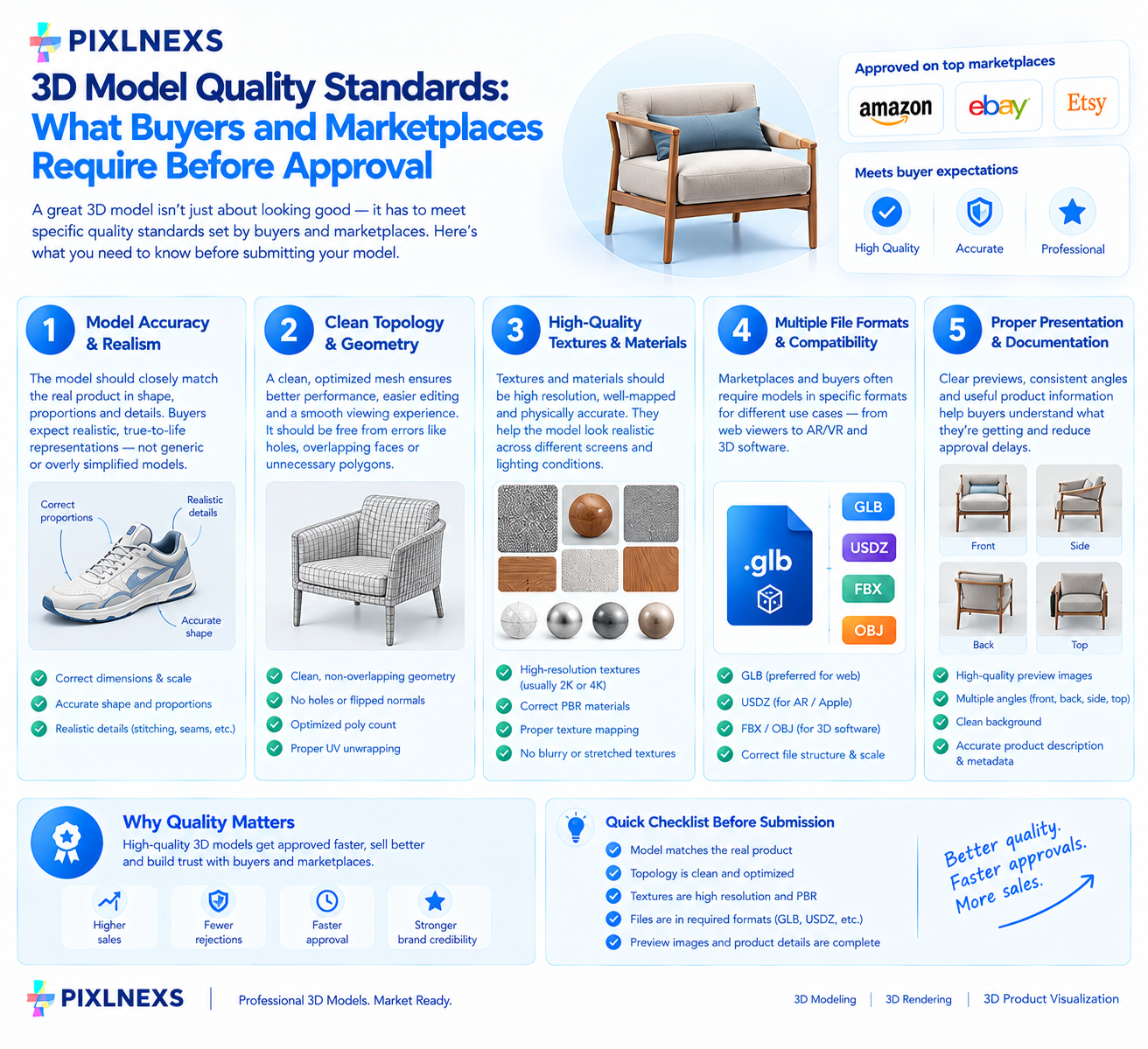
Quick Answer: Buyers and major marketplaces require 3D models to have clean topology, optimized polygon counts, properly mapped UVs without overlaps and realistic PBR textures. Files must include correct scale organized naming conventions and valid license terms. Rejection usually stems from non-manifold geometry, missing textures or poor polygon flow that breaks animation or rendering engines.
By Manoj, Pixlnexs Studio. 3D model quality standards, Pixlnexs produces high-fidelity 3D assets and manages our own marketplace store, and this checklist reflects the QC standards our team applies before any model goes live.
Key Takeaways
- Geometry integrity is non-negotiable: Models must be watertight with clean, quad-based topology to ensure compatibility across rendering engines and animation pipelines.
- Texture and material standards define realism: Buyers expect 4K PBR workflows with correct map channels (Albedo, Normal, Roughness, Metallic) and organized file structures.
- Marketplace rules vary by category: Architectural assets demand different optimization levels than character models and understanding these specific thresholds prevents rejection.
- Documentation drives sales velocity: Clear file lists, scale references and licensing terms reduce buyer friction and lower the rate of refund requests.
- Quality control is a revenue multiplier: Adhering to strict standards reduces support tickets and builds a reputation that leads to repeat purchases and higher visibility.
What is the Current State of 3D Model Quality Standards Expectations in the Industry?
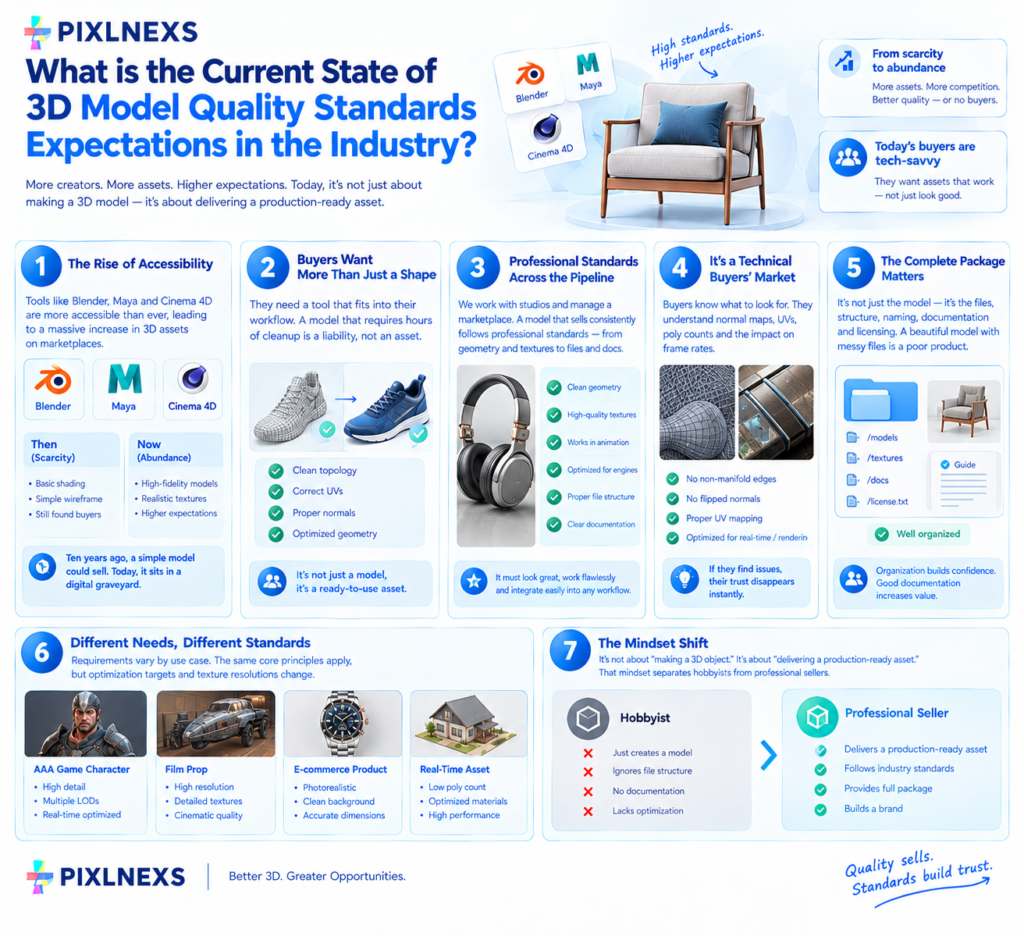
The barrier to entry for 3D creation has dropped significantly. Software like Blender, Maya and Cinema 4D is more accessible than ever. Consequently, the volume of assets uploaded to marketplaces has exploded. In this environment, the definition of “good enough” has shifted dramatically. Ten years ago, a model with basic shading and a simple wireframe might have found a buyer. Today, that same asset sits in a digital graveyard, ignored by buyers who have thousands of superior alternatives at their fingertips.
The industry has moved from a scarcity model to an abundance model. When supply is low, buyers tolerate imperfections. When supply is high, buyers become ruthless critics. They are not just looking for a shape; they are looking for a tool that integrates into their existing workflow. A model that requires hours of cleanup before it can be used is a liability, not an asset.
At Pixlnexs, we see this shift daily. We work with studios that produce high-fidelity product visualizations and character animations. We also manage the store where these assets are sold. The difference between a model that sells consistently and one that gathers dust often comes down to adherence to professional standards. It is not enough to make something that looks good in a single render. The model must hold up under scrutiny in a viewport, function correctly in an animation rig and render efficiently in a game engine or a ray-traced environment.
Buyers are now tech-savvy. They know what clean topology looks like. They know the difference between a baked normal map and a hand-painted one. They understand the implications of unoptimized geometry on frame rates in real-time applications. When a buyer downloads a file, they are investing their time and money. They expect the asset to work immediately. If they encounter non-manifold edges, flipped normals or broken UVs, their trust in the seller evaporates instantly.
This expectation extends beyond just the visual fidelity. It encompasses the entire package. The file structure, the naming conventions, the documentation and the licensing terms all contribute to the perceived quality. A beautiful model with messy files is a bad product. A mediocre model with flawless organization and clear instructions is often more valuable to a professional workflow.
The market has also become more specialized. There is a distinct difference in requirements for a character intended for a AAA game versus a prop intended for a background in a film versus a product model for an e-commerce configurator. While the core principles of geometry and texturing remain the same, the specific optimization targets and texture resolutions vary. A buyer looking for a real-time asset will reject a model with 5 million polygons, even if it renders beautifully in an offline engine. Conversely, a buyer looking for a cinematic render will reject a low-poly model with flat shading.
Understanding these nuances is the first step toward creating assets that meet the current standard. It requires a shift in mindset from “making a 3D object” to “delivering a production-ready asset.” This shift is what separates hobbyists from professional sellers. It is the difference between uploading files to a marketplace and building a brand.
Why Do Marketplaces Reject High-Quality Looking Models?
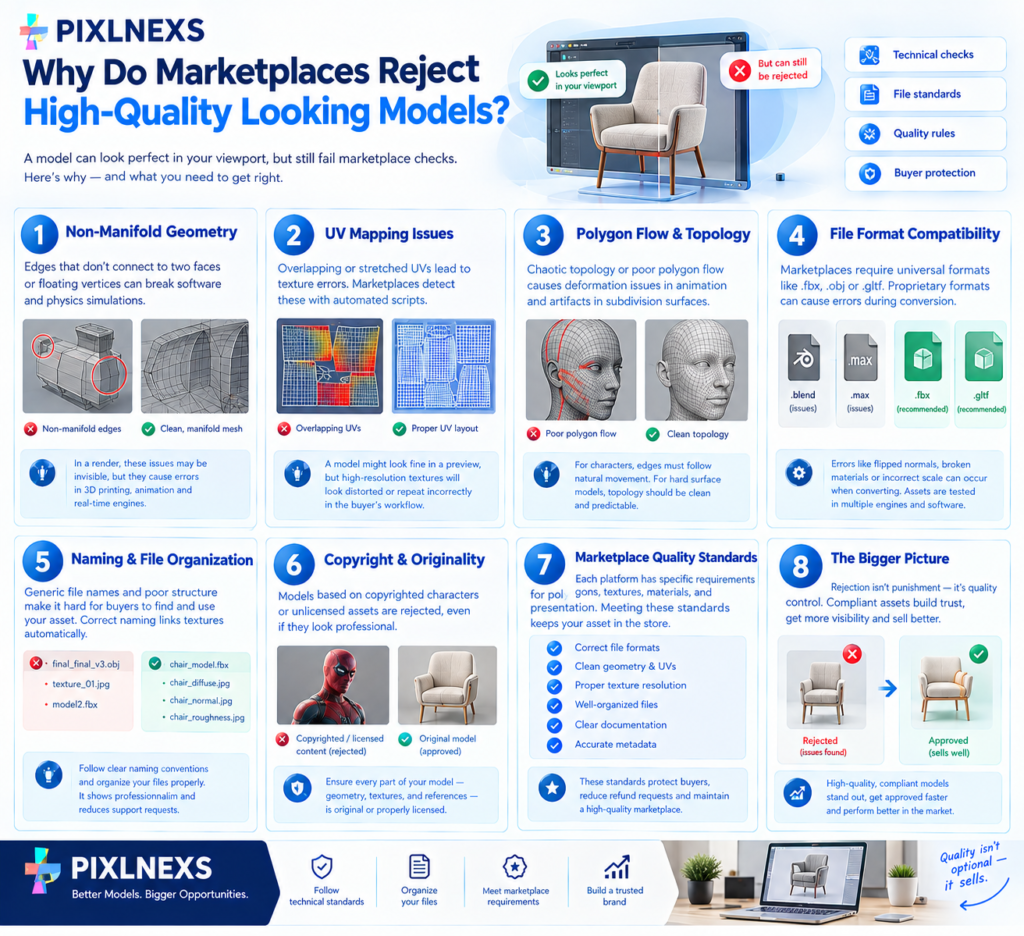
It is a common frustration for new sellers to spend weeks perfecting a model, rendering stunning images and then receiving a rejection notice from a marketplace. The rejection often cites vague reasons like “quality issues” or “technical errors,” leaving the seller confused. The model looked perfect in their viewport; why is it being rejected?
The answer lies in the distinction between visual appearance and technical integrity. A model can look incredible in a final render but fail the technical checks required for distribution. Marketplaces have automated and manual review processes designed to protect their ecosystem. They cannot afford to host assets that break the software of their customers.
One of the most frequent causes of rejection is non-manifold geometry. This occurs when a mesh has edges that do not connect to two faces or vertices that float in space without connecting to anything. In a render, these issues might be invisible if the lighting and shading hide them. However, in a 3D printing context or a physics simulation, non-manifold geometry causes catastrophic failures. The software cannot calculate the volume or the surface area, leading to errors.
Another major hurdle is UV mapping. UVs are the 2D coordinates that tell the computer how to wrap a texture around a 3D model. If UVs overlap, the texture will repeat incorrectly. If UVs are stretched, the texture will look distorted. Marketplaces often run scripts to detect these issues. A model with overlapping UVs might look fine in a low-resolution preview but when a buyer tries to apply a high-resolution texture, the result is a mess. This leads to refund requests and negative reviews, which marketplaces want to avoid.
Polygon flow is another critical technical aspect. While a model might look good from the outside, the internal structure of the mesh matters immensely. For animation, the polygon flow must follow the natural movement of the object. If a character’s elbow has a ring of triangles that do not deform correctly, the animation will look unnatural. For hard surface modeling, the flow should be clean and predictable to allow for subdivision surfaces to work without artifacts. Marketplaces reject models where the topology is chaotic or uses excessive triangles where quads would suffice.
File format compatibility is also a strict requirement. While many sellers prefer working in proprietary formats like .blend or .max, marketplaces require universal formats like .fbx, .obj or .gltf. The conversion process can introduce errors. Normals might flip, materials might disconnect or scale might be incorrect. A model that imports perfectly into Maya might fail to import into Unity or Unreal Engine if the export settings are not configured correctly. Marketplaces test assets in multiple environments. If a file fails in one, it is rejected.
Naming conventions and file organization often get overlooked but are a frequent cause of rejection. A file named “final_final_v3.obj” is a red flag. It suggests a lack of professionalism and makes it difficult for the buyer to identify the correct file. Texture files must be named correctly to link automatically with the material nodes. If a texture is named “texture_01.jpg” instead of “material_name_diffuse.jpg,” the material will appear broken in the viewer.
Marketplaces also have strict rules regarding copyright and originality. Even if a model looks professional, if it is based on a copyrighted character or uses stock assets that are not licensed for resale, it will be rejected. This is a legal necessity for the platform. Sellers must ensure that every component of their model, from the geometry to the textures, is original or properly licensed.
The rejection process is not designed to be punitive; it is a quality control mechanism. By filtering out technically flawed assets, marketplaces maintain a high standard that benefits everyone. Buyers trust the platform because they know the assets will work. Sellers benefit because their high-quality, compliant assets stand out more clearly against the noise of rejected or low-quality submissions.
How Do Geometry and Topology Standards Vary Across Different Asset Types?
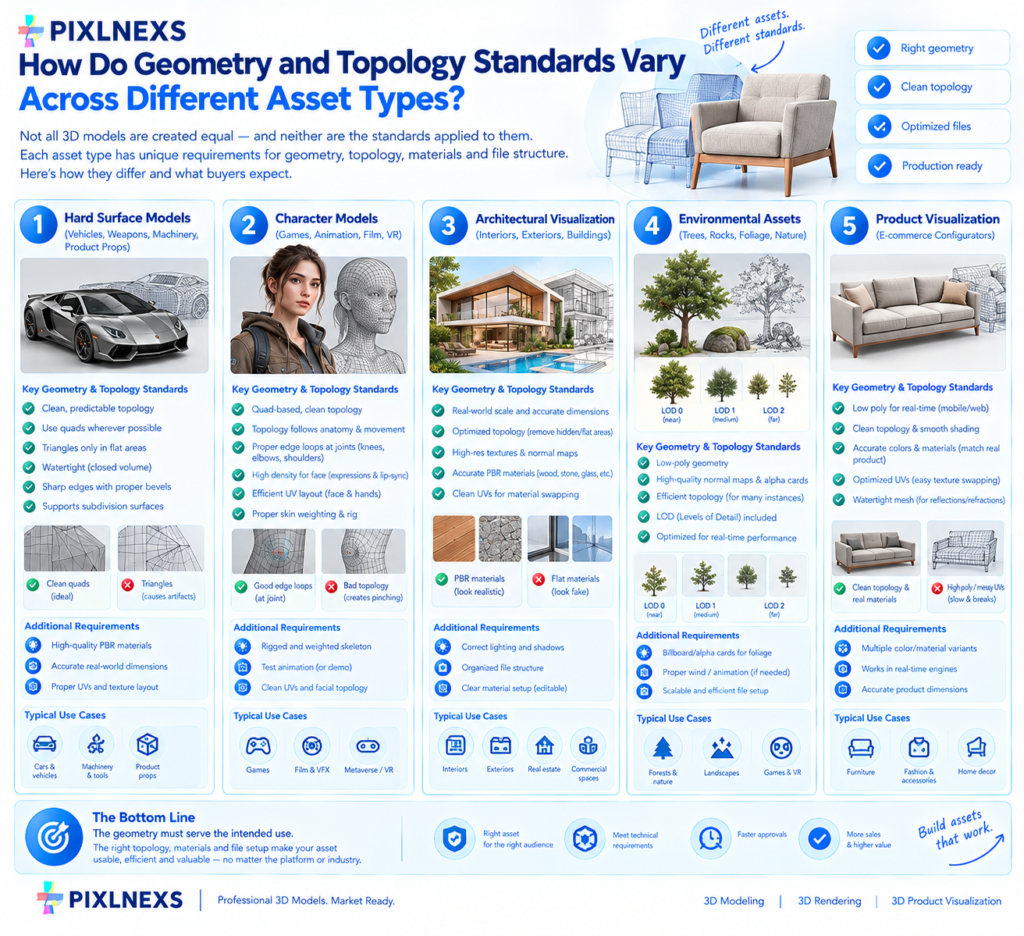
Not all 3D models are created equal and neither are the standards applied to them. The requirements for a rigid, static prop are vastly different from those for a deformable character or a complex architectural scene. Understanding these variations is essential for creating assets that meet the specific needs of the target audience.
For hard surface models (vehicles, weapons, machinery, product props), the primary focus is on clean, predictable topology. These models rarely deform, so the polygon flow does not need to support muscle movement. However, they must support subdivision surfaces to achieve smooth curves. The standard is to use quads (four-sided polygons) wherever possible. Triangles are acceptable in flat areas but they can cause artifacts when the model is subdivided.
Hard surface models must also be “watertight.” This means the mesh must be a closed volume with no holes. This is critical for 3D printing and for certain rendering engines that calculate light bounces based on volumes. The edges should be sharp and well-defined. Bevels are often required to catch highlights realistically. A model with perfectly sharp 90-degree edges will look artificial in a high-quality render because real-world objects always have some micro-beveling.
Character models have the most stringent topology requirements. Because characters must animate, the polygon flow must follow the anatomy and the direction of movement. Joints like knees, elbows and shoulders require specific ring structures to allow for clean deformation. The face requires a high density of polygons to support facial expressions and lip-syncing.
For characters, the standard is a clean, quad-based mesh that deforms without pinching or stretching. The UV map must be efficient to maximize texture resolution on the face and hands. The skeleton (rig) must be properly weighted so that the mesh moves naturally with the bones. Marketplaces often require a test animation or a demonstration of the rig to prove that the model is ready for use.
Architectural visualization (ArchViz) assets focus on realism and scale. These models often include complex materials like wood, stone and glass. The geometry must be accurate to real-world dimensions. A chair must be the correct size relative to a table. The topology should be optimized for rendering, meaning unnecessary polygons in areas that will be hidden or are flat should be removed.
ArchViz assets often require high-resolution textures and normal maps to simulate surface detail without adding geometry. The standard for these models includes accurate PBR materials that react correctly to different lighting conditions. The file must be organized so that the buyer can easily swap out materials or adjust the scale.
Environmental assets (trees, rocks, foliage) have unique requirements. These models are often used in large numbers in a scene, so optimization is key. The standard here is to use low-poly geometry combined with high-quality normal maps and alpha cards for leaves. The geometry must be efficient to allow for thousands of instances in a single scene without dropping the frame rate.
For foliage, the standard often includes LODs (Levels of Detail). As the camera moves away, the model switches to a lower-resolution version. This is crucial for game engines. Marketplaces expect assets to include these LODs or at least be structured in a way that makes creating them easy for the buyer.
Product visualization models for e-commerce configurators have a very specific set of standards. These models are often viewed in real-time on a website or mobile app. The polygon count must be low enough to run smoothly on a phone but high enough to look good on a desktop. The topology must be clean to allow for real-time lighting and shadows.
The standard for these models includes accurate colors and materials that match the physical product. The UVs must be optimized to allow for easy texture swapping (e.g., changing the color of a car or the fabric of a sofa). The model must be watertight to ensure that the rendering engine calculates reflections and refractions correctly.
In all cases, the underlying principle is the same: the geometry must serve the intended use. A model that is over-engineered for its purpose is inefficient. A model that is under-engineered is unusable. The seller must understand the context in which the buyer will use the asset and tailor the topology and geometry to meet those specific demands.
What Are the Non-Negotiable Requirements for Textures and Materials?
Textures and materials are what bring a 3D model to life. A model with perfect geometry but no textures looks like a grey wireframe. The standards for textures have evolved rapidly with the adoption of Physically Based Rendering (PBR). PBR is the industry standard for creating realistic materials that react to light in a physically accurate way for background on how the physically based rendering model developed technically, Wikipedia’s overview of physically based rendering is a useful non-commercial reference.
The first non-negotiable requirement is the use of PBR workflows. This means providing a set of texture maps that define the surface properties of the object. The standard set includes:
Albedo/Diffuse: The base color of the object without lighting.
Normal: A map that simulates surface detail (bumps and dents) without adding geometry.
Roughness: A map that defines how shiny or matte the surface is.
Metallic: A map that defines which parts of the surface are metal and which are dielectric.
Ambient Occlusion (AO): A map that simulates shadows in crevices and corners.
Displacement/Height: A map that actually moves the geometry (optional but recommended for high-end assets).
Marketplaces expect these maps to be provided in standard formats (usually PNG or JPG) and at appropriate resolutions. For most assets, 2K (2048×2048) or 4K (4096×4096) is the standard. Low-resolution textures (512×512) are often rejected unless the asset is specifically designed for mobile or low-end hardware.
Another critical requirement is UV mapping quality. The UVs must be unwrapped efficiently to minimize stretching and maximize texture space. Overlapping UVs are generally not allowed unless they are intentional (e.g., for symmetrical parts like shoes or gloves). The UV islands should be packed tightly to avoid wasting texture space.
The texture resolution must be consistent across the model. It is unacceptable to have a high-resolution texture on the main body and a low-resolution texture on a small part of the model. This creates a jarring visual inconsistency.
Material organization is also a strict standard. Each material on the model must have a clear, descriptive name. The texture files must be named to match the material and the map type. For example, “Chair_Leather_Diffuse.png”, “Chair_Leather_Normal.png”. This allows the material to load automatically in most 3D software and game engines.
Marketplaces also check for color space correctness. Textures must be saved in the correct color space (sRGB for color maps, Linear for roughness/metallic/normal maps). If these are mixed up, the material will look wrong. For example, a roughness map saved in sRGB will look too dark and the material will appear too shiny.
For organic models like characters and creatures, there are additional texture requirements. Skin shaders require subsurface scattering (SSS) maps to simulate light passing through the skin. Hair and fur require specific grooming files or alpha maps. Eyes require separate specular and reflection maps to look realistic.
Transparency and alpha channels must be handled carefully. If a model has transparent parts (like glass or leaves), the alpha channel must be clean and free of artifacts. The blending mode must be set correctly (e.g., Alpha Clip or Alpha Blend) to ensure it renders correctly in all engines.
Finally, texture tiling is a standard requirement for environmental assets. If a texture is meant to tile (repeat), it must be perfectly aligned. The edges of the texture must match perfectly so that there is no visible seam when the texture is repeated. Marketplaces often run automated checks to detect tiling errors.
The quality of textures is often the first thing a buyer notices. A model with high-quality, well-organized textures signals professionalism and attention to detail. It tells the buyer that the seller understands the technical requirements of the industry. This builds trust and increases the likelihood of a sale.
How Do File Formats and Optimization Standards Impact Buyer Satisfaction?
The choice of file format and the level of optimization are critical factors in buyer satisfaction. A model that looks great but is impossible to use because of the wrong format or poor optimization is a waste of time and money.
File formats are the first hurdle. Marketplaces typically require assets to be provided in multiple formats to ensure compatibility. The most common formats are:
.FBX: The industry standard for animation and game assets. It supports geometry, UVs, materials and animation data.
.OBJ: A universal format that is widely supported but does not support animation or complex materials well.
.GLTF/GLB: The standard for web and mobile applications. It is efficient and supports PBR materials.
.STL: The standard for 3D printing. It only supports geometry, no textures or colors.
.BLEND, .MAX, .C4D:* Source files for specific software. These are often included as a bonus for buyers who use that specific software.
Marketplaces expect sellers to provide at least one universal format (.FBX or .OBJ) and often a web-friendly format (.GLTF). Providing source files is a significant value add that can justify a higher price point.
Optimization is the process of reducing the file size and polygon count without sacrificing visual quality. This is essential for real-time applications like games and web configurators. The standard for optimization depends on the intended use.
For real-time assets, the polygon count is a major concern. A model with excessive polygons might be too heavy for a mobile game. The standard is to use the lowest polygon count possible while maintaining the silhouette and details. This often involves using normal maps to fake high-resolution details on a low-poly mesh.
Texture optimization is also crucial. Large texture files can slow down loading times and increase bandwidth costs. The standard is to use compressed texture formats (like DXT or ASTC) for games and optimized PNGs for web. The resolution should be appropriate for the size of the model in the scene. A small prop does not need a 4K texture.
LODs (Levels of Detail) are a standard requirement for many assets. LODs are multiple versions of the same model with decreasing polygon counts. As the camera moves away, the engine switches to a lower-resolution version. This maintains performance without sacrificing visual quality at a distance. Marketplaces often require LODs for assets intended for game engines.
Rigging and animation standards are also important. If a model includes a rig, it must be clean and easy to use. The bones should be named logically. The skin weights must be smooth to prevent deformation artifacts. Animation clips should be provided in a standard format and include a clear description of the action.
Scene organization is a subtle but important aspect of optimization. A messy scene with hundreds of layers, hidden objects and unused materials can be frustrating for the buyer. The standard is to provide a clean scene with only the necessary objects. Unused materials and lights should be deleted. The hierarchy should be logical and easy to navigate.
Marketplaces often run automated checks on files to ensure they meet these standards. They check for file size, polygon count, texture resolution and the presence of required files. If a file fails these checks, it is rejected.
Buyers appreciate assets that are “plug and play.” They want to download the file, import it into their software and start working immediately. They do not want to spend hours cleaning up the file, fixing errors or re-optimizing the geometry. By adhering to these standards, sellers can provide a better user experience and build a loyal customer base.
What Specific Rules Do Major Marketplaces Enforce on Sellers?
Different marketplaces have different rules but there are common themes across the industry. Understanding these rules is essential for avoiding rejection and ensuring a smooth selling process.
CGTrader is known for its strict quality control. They have a dedicated team that reviews every asset. They check for clean topology, proper UVs and correct file formats. They also require a minimum number of high-quality renders for the preview. CGTrader is particularly strict about copyright and originality. They have a zero-tolerance policy for stolen assets.
Sketchfab focuses on the visual presentation and the ability to view the model in a browser. They require models to be optimized for web viewing. They have specific rules about texture sizes and polygon counts to ensure smooth performance on their platform. Sketchfab also encourages the use of their native material system.
TurboSquid is one of the oldest and largest marketplaces. They have a “Checkmate” certification program that guarantees a model meets a high standard of quality. To get certified, a model must pass a series of automated and manual checks. These checks include topology, UVs, materials and file organization. Certified models get a badge that increases their visibility and sales.
Blender Market is specific to the Blender ecosystem. They require source files in .blend format. They check for compatibility with the latest version of Blender. They also have strict rules about add-ons and dependencies. If a model requires a specific add-on to work, it must be clearly stated and the add-on must be free or widely available.
Adobe Substance 3D (formerly Quixel) has a focus on photorealistic materials and assets. They require assets to be created using their scanning technology or to meet high photorealistic standards. They have strict rules about the quality of textures and the accuracy of the geometry.
Unity Asset Store and Unreal Engine Marketplace have their own specific requirements for game assets. They require assets to be optimized for their respective engines. They check for performance, memory usage and compatibility with their rendering pipelines. They also have strict rules about licensing and royalties.
Common rules across all marketplaces include:
Originality: All assets must be original or properly licensed.
Completeness: All files must be included (geometry, textures, materials, documentation).
Cleanliness: No hidden objects, unused materials or broken links.
Accuracy: The model must be to scale and accurate to the reference.
Documentation:* Clear instructions on how to use the asset.
Marketplaces also have rules about pricing and discounts. Some marketplaces have minimum price requirements. Others have rules about how discounts can be applied. Sellers must be aware of these rules to avoid account suspension.
The enforcement of these rules is becoming more automated. Marketplaces use AI and scripts to scan files for common errors. This speeds up the review process but also means that sellers must be more careful than ever. A small mistake can lead to rejection.
By understanding the specific rules of each marketplace, sellers can tailor their assets to meet those requirements. This increases the chances of approval and reduces the time spent on revisions. It also helps sellers choose the right marketplace for their specific type of asset.
Marketplace Quality Requirements at a Glance
| Marketplace | Review Process | Key Requirement | Notable Feature |
|---|---|---|---|
| CGTrader | Manual team review | Clean topology, proper UVs, zero tolerance for stolen assets | Minimum required preview renders |
| TurboSquid | Automated + manual (Checkmate) | Topology, UVs, materials, file organization | Checkmate certification badge boosts visibility |
| Sketchfab | Web-optimization focused | Texture size and polygon limits for browser viewing | Native material system encouraged |
| Blender Market | Manual review | .blend source files, current-version compatibility | Add-on dependencies must be free or widely available |
| Unity Asset Store / Unreal Marketplace | Engine-specific automated checks | Performance, memory usage, pipeline compatibility | Strict licensing and royalty rules |
How Can Sellers Implement a Quality Control Workflow Before Uploading?
Creating a quality control (QC) workflow is the best way to ensure that assets meet marketplace standards before they are uploaded. A QC workflow is a series of steps that a seller takes to check every aspect of their model.
The first step is pre-production planning. Before starting the model, the seller should research the requirements of the target marketplace and the intended use of the asset. This includes determining the polygon count, texture resolution and file formats.
The second step is in-progress checks. As the model is being created, the seller should regularly check for common errors. This includes checking for non-manifold geometry, UV overlaps and texture stretching. Most 3D software has tools to help with this. For example, Blender has a “Select Non-Manifold” tool and a “UV Check” tool.
The third step is post-production review. Once the model is complete, the seller should perform a thorough review. This includes:
Geometry check: Ensure the mesh is watertight and has clean topology.
UV check: Ensure UVs are packed, non-overlapping and efficiently stretched.
Texture check: Ensure all textures are present, named correctly, and at the correct resolution.
Material check: Ensure all materials are set up correctly and use the PBR workflow.
File check:* Ensure all files are exported correctly and the scene is clean.
The fourth step is cross-platform testing. The seller should import the model into different software and game engines to ensure compatibility. This includes testing in Blender, Maya, 3ds Max, Unity and Unreal Engine. If the model fails in any of these, it needs to be fixed.
The fifth step is documentation review. The seller should write clear instructions on how to use the asset. This includes information on file structure, material setup and any specific requirements.
The sixth step is preview creation. The seller should create high-quality renders and turntables to showcase the asset. These previews should be optimized for the marketplace’s requirements.
The seventh step is final submission. Once all checks are complete, the seller can submit the asset to the marketplace. They should keep a copy of the QC checklist for future reference.
Implementing a QC workflow takes time but it pays off in the long run. It reduces the number of rejections, refunds and negative reviews. It also builds a reputation for quality that attracts more buyers.
At Pixlnexs, we use a similar workflow for all our assets. We have a dedicated QC team that checks every model before it goes live. This ensures that our customers receive the highest quality assets possible. We also share our QC checklist with our community to help them improve their own workflows.
Want assets that pass review the first time?
Add immersive 3D and AR product visualizations to your store with Pixlnexs, built to the same quality-control standard covered in this guide.
Transform Your Store With PixlnexsFrequently Asked Questions
What is the most common reason for 3D model rejection on marketplaces?
The most common reason for rejection is non-manifold geometry. This occurs when a mesh has holes, floating vertices or intersecting faces that make it impossible for the software to calculate the volume. Other common reasons include missing textures, incorrect UV mapping and poor file organization.
Do I need to provide source files when selling 3D models?
It depends on the marketplace. Some marketplaces, like Blender Market, require source files. Others, like TurboSquid, allow you to sell only the exported files. Providing source files is generally a good idea as it adds value for the buyer and can justify a higher price. However, it also means you are giving away your workflow, so some sellers choose not to.
How do I know if my 3D model is optimized enough for a game engine?
The level of optimization depends on the target platform. For mobile games, the polygon count should be very low (under 5,000 triangles for a character). For PC games, it can be higher (20,000 to 50,000 triangles). The best way to know is to test the model in the target engine and monitor the frame rate. If the frame rate drops, you need to optimize further. Using LODs and texture compression can also help.
How can I ensure my textures are perfectly aligned and tile correctly?
To ensure textures tile correctly, use software tools that automatically align the edges of the texture. Programs like Substance Designer have built-in features for creating tiling textures. Always test the texture by repeating it in a 3D viewport to check for visible seams.
What should I do if my model is rejected by a marketplace?
If your model is rejected, carefully read the feedback provided by the marketplace. Address each issue systematically, whether it’s fixing non-manifold geometry, re-exporting files or improving texture quality. Once corrected, resubmit the model and consider implementing a QC workflow to prevent future rejections.
Is a 2K texture ever acceptable, or do I always need 4K?
2K (2048×2048) is acceptable and often preferred for smaller props, background assets or mobile-targeted models, where a 4K texture would be wasted resolution and unnecessary file weight. Reserve 4K for hero assets, close-up product visualizations or anything a buyer is likely to zoom into. Matching resolution to the object’s actual on-screen size, rather than defaulting to the highest resolution available, is itself part of meeting marketplace optimization standards.
Can I sell the same model on multiple marketplaces with different quality requirements?
Yes, but the export needs to be tailored to each platform rather than uploading one identical file everywhere. A model destined for TurboSquid’s Checkmate certification and one destined for the Unity Asset Store need different polygon budgets, different LOD setups and different file formats, even if the source file is the same. Treat the source model as your master asset and export a platform-specific version for each marketplace’s stated requirements.
How long does marketplace review typically take, and does a rejection hurt future submissions?
Review timelines vary by platform and by how automated versus manual their process is, so treat any specific number as illustrative rather than guaranteed. A rejection itself does not damage your seller reputation, since it’s a routine part of the process, not a strike against your account. Repeated rejections for the same easily-fixable issue, however, is worth addressing with a QC workflow rather than resubmitting the same problem file each time.
Learn how to sell 3D models online with our complete guide for 3D artists and studios → https://blog.pixlnexs.com/how-to-sell-3d-models-online-guide/
Compare the best marketplaces to sell 3D models in 2026 by fees, traffic and payout → https://blog.pixlnexs.com/best-site-to-sell-3d-models/
Discover how to price your 3D models effectively with our pricing strategy guide










Leave a Reply