
Quick answer: AI product videos for ecommerce are short, sales-focused clips you build by turning a product asset (ideally a 3D model) into animated motion with AI tools, instead of booking a physical shoot. The fastest, most consistent path starts with a clean 3D model of your product. From there you use AI to add camera moves, lighting, backgrounds, and motion, so you can output 360 spins, demo reels, and UGC-style ads on demand.
Because the source is a single 3D file, you get unlimited angles, tight brand consistency, and the ability to re-render whenever pricing, packaging, or seasonal themes change. The result is reels that look studio-grade for product pages, paid social, and marketplaces, produced in hours rather than weeks. This guide walks through the full workflow, the tradeoffs, and where 3D-first beats prompt-only AI video.
By the Pixlnexs Animation Studio team, we produce AI video and 3D content and run the marketplace at store.pixlnexs.com, so this reflects real production experience.
Pixlnexs builds and renders AI product videos and 3D models for ecommerce brands, and operates the model marketplace at store.pixlnexs.com.
What is an AI product videos for ecommerce?
An AI product video for ecommerce is a short marketing clip, usually 5 to 30 seconds, that shows one product with motion: a rotating hero shot, a feature callout, a lifestyle scene, or a fast-cut ad. The “AI” part means the steps that used to need a camera crew, a set, and a video editor are now handled by generative or procedural tools. You can drive these videos from a photo, but the most reliable, repeatable results come from a 3D model of the product. A model gives the AI true geometry to light, rotate, and animate, instead of guessing at shape and depth.
For online sellers, the value is concrete. Video on a product page tends to hold attention longer than a static gallery, and platforms from Amazon to Shopify to TikTok Shop now treat video as a first-class asset. Browsers render most of these reels with the open HTML video element, so a single well-encoded file plays everywhere without a proprietary player. The bottleneck has always been cost and turnaround. AI collapses both, and a 3D-first approach removes the biggest weakness of prompt-only AI video: products that morph, warp, or lose label accuracy frame to frame.
Why 3D models are the strongest source
When your starting point is a 3D model, the camera path, lighting rig, and material accuracy are deterministic. The product never drifts. You can output a clean 360 spin one day and a moody lifestyle ad the next, from the same file. That consistency is exactly what a brand catalog needs across dozens or hundreds of SKUs. If you don’t have models yet, you can source ready-made ones or commission them. Our marketplace at store.pixlnexs.com exists for that reason.
The three reel formats that actually sell
Not every video does the same job. We sort ecommerce reels into three workhorse formats, and most stores need all three.
1. The 360 spin (the product-page workhorse)
A clean rotation on a neutral or branded background. This is the single most useful asset for a product detail page and for marketplaces. It answers the buyer’s first silent question, “what does this actually look like from every side?”, and it converts browsers who would otherwise bounce for lack of detail. We cover the full method in our dedicated guide on how to make a 360 spin product video from a 3D model.
2. The animated demo (show, don’t tell)
This format opens the product, shows it in use, or animates a key mechanism: a watch clasp closing, a blender lid sealing, a backpack’s compartments unzipping. It’s the difference between a feature list and a felt benefit. Our deep dive on building these is product demo videos with AI.
3. The UGC-style ad (the paid-social closer)
Fast-cut, native-feeling, hook-in-the-first-second content for TikTok, Reels, and Shorts. AI lets you produce many variations cheaply, so you can test hooks at volume. See AI UGC-style ad videos at scale for the scaling playbook.
The end-to-end workflow: from 3D model to selling reel
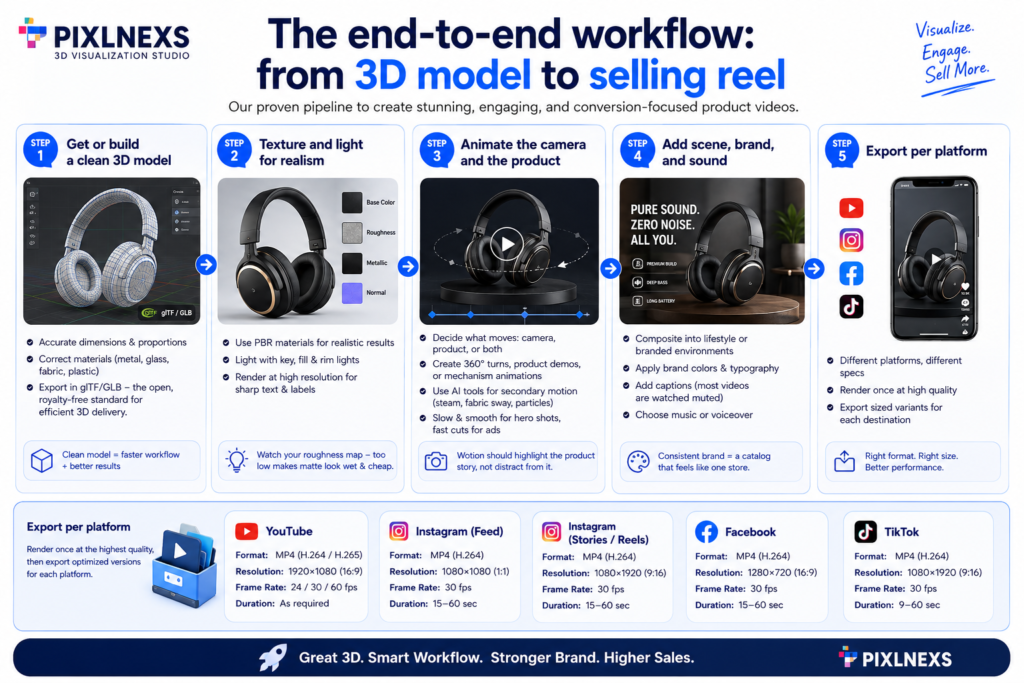
Here’s the production pipeline we actually run, stage by stage.
Step 1, Get or build a clean 3D model
Start with an accurate model. Real photographed dimensions, correct proportions, and properly assigned materials (metal, glass, fabric, plastic) matter more than polygon count. The widely used delivery format for real-time and web 3D is glTF/GLB — per the Khronos Group’s official glTF specification, it’s the open, royalty-free standard maintained specifically for efficient transmission and loading of 3D scenes.
Step 2, Texture and light for realism
Physically based rendering (PBR) materials are what make a model read as “real.” Get the base color, roughness, and metallic maps right, then light with a soft key, a fill, and a rim to separate the product from the background. If labels or text appear on the product, render at high resolution so they stay crisp. Blurry packaging copy kills trust instantly. One thing that bites people here: a roughness map that’s slightly too low turns a matte plastic into something that looks wet and cheap, and you usually don’t catch it until the product is moving on screen.
Step 3, Animate the camera and the product
Decide what moves: the camera, the product, or both. For a 360, the camera orbits a static product. For a demo, you keyframe the mechanism. AI video tools can also generate plausible secondary motion (steam, fabric sway, particles) and stylize backgrounds. Keep moves slow and deliberate for hero shots, and save fast cuts for ads.
Step 4, Add scene, brand, and sound
Composite the product into a lifestyle scene or a branded studio environment. Apply your color palette, add captions (most social video is watched muted), and choose music or a voiceover. Keep brand elements consistent across every SKU so the catalog feels like one store.
Step 5, Export per platform
Different destinations need different specs. Render once at high quality, then export sized variants. A rough reference:
| Destination | Aspect ratio | Typical length | Primary goal |
|---|---|---|---|
| Product detail page | 1:1 or 16:9 | 8–20s loop | Detail and trust |
| Amazon / marketplace | 16:9 or 1:1 | 15–30s | Feature clarity |
| TikTok / Reels / Shorts | 9:16 | 9–20s | Hook and click |
| Email / banner | 1:1 or 16:9 | 3–6s loop | Attention grab |
3D-first AI vs prompt-only AI video
Both approaches use AI, but they fail and succeed in different places. Here’s the honest comparison.
| Factor | 3D-model-driven AI | Prompt-only / photo-to-video AI |
|---|---|---|
| Product accuracy | High, true geometry, no morphing | Variable, can warp shape and labels |
| Angle flexibility | Unlimited from one file | Limited to what the model infers |
| Brand consistency at scale | Strong across many SKUs | Harder to keep uniform |
| Setup effort | Higher upfront (need a model) | Lower upfront |
| Best for | Catalogs, hero shots, demos | Quick concepts, mood, one-offs |
For most stores the practical answer is hybrid. Use a 3D model for the product itself so it stays accurate, and let AI handle scene, lighting variation, and motion polish around it.
Common mistakes that make AI reels look cheap
From production experience, the recurring problems are predictable and fixable:
- Camera moves too fast. Hero rotations should breathe. Fast spins read as nervous and hide detail.
- Flat, single-source lighting. One light makes a 3D product look like a 2D sticker. Use at least a key and a rim.
- Low-res labels. If buyers can’t read the packaging, they distrust the whole video.
- No first-second hook. Social viewers decide instantly. Lead with the product in motion, not a slow logo intro.
- Ignoring muted playback. Caption the value; never rely on audio alone.
- Inconsistent style across SKUs. A catalog of mismatched reels looks amateur. Lock a template.
How long it takes and what it costs
We avoid invented numbers, so here are honest ranges. If you already have a clean 3D model, a single polished reel can come together in a few hours of work. A first reel for a brand-new model takes longer, because modeling, texturing, and template setup all happen once up front. The big cost shift versus a traditional shoot is that the per-SKU marginal cost drops sharply after the first asset, since you reuse the model, lighting rig, and brand template across the whole catalog.
What actually happens in practice is that the first reel feels expensive and slow, the second one feels normal, and by the tenth you’re mostly swapping the model and hitting render. Exact figures depend on product complexity, the tools you license, and how much human finishing you want. Treat any single quoted price online with skepticism.
Where to start if you have no 3D models yet
You have three options: commission custom models, buy ready-made ones, or photogrammetry-scan physical products. For speed, a marketplace of production-ready models is usually the fastest on-ramp. Browse store.pixlnexs.com to find or request models you can drop straight into the workflow above. Once you have one good model per product, every reel format in this guide becomes a re-render rather than a reshoot.
Frequently asked questions
Do I need a 3D model to make an AI product video?
No, but it’s strongly recommended. You can animate a product photo with AI, but photo-to-video tools often warp shapes and distort labels. A 3D model gives the AI true geometry, so the product stays accurate from every angle and across every reel you produce.
What file format should my 3D model be in?
glTF/GLB is the most portable choice for web and real-time tools. It’s an open standard from the Khronos Group and loads into most modern 3D viewers and AI motion pipelines. Source formats like OBJ or FBX work too, but GLB is the cleanest for delivery.
Can AI product videos look as good as a real studio shoot?
For many product categories, yes, especially with a clean 3D model, PBR materials, and proper lighting. Highly tactile or human-interaction-heavy products may still benefit from some live footage, but for hero shots, 360 spins, and demos, 3D-driven AI reels are routinely indistinguishable from studio renders.
Which video format converts best on product pages?
A clean 360 spin is the most reliable product-page asset because it answers the buyer’s first question about how the item looks from every side. Pair it with a short animated demo for products where a feature or mechanism needs explanation.
How many ad variations should I make?
For paid social, more is better within reason. The point of AI is cheap variation so you can test hooks. Start with a handful of distinct opening hooks against the same product, keep the winners, and iterate. Our UGC-at-scale guide covers a structured approach.
How do I keep all my SKUs looking consistent?
Lock a reusable template: same lighting rig, same camera-move language, same caption style, same color palette and music bed. Because each reel is rendered from a model into that template, consistency across a large catalog becomes the default rather than something you fight for.
Will AI product videos work for marketplaces like Amazon?
Yes. Marketplaces accept and increasingly favor product video. Export a 16:9 or 1:1 variant focused on feature clarity, keep it under the platform’s length limit, and make sure any on-product text is legible at the platform’s compression.
Related guides
- AI Product Videos for Ecommerce (hub)
- How to Make a 360 Spin Product Video From a 3D Model
- AI UGC-Style Ad Videos at Scale: A Brand’s How-To
- Product Demo Videos With AI: From Static Shots to Animated Demos










Leave a Reply