
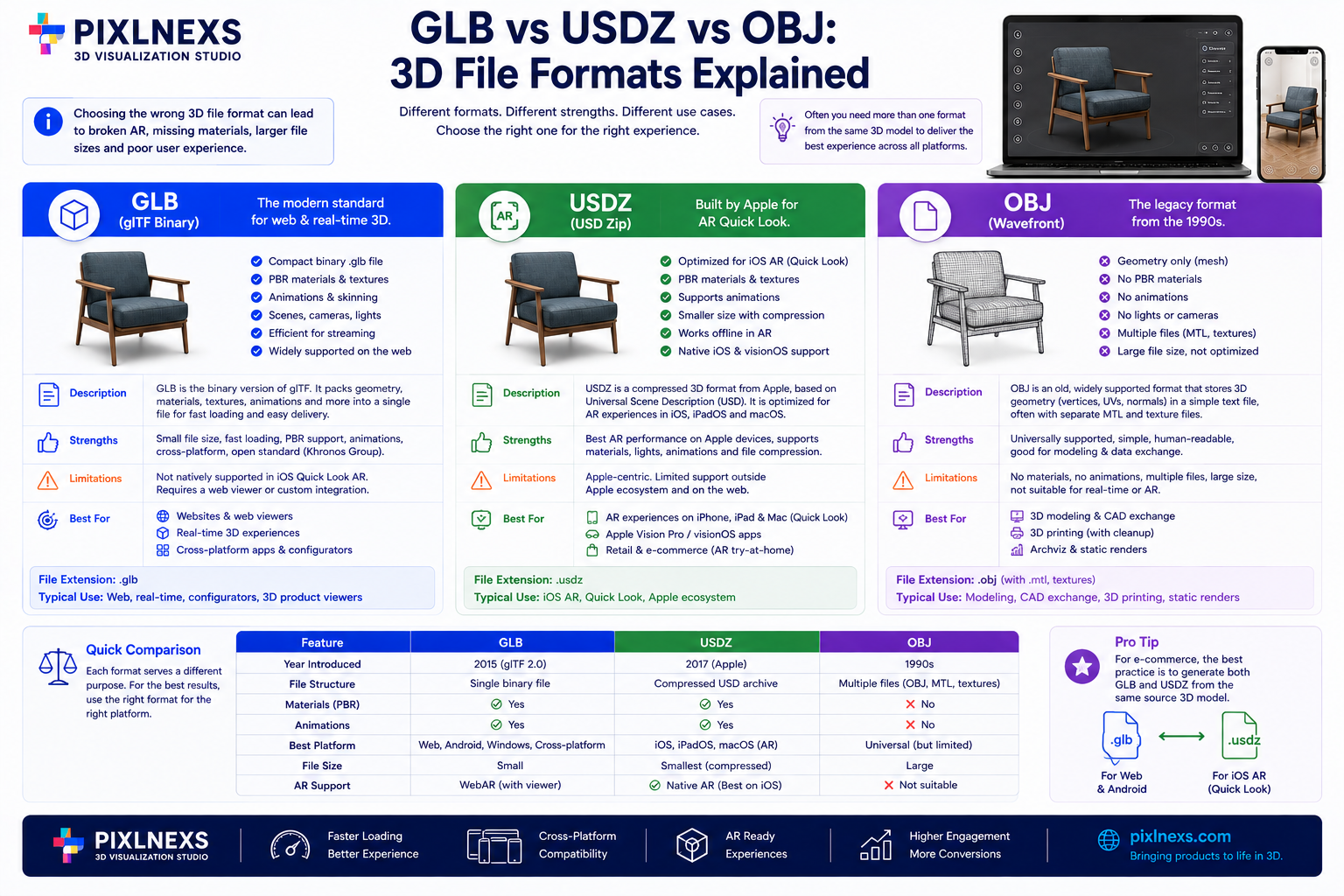
Quick answer: (GLB vs USDZ vs OBJ) GLB is a binary container for glTF, often called the “JPEG of 3D,” offering PBR materials and animation support across web and Android. USDZ is Apple’s native format for iOS AR Quick Look, optimized for mobile AR on iPhone and iPad. OBJ is a legacy text-based format that stores static geometry only, without native support for PBR lighting or animation. In short: use GLB for cross-platform web and Android, USDZ for iOS AR and OBJ only for legacy CAD or 3D printing workflows.
By the Pixlnexs Studio “Bali Balajee” Team. Pixlnexs builds interactive 3D and AR product visualization for eCommerce brands and file format choice is one of the first technical decisions in every project we take on.
Key Takeaways
- GLB is the modern standard for web and Android, combining geometry, materials and animation in a single binary file.
- USDZ is required for native iOS AR experiences through Quick Look, with strong material handling on Apple devices.
- OBJ is a legacy format for static meshes; it lacks PBR material support and is generally unsuitable for modern interactive web or AR applications.
- File size differs a lot: GLB and USDZ use efficient binary encoding, while OBJ is text-based and often larger for complex scenes.
- Typical workflow: author in your 3D tool, export to GLB for web and Android and convert to USDZ for iOS AR. Reach for OBJ only when interoperating with older CAD or print pipelines.
Why File Format Choice Breaks Your 3D Pipeline
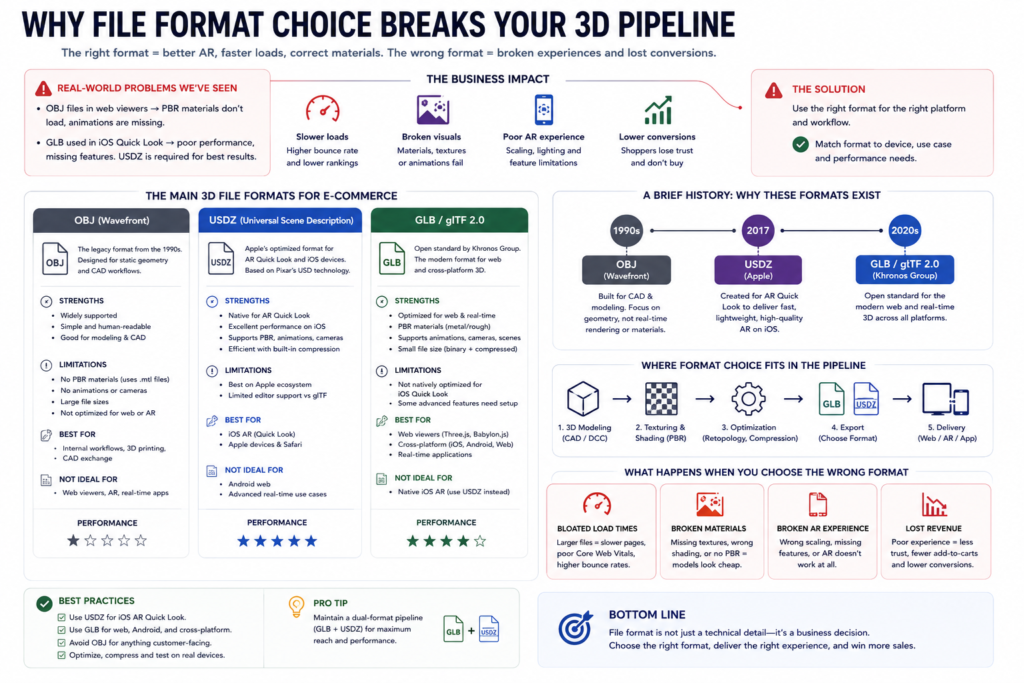
Choosing the wrong 3D file format is a common cause of broken AR experiences, bloated page loads and material rendering failures in e-commerce. We have seen teams ship OBJ files to a web viewer, only to find PBR materials do not load and animations are missing. We have also seen iOS AR campaigns underperform because the team assumed a GLB file would work natively in Quick Look, when USDZ is what delivers the best performance and feature support on Apple devices.
Choosing the wrong 3D file format is a common cause of broken AR experiences, bloated page loads and material rendering failures in e-commerce. We have seen teams ship OBJ files to a web viewer, only to find PBR materials do not load and animations are missing. We have also seen iOS AR campaigns underperform because the team assumed a GLB file would work natively in Quick Look, when USDZ is what delivers the best performance and feature support on Apple devices.
This sits alongside our broader guide to interactive 3D product visualization for ecommerce, which covers the full production pipeline from capture through to a shoppable 3D or AR experience.
The core issue is that each format was designed for a different era and platform. OBJ dates to the 1990s, built for static CAD and modeling. USDZ was introduced by Apple in 2017 to power AR Quick Look. GLB, based on the glTF specification maintained by the Khronos Group, became the de facto standard for web and cross-platform 3D through the 2020s.
Understanding these distinctions is not academic. It directly affects user experience, load times and development effort. A single product model might need to be served in more than one format depending on the shopper’s device and context. The rest of this guide breaks down the technical realities, tradeoffs and best practices for each format, drawing from production pipelines rather than spec sheets alone.
GLB: The Web-First Binary Standard
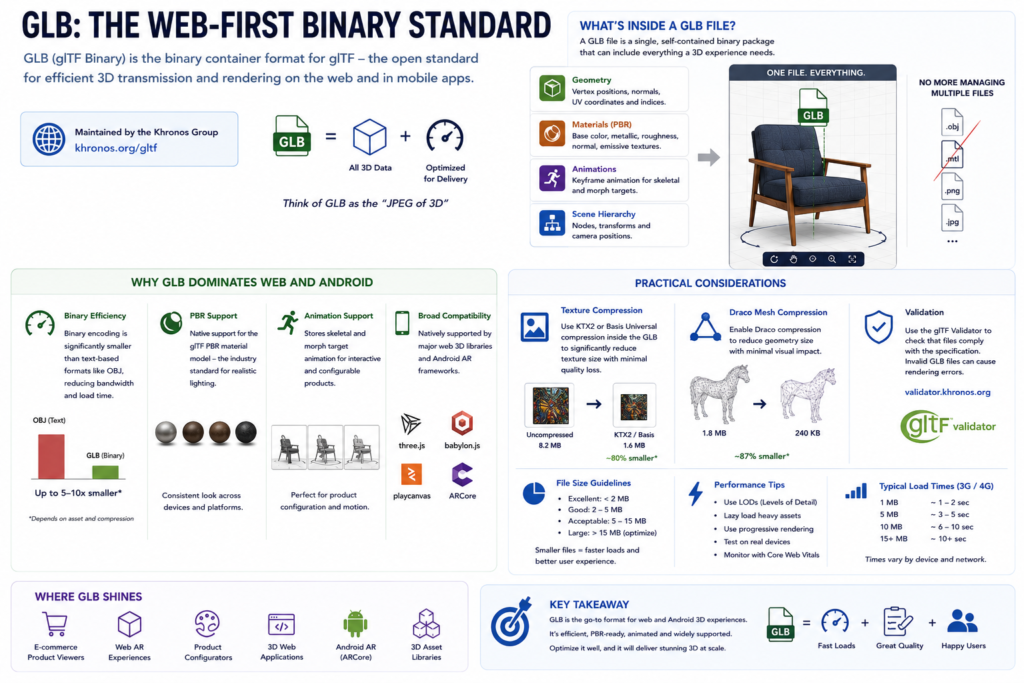
GLB (glTF Binary) is the binary container format for glTF (Graphics Library Transmission Format) a royalty-free, open standard maintained by the Khronos Group and documented at khronos.org/gltf. Think of GLB as the “JPEG of 3D”: optimized for efficient transmission and rendering on the web and in mobile apps.
What’s Inside a GLB File?
A GLB file is a single, self-contained binary package that can include:
- Geometry: vertex positions, normals, UV coordinates and indices.
- Materials: PBR (Physically Based Rendering) parameters base color, metallic, roughness, normal and emissive textures.
- Animations: keyframe animation for skeletal and morph targets.
- Scene hierarchy: nodes, transforms and camera positions.
This all-in-one approach removes the need for separate texture files, which simplifies deployment: upload one file and the viewer handles the rest.
Why GLB Dominates Web and Android
- Binary efficiency: binary encoding is significantly smaller than a text-based format like OBJ, reducing bandwidth and load time.
- PBR support: GLB natively supports the glTF PBR material model, the industry standard for realistic lighting, giving consistent visual quality across devices.
- Animation support: GLB can store skeletal and morph target animation, useful for interactive product configuration.
- Broad compatibility: most modern web 3D libraries (Three.js, Babylon.js, PlayCanvas) and Android AR frameworks (ARCore) support GLB natively.
Practical Considerations
- Texture compression: use KTX2 or Basis Universal compression within the GLB to further reduce size.
- Draco compression: enable Draco mesh compression to reduce geometry size, typically with a large reduction and minimal visible quality loss exact savings depend on the mesh.
- Validation: use the glTF Validator to check that files comply with the specification; invalid GLB files can cause rendering errors in some viewers.
Smaller GLB files (a few megabytes or less) tend to load comfortably on typical mobile connections, while larger files benefit from lazy loading or progressive rendering.
USDZ: Apple’s Native AR Container
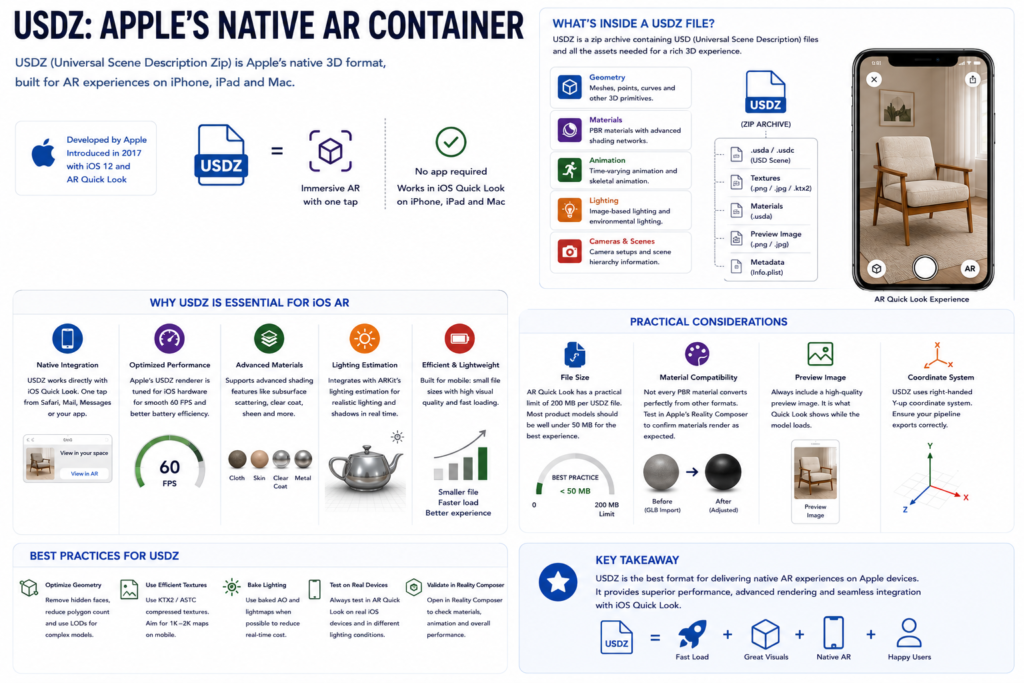
USDZ (Universal Scene Description Zip) is Apple’s native 3D format, introduced in 2017 alongside iOS 12 and AR Quick Look and documented in Apple’s USDZ developer documentation. It is designed specifically for mobile AR experiences on iPhone, iPad and Mac.
What’s Inside a USDZ File?
USDZ is a zip archive containing USD (Universal Scene Description) files, an open framework for sharing 3D content. A USDZ file can include geometry (meshes, points, curves) PBR materials with more complex shading networks, time-varying and skeletal animation and lighting information such as image-based lighting.
Why USDZ Is Essential for iOS AR
- Native integration: USDZ works directly with iOS Quick Look, letting a user view a 3D model in AR with a single tap, no additional app required.
- Optimized performance: Apple’s USDZ renderer is tuned for iOS hardware, supporting smooth frame rates and reasonable battery use.
- Advanced material support: USDZ supports shading features, such as subsurface scattering or cloth-like materials, that are not fully supported in GLB.
- Lighting estimation: USDZ integrates with ARKit’s lighting estimation, so a 3D object blends more realistically with the real-world environment around it.
Practical Considerations
- File size: AR Quick Look has a practical ceiling well above what most product models need but smaller files (well under that ceiling) give a snappier experience.
- Material compatibility: not every PBR material converts perfectly from another format test in Apple’s Reality Composer to confirm materials render as expected.
- Preview image: always include a high-quality preview image in the USDZ file, since it is what Quick Look shows before the model loads.
OBJ: The Legacy Static Mesh Format
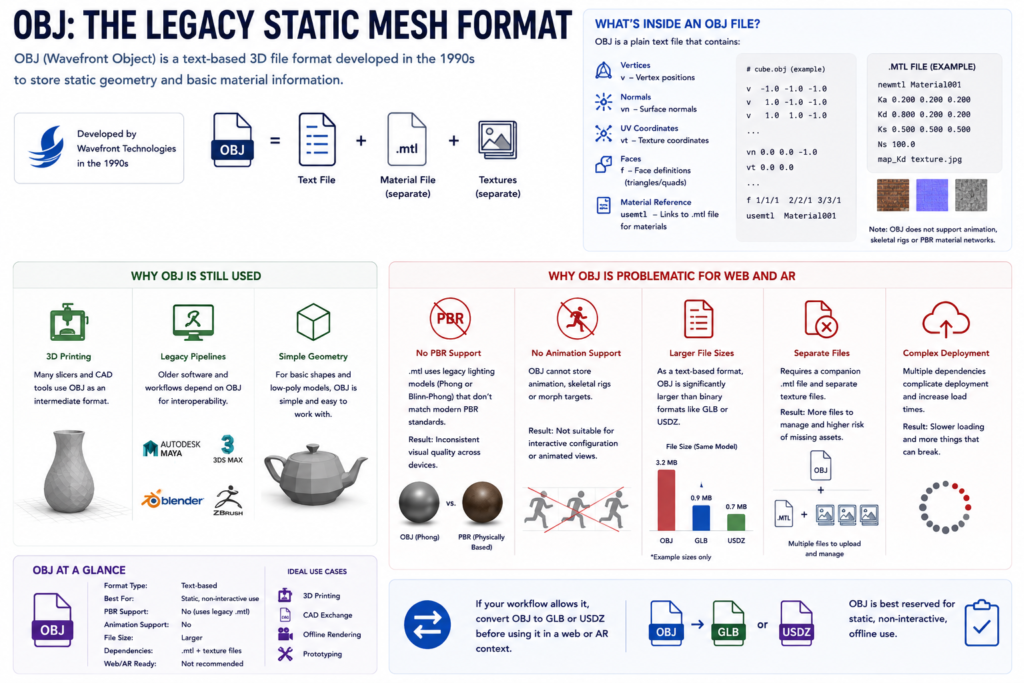
OBJ (Wavefront Object) is a text-based 3D file format developed by Wavefront Technologies in the 1990s. It was designed to store static geometry and basic material information and it remains common in CAD, 3D printing and legacy modeling pipelines.
What’s Inside an OBJ File?
An OBJ file is plain text containing vertices, normals, UV coordinates, face definitions and a reference to a separate .mtl (Material Template Library) file for basic materials. OBJ does not support animation, skeletal rigs or PBR material networks.
Why OBJ Is Still Used
- 3D printing: many slicers and CAD tools use OBJ as an intermediate format.
- Legacy pipelines: older software and workflows may depend on OBJ for interoperability.
- Simple geometry: for basic shapes and low-poly models, OBJ is simple and easy to work with.
Why OBJ Is Problematic for Web and AR
- No PBR support: the
.mtlfile uses a legacy lighting model (Phong or Blinn-Phong) that does not match modern PBR standards, leading to inconsistent visual quality across devices. - No animation support: OBJ cannot store animation, ruling it out for interactive configuration or animated views.
- Larger file sizes: as a text-based format, OBJ tends to be noticeably larger than binary formats like GLB or USDZ for the same geometry.
- Separate files: OBJ needs a companion
.mtlfile and separate texture files, which complicates deployment and increases the risk of missing assets.
If your workflow allows it, convert OBJ to GLB or USDZ before using it in a web or AR context OBJ is best reserved for static, non-interactive, offline use.
Technical Spec Comparison: GLB vs USDZ vs OBJ
| Feature | GLB | USDZ | OBJ |
|---|---|---|---|
| File type | Binary | Zip archive (USD) | Text |
| Typical file size | Small (compressed binary) | Small to moderate | Large (uncompressed text) |
| Platform support | Web, Android, iOS via libraries | iOS, macOS, tvOS (native) | Web, CAD, 3D printing |
| PBR material support | Yes (glTF PBR) | Yes (USD PBR) | No (legacy .mtl) |
| Animation support | Yes (skeletal, morph) | Yes (skeletal, morph) | No |
| Lighting support | IBL, light sources | IBL, ARKit lighting estimation | Basic (Phong/Blinn-Phong) |
| Best use case | Web viewers, Android AR | iOS AR Quick Look, macOS | 3D printing, legacy CAD |
| Compression | Draco, KTX2 | Native optimization | None |
Reading the table: GLB is the most versatile format for web and Android, supporting PBR materials and animation. USDZ is the best choice for iOS AR, with native integration and tuned performance. OBJ is limited to static geometry and is not suitable for modern interactive 3D experiences.
Which Format for Which Channel?
Shopify and Web Viewers
For e-commerce platforms and web-based 3D viewers, GLB is the recommended format: fast load times from binary encoding and compression, consistent PBR materials, animation support for interactive configuration and broad compatibility with 3D web libraries. If you use a viewer plugin for Shopify or another platform, confirm it supports GLB before committing to it our own GLB Viewer is built specifically around this format.
iOS AR (AR Quick Look)
For iOS AR, USDZ is the required format, providing native integration with Quick Look, tuned performance, advanced material support and ARKit lighting estimation. While some third-party libraries can load GLB in iOS AR contexts, USDZ offers the more reliable experience and broader feature support.
Android AR (ARCore)
For Android AR, GLB is the recommended format: broad compatibility with ARCore and most Android 3D libraries, PBR materials, animation support and efficient binary encoding.
3D Printing and Legacy Pipelines
For 3D printing and legacy CAD workflows, OBJ (or STL, depending on the printer/slicer) remains a common choice because of its simple geometry and broad tool support. For any other use case, converting to GLB or USDZ generally gives better performance and visual quality.
Conversion Workflows: Moving Between Formats
From a DCC Tool to GLB
- Author or import your model in a DCC tool such as Blender, Maya or 3ds Max.
- Optimize geometry reduce polygon count, remove hidden geometry, merge materials.
- Apply PBR materials (base color, metallic, roughness, normal, emissive).
- Export to GLB using the glTF exporter, enabling Draco and KTX2 compression where available.
- Validate the file with the glTF Validator.
From a DCC Tool to USDZ
- Author or import your model in a DCC tool.
- Optimize geometry and simplify materials.
- Export to USD using the tool’s USD exporter.
- Convert the USD file to USDZ using Apple’s USDZ converter or a comparable tool.
- Test in Xcode’s Reality Composer to verify materials and animation.
From OBJ to GLB
- Import the OBJ file into a DCC tool or conversion tool.
- Replace legacy
.mtlmaterials with PBR materials. - Optimize and clean up the geometry.
- Export to GLB with Draco and KTX2 compression enabled.
- Validate with the glTF Validator.
Best Practices for Conversion
- Start with GLB as your master format if you are unsure it converts reasonably well toward USDZ for Apple platforms or OBJ for legacy pipelines.
- Preserve texture quality during conversion; avoid unnecessary downsampling.
- Check normals after conversion inverted normals are a common issue when moving between formats with different coordinate system conventions.
- Test on an actual device. Desktop previews can be misleading; performance and fidelity issues often only show up on real mobile hardware.
Common Pitfalls and How to Avoid Them
- Incorrect coordinate systems. glTF uses a right-handed, Y-up system, while some CAD tools use Z-up. Misaligned coordinate systems make a model appear rotated or flipped after conversion verify orientation immediately after export.
- Missing textures. When exporting to GLB or USDZ, confirm textures are embedded; missing textures show up as black or white materials.
- Excessive polygon count. High polygon counts hurt performance, especially on mobile. Use a decimation tool before exporting rather than shipping the raw high-poly mesh.
- Incompatible materials. OBJ does not support PBR. When converting from OBJ, replace legacy materials with PBR equivalents rather than assuming an automatic conversion will look right.
- Skipping device testing. Desktop previews do not reveal every problem always confirm on the actual target devices before launch.
Operator Insights: Choosing Formats in Production
In our production pipeline, format choice is one of the first decisions made on any new project, because it shapes the entire asset pipeline downstream. When we convert a model from OBJ to GLB for a web viewer, the file size typically drops substantially and PBR materials become available for the first time, which noticeably improves how a metallic or glass-like product reads on screen compared to the legacy Phong shading OBJ relies on.
For iOS AR campaigns, we build the USDZ version as its own deliverable rather than treating it as an automatic export from the GLB the two formats handle materials and lighting differently enough that a direct, unreviewed conversion can introduce visible material mismatches. For 3D printing or legacy CAD handoffs, OBJ remains a reasonable choice specifically because those downstream tools do not need PBR or animation in the first place.
The lesson from doing this repeatedly across projects: pick the format for what the destination platform actually requires, not for convenience in your own pipeline. A format that is easy to export is not helpful if the destination viewer cannot use its features.
Why File Size Matters for Web Performance
In the glb vs usdz vs obj comparison, file size is often the deciding factor for web-based applications, since large files mean slower loads and higher bounce rates.
- GLB is binary and compressible with Draco geometry compression and KTX2 texture compression, which typically brings a complex product model down to a fraction of its uncompressed size while keeping quality acceptable for the web.
- USDZ is optimized specifically for mobile, balancing fidelity against the storage and processing constraints of a phone. Apple’s rendering pipeline is tuned for USDZ, which helps performance stay reasonable even on older devices.
- OBJ is text-based and has no native compression, which makes it the heaviest of the three for a comparable model one reason it is generally kept out of web delivery.
Material and Lighting Differences
How each format handles materials and lighting affects how consistent your product looks across devices.
GLB: PBR With glTF
GLB uses the glTF PBR workflow, covering base color, metallic, roughness, normal, emissive and occlusion maps, plus support for image-based lighting (IBL) for realistic environment reflections.
USDZ: PBR With USD
USDZ uses the USD PBR workflow, which supports the same core maps as glTF plus more advanced options such as clearcoat (for car-paint-like finishes) and sheen (for fabric). USD also integrates with ARKit’s lighting estimation for realistic blending with the real environment.
OBJ: Legacy Materials
OBJ relies on the .mtl format, limited to basic Phong or Blinn-Phong lighting. It does not support PBR or IBL, which is why OBJ renders tend to look flatter and less realistic than GLB or USDZ renders of the same model.
Animation and Interactivity
- GLB supports skeletal animation, morph targets and node-based animation sequences, making it suitable for animated product views and interactive configuration.
- USDZ supports the same categories of animation, with particular strength in smooth, responsive playback for AR contexts.
- OBJ supports none of this it is a static geometry format. Any project requiring animation needs GLB or USDZ.
Tools for Working With Each Format
- Blender free and open-source, with solid import/export support for all three formats and built-in optimization tools like the Decimate modifier.
- Maya and 3ds Max professional tools with strong GLB and USDZ export support, common in game and product-visualization pipelines.
- Apple’s USDZ tools Reality Composer and the USDZ command-line converter, both useful for validating and building USDZ assets on macOS.
- glTF Validator a free tool for checking that a GLB or glTF file is spec-compliant before it ships.
Building a Multi-Format Delivery Pipeline
Most brands serving 3D or AR content across web Android and iOS end up maintaining more than one export from the same source asset. A practical way to structure this:
- Keep a single source-of-truth model in your DCC tool (Blender, Maya or similar) with clean topology and organized material slots. Every export downstream should trace back to this file, not to a one-off export that gets manually patched.
- Generate GLB as the primary web/Android deliverable, with Draco and KTX2 compression applied consistently across your catalog rather than case by case.
- Generate USDZ as a separate, reviewed deliverable for iOS, rather than assuming an automated GLB-to-USDZ conversion is good enough without a visual check material and lighting differences between the two ecosystems are common enough to justify a manual pass.
- Reserve OBJ exports for specific downstream needs a 3D printing partner, a legacy CAD integration rather than including it in your default export set.
- Version your exports alongside the source model, so that when a product’s design changes, you know exactly which GLB, USDZ and any OBJ derivatives need to be regenerated.
- Before you get to export, the model needs to be retopologized and UV-unwrapped see our full breakdown, and if you’re starting from a photogrammetry scan, that cleanup happens before any format export.
This structure adds a small amount of upfront process but avoids the more common failure mode: an iOS AR experience or a web viewer quietly running on a stale or mismatched export because nobody tracked which version came from which source file.
When a Format Choice Signals a Bigger Decision
Sometimes the question “which format should I use” is really a proxy for a larger decision about your visualization strategy.
- If you keep needing GLB for one channel and USDZ for another, that is a signal you are building genuine cross-platform 3D or AR support, not a one-off web viewer worth planning your asset pipeline and QA process around that reality from the start rather than adding platforms one at a time under time pressure.
- If OBJ keeps showing up in your workflow because a legacy tool or vendor only outputs it, that is worth flagging to whoever owns that tool relationship, since every OBJ-to-GLB conversion is an extra step, an extra QA pass and an extra place for a material or scale error to slip through.
- If you are unsure whether you need PBR materials at all, ask whether your product photography currently relies on studio lighting to look good. If yes, you likely need PBR to keep the 3D version consistent with your existing photography standard, which points toward GLB or USDZ rather than OBJ regardless of platform.
A Note on Long-Term File Format Support
glTF and GLB are maintained by the Khronos Group as an open, versioned standard, which means the format itself is unlikely to be deprecated outright, though tooling and best practices continue to evolve. USDZ is tied to Apple’s platform roadmap; because it wraps the more general USD framework, changes tend to be additive rather than breaking but it is still worth checking Apple’s current developer documentation before a major project rather than relying on guidance that may be a few OS versions old.
OBJ, being a decades-old, minimal specification, is stable simply because there is little left to change its limitations are permanent rather than something a future update is likely to fix.
How often should I re-export my 3D assets as formats evolve?
There is no fixed schedule but it is worth re-checking your export settings whenever you adopt a new major version of your DCC tool, when Apple updates its AR or USDZ tooling in a way that affects material rendering or when you notice a visible quality or performance gap between your assets and newer work from competitors or vendors. Treat the export pipeline as something to revisit periodically, not a one-time setup you never touch again.
What happens if I ship the wrong format to a platform by mistake?
Behavior varies by platform rather than failing the same way everywhere. A web viewer given an OBJ where it expects GLB will typically either refuse to load the model or render it with broken or missing materials, since the viewer’s material pipeline assumes glTF PBR inputs it will not find in an OBJ’s .mtl file. On iOS, AR Quick Look specifically expects USDZ pointing it at a GLB will generally fail to trigger the native AR view at all, since Quick Look’s activation depends on the file extension and internal structure matching what it expects.
The safest habit is to treat format selection as part of your QA checklist for every new product listing, not something you assume was handled correctly once and never verify again a single mismatched export slipping into a product feed is a common, avoidable source of a broken AR or 3D experience reaching real shoppers.
Frequently Asked Questions
What is the best format for web-based 3D viewers?
GLB is the best format for web-based 3D viewers. It offers fast load times, PBR materials and broad compatibility with modern 3D web libraries such as Three.js and Babylon.js.
Can I use OBJ for AR experiences?
No. OBJ does not support animation, PBR materials or image-based lighting, all of which matter for a realistic AR experience. Use GLB for Android AR and USDZ for iOS AR.
How do I convert OBJ to GLB?
Import the OBJ file into a DCC tool like Blender, replace the legacy materials with PBR materials, optimize the geometry and export to GLB with Draco and KTX2 compression enabled.
What is the difference between GLB and glTF?
GLB is the binary version of the glTF format. It embeds all textures and data in a single file, which is easier to manage and more efficient to deliver over the web. Plain glTF is a JSON-based format that typically requires separate files for textures and binary data.
Is USDZ supported on Android?
Not natively. For Android AR, use GLB. USDZ can be converted to GLB if needed but it is generally better to author or export directly to GLB for an Android target.
How do I optimize a 3D model for mobile?
Reduce the polygon count, compress textures and use an efficient format like GLB or USDZ. Test the model on actual mobile devices rather than relying solely on a desktop preview.
Can I use GLB for 3D printing?
Not typically. Use OBJ or STL for 3D printing, since these are the formats most slicers and 3D printing tools are built to expect.
Do I need both a GLB and a USDZ version of the same product?
Usually yes, if you want AR support across both Android and iOS. GLB serves your web viewer and Android AR, while USDZ serves iOS AR Quick Look the two are not interchangeable, so most cross-platform product visualization projects maintain both.
Will glTF or USDZ eventually replace OBJ entirely?
For web and AR use cases, they effectively already have there is little reason to choose OBJ over GLB or USDZ for a new interactive product visualization project. OBJ persists mainly because certain CAD and 3D-printing tools and workflows were built around it long before glTF existed and switching those specific pipelines has a cost that many teams have not found a reason to pay yet.
Ready to Put the Right 3D Format to Work?
Choosing between GLB, USDZ and OBJ is only the first decision in shipping a working 3D or AR product experience asset optimization, integration and viewer choice matter just as much. Pixlnexs builds and optimizes 3D product visualization end to end, including our own GLB Viewer for web and Android delivery.
Need the right 3D file for every platform?
Pixlnexs builds and optimizes GLB, USDZ and legacy-format exports as part of end-to-end 3D and AR product visualization.
Talk to PixlnexsFor more on turning existing product photography into a usable 3D asset in the first place, see From Product Photos to 3D Model: No-Scanner Workflow.










Leave a Reply