
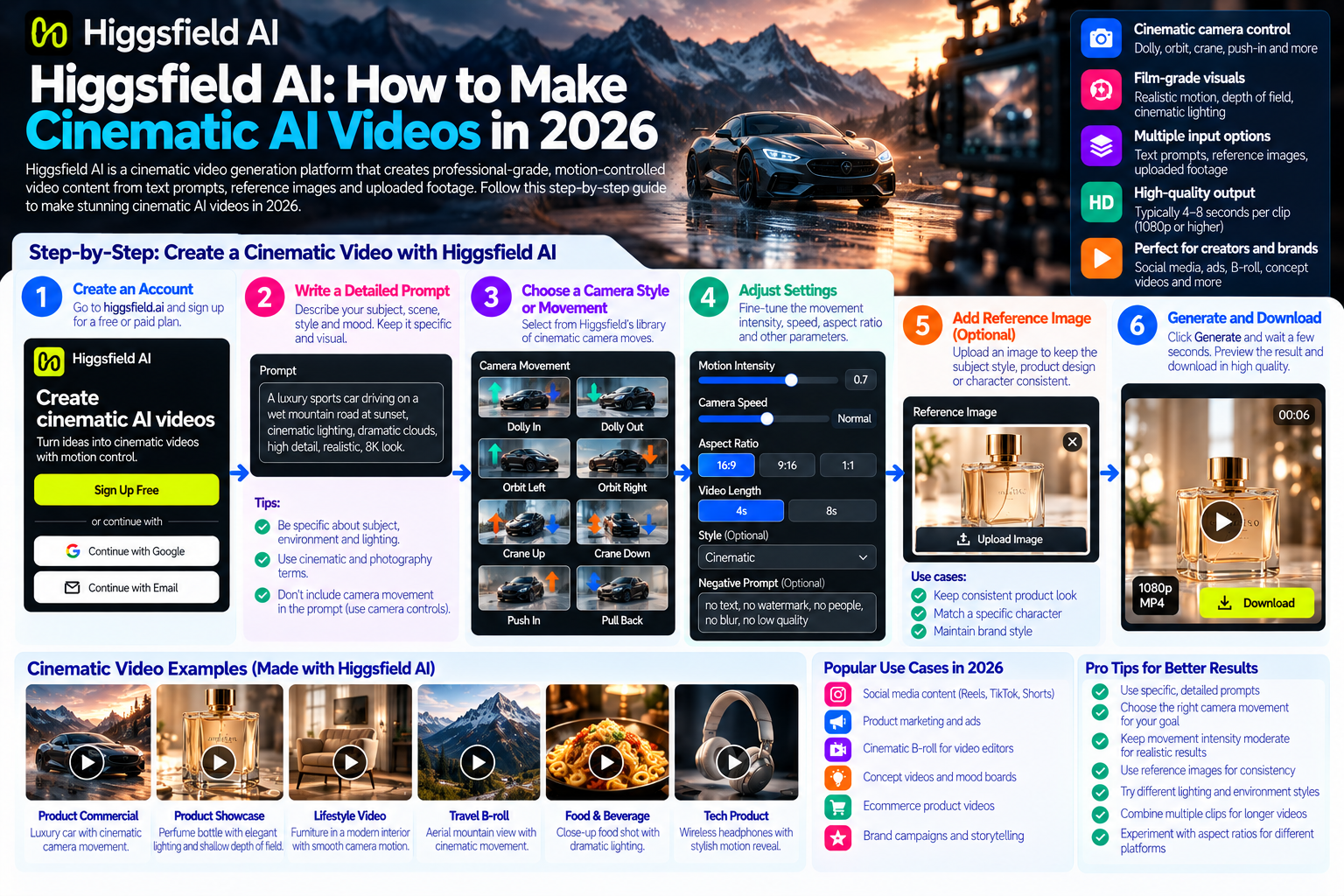
Quick answer: Higgsfield AI cinematic video generation platform built specifically for creating professional-grade, motion-controlled video content from text prompts, reference images and uploaded footage. In 2026, it stands out in the AI video market for its emphasis on cinematic camera control giving creators and brands precise control over camera moves, depth of field, lens characteristics and motion timing in a way that most AI video generators do not. To make cinematic AI videos with Higgsfield in 2026, you write a detailed prompt describing the scene, subject and motion, select a camera style or specify a camera move, optionally upload a reference image to anchor the subject’s appearance, and generate.
The result is typically a short clip (four to eight seconds) with film-grade motion characteristics that can be extended, combined with other clips and integrated into a broader production workflow.
By Bali Balaji, Pixlnexs Studio. Pixlnexs produces AI video and 3D content for ecommerce brands and creative and this guide reflects hands-on experience with Higgsfield AI in real production workflows, including what it does better than competing platforms, where its limitations appear in practice and how it integrates with a broader AI video pipeline.
Key Takeaways
- Higgsfield AI is built for cinematic output its core differentiator from Runway, Pika and Kling is the level of camera control it gives creators over motion, angle and lens characteristics in generated clips.
- The platform is prompt-sensitive in a way that rewards cinematic thinking prompts written to describe camera behavior (“slow push-in,” “handheld tracking shot,” “overhead crane pull”) produce noticeably different and more controlled outputs than prompts focused only on subject description.
- Higgsfield works best as part of a hybrid production workflow its clips are strongest when combined with other AI-generated clips, post-production color grading and sound design rather than used as raw, unedited output.
- For ecommerce product content specifically, Higgsfield is well-suited to lifestyle video and product-in-context animation where cinematic motion around a product creates the visual engagement that flat product photography cannot.
- The platform’s current clip length limitations (typically four to eight seconds per generation) mean longer pieces require multi-clip assembly in a video editor rather than single-generation long-form output.
- Understanding Higgsfield’s prompt separating subject description from environment description from camera instruction from motion is the single most important skill for getting consistently good output.
What Is Higgsfield AI and Why It Matters in 2026
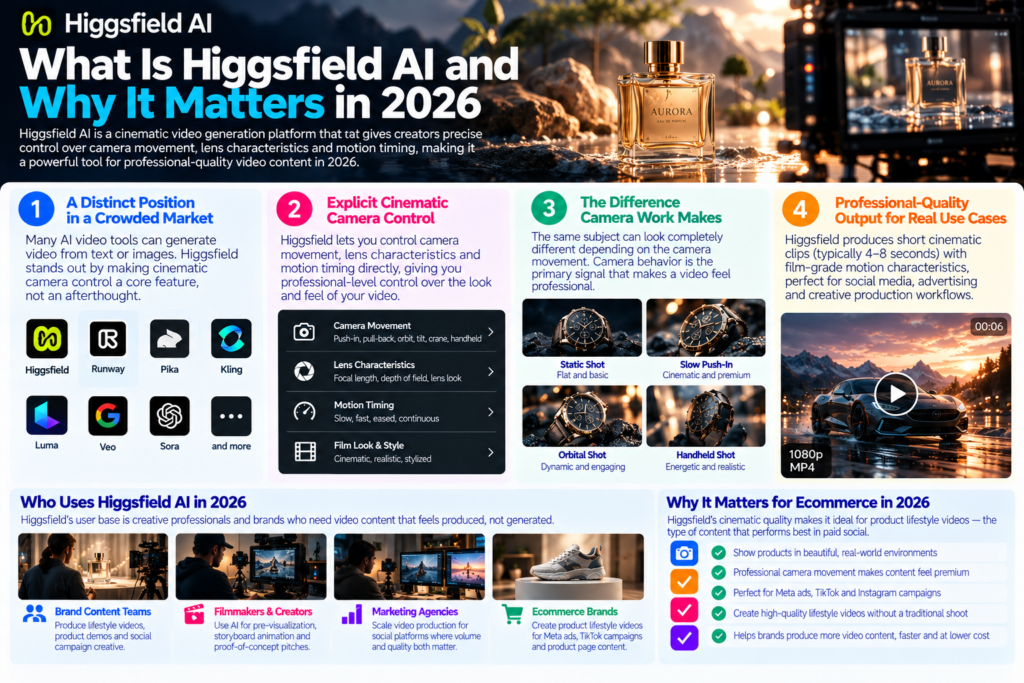
The AI video generation market in 2026 is crowded. Runway, Pika, Kling, Luma Dream Machine, Google’s Veo, Sora and a growing range of specialist tools all compete for the same creative use case: generate video from a text description or reference image. Most have converged on similar output quality for basic prompts and similar four to eight second clips, occasional motion inconsistencies, occasional subject drift across frames.
Higgsfield AI carved out a distinct position in this market by focusing on what serious video creators care about most: cinematic camera control. Where most AI video generators treat camera behavior as an implicit property of the generated output, Higgsfield makes camera control an explicit, first-class creative parameter. Creators can specify lens characteristics (focal length behavior, depth of field), camera movement type (push-in, pull-back, orbit, tilt, crane, handheld) and motion timing (slow, fast, eased, continuous) as part of the generation prompt.
This distinction matters because the gap between amateur video and professional-feeling video is almost entirely in the camera work. The same subject, under the same lighting, looks completely different through a slow, controlled push-in versus a static locked-off frame versus a shaky handheld follow shot. Camera behavior is the primary signal by which viewers categorize content as “production quality” or and Higgsfield is the AI video platform that most directly addresses this signal.
Who Uses Higgsfield AI in 2026
Higgsfield’s user base is creative professionals and brands who need video content that feels produced, not generated. This includes:
- Brand content teams producing lifestyle videos, product demos and social campaign creative that needs to feel cinematic rather than AI-generated
- Independent filmmakers and video creators using AI for pre-visualization, storyboard animation and proof-of-concept pitches
- Marketing agencies scaling video production for social platforms where volume and visual quality both matter
- Ecommerce brands creating product-in-context video for Meta ads, TikTok campaigns and product page video content
For ecommerce brands specifically, Higgsfield’s cinematic output quality makes it a strong tool for product lifestyle videos placing a product in a beautiful, cinematically lit environment and moving the camera around it with professional motion which is the category of video content that performs best in paid social.
How to Make Higgsfield AI Cinematic Videos: Step by Step
Step 1: Access Higgsfield AI and Understand the Interface
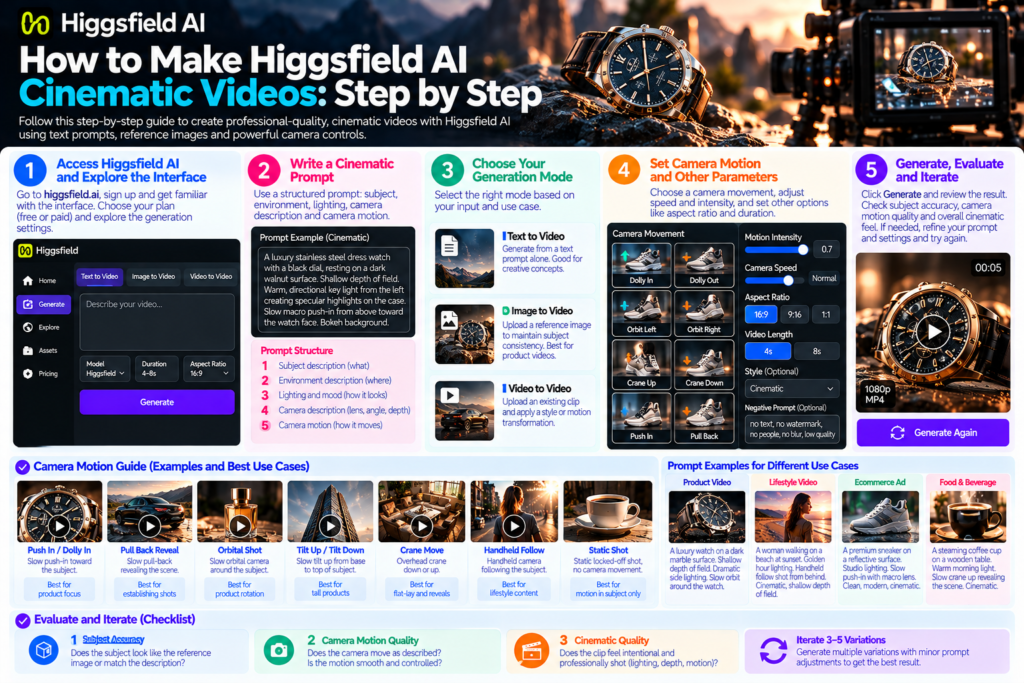
Higgsfield AI is accessed through its web platform at higgsfield.ai. The interface centers on a prompt field with controls for generation parameters model selection, generation mode, optional image upload for reference and style settings.
As of 2026, Higgsfield operates on a credit-based system with a free tier that provides limited monthly generations and paid subscription tiers for higher generation volume. Verify current pricing and tier limits directly on the platform, as these change and the specific numbers at time of publication may differ from the time you read this.
Step 2: Understand the Higgsfield Prompt Structure for Cinematic Output
This is the most important skill for Higgsfield AI. The platform is significantly more responsive to cinematically structured prompts than to simple scene descriptions, because its training data and optimization are oriented toward camera-aware generation.
A well-structured Higgsfield prompt has four components:
Subject description: who or what is in the frame, their appearance, positioning and state. Specific and visual rather than conceptual.
Environment description: where the scene takes place, the lighting quality, the time of day, the mood. Film-like environmental language (“golden hour,” “soft window light,” “dramatic side lighting,” “minimalist studio environment”) tends to produce better results than generic descriptors.
Camera description: the lens type or focal length behavior (wide, telephoto, macro), the camera position (low angle, eye level, overhead) and the depth of field (shallow focus, deep focus, rack focus).
Camera motion: the specific movement (slow push-in, pull-back reveal, orbital tracking shot, tilt up, handheld follow, static locked-off, overhead crane descent). This is the component most unique to Higgsfield and most important for distinguishing its output from other platforms.
Example of a weak prompt:
A luxury watch on a wooden table
Example of a cinematically structured Higgsfield prompt:
A luxury stainless steel dress watch with a black dial, resting on a dark walnut surface. Shallow depth of field. Warm, directional key light from the left creating specular highlights on the case. Slow macro push-in from above toward the watch face. Bokeh background.
The second prompt produces a clip that feels like it was shot by a professional product filmmaker. The first produces something generic.
Step 3: Choose Your Generation Mode
Higgsfield offers multiple generation modes depending on your input:
Text-to-video: generate from a text prompt alone. Best for scenes where you have a clear visual concept but no reference image. Results vary more than with image reference.
Image-to-video: upload a reference image and describe the motion and camera work to apply to it. This mode is significantly more consistent for subject appearance across frames the subject maintains its appearance from the reference image rather than being generated probabilistically. For product content specifically, this mode is the strongest choice: photograph the product, upload the image and use the prompt to describe the cinematic camera move around it.
Video-to-video: upload an existing clip and apply a style, motion extension or transformation. Useful for adding cinematic motion characteristics to a straightforward reference clip.
For ecommerce brands, the image-to-video mode is the recommended starting point it combines the visual accuracy of a real product photograph with the cinematic motion generation that Higgsfield specializes in.
Step 4: Craft Your Camera Motion Prompt
Camera motion description is Higgsfield’s unique strength and the component that most directly determines output quality. Use specific, film-industry language rather than vague directional instructions:
| Camera Move | Higgsfield Prompt Language | Best For |
|---|---|---|
| Push-in / Dolly in | “slow push-in toward the subject” / “cinematic dolly toward” | Hero reveals, product focus, emotional emphasis |
| Pull-back reveal | “slow pull-back revealing the full scene” / “crane pull-back” | Context reveals, product-in-environment establishing shots |
| Orbital / Arc shot | “slow orbital camera moving clockwise around the subject” | Product rotation, 360-degree showcase |
| Tilt up / Tilt down | “slow tilt up from base to top of subject” | Height reveal, tall product showcase |
| Overhead crane descent | “overhead camera descending slowly toward subject” | Flat-lay animation, packaging reveal |
| Handheld follow | “intimate handheld camera following the subject” | Lifestyle content, authentic brand feel |
| Static locked-off | “static locked-off shot, no camera movement” | Motion in subject only, minimal background movement |
Step 5: Generate, Evaluate and Iterate
Generate the first clip and evaluate it against three criteria before deciding whether to iterate:
Subject accuracy: does the subject look like the reference image or match the description? Subject drift where the subject’s appearance changes during the clip is a common failure mode in AI video generation. If it is significant, try image-to-video mode with a tighter subject description.
Camera motion quality: does the camera move as described? Is the motion smooth and controlled, or does it feel random or inconsistent? Higgsfield’s motion control is its primary strength if the motion is not right, refine the camera motion prompt language before changing anything else.
Cinematic quality: does the clip feel like it was shot with intention? Look at the light quality, the depth of field behavior and whether the motion timing feels deliberate or mechanical.
Iteration is faster than trying to get a perfect result on the first generation. Generate three to five variations with minor prompt adjustments before making significant prompt changes.
Higgsfield AI vs Other AI Video Platforms in 2026
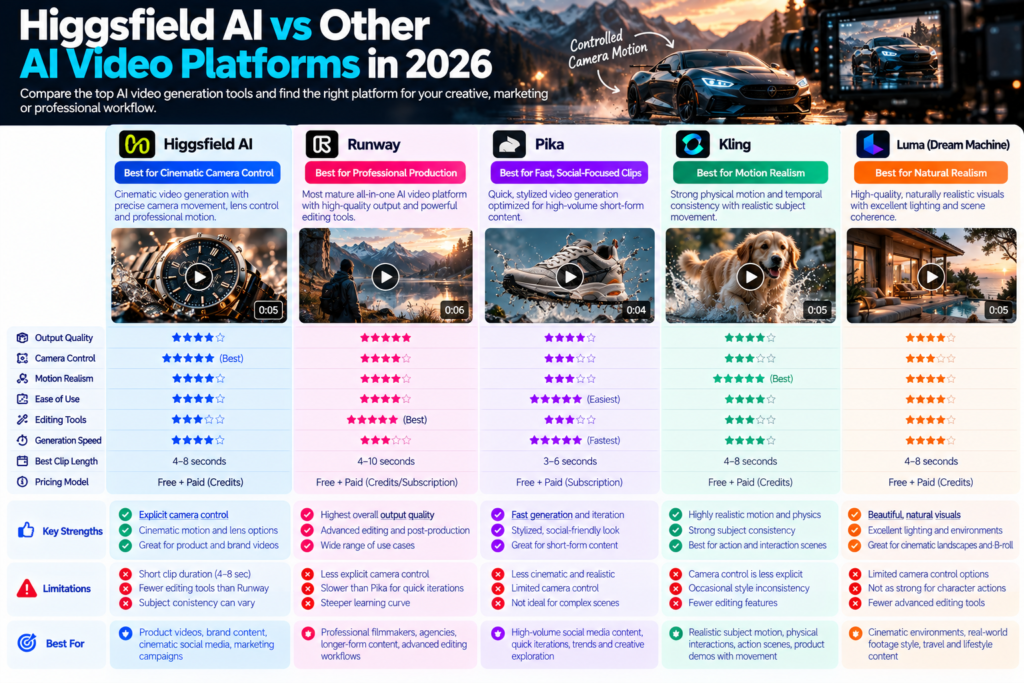
Understanding where Higgsfield sits in the competitive landscape helps you use it where it excels and use other tools where they perform better.
Higgsfield vs Runway for Cinematic Video
Runway Gen-3 is the strongest general-purpose AI video platform for professional use and has the most mature editing and post-production workflow of any AI video tool. Its cinematic output quality is high for a wide range of use cases.
Higgsfield’s specific advantage over Runway is in explicit camera control. Runway produces cinematic-feeling output because of the quality of its training data; Higgsfield produces cinematic output because camera motion is a first-class creative parameter. For creators who want to specify exactly how the camera should move, Higgsfield gives more direct control. For creators who want the best overall production-ready output with the strongest editing environment, Runway is still the most mature platform.
Higgsfield vs Pika for Product Content
Pika is optimized for fast, stylized, social-friendly clips it is the strongest AI video tool for high-volume short-form social content where speed and iteration pace matter most. Its camera control is less explicit than Higgsfield’s.
For product content specifically, Higgsfield produces more cinematic, polished output than Pika but Pika generates faster and supports a higher iteration volume in the same time period. The choice between them for product content depends on whether the output destination prioritizes cinematic quality (Higgsfield) or iteration volume and social-native feel (Pika).
Higgsfield vs Kling for Motion Realism
Kling is notable for strong motion realism physical interactions, subject movement and temporal coherence across clip duration. For content where the physics of motion matters (a product being picked up, liquid being poured, a door being opened), Kling often produces more physically believable results than Higgsfield.
Higgsfield’s advantage over Kling is in camera behavior rather than subject motion. A clip that needs a precisely controlled camera move with cinematic quality is stronger from Higgsfield; a clip where the physical realism of subject movement is the priority is stronger from Kling.
For a full platform-by-platform comparison of AI video tools in 2026, see our comprehensive guide on AI video production workflow: from script to screen.
Need Production-Grade AI Video and 3D for Your Brand?
Pixlnexs combines AI-assisted video production with interactive 3D product visualization cinematic content for your social ads and AR-ready models for your product pages, from one production partner.
See Pixlnexs Interactive 3D and AI Video Talk to Our TeamUsing Higgsfield AI for Ecommerce Product Video Content
For ecommerce brands, Higgsfield AI’s cinematic capabilities address a specific content gap: professional-quality product lifestyle video that would traditionally require a film crew, studio and post-production budget to produce. A three-second slow push-in on a skincare product with beautiful bokeh, or a smooth orbital camera move around a watch on a surface with directional key light these are clips that feel produced and perform significantly better in paid social than static product photography.
Higgsfield AI for Meta and Instagram Product Ads
Higgsfield-generated clips integrated into Meta ad creative consistently demonstrate stronger thumb-stop rates than static images in A/B tests, because the cinematic motion creates the pattern interrupt that makes a user pause in a scrolling feed. The specific camera moves that perform best in Meta feed slow push-in, shallow depth of field macro close-up, gentle orbital are exactly the moves Higgsfield handles well.
For our full guide on using 3D animation and AI video for social media ads including format specifications and creative structure, see our article on 3D animation for social media ads on Meta and TikTok.
Higgsfield AI for TikTok Product Content
TikTok’s creative culture rewards content that feels both high-quality and authentic. Higgsfield-generated clips work well for TikTok when the camera motion is more dynamic and less polished than a Meta equivalent a handheld-feeling tracking shot, a fast push-in with slight motion blur, an unexpected angle. Combining Higgsfield-generated product clips with creator-recorded voiceover or trending audio is one of the strongest formats for Spark Ads using AI-generated product video.
Combining Higgsfield with 3D Product Models for Ecommerce Content
One production approach that produces particularly strong results for ecommerce brands is combining Higgsfield AI video with 3D-rendered product assets from Pixlnexs. A 3D product model provides perfect dimensional and material accuracy the product looks exactly right from every angle. Higgsfield’s cinematic camera motion adds the sense of production quality and visual dynamism that makes the content compelling in a social feed.
The workflow: produce a photorealistic 3D render or rendered turntable of the product from Pixlnexs, use this as the reference image input in Higgsfield’s image-to-video mode, and specify the cinematic camera motion to apply to it. The result is a clip that has the visual accuracy of a 3D model and the cinematic motion quality of a professional video production at a fraction of the cost of either a live video shoot or a fully animated 3D production.
For our full interactive 3D and visualization service for ecommerce brands, visit our interactive 3D ecommerce page.
Higgsfield AI Prompting: Advanced Techniques
Lighting Language That Produces Cinematic Results
Lighting description in Higgsfield prompts has a significant effect on output quality. Specific lighting language outperforms generic:
- “Golden hour natural window light from the left” → produces warm, directional key light
- “Cinematic chiaroscuro, deep shadows on right, bright key light from left” → produces high-contrast dramatic lighting
- “Soft overcast diffused light, no harsh shadows” → produces even, clean commercial lighting
- “Studio lighting with rim light separating subject from dark background” → produces product-photography style output
- “Neon ambient glow with practical lights in background” → produces contemporary lifestyle aesthetic
Depth of Field Language for Product Content
Depth of field behavior is one of the strongest signals of production quality in video. Specify it explicitly:
- “Extremely shallow depth of field, subject sharp, background fully blurred” strongest bokeh effect
- “Medium depth of field, sharp from front to mid-range, background soft” standard product video depth
- “Deep focus, everything sharp” commercial/technical product documentation feel
- “Rack focus from foreground to subject during motion” cinematic narrative technique
Negative Prompting and Quality Instructions
Higgsfield responds to negative prompt guidance specifying what you do not want alongside what you do:
- “No camera shake, smooth controlled motion” helps avoid unwanted jitter
- “No distortion, no warping, no AI artifacts” helps reduce common AI video quality failures
- “Photorealistic, not illustrated, not animated” anchors the output in a realistic visual style
- “Maintain consistent subject appearance throughout clip” helps reduce subject drift
Higgsfield AI in a Professional Production Workflow
How to Use Higgsfield AI Clips in Post-Production
Higgsfield generates clips at the quality level of source footage they are best treated as raw material for a post-production workflow rather than finished output ready for direct publication. The professional production workflow for Higgsfield clips:
Color grading: Higgsfield clips benefit significantly from color grading in DaVinci Resolve, Premiere Pro or similar tools. The AI-generated color can be stylized, standardized across clips or matched to brand guidelines through color work.
Sound design: Higgsfield generates silent video. Ambient sound, music, product sound design and voiceover are all added in post-production.
Clip assembly: for pieces longer than eight seconds, multiple Higgsfield clips are assembled in a video editor. Plan the clip structure (what camera move goes in each clip) before generating, so the assembled piece flows naturally.
Motion graphics: text overlays, brand logos, product specifications and call-to-action graphics are added in the video editor, not in Higgsfield.
Storyboarding for Higgsfield AI Production
Because each Higgsfield generation is a separate clip, planning a multi-clip piece before generating saves time and credit. A simple storyboard for a 15-second product video:
- Clip 1 (0–4s): Product reveal slow pull-back from close-up of product detail to full product in environment
- Clip 2 (4–8s): Feature highlight macro push-in to key product feature with text overlay space
- Clip 3 (8–12s): Lifestyle context orbital shot around product in lifestyle environment
- Clip 4 (12–15s): Brand close slow push-in to product logo or brand mark
Each clip is generated separately in Higgsfield, then assembled in the video editor with sound design, color grading and motion graphics applied to the assembled sequence.
Higgsfield AI Limitations to Know Before Starting
Clip Length Is Fixed at Four to Eight Seconds Per Generation
This is the most significant practical constraint. Higgsfield generates short clips, not long-form video. For any piece longer than eight seconds, multi-clip assembly in a video editor is required. This is not a limitation that is expected to remain permanent as the platform develops, but it is a current constraint that affects production planning.
Subject Drift Across Frames Can Occur
AI video generation is probabilistic the model generates each frame with reference to adjacent frames but cannot guarantee perfect consistency across a long clip. For product content where the product must look identical in every frame, image-to-video mode with a tight reference image and a subject accuracy-focused prompt reduces drift but does not eliminate it entirely. Always review the full clip for subject consistency before accepting a generation.
Complex Multi-Subject Scenes Are Challenging
Scenes with multiple interacting subjects, complex spatial relationships or physically accurate interactions (liquids, collisions, deformation) are at the limit of what Higgsfield handles reliably. Single-subject product-focused prompts produce the most consistent results.
AR and Interactive 3D Are Not Higgsfield’s Domain
Higgsfield produces flat video it does not produce 3D model files, GLB assets or anything that can be used for AR placement or interactive 3D viewers on product pages. For product page 3D and AR, the production approach is completely separate: a GLB model produced through a 3D modeling pipeline, delivered and optimized for Shopify or Amazon deployment. Higgsfield and interactive 3D are complementary tools for different use cases video content for social and ads versus interactive 3D viewers for product pages rather than alternatives to each other.
Conclusion
Higgsfield AI is one of the most capable tools for cinematic product video generation in 2026 and its specific strength in camera control makes it the right choice for ecommerce brands and content teams who need video that feels produced rather than generated. The prompt structure that unlocks this capability is learnable, the output quality for single-subject product content is genuinely strong and the integration with broader production workflows makes it a practical tool for professional video pipelines rather than a novelty.
The ceiling on what Higgsfield can do in isolation is real: short clip lengths, no multi-subject complex scenes, and the need for post-production to reach a finished deliverable. These are not reasons to avoid the platform they are reasons to use it within a well-structured workflow that accounts for them.
For ecommerce brands combining Higgsfield-generated video with interactive 3D product models and AR placement, the combination addresses every visual content need across every channel cinematic video for social and ads, interactive 3D for product pages, AR placement for customer spatial confidence before purchase.
Want to Go Deeper on AI Video Production?
Our complete AI video production guide covers the full workflow from prompt to final delivery across every major AI video platform including Higgsfield, Runway, Pika and Kling.
Read the Full AI Video Production Guide Compare Free AI Video ToolsFrequently Asked Questions
What Is Higgsfield AI and What Makes It Different From Other AI Video Tools?
Higgsfield AI is a cinematic AI video generation platform that makes camera control a first-class creative parameter. Where most AI video tools generate camera behavior implicitly as part of the overall scene generation, Higgsfield allows creators to specify the camera move, lens type, depth of field and motion timing explicitly in the prompt. This produces more consistent, controlled cinematic output for creators who know how they want the camera to behave.
Is Higgsfield AI Free to Use?
Higgsfield AI offers a free tier with limited monthly generations, with paid subscription tiers for higher volume. Verify the current pricing and credit structure directly on u003ccodeu003ehiggsfield.aiu003c/codeu003e before starting a project pricing models for AI video platforms change frequently and the specific numbers at time of publication may differ from current offerings.
What Is the Best Way to Prompt Higgsfield AI for Product Content?
Use image-to-video mode with a product photograph as the reference, and write a prompt with four components: subject description (the product and its appearance), environment description (the surface, lighting quality, background style), camera description (focal length behavior, position, depth of field) and camera motion description (the specific move push-in, orbital, pull-back). Camera motion is Higgsfield’s specific strength specifying it with film-industry language produces the most controlled output.
How Long Are the Videos Higgsfield AI Generates?
Higgsfield currently generates clips of approximately four to eight seconds per generation. For longer pieces, multiple clips are generated and assembled in a video editor. The platform continues to develop and clip length parameters may change verify current generation settings directly on the platform.
Can I Use Higgsfield AI for Commercial Brand Content?
Yes Higgsfield AI is used commercially for brand content, social ads and product video production. Verify the current terms of service regarding commercial use rights, particularly for any content that includes AI-generated representations of people, as these terms vary between AI video platforms and change periodically.
How Does Higgsfield AI Compare to Runway in 2026?
Runway Gen-3 is the strongest all-round AI video platform for professional use with the most mature editing and workflow integration. Higgsfield’s specific strength over Runway is in explicit camera control for creators who need to specify exactly how the camera should move rather than describing a scene and hoping for the right motion, Higgsfield gives more direct control. Both platforms are used in professional production; they are not mutually exclusive.
Can Higgsfield AI Generate Videos of Real Products?
Higgsfield can generate video of a product from a reference photograph using image-to-video mode the product’s appearance is anchored to the photograph and cinematic motion is applied to it. This is one of the strongest use cases for the platform in ecommerce contexts. For products where precise dimensional and material accuracy is critical (for AR placement or interactive 3D), a GLB model produced through a 3D modeling pipeline is the appropriate tool rather than AI video generation.
What Post-Production Steps Does Higgsfield AI Video Need?
Higgsfield generates silent video without music, sound design or text graphics. Color grading, sound design, music, voiceover, motion graphics, text overlays and platform-specific format cuts are all added in post-production using a video editing tool such as DaVinci Resolve, Adobe Premiere Pro or CapCut for mobile-first workflows.
Related Guides
Benefits of 3D Animation Videos for Business (2026)
How to Reduce eCommerce Returns with 3D Product Visualization
Best Free AI Video Generators (and the Hidden Limits You Hit Fast)










Leave a Reply