
Quick answer: A strong 3D animation brief tells a studio exactly what you want made, why, for whom and within what budget and timeline. The essentials: a one line goal, target audience, deliverable specs (duration, aspect ratio, resolution) visual references, script or key messages, brand assets, technical delivery format, budget range and a deadline. The clearer the brief, the fewer revision rounds you pay for and the closer the first draft lands to what you imagined. Use the copy paste template below, fill every field honestly and attach references. That single document removes most of the back-and-forth that inflates cost and slips schedules.
By the Pixlnexs Animation Studio team, we produce AI video and 3D content and run the marketplace at store.pixlnexs.com, so this reflects real production experience.
A 3D animation brief is the contract of intent between you and your studio. It is the difference between a project that runs on rails and one that drifts through endless “can you just change..” emails. We have animated explainers, product visualizations, character pieces and architectural walkthroughs and the pattern holds up every time: the briefs that take an extra hour to write save days of production time. This guide walks through every section of a working brief, explains why each one matters to the artists actually building your shots and hands you a template you can paste into a document and send today.
Why a 3D animation brief matters more than you think
3D is expensive because it is built in layers modeling, texturing, rigging, animation, lighting, rendering and compositing. Each layer leans on decisions made in the one before it. If the brief is vague about, say whether a character needs to talk the studio may rig a face you never needed or skip one you did. Both cost money to fix because fixing means going back down the stack.
A good brief front-loads those decisions while changes are still cheap. Moving a camera in a storyboard costs minutes. Moving it after a 40-hour render costs you the whole render again. The brief is where you spend cheap clarity to avoid expensive confusion.
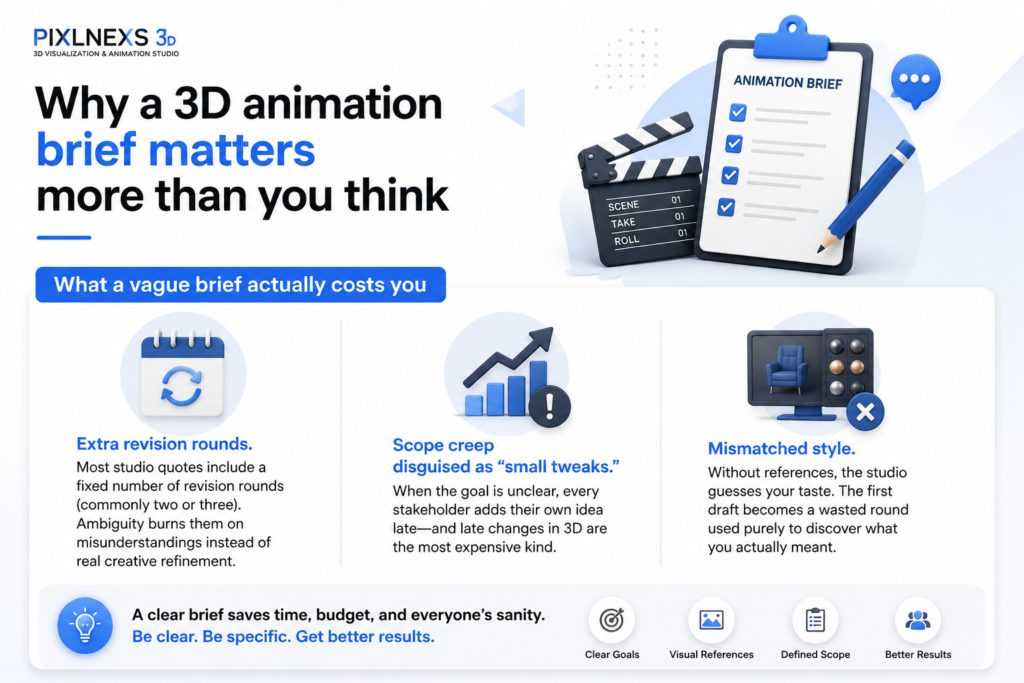
What a vague brief actually costs you
- Extra revision rounds. Most studio quotes include a fixed number of revision rounds (commonly two or three) Ambiguity burns them on misunderstandings instead of real creative refinement.
- Scope creep disguised as “small tweaks.” When the goal is unclear, every stakeholder adds their own idea late and late changes in 3D are the most expensive kind.
- Mismatched style. Without references, the studio guesses your taste. The first draft becomes a wasted round used purely to discover what you actually meant.
The 10 sections every 3D animation brief needs
Here’s each section, what to write and the production reason it matters. Skip none of them. Even a one-line answer beats silence.
1. Project goal (one sentence)
State the single outcome the video must achieve: “Explain how our app onboards a new user in under 60 seconds, for our website homepage.” This anchors every later decision. If a creative choice does not serve that sentence it gets cut.
2. Audience
Who watches this, where and in what mindset? A B2B procurement manager and a Gen-Z mobile gamer need different pacing, tone and visual density. Tell the studio the viewers sophistication, the platform and whether sound will usually be on or off. (Mobile feeds are often watched muted, which changes how much you lean on on-screen text.)
3. Deliverable specifications
Be concrete. Duration, aspect ratio, resolution and frame rate are not details. They’re the canvas size. The table below shows common combinations.
| Use case | Aspect ratio | Typical duration | Resolution / FPS |
|---|---|---|---|
| Website hero / explainer | 16:9 | 30–90 sec | 1080p or 4K, 24 to 30 fps |
| Social feed (reels/shorts) | 9:16 | 15–45 sec | 1080×1920, 30 fps |
| In-app / square | 1:1 | 10–30 sec | 1080×1080, 30 fps |
| Trade show loop | 16:9 or custom | 60 sec loop | 4K, 30 to 60 fps |
| Broadcast / TV spot | 16:9 | 15 / 30 sec | 1080p+, 25 or 30 fps |
4. Style and visual references
This is the highest leverage section. Words like clean, modern or premium mean something different to everyone. Instead, attach three to five reference videos or stills you admire and, this part matters, note what specifically you like in each: “the matte clay look here” “the snappy timing on the text reveals there.” Just as useful: one or two anti-references showing what to avoid.
5. Script, voiceover and key messages
If you have a script, share it. If not give the must-say messages in priority order. Specify whether there is a voiceover and if so, the language, accent and tone. Voiceover length effectively sets video length, since animation timing follows the read.
6. Brand assets and guidelines
Send your logo in vector format, brand color hex codes, fonts and any existing brand guidelines. For 3D specifically, mention whether you have existing 3D models, CAD files or product geometry. Reusing accurate geometry saves significant modeling time and guarantees the product looks right.
7. Music and sound direction
Note whether you need licensed music, the mood and whether sound design (whooshes, clicks, ambience) is in scope. Confirm who owns the music license and for which territories and platforms.
8. Technical delivery requirements
State the final file format (often H.264 MP4 for web, ProRes for editing) whether you need source files or project files, captions/subtitles and any platform specific specs. If the video feeds an ad platform, check that platform’s current spec sheet before you write this section.
9. Budget range
Share a realistic range not a single number you hope to beat. Budget honesty lets the studio propose an approach that fits: more stylized and efficient at one end, more photoreal and detailed at the other. Withholding budget usually produces a quote you reject and a wasted round of scoping.
10. Timeline and milestones
Give the hard deadline and any interim review dates. Realistic 3D timelines run from a couple of weeks for a short stylized piece to a couple of months for complex character or photoreal work. Ranges vary widely by scope, so treat these as directional, not promises. Flag fixed external dates (a launch, a trade show) explicitly.
Copy paste 3D animation brief template
Paste this into a document, fill every field and attach your references. This is the exact skeleton we wish every inbound project arrived with.
- Project name:
- Goal (one sentence):
- Audience: who / platform / sound on or off
- Deliverables: duration / aspect ratio / resolution / fps / number of versions
- Style references: 3–5 links + what you like in each + 1–2 anti-references
- Script / key messages: (in priority order)
- Voiceover: yes/no, language, tone
- Brand assets: logo (vector) colors (hex) fonts, existing 3D/CAD files
- Music & sound: mood, licensing needs, sound design in scope?
- Technical delivery: final format, source files, captions
- Budget range:
- Timeline: final deadline + review milestones + any fixed external dates
- Stakeholders & approver: who gives final sign-off (name one person)
That last line, naming a single final approver, quietly prevents more delays than any other field. When five people can each request changes with equal authority, revision rounds multiply. We’ve watched a project burn an entire round because two VPs gave contradictory notes and nobody had the authority to pick one.
How studios read your brief (and what to make easy to find)
When a brief lands, a producer scans for three things first: scope (can we estimate this?) feasibility (does the timeline fit the ambition?) and clarity of taste (do the references agree with each other?) You can speed up your quote and sharpen its accuracy by making those three things obvious in the first paragraph.
Reference hygiene
Pick references that are internally consistent. Five clips in five wildly different styles tell the studio you have not decided and the quote widens to cover the uncertainty. If you genuinely want to explore directions, say so and budget a paid style-frame or moodboard phase.
Separate “must” from “nice”
Mark which messages and features are non-negotiable versus aspirational. This lets the studio protect your priorities if time or budget tightens, rather than cutting the wrong thing. Here is what actually happens when you skip this the deadline gets close, something has to give and the studio trims whatever easiest to trim, which is rarely what you’d have chosen.
For more on how scope drives price, see our companion guide on what a 3D animation video actually costs, linked below. Understanding the cost levers (duration, style complexity, character work and revision rounds) helps you write a brief that fits your budget on the first pass. If you are still weighing dimensions at all, our 2D vs 3D animation explainer guide is the right place to start before you brief anyone.
Common briefing mistakes to avoid
- No budget and no timeline. The two fields that scope everything, left blank.
- “Make it pop.” Subjective adjectives with no reference are guesses dressed as direction.
- Committee references. Each stakeholder’s favorite clip, none agreeing with the others.
- Forgetting the platform. Briefing a 16:9 hero video when you actually need vertical social cuts too.
- Hiding the real approver. The person who will reject the final cut never saw the brief.
- Late asset delivery. Promising logos and product files, then sending them after animation starts.
For grounding on the technical vocabulary your brief touches (formats, color and real-time 3D standards the Khronos Group (stewards of glTF and OpenGL) and the practical guidance at web.dev on video delivery are reliable, vendor-neutral references. For a general overview of the 3D production pipeline, Wikipedia’s computer animation article is a solid starting point.
Ready to brief a studio?
Fill the template above, attach your references and you are ahead of most projects that reach us. If you also want ready made 3D assets to speed production (characters, props, environments) you can browse and license models on our marketplace at store.pixlnexs.com, then point to them directly in your brief so the studio knows exactly what to build around.
Frequently asked questions
How long should a 3D animation brief be?
One to two pages is ideal for most projects. Long enough to cover the ten essential sections, short enough that a producer can scan it in a few minutes. Attach references and assets as links or files rather than padding the document itself. Clarity beats length. A tight one-pager with strong references outperforms five vague pages.
What if I don’t have a script yet?
You don’t need a finished script to brief a studio. Provide your key messages in priority order, your goal and your audience and many studios offer scriptwriting as part of the project. State clearly whether scripting is in scope so it is included in the quote rather than discovered later as an add-on.
How many style references should I include?
Three to five is the sweet spot and they should be internally consistent. For each one, note specifically what you like: the timing, the texture, the color palette, the camera movement. Include one or two anti-references showing what to avoid. Too many conflicting references make your taste harder to read, which widens the quote.
Should I tell the studio my budget?
Yes. A realistic budget range lets the studio recommend an approach that fits, rather than guessing and quoting something you reject. 3D scales from efficient stylized work to detailed photoreal work; your budget tells them which end of that spectrum to design for. Withholding it almost always costs you a wasted scoping round.
Can I reuse 3D models I already have?
Often, yes and it can save meaningful time and money. If you have existing 3D models, CAD files or product geometry, mention them in the brief and share the file formats. Reusing accurate geometry guarantees your product looks correct and removes a large chunk of modeling work. You can also license ready-made models, for example from store.pixlnexs.com and reference them directly.
How do I keep revision rounds under control?
Name a single final approver in the brief, gather all stakeholder feedback before each review and consolidate it into one clear list per round rather than drip-feeding changes. Most studios include a set number of revision rounds in the quote, so spending those rounds on genuine refinement, not on resolving internal disagreements, keeps you on budget.
What’s the difference between a brief and a storyboard?
The brief is your input: what you want, why, for whom and within what constraints. The storyboard is the studio’s first response: a shot by shot visual plan based on your brief. A good brief produces an accurate storyboard, which is the cheapest place to catch and fix problems before any 3D is built. Approve the storyboard carefully. It’s your last cheap checkpoint.










Leave a Reply