

Quick answer: An AI product demo video uses AI tools to turn static product shots, 3D models or short clips into a moving demonstration that shows how a product looks, works and benefits a buyer. The most reliable path is to start from a clean 3D model or a handful of high resolution photos, generate or render the motion (turntables, exploded views, feature call outs) then layer on AI voiceover, captions and music.
Quality tracks input fidelity. A real 3D model gives you accurate, repeatable demos, while image to video AI is great for stylized b-roll but drifts on fine detail. Budget anywhere from a few hours for a single hero clip to a day or two for a full demo with variants. What you get back is a video that explains a product faster than text and converts better than a static image gallery.
By the Pixlnexs Animation Studio team, we produce AI video and 3D content and run the marketplace at store.pixlnexs.com, so this reflects real production experience.
Static product photos answer “what does it look like.” A demo video answers “what is it like to use.” That gap is where most ecommerce and SaaS pages quietly lose buyers and it’s where an ai product demo video earns its keep. Below is the practical, operator grade workflow we use to go from flat assets to animated demos, the trade-offs between approaches and the honest limits you should plan around.
What an AI product demo video actually is
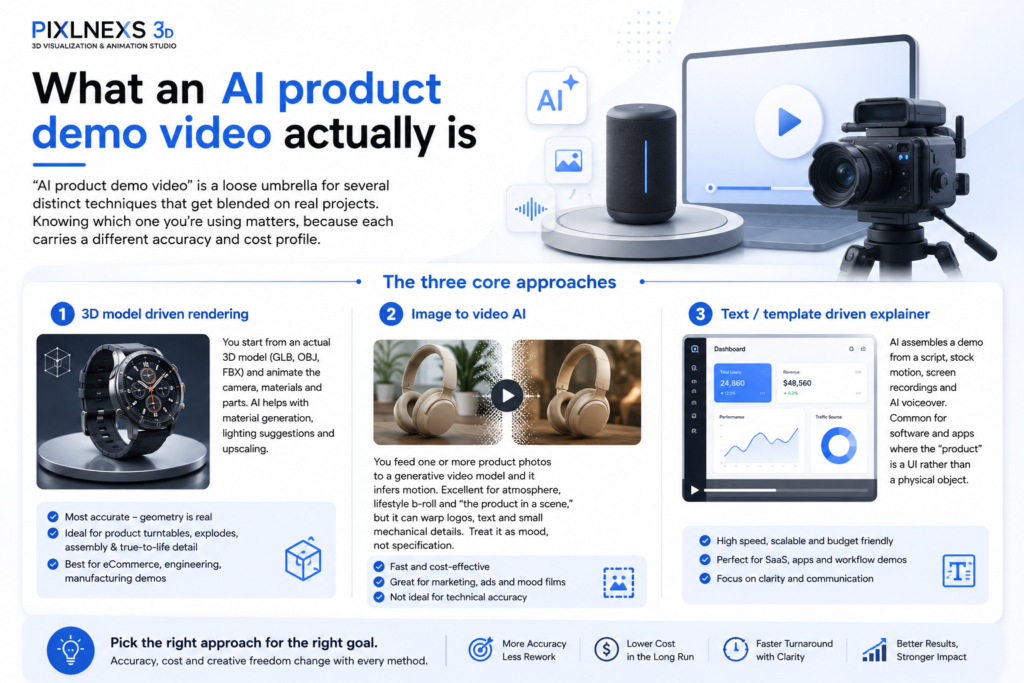
“AI product demo video” is a loose umbrella for several distinct techniques that get blended on real projects. Knowing which one you’re using matters, because each carries a different accuracy and cost profile.
The three core approaches
- 3D model driven rendering: You start from an actual 3D model (GLB, OBJ, FBX) and animate the camera, materials and parts. AI helps with material generation, lighting suggestions and upscaling. This is the most accurate route because the geometry is real. A turntable spin is genuinely your product from every angle, not a hallucinated guess.
- Image to video AI: You feed one or more product photos to a generative video model and it infers motion. Excellent for atmosphere, lifestyle b-roll and “the product in a scene,” but it can warp logos, text and small mechanical details. Treat it as mood, not specification.
- Text/template driven explainer: AI assembles a demo from a script, stock motion, screen recordings and AI voiceover. Common for software and apps where the “product” is a UI rather than a physical object.
Most strong demos combine all three: a 3D rendered hero shot for accuracy AI-generated lifestyle inserts for emotion and an AI voiceover plus captions to carry the message. If you sell physical goods and already have (or can commission) a 3D model, the model driven path is almost always worth it. See our companion guide on turning a 3D model into a 360 spin product video for the mechanics.
From static shots to animated demos: the workflow
Here’s the sequence we run on production jobs. It scales from a single SKU to a whole catalog.
1. Audit your inputs
Your output ceiling gets set right here. Rank what you have:
- Best: a clean, watertight 3D model with proper UVs and PBR materials. You can do anything (spins, exploded views, cutaways, close-ups) repeatably and accurately.
- Good: 8 to 20 high resolution photos covering all angles. Enough for photogrammetry, image to video or a parallax-style pseudo-3D demo.
- Workable: 1 to 3 hero photos. Image to video AI can add subtle motion but plan for stylized rather than precise output.
If you only have a single front-on photo, set expectations accordingly. You’ll get an attractive moving image, not a faithful 360 demonstration. Be honest with stakeholders about this up front. It heads off the most common round of disappointed revisions, the one where someone asks to see the back of a product you only ever photographed from the front.
2. Build or source the 3D model (if going model driven)
You can model from scratch, scan via photogrammetry or buy a ready made asset. A marketplace model can cut days off the schedule when a close enough base exists. That’s exactly why we run store.pixlnexs.com, so teams can grab a starting asset instead of modeling from zero. Whatever the source, validate it before you animate anything: closed mesh, sane scale, named parts (so you can animate sub-assemblies) and materials that read correctly under studio lighting.
3. Storyboard the demo beats
A demo isn’t a music video. It’s an argument. Map out 4 to 6 beats: hook (what it is) the key differentiating feature, a second feature or use case, a proof/scale detail and a call to action. Each beat gets a camera move and an on-screen message. Decide the beats before you render a single frame, because re-rendering to fix the story is the most expensive mistake on the board.
4. Animate and render
For model driven work, the staple moves are the turntable (slow 360) the dolly-in to a feature, the exploded view and the material/colorway swap. Render at the resolution and frame rate of your target platform: vertical 9:16 for social, 16:9 for product pages and YouTube. Most platforms favor short clips and standards like the W3C media specifications underpin how those clips stream reliably in-browser, so encode to widely supported H.264/H.265 or VP9/AV1 rather than exotic codecs.
5. Layer AI voiceover, captions and music
AI voiceover has crossed the line from “obviously synthetic” to “good enough for most demos,” especially for short, factual narration. Always add captions. The majority of social video gets watched muted and captions also improve accessibility, which lines up with guidance on the web.dev performance and accessibility pages. Keep the music subordinate to the message.
6. Cut variants
One render session should yield a stack of deliverables: a 6 second loop for ads, a 15 to 30 second product page demo, a 60 second YouTube explainer and a square version for feeds. Cutting variants is where AI-assisted editing genuinely saves hours over traditional video.
Comparison: which approach fits your product
| Approach | Accuracy | Best for | Main limitation | Typical effort |
|---|---|---|---|---|
| 3D-model-driven render | High, true geometry | Physical products, configurable goods, detailed hardware | Needs a 3D model | Hours to 1–2 days |
| Image to video AI | Medium, can drift on detail | Lifestyle b-roll, mood, single angle hero shots | Warps text/logos/fine parts | Minutes to hours |
| Template/explainer AI | High for UI, N/A for objects | Apps, SaaS, services, processes | Less suited to physical detail | Hours |
| Hybrid (recommended) | High where it counts | Most ecommerce + DTC demos | More moving parts to manage | Half day to 2 days |
If your catalog is large, the hybrid model scales best: accurate 3D-rendered hero shots for the SKUs that drive revenue, faster image to video for the long tail. Our guide on AI product videos for ecommerce goes deeper on prioritizing a catalog.
Honest limits and how to work around them
Selling AI video as magic sets you up to fail. Here are the real constraints:
- Text and logos drift in pure generative video. If your product has branding, fine print or a screen UI, render those from the real model or composite them in afterward. Don’t trust an image to video model to keep your wordmark intact.
- Hands and interaction are hard. Generative models still struggle with realistic hands manipulating a product. For “using it” shots, either film a real hand on green screen and composite or rig the interaction in 3D.
- Consistency across shots takes effort. Keeping the same product, lighting and color across multiple AI-generated clips means reference locking and, often, some manual cleanup. Model driven rendering gives you this for free.
- Claims must be true. A demo implies the product behaves as shown. Don’t animate a feature the product doesn’t have. That’s a returns and refunds problem, not just a marketing one.
None of these are dealbreakers. They’re just reasons to pick the right technique per shot rather than forcing one tool to do everything. In practice, the projects that go sideways are the ones that try to run a whole demo through a single generative model and then spend the saved time fixing warped logos frame by frame.
Where AI demos pay off
Video on a product page tends to lift engagement and time on page and a demo specifically cuts the “I can’t tell how it works” friction that drives both pre-purchase abandonment and post purchase returns. We won’t quote a precise conversion uplift figure here, because it swings wildly by category, price point and traffic quality. Anyone citing a single universal number is guessing. What is consistent in our experience: demos help most for products that are configurable, mechanical or hard to read from a flat photo and least for commodity items buyers already understand. Spend your demo budget where comprehension is the bottleneck.
For ad creative specifically, the economics flip toward volume. Testing many short variants beats polishing one. That’s the domain of AI UGC-style ad videos at scale, where speed and quantity matter more than render perfection.










Leave a Reply