
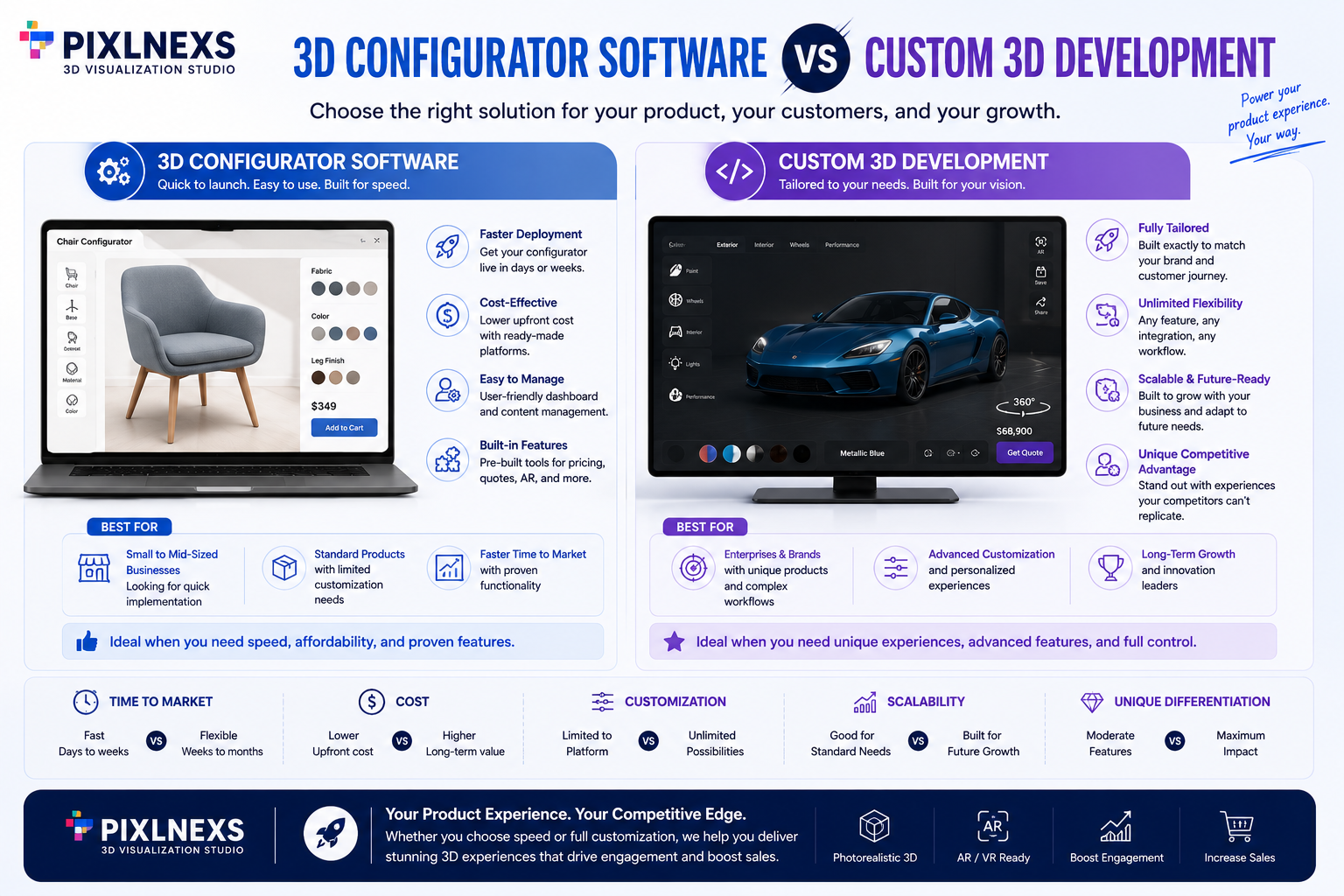
Quick Answer:Choosing between 3D configurator software vs custom 3D development comes down to one honest question: do you need a fast, proven path to a working product configurator or do you need a bespoke experience that no template can match?
Both routes get you to interactive, customizable 3D products on your store. They just trade off cost, speed, control and long-term ownership in different ways. In this guide we walk through what each option really involves, the decision factors that matter and a simple framework for picking the right one.
Key takeaways
- Off-the-shelf 3D configurator software is the fastest, lowest-risk way to launch you subscribe, configure and ship in weeks but deep customization is bounded by the platform.
- Custom 3D development gives you full control over UX, rules and brand fit, at a higher upfront cost and a longer build, with maintenance landing on your team.
- Product complexity, meaning the number of variants and the rules connecting them, is often the deciding factor on its own
- Total cost of ownership beats sticker price weigh subscription fees against build, hosting and ongoing engineering before you decide.
- A hybrid path exists a configurable platform under a custom front end can blend speed with brand-perfect UX.
What is a product configurator, briefly
A product configurator lets a shopper build their own version of a product choosing colors, materials, sizes, components or engravings and see the result update live in 3D. Instead of scrolling through a dozen static photos, the buyer rotates, zooms and customizes a single interactive model that reflects their exact choices.
Pixlnexs builds interactive 3D configurators and AR product experiences for ecommerce brands, combining SaaS-style speed with custom-grade rule logic depending on what a client needs
That live feedback is what makes configurators worth the effort. We have seen first-hand how interactive 3D improves sales by closing the gap between what a buyer imagines and what they will actually receive. If you are new to the category, our primer on what interactive 3D in ecommerce is covers the fundamentals before you weigh build options. If you want a second opinion on which path fits your product, talk to our team and we will map it out with you.
Off-the-shelf 3D configurator software: the SaaS route
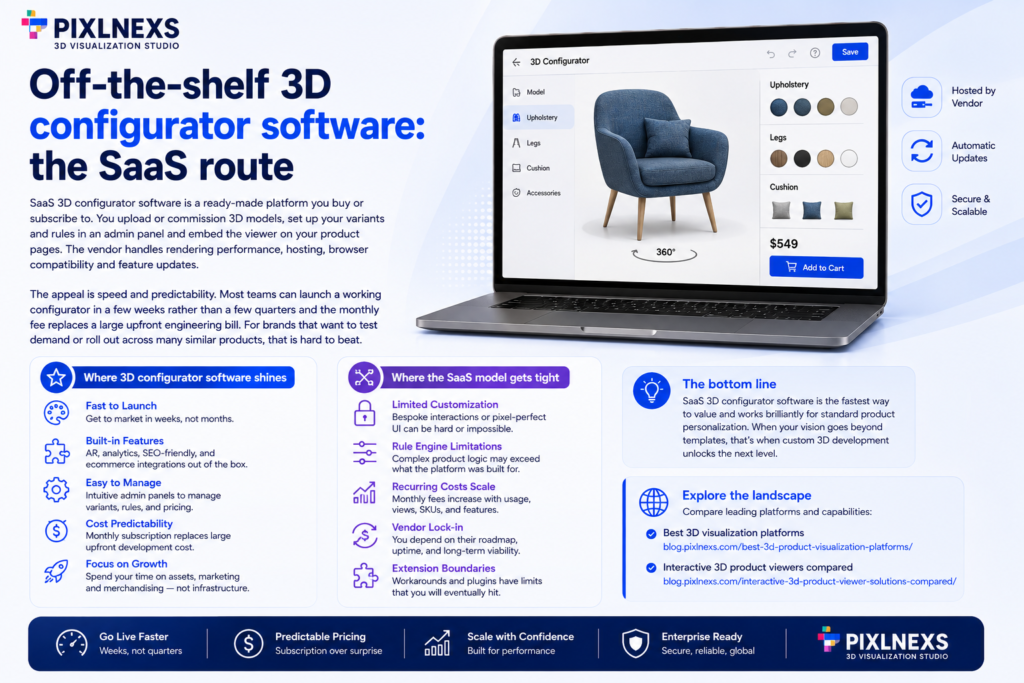
SaaS 3D configurator software is a ready-made platform you buy or subscribe to. You upload or commission 3D models, set up your variants and rules in an admin panel and embed the viewer on your product pages. The vendor handles rendering performance, hosting, browser compatibility and feature updates.
The appeal is speed and predictability. Most teams can launch a working configurator in a few weeks rather than a few quarters and the monthly fee replaces a large upfront engineering bill. For brands that want to test demand or roll out across many similar products, that is hard to beat.
Where 3D configurator software shines
It works best when your product logic fits common patterns pick a color, swap a material, toggle a component. Templated UI, built-in AR, analytics and ecommerce plugins come included, so you spend your energy on assets and merchandising rather than infrastructure.
Where the SaaS model gets tight
The trade-off is ceiling, not floor. When you need a bespoke interaction, a pixel-exact brand UI or a rule engine the platform was not designed for, you start fighting the tool. Recurring fees also scale with usage and you are tied to the vendor’s roadmap and uptime. For a sense of the landscape, our roundup of the best 3D visualization platforms and our comparison of interactive 3D product viewers show how capabilities differ across categories.
On pricing, most SaaS 3D configurators run anywhere from a few hundred to a few thousand dollars a month depending on catalog size and traffic, while a custom build typically starts in the low five figures and scales up fast with rule complexity and integration depth. Neither number means much on its own, which is why total cost of ownership over two to three years is the comparison that actually matters.
Custom 3D development: the bespoke route
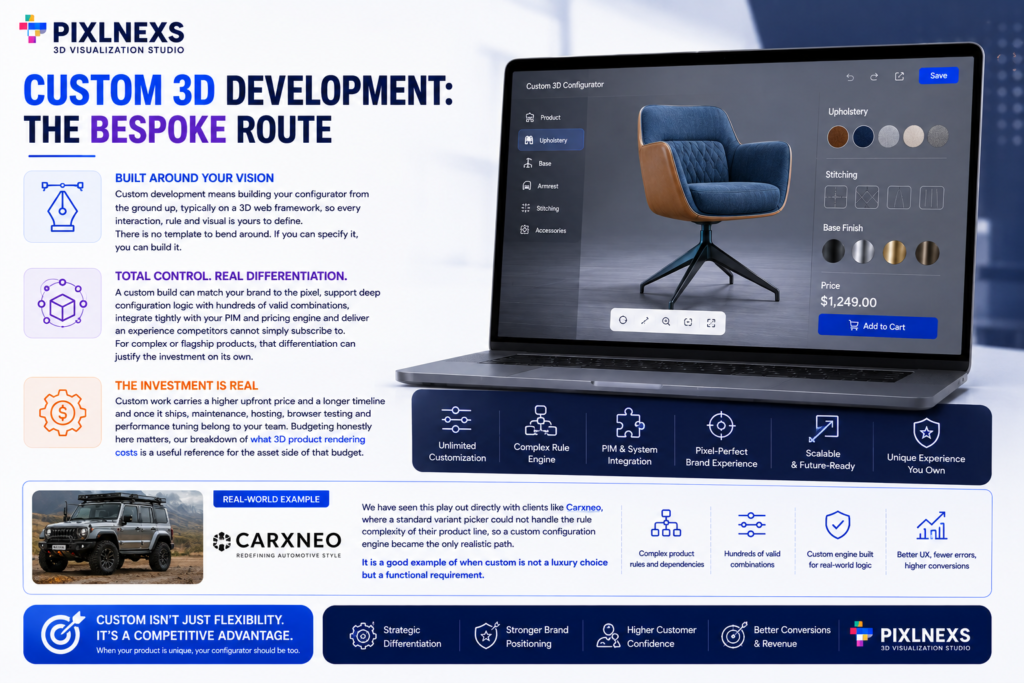
Custom development means building your configurator from the ground up, typically on a 3D web framework, so every interaction, rule and visual is yours to define. There is no template to bend around. If you can specify it, you can build it.
That control is the whole point. A custom build can match your brand to the pixel, support deep configuration logic with hundreds of valid combinations, integrate tightly with your PIM and pricing engine and deliver an experience competitors cannot simply subscribe to. For complex or flagship products, that differentiation can justify the investment on its own.
The cost is real, though. Custom work carries a higher upfront price and a longer timeline and once it ships, maintenance, hosting, browser testing and performance tuning belong to your team. Budgeting honestly here matters, our breakdown of what 3D product rendering costs is a useful reference for the asset side of that budget.
We have seen this play out directly with clients like Carxneo, where a standard variant picker could not handle the rule complexity of their product line so a custom configuration engine became the only realistic path. It is a good example of when custom is not a luxury choice but a functional requirement.
The decision factors that actually matter
Set marketing claims aside and weigh seven practical factors. Budget sets the outer bound. Time-to-launch decides whether a multi-month build is even an option. Product complexity the number of variants and the rules connecting them is often the deciding factor on its own. UX fidelity tells you whether a templated interface is good enough or whether you need a bespoke front end.
Then come the operational factors. Integration with your PIM and ecommerce stack determines how cleanly data flows into the configurator. Scalability asks whether the solution holds up across many products and traffic spikes. And total cost of ownership, meaning subscription versus build plus ongoing engineering, is the number to compare over a two or three-year horizon, not on day one.
3D configurator software vs custom 3D development
| Factor | 3D configurator software (SaaS) | Custom 3D development |
|---|---|---|
| Cost | Lower upfront, recurring subscription | Higher upfront, lower recurring |
| Time to launch | Weeks | Months |
| Flexibility | Bounded by the platform | Effectively unlimited |
| Maintenance | Handled by the vendor | Owned by your team |
| Scalability | Built in, fee scales with usage | You engineer and pay for it |
| Best fit | Standard variant logic, fast rollout | Complex rules, brand-critical UX |
What we’ve seen across 30+ configurator builds
Across the configurator projects we’ve shipped at Pixlnexs, the single biggest predictor of which route a client should take isn’t budget it’s how many dependent variant rules their product has. Brands with fewer than 15 independent options (color, size, material) succeed on SaaS platforms in most cases we’ve handled. Once options start interacting a material choice restricting available colors, or a component change shifting price and dimensions SaaS rule engines start requiring workarounds that erase the cost advantage within 12–18 months. That’s the pattern that led us to build a custom configuration engine for Carxneo rather than force-fit a template.
Choose SaaS if, choose custom if
Choose 3D configurator software if you want to launch quickly, your product logic fits common variant patterns, your budget favors predictable monthly costs over a large upfront spend and a polished templated UI meets your brand bar. It is also the smart call when you want to validate demand before committing deeper.
Choose custom development if your products carry deep configuration rules, your brand demands a one-of-a-kind experience, you need tight integration with internal systems and you have the budget and team to own the build long term. Flagship and high-margin products are where custom usually pays for itself.
The hybrid path with 3D configurator software underneath
You are not limited to a binary.A common middle ground pairs a configurable platform or 3D engine on the back end with a custom front end built on top. You get the vendor’s rendering, hosting and rule handling while keeping full control of the interface your shoppers actually touch. It is faster than full custom and more flexible than pure SaaS, a practical fit for teams that want brand-perfect UX without owning the entire stack.
Whichever route you pick, the modeling work behind it is the same foundation. Our guide to the full process to create an interactive 3D product model and our wider overview of interactive 3D product visualization both walk through the asset pipeline that feeds any configurator. And if you are deciding who builds those assets, in-house versus outsourced 3D modeling is worth a read.
Frequently asked questions
How long does each option take to launch?
A SaaS configurator often launches in weeks once your 3D assets are ready. A custom build typically runs months, depending on rule complexity, integrations and how polished the interface needs to be.
Can I start on SaaS and move to custom later?
Often, yes. Many teams validate demand on a platform first, then invest in custom once the business case is proven. Your 3D models usually carry over, so the asset work is rarely wasted.
Which option is better for complex products?
Highly complex products with deep rules and bespoke interactions tend to favor custom or hybrid approaches. Standard variant logic color, size, material is well served by off-the-shelf 3D configurator software.
Is 3D configurator software cheaper than custom development?
Usually cheaper upfront, yes. SaaS spreads cost across a subscription while custom front-loads a build. Over a few years, compare total cost of ownership, recurring fees can add up but so can ongoing engineering on a custom system.
Do I need 3D models before I can build a configurator?
Yes, both routes need 3D assets as the starting point. SaaS platforms and custom builds alike render existing models, they don’t generate product geometry from scratch. Budget for asset creation separately from the configurator build itself.
what happens if I outgrow my SaaS configurator?
You migrate to custom or a hybrid setup once the platform’s rule engine or UI ceiling stops fitting your needs. Since your 3D models typically carry over, the switch is more of an engineering shift than a full rebuild from zero.
Does a 3D configurator work on mobile?
Most SaaS platforms handle mobile rendering and touch controls out of the box. Custom builds can match or exceed that, but mobile performance and browser testing become your team’s responsibility rather than the vendor’s.
How do I decide if my product needs custom rules instead of standard variants?
If your options interact with each other, for example certain colors only pairing with certain materials, or component choices affecting price and dimensions, that’s a signal you need a rule engine deeper than most SaaS platforms offer out of the box.
Written by the Pixlnexs 3D team. We build interactive 3D, configurators and AR experiences for ecommerce brands. Talk to us about your product configurator and we will help you scope the right path.
Read more:
GLB vs GLTF: The Real Difference (and When to Use Each) in 2026
How to Convert a GLB to USDZ for iOS AR (Step by Step) Guide in 2026
3D Configurator Software vs Custom 3D Development | Guide in 2026










Leave a Reply