
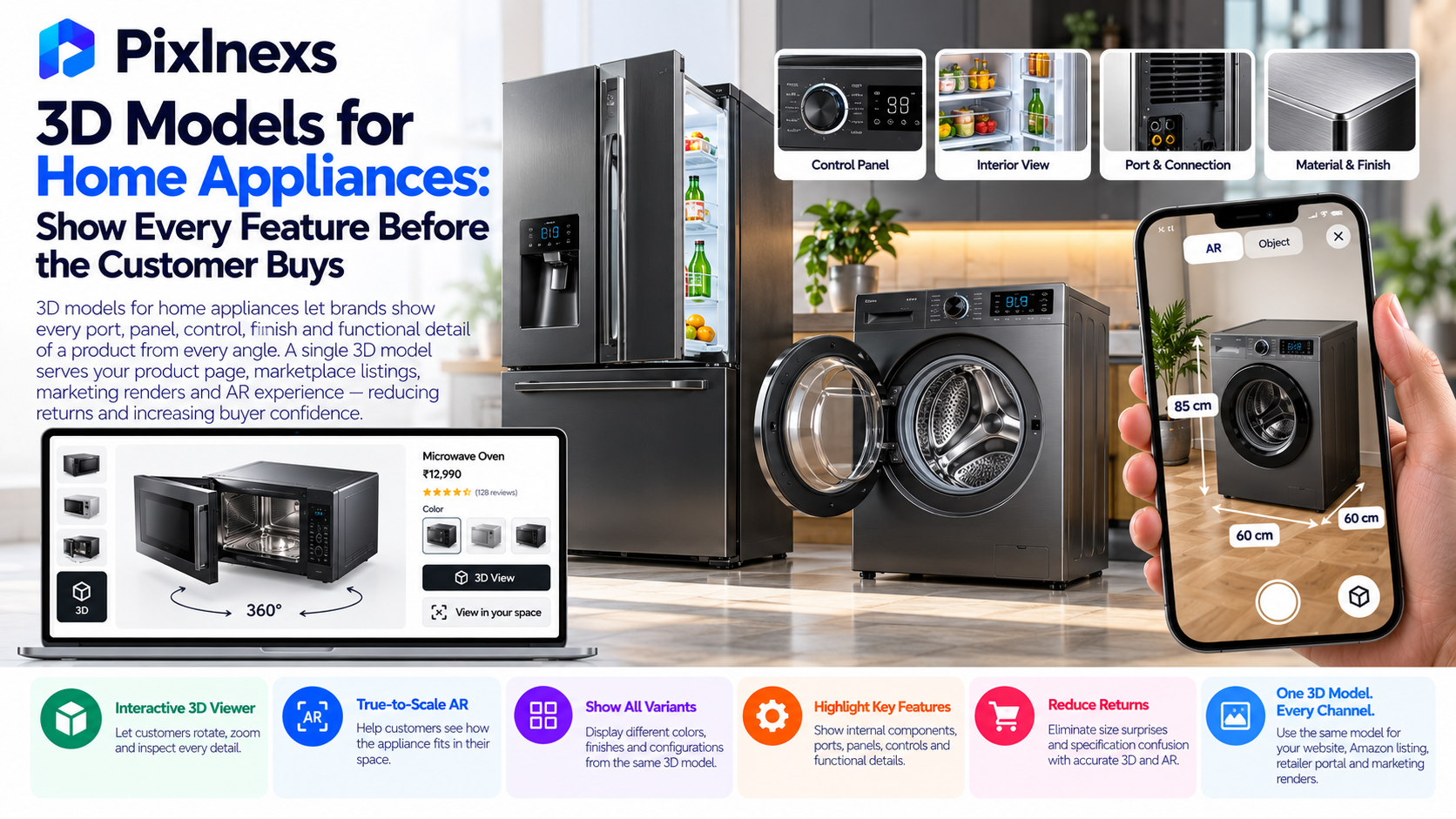
- Quick answer: 3D models for home appliances let brands show every port, panel, control, finish and functional detail of a product from every angle before a single unit ships to a customer. For appliance categories where return rates are driven by size surprises, specification confusion and finish mismatch, a correctly scaled, accurately materialed 3D model with AR placement directly addresses each cause at the point of purchase. A single 3D model serves the product page viewer, the Amazon listing, the retailer portal, the marketing render library and the AR placement experience one production investment replacing what previously required separate photoshoot sessions for each channel and each variant.
By Bali Balaji, Pixlnexs Studio. Pixlnexs builds production-ready 3D models for home appliance brands across kitchen, laundry, climate control and small domestic appliances and this guide reflects the specific challenges, technical requirements and production approaches our team applies to real appliance briefs.
Key Takeaways
- Home appliances have among the highest return rates in ecommerce and the dominant non-defect return causes size does not fit, finish looked different, specification not as expected are all directly addressable with accurate 3D product models and AR placement.
- Appliance 3D models must be built to exact real-world dimensions. AR placement accuracy depends entirely on correct scale a refrigerator that appears smaller than its actual dimensions in AR gives the customer misleading spatial information at the exact moment they are deciding whether it fits their kitchen.
- PBR materials are essential for finish accuracy in appliance visualization. Stainless steel, brushed aluminum, matte black and gloss white are the finishes that drive purchase decisions in this category and each requires correct metalness, roughness and reflection behavior to render credibly.
- A single base model can serve multiple finish variants through material swaps brushed stainless, fingerprint-resistant black stainless and white can all be generated from one geometry, which significantly reduces the per-SKU cost of a full finish range.
- Appliance 3D models serve more use cases than any other product category: product page viewer, Amazon 3D listing, retailer portal submission, marketing render library, AR placement, assembly instruction visualization and service manual illustration all from one production run.
- For brands selling through retailer portals (Best Buy, John Lewis, Currys) 3D model submission is becoming a standard retailer requirement not a brand differentiator but a listing prerequisite in a growing number of categories.
Why Home Appliances Have the Highest Return Cost in Ecommerce
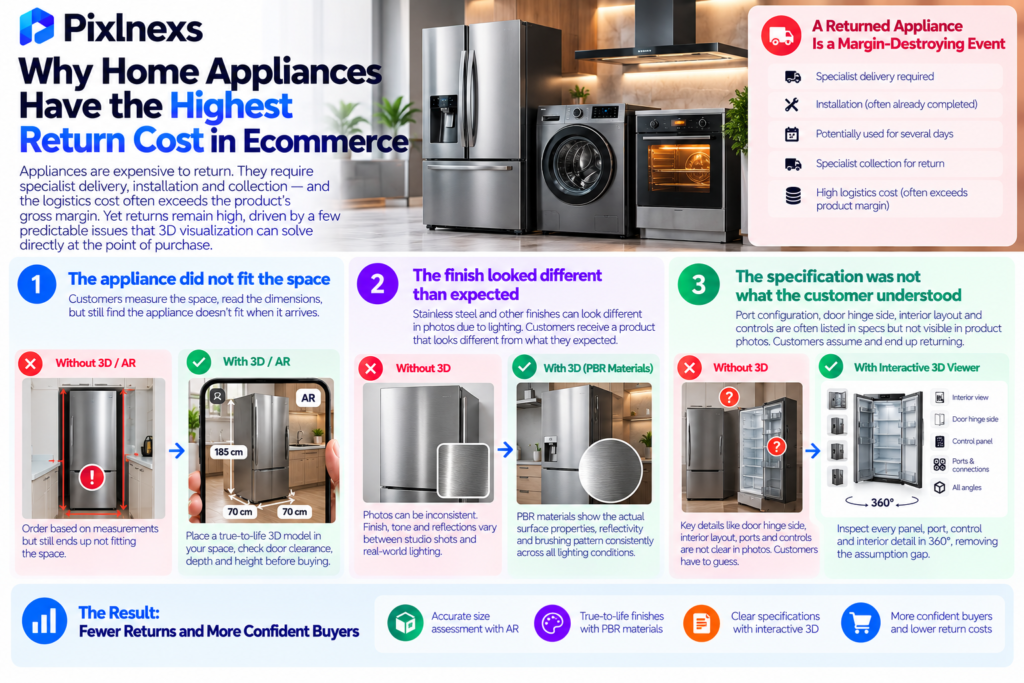
Appliances are not fashion customers do not return them lightly. When a refrigerator is returned, it has usually already been delivered by a specialist service, installed, potentially used for several days and then collected for return by another specialist delivery team. The logistics cost of an appliance return often exceeds the product’s gross margin entirely. A returned refrigerator is not a restocking challenge it is a margin-destroying event.
And yet appliance return rates remain high, concentrated in specific, entirely predictable causes. Understanding exactly why appliances get returned is the starting point for understanding why 3D visualization solves the problem more directly than any other intervention.
The Three Return Causes That 3D Directly Addresses
Cause 1: The appliance did not fit the space. This is the dominant return driver for large appliances refrigerators, washing machines, dishwashers, range cookers, air conditioning units. The customer measured the space, read the dimensions on the product page, ordered the appliance and discovered on delivery that the dimensions they read did not translate correctly to the space they measured. Either their measurement was wrong or the spatial translation from a number on a page to a physical object in a kitchen is harder than it looks.
AR placement removes this translation requirement entirely. A customer who places a true-to-life 3D model of a refrigerator in their kitchen using AR on their phone, checks the door swing clearance, confirms the depth against the counter edge and sees the height against the cabinet above that customer has done the measurement in visual, spatial terms rather than arithmetic ones. The “it didn’t fit” return is prevented at source.
Cause 2: The finish looked different than expected. Stainless steel in particular is notorious for photographing inconsistently the degree of brushing direction, the warmth or coolness of the tone, the specular response under different lighting all vary significantly between the studio photograph and the real product in a customer’s kitchen. A customer who orders based on a photograph of stainless steel and receives an appliance that looks subtly different from the photograph has a rational complaint even if the specification was technically accurate.
A 3D model with correctly calibrated PBR metallic and roughness maps renders the stainless steel’s actual surface properties its reflectivity, its brushing pattern, its tonal response under light more consistently than a photograph because the lighting is standardized rather than studio-variable. Finish-driven returns decrease when the pre-purchase visual more accurately represents the real product.
Cause 3: The specification was not what the customer understood. Port configuration on smart appliances, door hinge side, interior layout and capacity, control panel placement, exhaust direction on range hoods these details are often listed in the specification table but not visible in the product photography. A customer who assumed the fridge freezer had a reversible door hinge or who assumed the dishwasher opened into a different space than it actually does, returns based on a specification that was never correctly communicated.
A 3D viewer that lets the customer inspect every panel, every port, every door and every control of the appliance in full 360-degree rotation removes the assumption gap. The customer either sees the information they need in the viewer or determines it is not visible and asks before buying rather than assuming and returning.
For our full analysis of how 3D product visualization addresses these return drivers across product categories, see our guide on reducing ecommerce returns with 3D product visualization.
How 3D Models for Home Appliances Are Built
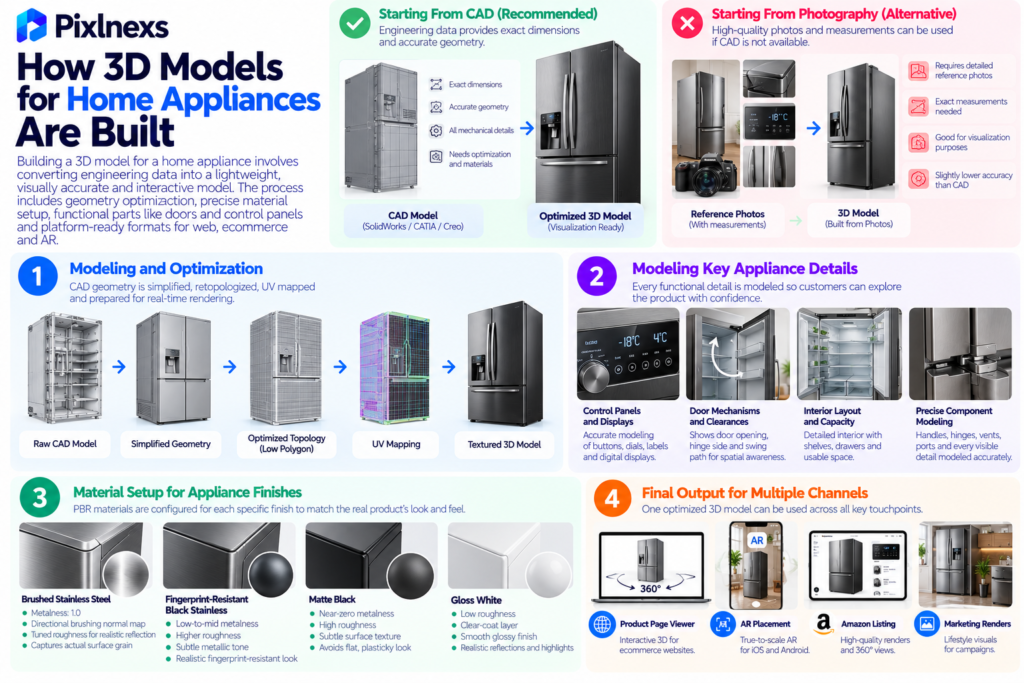
Building a 3D model for a home appliance is more technically demanding than building one for a simple consumer product and understanding why helps brands set the right brief, choose the right production partner and evaluate the quality of what they receive.
Starting From CAD vs Starting From Photography
Most home appliance brands have CAD data. The engineering team that designed the product built it in a CAD system SolidWorks, CATIA, Creo or similar. That CAD data is geometrically accurate to the exact dimensions of the real product, which makes it the ideal starting point for a visualization model.
The challenge is that CAD geometry is not visualization-ready. CAD models contain every internal component, every fastener, every mechanical detail necessary for engineering which means a typical appliance CAD file has millions of polygons and no material or texture information. Converting a CAD model for visualization involves simplification (removing interior components not visible in the final model) retopology (rebuilding the external surface with efficient polygon topology) UV mapping and material assignment.
Starting from CAD has a significant accuracy advantage over starting from photography alone: the dimensions are exact, the geometry is correct and the surface is mathematically defined rather than interpreted from a photograph. For appliances where dimension accuracy directly determines AR placement value, starting from CAD is strongly preferred.
If CAD data is not available, a high-quality model can be built from detailed reference photography with exact measurements supplied in the brief. The accuracy is lower than a CAD-based model for fine geometric details but sufficient for visualization purposes when measurements are precise.
Modeling the Key Appliance-Specific Details
Home appliances have a set of features that standard product modeling often shortchanges but that customers specifically look for in a 3D viewer:
Control panels and displays. A washing machine’s control panel, a refrigerator’s digital display, an oven’s dial layout these are among the first things a customer looks at when evaluating an appliance. In a 3D viewer, they can zoom into the control panel and read every label, which is often impossible from the product photograph. The labels and markings on the control panel must be modeled and textured accurately rather than treated as background detail.
Door mechanisms and clearances. How the door opens, where the hinge is, how far it swings before it hits a wall these are the spatial questions that drive size-related returns. A model that shows the door in both closed and open positions or that allows the viewer to see the door swing path, provides the spatial information a customer needs to avoid a return.
Interior layout and capacity visualization. For refrigerators, ovens and dishwashers, interior layout is a purchase factor the number and position of shelves, the usable capacity, the way the internal space is divided. A model that shows the interior layout from the open-door view gives customers the information that the exterior photography alone cannot communicate.
Surface finish detail and texture. Stainless steel brushing direction, the grain of matte black coatings, the reflectivity of glossy white surfaces these are the finish properties that photography handles inconsistently and that a correctly materialed 3D model handles more reliably. PBR materials for appliances must capture the correct metalness, roughness and normal-map surface detail for each finish to render credibly.
Material Setup for Appliance Finishes
Appliance finishes present specific challenges in PBR material setup:
Brushed stainless steel requires a normal map that captures the directional brushing pattern, a metalness value of 1.0 and a roughness value tuned to the specific brushing coarseness of the real product typically in a range that produces a directional, slightly diffuse reflection rather than a mirror-like or fully matte one. The roughness value is what distinguishes different grades of stainless finish and getting it wrong is what produces models that look generically metallic rather than specifically like the product.
Fingerprint-resistant black stainless has a very specific tonal quality neither black nor standard stainless, with a low-reflectivity semi-metallic character. It requires a dark base color with low-to-mid metalness and a roughness value higher than standard stainless.
Matte black requires a near-zero metalness and high roughness, with a subtle normal map for the coating texture if the surface has any grain. Without the coating normal detail, matte black surfaces read as flat and plasticky.
Gloss white requires low roughness with a strong clear-coat layer on top of the base color without the clear-coat, white appliances look chalky rather than smooth and glossy.
Getting these material values correct for the specific product finish rather than using generic “stainless steel” or “matte black” presets is what separates a model that looks like the product from a model that looks like a generic appliance of the same color category.
How 3D Models for Home Appliances Serve Multiple Channels
One of the strongest commercial arguments for investing in high-quality appliance 3D models is that the same asset serves an unusually wide range of downstream channels more than almost any other product category.
| Use Case | What the 3D Model Delivers | Previous Approach |
|---|---|---|
| Brand website product page | Interactive 3D viewer rotate, zoom, inspect every surface | Static photo gallery, 5–8 angles |
| AR placement on mobile | True-to-life scale placement in customer’s space | Not available with photography |
| Amazon 3D listing | GLB file submitted through Brand Registry 3D program | Standard Amazon photography pack |
| Retailer portal submission | 3D asset file submission to Best Buy, John Lewis, Currys | Photography pack + specification sheets |
| Marketing render library | Any angle, any background, any lighting rendered on demand | Re-shoot or re-request from photography studio |
| Social media and advertising | Animated product renders, feature highlight videos | Filmed video content or static photography |
| Service and installation documentation | Exploded view, assembly sequence, service access illustrations | Technical illustration from CAD drawings |
The Marketing Render Library Advantage
Traditional appliance photography requires booking a studio, transporting the product, staging the environment and shooting the angles needed for the current campaign. If a new campaign needs a different angle, a different background or a different lighting style, a new shoot is required.
A 3D model replaces this with an on-demand render library. Any angle, any environment, any lighting setup can be rendered from the same source model at any time without a studio, without the product being physically present and without coordinating a new production session. For brands launching a new appliance, the 3D model built for the product page viewer simultaneously becomes the source for every hero image, lifestyle render, campaign visual and social content asset the marketing team needs from launch and for the lifetime of the product.
Variant Finish Generation From One Base Model
For appliance ranges that come in multiple finishes stainless steel, black stainless, white, slate the base geometry is identical across all variants. Only the material changes. A correctly built 3D model allows all finish variants to be generated as material swaps on the same base geometry, rather than requiring a separate model per finish.
For a range with three finish options, this reduces the modelling cost by roughly two-thirds compared to building three separate models the geometry and UV work is done once and three sets of materials are applied to it. Each finish variant produces its own GLB file for platform submission but the production cost per variant is a fraction of the original model cost.
AR Placement for Home Appliances: The Spatial Commerce Use Case
AR placement is more valuable for large home appliances than for almost any other product category because the spatial question will this fit in my kitchen, my laundry room, my utility space? is the specific information gap that drives the most return volume.
How AR Placement Works for Large Appliances
On an AR-capable iPhone, tapping the AR button on an appliance product page opens the camera, detects the kitchen floor (or the floor space near the installation point) and places the appliance at true-to-life scale anchored to that surface. The customer can walk around the virtual appliance, check the door swing clearance against the adjacent cabinet, confirm the depth against the counter edge and see the height against the wall above.
On Android, the same experience is delivered through Google’s Scene Viewer using the GLB file directly.
Neither requires an app download. Both work through the browser on any modern iOS or Android device.
Why Scale Accuracy Is Non-Negotiable for Appliance AR
An appliance that appears at incorrect scale in AR gives the customer misleading spatial information at exactly the moment they are deciding whether to buy. A refrigerator that appears 5 centimeters narrower than its real dimensions will fit into a gap in the AR view that it would not fit into in reality. A customer who confirms the fit in AR and then discovers on delivery that the appliance does not actually fit has been misled by the tool that was supposed to prevent this exact problem.
For appliance AR to deliver its value, the model must be built to exact real-world dimensions which is why CAD-based models are strongly preferred for large appliances over photography-based models. A CAD-derived geometry has mathematically correct dimensions; a photography-based model has dimensions that are as accurate as the reference photographs and measurements allow.
For our complete guide on verifying AR placement scale across devices before going live, see our article on how to test 3D and AR on product pages before launch.
3D Models for Home Appliances: Implementation on Your Sales Channels
Implementing Appliance 3D Models on Your Brand Website
For brand websites on Shopify, uploading the GLB to product media activates the native 3D viewer and AR handoff automatically. For custom-built brand storefronts, the open-source <model-viewer> web component handles 3D rendering and AR handoff for both iOS and Android from a standard HTML embed.
For our complete guide to embedding a 3D product viewer on any website platform including Shopify, WooCommerce and custom storefronts, see our article on 3D product viewer embed guide: how to add an interactive viewer to any website.
Submitting Appliance 3D Models to Amazon
Amazon’s 3D product display program, now open to brand-registered third-party sellers, supports appliance categories including kitchen appliances, small domestic appliances and some large appliance categories. The submission process requires a compliant GLB file meeting Amazon’s technical specifications file size limit, correct scale, PBR materials, no baked lighting.
For our full guide to the Amazon 3D submission process including technical requirements and common rejection reasons, see our article on how to add interactive 3D to Amazon product listings.
GLB File Requirements for Shopify Appliance Listings
For Shopify specifically, appliance GLB files face the additional challenge of file size a detailed refrigerator or washing machine model with multiple material maps can easily reach 20MB or more without optimization. Shopify’s practical performance ceiling (under 15MB for acceptable mobile load speed, under 5MB for optimal mobile performance) requires meaningful optimization for complex appliance models.
The optimization tools and techniques KTX2 texture compression, Draco geometry compression, texture resolution reduction are the same for appliances as for any other product category but the starting file sizes are typically larger, making the optimization pass more critical. For our complete guide to GLB file requirements and optimization for Shopify.
What to Include in a 3D Model Brief for Home Appliances
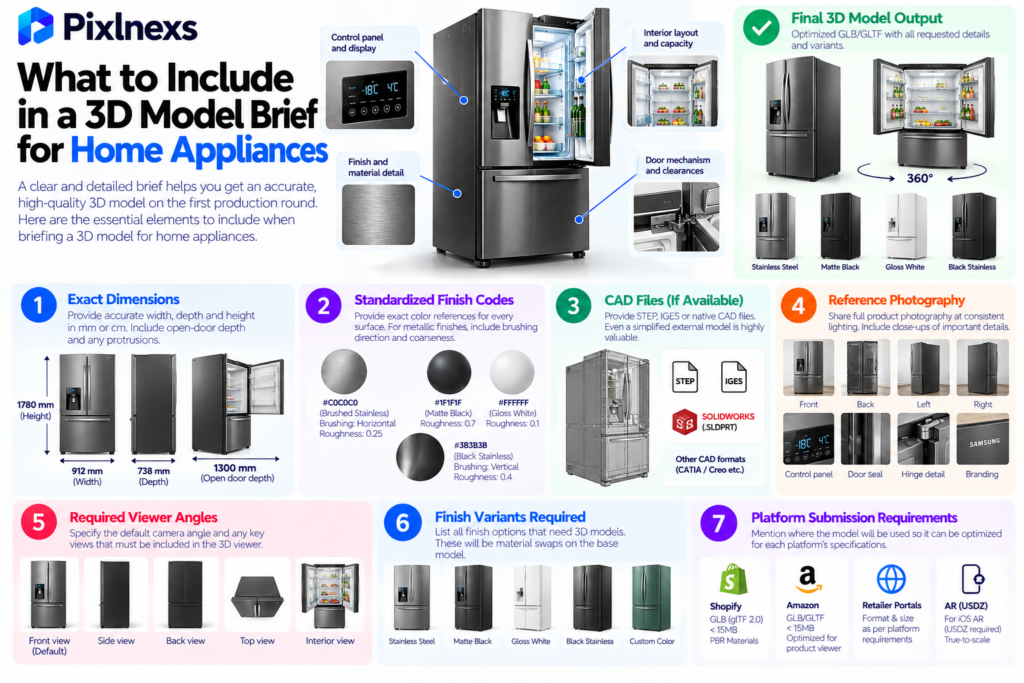
A well-structured brief is the single most important factor in getting a high-quality appliance 3D model on the first production round. Revision cycles on complex appliance models are expensive getting the brief right before production begins prevents most of them.
Essential Brief Elements for Appliance 3D Models
Exact dimensions. Width, depth and height in millimeters or centimeters. For appliances with door or drawer protrusions, the open-door depth. These are not optional they determine AR accuracy and customer trust in the spatial information the model provides.
Standardized finish codes. Hex, RGB or Pantone for every surface color and finish. For metallic finishes, a description of the brushing direction and coarseness alongside the color reference. “Stainless steel” is not a sufficient brief there are dozens of stainless steel finishes that look meaningfully different from each other.
CAD files if available. STEP, IGES or the native CAD format. Even a simplified CAD export that covers the external surfaces only is more useful than photography alone.
Reference photography. Full-circumference photography at consistent lighting every 45-degree angle minimum, plus close-up shots of the control panel, the door seal, the hinge detail and any branded markings.
Specification of required viewer angles. The default camera position in the 3D viewer should show the appliance from its most compelling commercial angle. Specify this rather than leaving it to the production team to decide.
Finish variants required. All finish options that need GLB files each variant will be a material swap on the base geometry, not a separate model but all variants need to be briefed upfront rather than added after delivery.
Platform submission requirements. Which platforms will the model be submitted to Shopify, Amazon, retailer portals? Each has specific technical requirements that inform the optimization targets for the final file.
Conclusion
The case for 3D models for home appliances is built on two compounding arguments: it directly prevents the most expensive category of ecommerce returns in a product segment where return costs are uniquely severe and the same production investment serves more downstream channels and use cases than 3D in almost any other product category.
The brand website viewer, the Amazon 3D listing, the retailer portal submission, the marketing render library, the social animation library and the AR placement experience all run from the same source model. Once the model exists built correctly to exact dimensions, with calibrated finishes and validated scale every downstream use is a derivative of that investment rather than a new production.
The starting point is the highest-return appliance SKU in your catalog. Commission a model built to the brief standards above, deploy it on your product page with AR enabled, measure the before-and-after return rate over 60 to 90 days and scale from validated results.
Ready to Build 3D Models for Your Home Appliance Range?
Pixlnexs builds appliance 3D models from CAD data or detailed reference photography exact dimensions, calibrated finish materials and optimized for every platform your products are sold on.
Get a Quote for Appliance 3D Models Talk to Our TeamFrequently Asked Questions
Why Do Home Appliances Get Returned at High Rates in Ecommerce?
The dominant non-defect return causes for large appliances are size mismatch (the appliance does not fit the intended installation space) finish mismatch (the surface finish looked different from the product photography) and specification confusion (a specific feature or interface detail was not as the customer assumed from the product listing). All three are information failures that occur before the purchase, not product failures that occur after it and all three are directly addressable with accurate 3D visualization and AR placement.
What Is the Difference Between a 3D Model Built From CAD vs Photography for Appliances?
A CAD-based model is built from the engineering data that defines the product the dimensions are mathematically exact, the geometry matches the manufactured product precisely and the surface is the actual designed surface rather than an interpretation of a photograph. A photography-based model is built by a modeler interpreting photographs and supplied measurements it is highly accurate for visualization purposes but lacks the geometric precision of a CAD derivation. For large appliances where AR placement accuracy determines whether a customer can trust the spatial information the model provides, CAD-derived geometry is strongly preferred.
Can One 3D Model Cover Multiple Finish Variants of the Same Appliance?
Yes the base geometry is built once and material sets for each finish variant are applied to it. A refrigerator range offered in brushed stainless, black stainless and white requires one geometry build and three material setups, with a separate GLB file exported for each variant. This significantly reduces the per-finish production cost compared to building three separate models.
How Long Does It Take to Build a 3D Model for a Large Home Appliance?
A standard kitchen appliance (refrigerator, washing machine, dishwasher) built from supplied CAD data or detailed reference photography with exact dimensions typically takes five to ten working days for the base model plus one to two additional days per finish variant. Complex appliances with multiple openable components, detailed interior layouts or custom surface textures take longer. Having complete reference materials and a clear brief ready before production begins is the most reliable way to keep timeline within estimate.
What File Format Is Required for Appliance 3D Models on Ecommerce Platforms?
GLB the binary packaging of glTF 2.0 is the required format for web product viewers, Shopify native 3D media, Amazon’s 3D listing program and most retailer portal 3D submissions. USDZ is additionally required for iOS AR Quick Look on iPhone and iPad. Both files are generated from the same 3D source model. For a full explanation of the GLB format and how it compares to glTF and other formats, see our guide on GLB vs glTF: the real difference.
Does AR Placement Actually Work for Large Appliances Like Refrigerators?
Yes AR placement for large appliances is one of the highest-value AR use cases specifically because the spatial fit question is so consequential for this category. A customer who can place a refrigerator in their kitchen at true-to-life scale, check the door swing clearance and confirm the depth against the counter before buying is getting spatial information that no amount of written dimensions on a specification table provides. The key requirement is correct real-world scale in the model the value of the feature is entirely dependent on the model appearing at the actual product dimensions, not an approximation.
Can a 3D Model of an Appliance Show the Interior Layout?
Yes. A 3D model can include the interior of an appliance shelves, drawers, interior walls, capacity divisions as a separate scene state or as content visible from the open-door view. For refrigerators and ovens in particular, interior layout is a purchase factor and a model that shows the interior from the open position provides information that exterior photography cannot. This adds to the modeling scope but is often worth including for high-consideration appliances where interior configuration drives the purchase decision.
What Should I Look for When Choosing a 3D Production Partner for Appliances?
Key questions: do they have specific experience with appliance models and CAD data conversion? Do they build to exact supplied dimensions rather than approximating from photographs? How do they handle metallic and finish accuracy do they work from specification data or match against photographs? What is their pre-delivery QA process for scale accuracy and material quality? Can the same model serve your website, Amazon submission and retailer portal requirements? Do they support the full finish variant range from one geometry?










Leave a Reply