
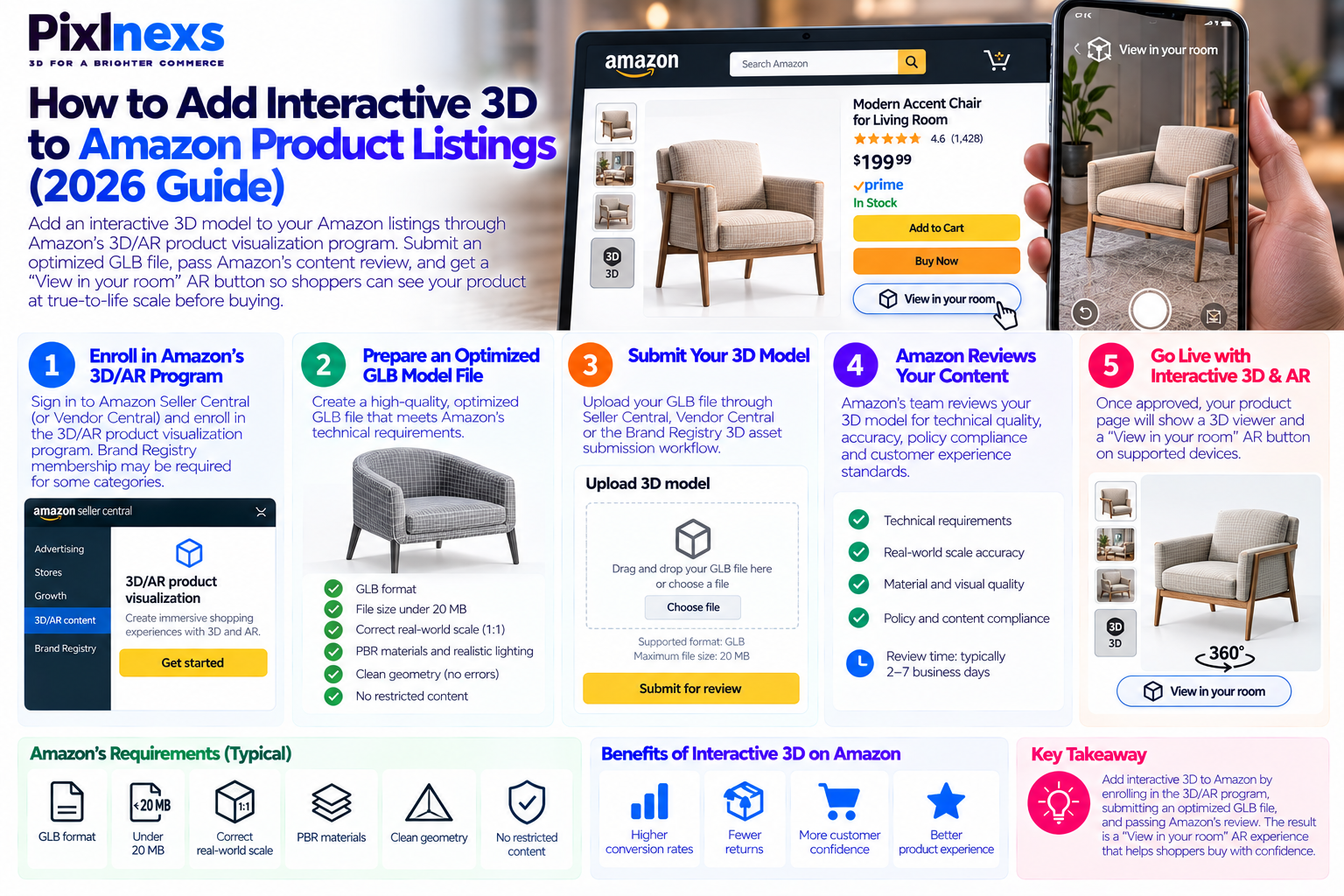
Quick answer: How to add interactive 3D to Amazon product listings in 2026, you need to enroll in Amazon’s 3D/AR product visualization program, prepare an optimized GLB model file meeting Amazon’s technical specifications (typically under 20MB, correct real-world scale, PBR materials, no restricted content) submit through Brand Registry or your vendor/seller central account, and pass Amazon’s content review. The result is a “View in your room” AR button on supported product detail pages that lets shoppers place your product at true-to-life scale in their own space using their phone camera before buying. Amazon’s own data shows 3D/AR listings convert at significantly higher rates and generate fewer returns than standard photo-only listings.
By Bali Balaji, Pixlnexs Studio. Pixlnexs produces Amazon-ready 3D models for brands across furniture, consumer electronics, packaged goods and home décor, and this guide reflects the technical requirements, submission process and optimization practices our team applies to every Amazon 3D project we deliver.
Key Takeaways
- Amazon’s 3D/AR feature is available to brand-registered sellers and vendor central accounts in supported categories eligibility confirmation is the first step before any production work begins.
- The GLB file format is Amazon’s required delivery format for 3D product models. The file must meet Amazon’s specific polygon, texture and file size requirements, which differ from general web optimization targets.
- Correct real-world scale in the model is non-negotiable for Amazon 3D an AR placement that shows a product at the wrong size undermines customer trust and increases returns.
- Amazon’s content review process checks technical compliance and visual accuracy before the 3D asset goes live plan for a review cycle of several business days.
- Brands using 3D on Amazon report measurable improvements in conversion rate and return rate, particularly for furniture, home décor, large appliances and consumer electronics.
- A single GLB file produced for Amazon can also serve your Shopify store, your own website AR viewer and your social media 3D content making the production investment a multi-platform asset, not an Amazon-only cost.
Why Amazon 3D Listings Matter for Sellers in 2026
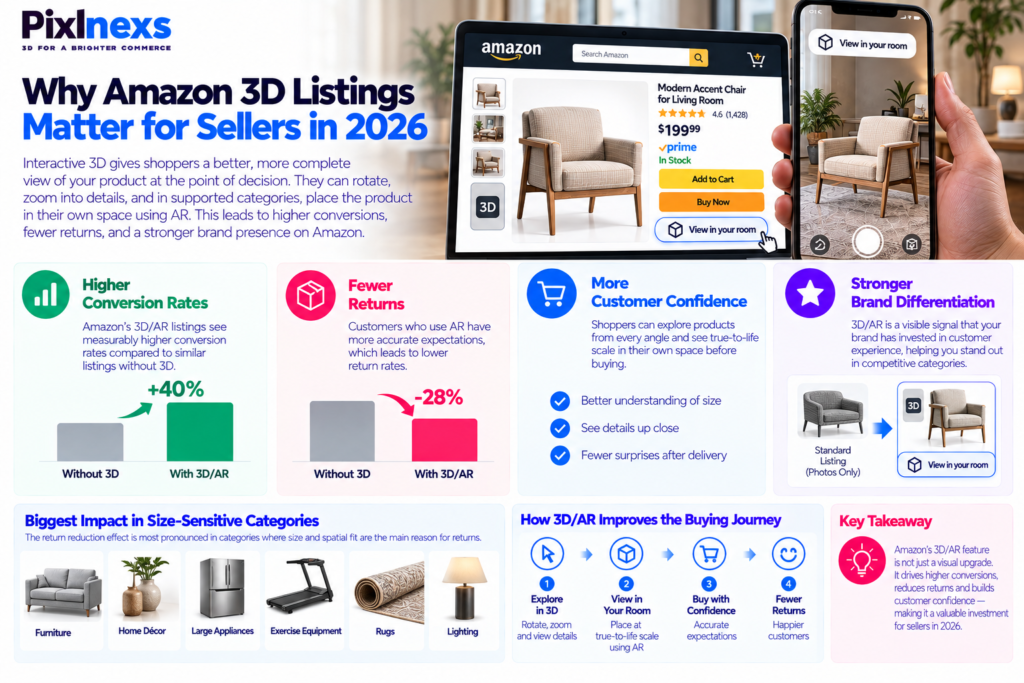
Amazon is the world’s largest ecommerce marketplace, and the decision a shopper makes on a product detail page is determined almost entirely by the information available on that page. For most product categories, that information has historically been limited to static photos, a bullet-point feature list and customer reviews.
Interactive 3D changes the information available at the point of decision in a fundamental way. Instead of choosing between four or five static images shot from angles the seller chose, a shopper can rotate the product in any direction, zoom into details that matter to them, and in AR-enabled categories, place the product at true-to-life scale in their own room before making a purchase commitment.
For sellers competing in crowded categories on Amazon, the 3D/AR feature is increasingly a differentiation signal a visible indication that a brand has invested in its customer experience and the conversion and return-rate data behind it makes a strong business case independently of the positioning benefit.
What Amazon’s Own Data Shows About 3D and AR Listings
Amazon has published data from its own 3D/AR program showing that product pages with the “View in your room” AR experience see measurably higher conversion rates compared to equivalent listings without it, and that return rates are lower for products purchased after an AR interaction. The mechanism is the same as in every other ecommerce AR context: a customer who has placed a product in their own space at real scale and seen how it actually looks in that context has a more accurate expectation when the product arrives, and accurate expectations mean fewer disappointments and fewer returns.
For furniture, home décor and large appliances specifically categories where size and spatial fit are the dominant return drivers the return reduction effect of AR is particularly pronounced. A customer who used AR to confirm a sofa fits in their living room before buying is not going to return it because it was the wrong size.
How Amazon’s 3D and AR Product Visualization Program Works
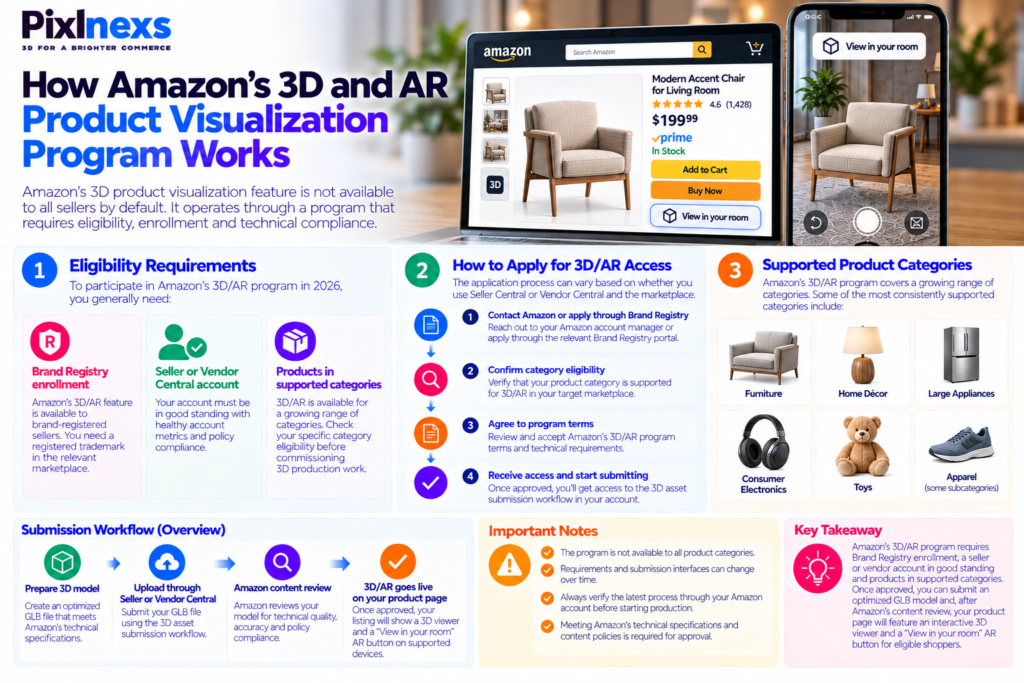
Amazon’s 3D product visualization feature is not available to all sellers by default it operates through a program that requires eligibility, enrollment and technical compliance.
Eligibility Requirements for Amazon 3D Listings
To participate in Amazon’s 3D/AR program in 2026, you generally need:
- Brand Registry enrollment. Amazon’s 3D/AR feature is available to brand-registered sellers. If you are not enrolled in Brand Registry, that is the prerequisite step before applying for 3D/AR access. Brand Registry requires a registered trademark in the relevant marketplace.
- A Vendor Central or Seller Central account in good standing. Account health metrics, policy compliance and category eligibility all factor into access decisions.
- Products in supported categories. Amazon’s 3D/AR program covers a growing range of categories but is not universally available for every product type. Furniture, home décor, large appliances, consumer electronics, toys and some apparel subcategories have been among the most consistently supported. Confirm your specific category’s eligibility before commissioning 3D production work.
How to Apply for Amazon 3D/AR Access
The application path varies slightly depending on whether you sell through Seller Central or Vendor Central and which marketplace you are targeting. The general process involves contacting your Amazon account manager or applying through the relevant Brand Registry portal, confirming category eligibility, agreeing to the program’s terms and technical requirements, and receiving access to the submission workflow.
Because Amazon’s program details, category availability and submission interfaces change periodically, always verify the current process directly through your Amazon account before starting production the requirements as of the date of your application may differ from any guide written before that date, including this one.
Amazon’s Technical Specifications for 3D Model Files
Meeting Amazon’s technical requirements is the step that determines whether a model passes or fails content review. These specifications exist to ensure that 3D content on Amazon’s platform performs consistently across the range of devices customers use and renders accurately enough to be trusted as a product representation.
File Format: GLB Is the Required Standard
Amazon requires GLB the binary packaging of the glTF 2.0 standard as the delivery format for 3D product models. GLB packages geometry, materials, textures and animations into a single file, which makes it the right choice for platform delivery because it eliminates the broken-texture-path risk that comes with multi-file formats.
For a full explanation of why GLB is the standard for web and platform 3D delivery and how it relates to glTF, see our guide on GLB vs glTF: the real difference and when to use each.
File Size and Polygon Budget Requirements
Amazon’s specific technical limits change over time and vary by category, so treat the following as directional guidance and verify against Amazon’s current published specifications at the time of submission:
| Technical Requirement | Amazon Guidance (Verify Current Specs) | Why It Matters |
|---|---|---|
| File format | GLB (glTF 2.0) | Single file, no missing textures, platform-compatible |
| Maximum file size | Typically under 20MB (verify current limit) | Controls load time on mobile devices and customer data usage |
| Polygon count | Category-specific limits (verify per category) | Ensures real-time performance on mid-range mobile devices |
| Texture resolution | Typically 1K–2K per map (verify current limit) | Balances visual quality against file size and load performance |
| Real-world scale | Required must match product’s actual dimensions | AR placement accuracy depends entirely on correct scale |
| PBR materials | Required metallic-roughness workflow | Ensures consistent material rendering under different lighting |
| Baked lighting | Not permitted in albedo texture | Prevents double-shadow artifacts when Amazon’s viewer lights the model |
Why Real-World Scale Is the Most Critical Requirement
Of all the technical requirements, correct real-world scale is the one that directly determines whether the 3D/AR experience delivers its primary customer value. Amazon’s AR feature places the product in the customer’s physical space and if the model is the wrong size, the entire premise of “see it in your room before you buy” fails.
A sofa that appears at coffee-table size, a lamp that looks miniature, or a television that appears smaller than the customer’s actual wall space all undermine customer trust in Amazon’s AR feature and, by extension, in the seller’s listing. Amazon reviews scale compliance as part of its content review, and incorrect scale is a common reason for submission rejection.
For our full guide on how to verify AR placement scale across devices before submitting to any platform, see our article on <a href=”https://blog.pixlnexs.com/how-to-test-3d-ar-product-pages-before-launch/”>how to test 3D and AR on product pages before launch</a>.
Step-by-Step: How to Add Interactive 3D to Amazon product Listing
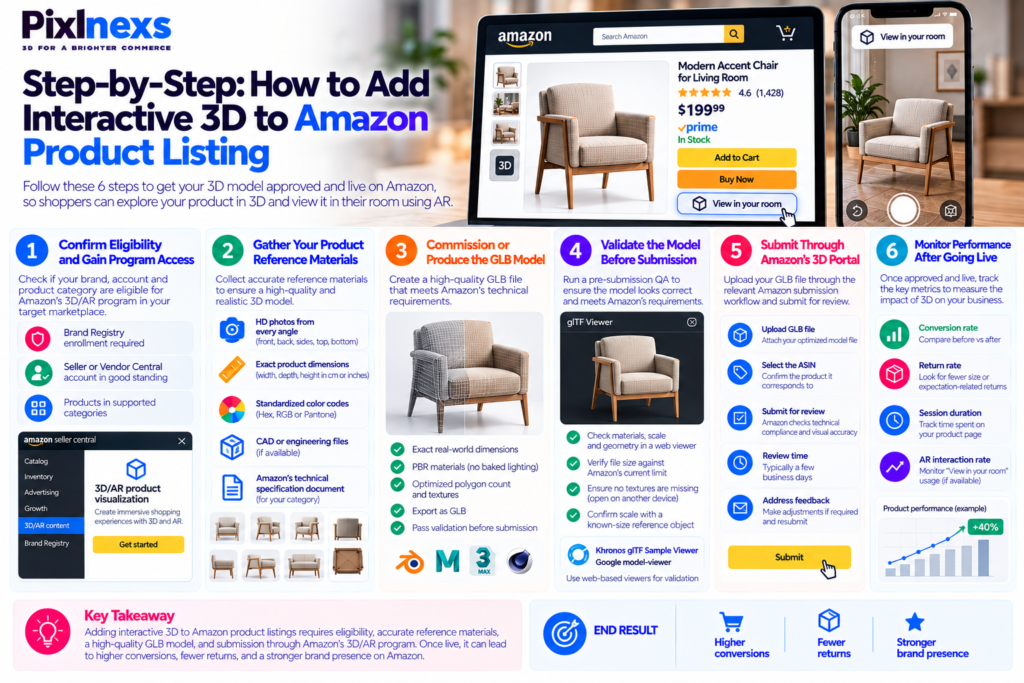
Step 1: Confirm Eligibility and Gain Program Access
Before commissioning any 3D production work, confirm that your account, your brand and your product category are eligible for Amazon’s 3D/AR program in your target marketplace. Production work that cannot be submitted because of eligibility barriers is wasted investment.
Contact your Amazon account manager or navigate to the relevant Brand Registry or Seller Central section for 3D content submission in your marketplace. Get written confirmation of your eligibility before proceeding.
Step 2: Gather Your Product Reference Materials
A well-built 3D model requires accurate input. Collect and prepare:
- HD photos from every angle front, back, both sides, top and bottom at minimum.
- Exact product dimensions width, depth and height in real-world units (centimeters or inches). For round items, diameter and height. These are what determine AR scale accuracy.
- Standardized color codes Hex, RGB or Pantone for every surface color. Do not rely on photos alone for color reference screen color rendering is inconsistent and photos are frequently color-graded away from the real product shade.
- CAD or engineering files, if available. Not required, but they improve dimensional accuracy and reduce modeling time.
- Amazon’s current technical specification document for your category. Download this from your Amazon account or request it from your account manager.
Step 3: Commission or Produce the GLB Model
This is the production stage. Whether you are building the model in-house or commissioning it from a specialist studio, the deliverable is a GLB file meeting Amazon’s technical specifications.
Key requirements to confirm with whoever produces the model:
- The model is built to the product’s exact real-world dimensions
- PBR materials are used throughout with no baked lighting in the albedo texture
- Polygon count and texture resolution are within Amazon’s limits for the category
- The file is exported as GLB and passes basic validation before submission (tools like the Khronos glTF Validator can flag structural issues before Amazon’s review)
For our detailed explanation of how PBR materials and texture optimization work in production, see our guide on what game-ready and web-ready 3D models actually require.
Step 4: Validate the Model Before Submission
Before submitting to Amazon, run your own pre-submission QA:
- Open the GLB in a web-based viewer (such as the Khronos glTF Sample Viewer or Google’s model-viewer) and confirm materials, scale and geometry look correct
- Check file size against Amazon’s current limit for your category
- Verify that no textures are missing by opening the file on a different machine a self-contained GLB should work identically on any device
- Confirm scale by comparing the model against a known-size reference object in the viewer
Step 5: Submit Through Amazon’s 3D Content Portal
With a validated GLB and confirmed eligibility, submit through the relevant Amazon 3D content submission path for your account type. Attach the GLB file, confirm the ASIN it corresponds to and submit for content review.
Amazon’s review process checks both technical compliance and visual accuracy reviewers confirm that the model accurately represents the listed product. Plan for a review window of several business days and be prepared to address feedback if the model requires adjustments.
Step 6: Monitor Performance After the 3D Feature Goes Live
Once your 3D listing is approved and live, track the performance metrics that the feature is designed to move:
- Conversion rate on the 3D-enabled listing versus a comparable period before the feature was active
- Return rate on the product, specifically return reasons related to size, appearance or expectation mismatch
- Session duration and engagement rate on the product detail page
- “View in your room” interaction rate, if Amazon provides this data through your account reporting
How to Optimize Your Amazon 3D Model for Maximum Impact
Passing Amazon’s technical review and going live with a 3D model is the start, not the finish. The quality of the model determines whether the feature improves your conversion and return metrics or simply adds an underused feature to your listing.
Prioritize Material Accuracy Over Visual Flair
The most common mistake in Amazon 3D models is prioritizing visual impressiveness over material accuracy. A model that uses exaggerated lighting or material effects to look striking in a static render will look wrong in Amazon’s real-time viewer and will look wrong when placed in AR in a customer’s home.
Accurate materials the right roughness value so matte fabric reads as matte rather than glossy, the right metalness so chrome hardware reflects light correctly, the right base color calibrated to your actual product’s Pantone reference are what make a customer trust that the model represents the real product. Trust is what drives the conversion and return-rate impact.
Keep Texture Maps Clean and Compression-Friendly
Amazon’s file size limits require texture compression. Textures that are clean, well-organized and authored with compression in mind compress better without visible quality loss than textures that are noisy or poorly organized. Use lossless PNG for normal maps and roughness/metalness maps, and allow lossy compression on the albedo texture where the quality reduction is not visible at the resolution Amazon is displaying.
One Model Per ASIN, Not One Model for Multiple Variants
If your product has size variants a sofa that comes in a two-seat and a three-seat configuration, or a product available in multiple size options each variant needs its own 3D model built to that variant’s actual dimensions. Reusing a single model across size variants defeats the purpose of AR scale accuracy and will be flagged in Amazon’s content review if the model does not match the specific ASIN’s listed dimensions.
Color and finish variants can share a base model geometry with swapped material sets, since the geometry is identical only the surface properties change.
Using Your Amazon 3D Model Across Other Sales Channels
A GLB model produced to Amazon’s technical standards is also suitable for use across other ecommerce platforms and digital channels, making the production investment significantly more versatile than an Amazon-only cost.
Shopify and WooCommerce
The same GLB that passes Amazon’s review can be uploaded directly to a Shopify product listing as a 3D media type, activating Shopify’s built-in 3D viewer and AR handoff without additional optimization. For WooCommerce, a viewer plugin or the model-viewer web component serves the same function.
For our complete guide to adding a 3D viewer to a Shopify product page, see our article on how to add interactive 3D to Shopify product listings.
Social Media and Advertising
A GLB file can be used to generate rendered still images and short animated turntables from any angle without a photoshoot. These assets serve Instagram, Facebook, Pinterest, LinkedIn and paid advertising channels consistently, since they are rendered from the same source as the Amazon listing and maintain visual identity across platforms.
Your Own Website and AR Viewer
A web-based AR viewer using the open-source <model-viewer> component can serve the same GLB file on your brand’s own product pages, giving customers the same AR placement experience on your direct-to-consumer channel that they get on Amazon. For brands running both Amazon and DTC channels, this means one 3D production investment serving both simultaneously.
Reducing Returns Across All Channels
The return-reduction benefit of interactive 3D fewer returns from customers who used AR to confirm size, scale and appearance before buying applies across every channel where the model is used, not just on Amazon. For a detailed analysis of how 3D product visualization reduces return rates and the specific categories where the impact is largest, see our guide on reducing ecommerce returns with 3D product visualization.
Common Reasons Amazon 3D Submissions Are Rejected
Understanding why submissions fail before you submit saves time and avoids the frustration of a rejection cycle.
Incorrect Scale
The model renders at a size that does not match the product’s actual dimensions when placed in AR. The fix is always in the export settings the model needs to be re-exported with correct real-world unit settings, not re-modeled.
Baked Lighting in the Albedo Texture
The color texture contains pre-rendered shadows and highlights from an offline render. In Amazon’s real-time viewer, this produces incorrect double-shadow artifacts that immediately read as “fake.” The fix requires a clean albedo texture without lighting baked in, which typically means rebuilding the material from source textures.
File Size Over the Category Limit
The GLB exceeds Amazon’s size limit for the category. The fix is texture compression (KTX2 or JPEG compression on the albedo) Draco geometry compression, or reducing texture resolution ideally without visible quality loss at the resolutions Amazon’s viewer displays.
Model Does Not Accurately Represent the Listed Product
Geometry, materials or proportions differ significantly from the actual product. This is a content accuracy rejection rather than a technical rejection, and it requires the model to be revised to match the real product more closely.
Missing or Broken Geometry
Non-manifold geometry, inverted normal or holes in the mesh cause visual artifacts in Amazon’s viewer. These are modeling issues that need to be corrected at the source before re-export.
What to Look for in a 3D Modeling Partner for Amazon Listings
If you are commissioning 3D models from an external studio rather than building in-house, the quality of the partner determines the quality of the submission and the likelihood of passing Amazon’s review on the first attempt.
Key questions to ask a prospective 3D modeling partner:
- Have they produced models specifically for Amazon’s 3D/AR program, and can they share examples that have passed Amazon’s review?
- Do they build models to exact product dimensions from supplied measurements, or from photographs alone?
- How do they handle color accuracy do they work from standardized color codes or from photographic reference?
- What does their pre-submission QA process look like? Do they validate the GLB against Amazon’s requirements before delivering it?
- How do they handle revisions if the model is rejected by Amazon’s review?
- Can the same model be used on other platforms, or is it optimized only for Amazon?
For our full guide on what a good 3D model should include and how to assess quality before accepting a delivery, see our article on manual 3D modeling vs AI-generated 3D models.
Ready to Add Interactive 3D to Your Amazon Listings?
Pixlnexs produces Amazon-ready GLB models that meet technical review requirements on the first submission accurate dimensions, calibrated PBR materials and optimized file size for every product category.
Get a Quote for Amazon 3D Models Talk to Our TeamConclusion
Adding interactive 3D to Amazon product listings is one of the highest-leverage improvements available to brand-registered sellers in supported categories in 2026. The conversion and return-rate data is consistent: customers who interact with a 3D model before purchase buy more confidently and return less frequently, and the “View in your room” AR feature closes the spatial imagination gap that is responsible for the majority of non-defect returns in furniture, home décor and large appliance categories.
The process is straightforward when you approach it in the right order: confirm eligibility before commissioning production, gather accurate reference materials including exact dimensions and color codes, work with a production partner who has specific Amazon 3D experience, validate the GLB thoroughly before submission and plan for Amazon’s review timeline.
The production investment is most durable when the same model serves Amazon, your own website, your social media channels and your retail sales materials simultaneously a single well-built asset generating value across every channel rather than a single-platform cost.
Frequently Asked Questions
Which Amazon Sellers Can Use the 3D and AR Feature?
Amazon’s 3D/AR feature is available to brand-registered sellers and vendors in supported product categories. Eligibility requires Brand Registry enrollment and an account in good standing. Category availability varies by marketplace and changes over time, so confirm current eligibility directly through your Amazon account before beginning production.
What File Format Does Amazon Require for 3D Product Models?
Amazon requires GLB the binary packaging of the glTF 2.0 standard. GLB bundles geometry, materials and textures into a single file, which meets Amazon’s requirement for a self-contained 3D asset with no external dependencies. FBX, OBJ and other formats are not accepted for submission.
How Long Does Amazon’s 3D Content Review Take?
Amazon’s review timeline varies but typically takes several business days from submission. Plan for this window in your production and listing schedule. If a submission is rejected, the revision and resubmission cycle adds additional time, so building pre-submission QA into your production process is the most reliable way to minimize total timeline.
Does Adding 3D to an Amazon Listing Improve Search Rankings?
Amazon’s A9/A10 search algorithm does not directly use 3D content as a ranking factor. However, the conversion rate improvement associated with 3D-enabled listings has an indirect positive effect on search visibility, since conversion rate is one of the factors Amazon’s algorithm uses to rank product relevance. A listing that converts better after adding 3D tends to rank better over time.
Can I Use the Same 3D Model on Amazon and on My Own Website?
Yes and this is one of the strongest economic arguments for the production investment. A GLB model that meets Amazon’s technical requirements is also suitable for use on Shopify (as a native product media type) on WooCommerce (via a viewer plugin) on your own website (via the model-viewer component) and on social media as a source for rendered still images and animated turntables. One production pass serves all channels.
How Much Does It Cost to Produce a 3D Model for an Amazon Listing?
Production cost varies with product complexity, number of finish variants and whether usable CAD geometry exists. A simple consumer product with clean geometry and standard materials typically costs less than a complex product with multiple materials, intricate details or many size variants. The economic case is strongest when the same model serves Amazon, your own website, social media and printed marketing materials simultaneously the per-channel cost of a multi-use asset is significantly lower than the face value of the production.
What Happens if Amazon Rejects My 3D Model Submission?
Amazon provides feedback on why a submission was rejected. Common rejection reasons are incorrect scale, baked lighting in the albedo texture, file size over the category limit and visual accuracy issues. Most rejections are fixable at the export or material level without requiring the model to be rebuilt from scratch. A production partner who has experience with Amazon’s review process can typically diagnose and fix the issue on the first revision attempt.
How Do I Verify My 3D Model Is Scaled Correctly Before Submitting?
Open the GLB in a web viewer that shows real-world scale Google’s model-viewer and the Khronos glTF Sample Viewer both display models in a reference environment. Compare the on-screen model against a known-size object or use the viewer’s measurement tools if available. The model should appear at the same dimensions as the real product when compared to a reference object at the same scale. For a full pre-submission testing guide, see our article on how to test 3D and AR on product pages before launch.










Leave a Reply