
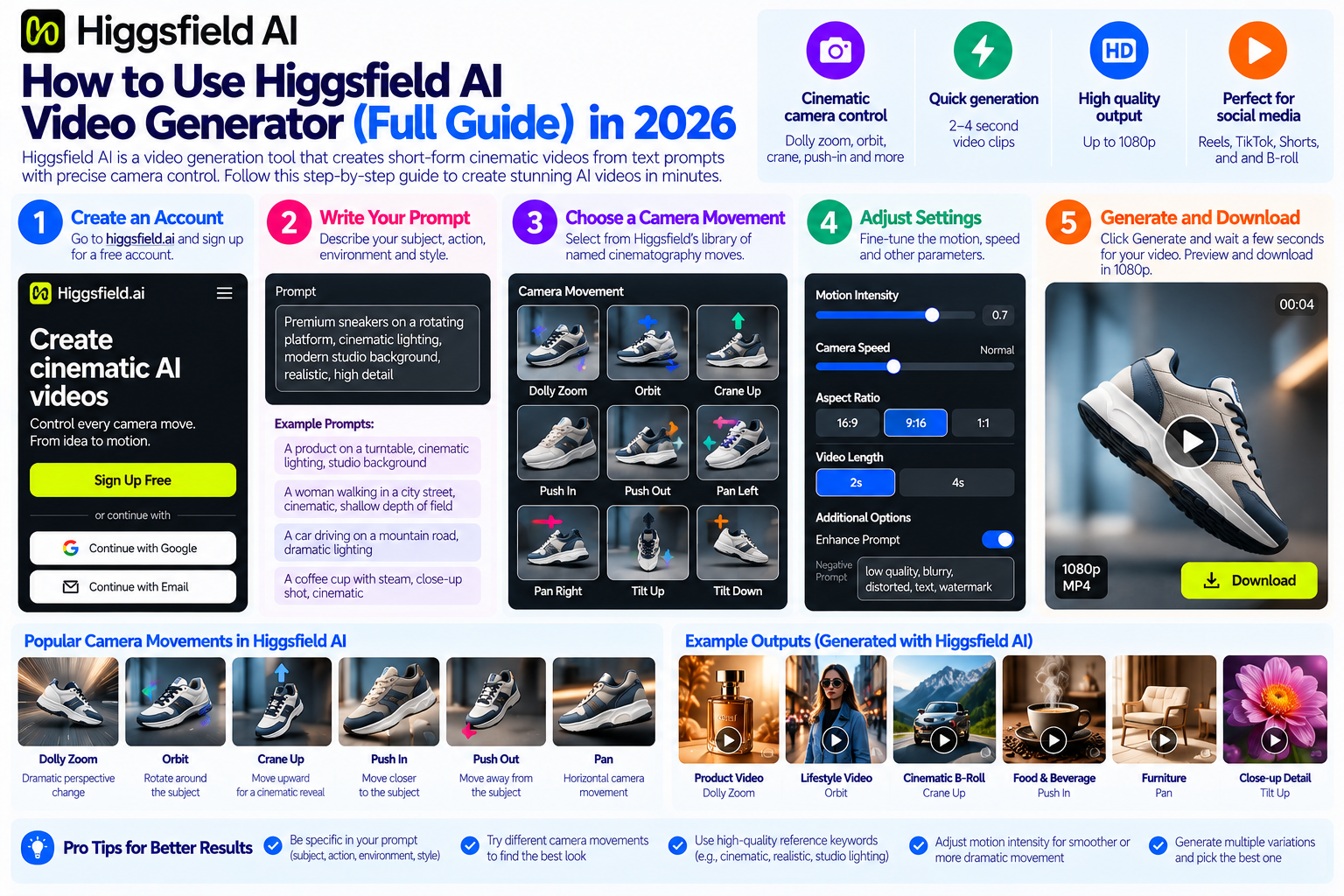
Quick Answer: Higgsfield AI is a video generation tool that produces short-form cinematic video clips from text prompts, with unusually fine control over camera movement including named cinematography moves like dolly zoom, orbital shot, crane up and push-in. To use it, create a free account at higgsfield.ai, write a subject-and-action prompt describing your scene, select a camera movement from its named motion library, adjust speed and intensity sliders, and generate. Output is typically a 2 to 4 second clip at 1080p, suitable for social media, advertising and B-roll.
Higgsfield’s differentiator is its camera control layer it is not the highest-fidelity generator available in 2026, but it is one of the most controllable for directing specific camera behavior around a subject, which makes it particularly useful for product-focused video content where the camera angle and motion are part of the creative brief.
By Bali Balaji, Pixlnexs Studio. Pixlnexs produces AI video content for brands, EdTech platforms and ecommerce businesses, and our team uses a range of AI video generation tools in production including Higgsfield for specific camera-controlled shot types. This guide reflects direct production use rather than a feature overview assembled from documentation.
Key Takeaways: How to Use Higgsfield AI Video Generator
- Higgsfield AI’s primary differentiator is cinematic camera movement control it offers a named library of camera moves (dolly zoom, orbital, push-in, crane, tilt) that most competing tools do not expose as controllable parameters.
- The tool generates short clips typically 2 to 4 seconds which are intended as B-roll building blocks rather than complete video productions. Longer video requires assembling multiple clips in a video editor.
- Prompt structure matters more in Higgsfield than in some competing tools because the camera movement and the subject description interact a vague subject prompt produces inconsistent results even when the camera movement is correctly specified.
- Higgsfield is not the highest-fidelity AI video generator currently available tools like Sora and Veo produce higher photorealism for certain content types but it is one of the most controllable for camera direction, which matters for professional and branded video use.
- The free tier allows a limited number of daily generations. Production use at volume requires a paid subscription. The output is commercially usable under Higgsfield’s terms, but always verify current licensing before using generated content commercially.
- Higgsfield’s output is strongest for environmental and abstract footage (cityscapes, nature, atmospheric backgrounds) and product-adjacent shots. It is less reliable for consistent human faces across multiple clips.
- For brands that need production-ready, brand-consistent video at scale, a professional AI video studio like Pixlnexs produces the quality and consistency that self-service tools currently cannot match but for rapid concept visualization and social B-roll, Higgsfield is a genuinely useful tool in the workflow.
What Is Higgsfield AI and How Does It Work
The Core Technology Behind Higgsfield AI Video Generator
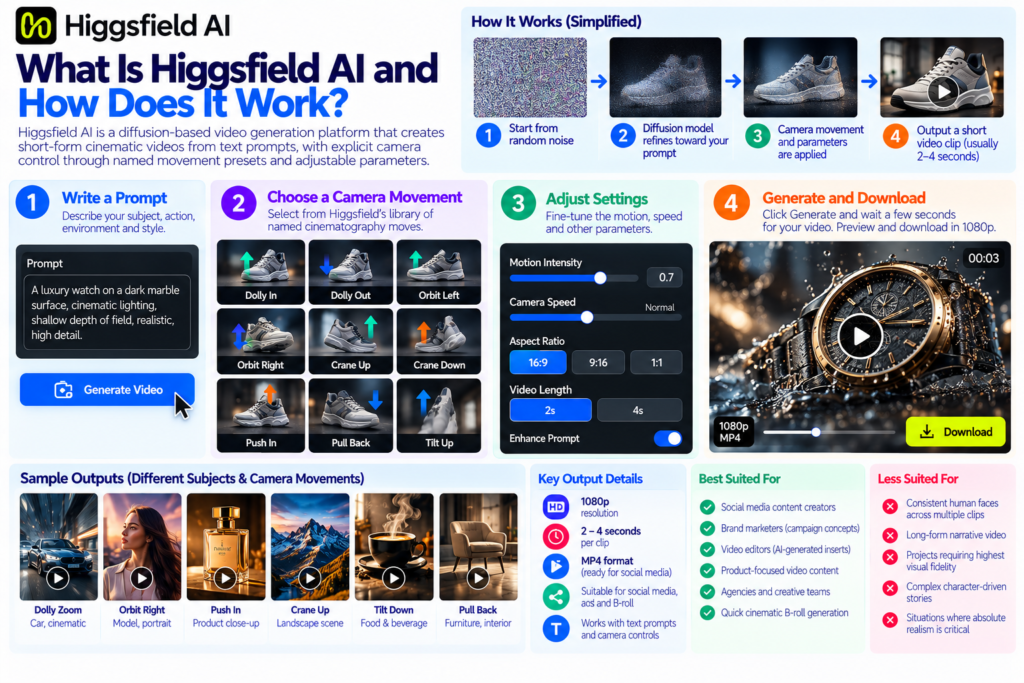
Higgsfield AI is a generative video platform built on a diffusion-based video generation model the same underlying technical category as Runway Gen-3, Pika Labs and Sora. Diffusion models generate video by starting from random noise and iteratively refining it toward an output that matches the text prompt, guided by the model’s understanding of how subjects, motion and camera behavior relate to language descriptions.
What distinguishes Higgsfield from other tools in this category is not primarily the base model’s output fidelity (which is competitive but not uniquely superior to alternatives in its price range) but its camera control abstraction layer. Most AI video generators allow users to describe camera movement in text “the camera slowly pushes in on the subject” which produces variable and unpredictable results because the model has to infer camera behavior from language. Higgsfield exposes camera movement as a separate, explicit control with named presets (Dolly In, Dolly Out, Orbital Left, Orbital Right, Crane Up, Crane Down, Push In, Pull Back, Tilt Up, Tilt Down and several others) that are applied as distinct motion parameters rather than interpreted from text.
This architecture makes Higgsfield predictable in a way that text-only camera description is not if you select Orbital Right, the camera will orbit to the right of the subject. The intensity and speed of the movement are separately adjustable, giving the user a degree of directorial control that more closely resembles a camera operator instruction than a text prompt interpretation.
What Higgsfield Generates
Higgsfield produces video clips at 1080p resolution, typically 2 to 4 seconds in duration per generation. The clips are rendered as MP4 files suitable for direct use in social media platforms or import into a video editing timeline for assembly into longer content.
The platform operates on a credit or subscription model the free tier provides a limited number of daily generations sufficient for exploration and testing, while paid tiers provide higher generation volume and in some cases access to higher quality output settings or longer clip durations.
Who Higgsfield Is Best Suited For
Higgsfield is most productive for: social media content creators who need cinematic B-roll quickly, brand marketers who want to rapidly prototype video concepts before committing to a full production, video editors who need AI-generated inserts for documentary or promotional edits, and developers or agencies who want a camera-controlled AI video component in a larger content pipeline.
It is less well-suited for: content requiring consistent human faces across multiple clips (AI face consistency remains a challenging problem for most generators including Higgsfield), long-form narrative video (the short clip format requires significant editorial assembly), and productions where the absolute highest visual fidelity is the primary requirement.
How to Set Up and Access Higgsfield AI Video Generator
Creating Your Higgsfield Account
Navigate to higgsfield.ai and click the sign-up option. Account creation accepts Google, Apple or email registration and does not require a credit card for the free tier. After account creation and email verification, you are taken directly to the generation interface.
The free tier begins with a set number of daily generation credits enough to meaningfully explore the tool and evaluate whether the output quality and camera control meet your use case requirements before committing to a paid plan.
Understanding the Higgsfield Interface
The main generation interface has four primary components: the prompt input field, the camera motion selector, the motion parameter sliders (speed and intensity) and the generation button. Secondary controls available in the interface depending on the current plan and feature availability include resolution options, clip duration selection, seed control for reproducibility and aspect ratio selection for different platform outputs.
The camera motion selector is the central UI element that differentiates Higgsfield from a standard prompt-only generator. It presents camera movement types as labeled options with small preview icons allowing you to select a specific camera move without describing it in text. The motion speed slider (typically from 1 to 10) controls how fast the selected camera movement executes over the clip’s duration. The motion intensity slider controls how dramatic the movement is a high-intensity dolly in produces an aggressive push, while a low intensity produces a subtle, barely perceptible movement.
How to Write Effective Prompts for Higgsfield AI
The Prompt Structure That Works Best in Higgsfield
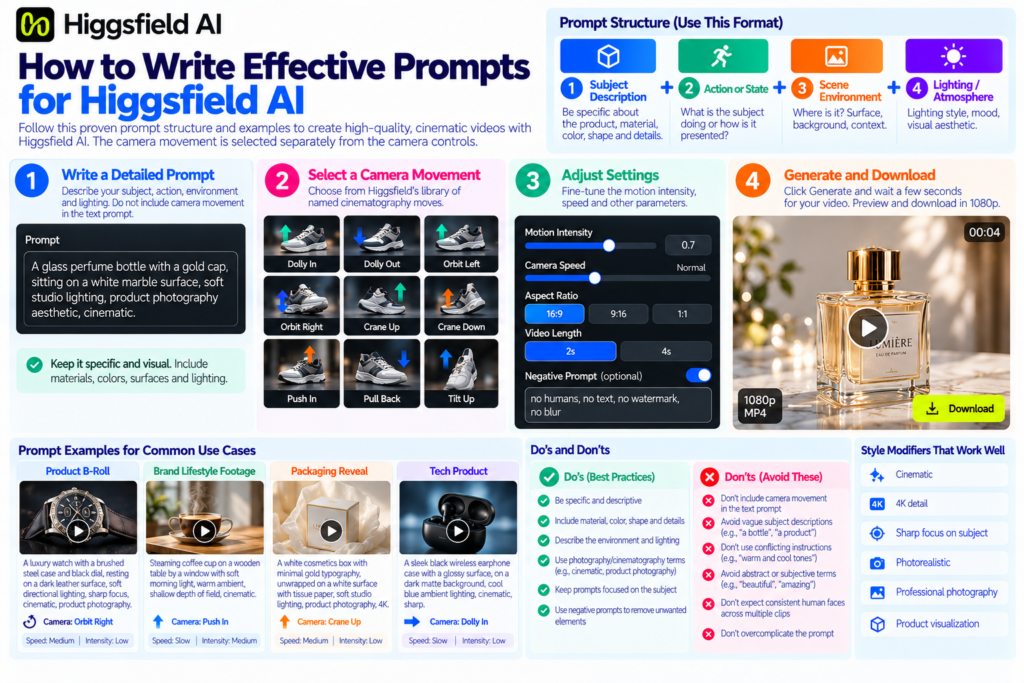
Effective Higgsfield prompts follow a structure of: Subject description + Action or state + Scene environment + Lighting/atmosphere. The camera movement is handled separately by the camera selector, so the text prompt does not need to describe camera motion doing so can produce conflicting instructions and inconsistent output.
Example effective prompt structure:
“A glass perfume bottle with a gold cap, sitting on a white marble surface, soft studio lighting, product photography aesthetic, cinematic.”
This prompt describes: the subject (glass perfume bottle with gold cap), the surface (white marble), the lighting (soft studio), the aesthetic (product photography, cinematic). The camera motion is then selected as Orbital Right at medium speed and low intensity in the camera selector producing a smooth orbit around the subject that reveals the product from multiple angles.
Subject Description: Be Specific and Visual
The subject description is the most important element of the prompt. Vague subject descriptions (a bottle, a car, a person) produce inconsistent results because the model has too much latitude in interpreting the visual. Specific subject descriptions that include visual attributes (material, color, shape, finish, scale references) produce more controlled and reproducible output.
Good: “A matte black cylindrical protein supplement tub with a white label and silver lid, sitting on a dark granite surface”
Weak: “A supplement container on a table”
The stronger prompt specifies: the finish (matte black), the shape (cylindrical), the product type (protein supplement tub), the label detail (white label), the lid (silver), and the surface (dark granite). Each of these attributes constrains the model’s interpretation toward the intended visual.
Environment and Lighting: The Atmospheric Layer
The environmental and lighting description controls the mood and context of the clip. Higgsfield responds well to photography and cinematography-adjacent lighting terminology: soft studio lighting, golden hour sunlight, overcast ambient, hard directional light, backlit silhouette, warm interior ambient, cool clinical white. These terms are well represented in the training data and produce more consistent results than abstract mood descriptions (“dramatic,” “cozy,” “professional”).
For product-focused content, neutral studio environments (clean white or black background, soft diffuse lighting) produce the most accurate and consistent product representation. For lifestyle and brand content, environmental descriptors that reference natural contexts (a kitchen counter in warm morning light, a bathroom shelf with soft overhead illumination) produce more context-appropriate output.
Style Modifiers That Improve Higgsfield Output
Certain style modifiers consistently improve the visual quality and coherence of Higgsfield generations: “cinematic,” “4K detail,” “sharp focus on [subject],” “photorealistic,” “professional photography” and “product visualization.” These terms activate higher-quality output modes in the model’s generation process.
Terms to avoid or use carefully: highly specific technical cinematography terms that are not in the model’s training vocabulary (exotic lens types, highly specific color grading references), subjective quality terms that are hard to operationalize visually (“beautiful,” “amazing,” “perfect”), and conflicting visual instructions (“warm and cool tones simultaneously”).
Negative prompting (using a negative prompt field if available in your plan) is useful for excluding specific unwanted elements: “no humans, no text, no watermarks, no blur” focuses the model on the product and environment without irrelevant inclusions.
Prompt Examples for Common Use Cases
For product B-roll:
“A luxury watch with a brushed steel case and black dial, resting on a dark leather surface, soft directional lighting, sharp focus, cinematic, product photography” + Orbital Right at medium speed, low intensity.
For brand lifestyle footage:
“Steaming coffee cup on a wooden table by a window with soft morning light, warm ambient, shallow depth of field, cinematic” + Push In at slow speed, medium intensity.
For packaging reveal:
“A white cosmetics box with minimal gold typography, unwrapped on a white surface with tissue paper, soft studio lighting, product photography, 4K detail” + Crane Up at medium speed, low intensity.
For tech product:
“A sleek black wireless earphone case with a glossy surface, on a dark matte background, cool blue ambient lighting, cinematic, sharp” + Dolly In at slow speed, low intensity.
Wondering what professional AI video actually costs?
Before you commit to a self-service tool or a studio production, read our full pricing guide real ranges, cost drivers and how to compare quotes accurately.
Read: AI Video Generation Cost GuideHow to Use Higgsfield’s Camera Controls Effectively
Understanding the Camera Motion Library
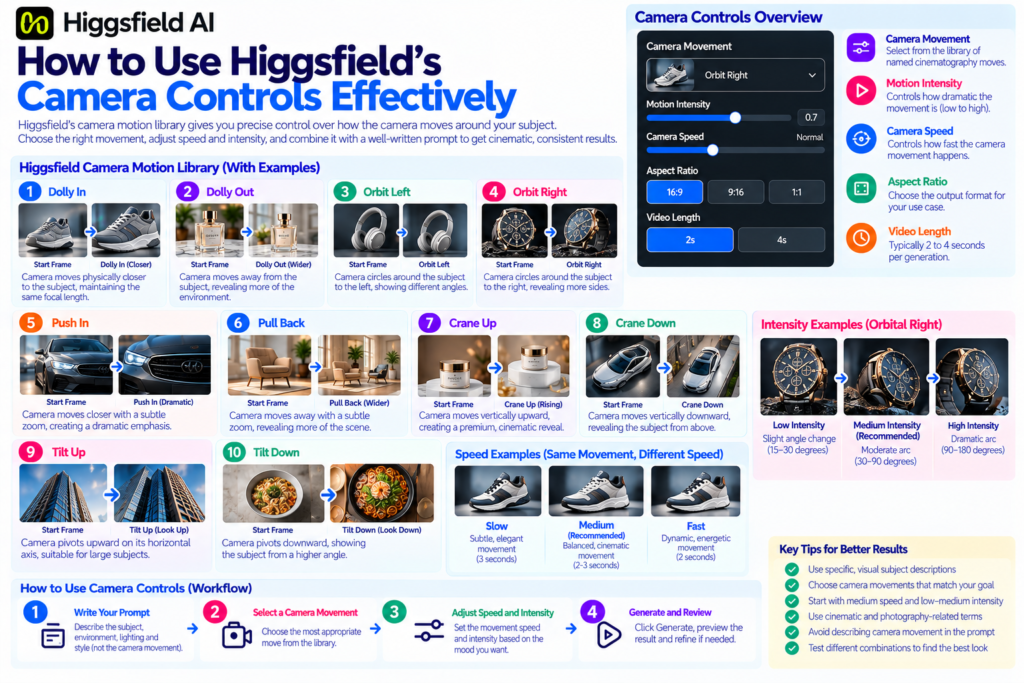
Higgsfield’s camera motion library is the tool’s primary differentiator and deserves careful exploration rather than a single default selection. The available movements generally include:
Dolly In / Dolly Out the camera moves physically closer to or further from the subject, maintaining the same lens focal length. This produces a sense of approaching or receding from the subject appropriate for reveals, emphasis and transitions.
Orbital Left / Orbital Right the camera circles around the subject, revealing it from progressively different angles. This is the most common and most useful motion for product content, because it shows the subject from multiple sides in a single clip.
Push In / Pull Back similar to dolly but typically with a subtle zoom component, producing a more dramatic approach or recession. Push In is strong for product emphasis and CTA moments in social video.
Crane Up / Crane Down the camera moves vertically, producing a rising or descending reveal of the subject. Crane Up works well for revealing a product from below (from table level up to a three-quarter view) and produces a premium, high-production-value aesthetic.
Tilt Up / Tilt Down the camera pivots on its horizontal axis, looking upward or downward without physically moving. This is appropriate for architectural or large product content where the tilt suggests scale.
Speed and Intensity: The Movement Quality Controls
Speed controls how fast the camera movement executes over the clip’s duration. A slow speed with a 3-second clip produces a barely perceptible, elegant movement that feels cinematic. A fast speed produces a dynamic, energetic motion that feels more commercial or social-native.
Intensity controls how dramatic the arc or extent of the movement is. A low-intensity orbital produces a slight angular shift the camera moves perhaps 15 to 30 degrees around the subject. A high-intensity orbital moves the camera through a much larger arc, potentially 90 to 180 degrees. For product content, low to medium intensity with medium speed is the reliable setting for a controlled, elegant movement. High intensity at high speed produces dramatic, stylized movement appropriate for social content that needs to grab attention quickly.
Combining Camera Motion With Prompt for Maximum Control
The most important operational principle in Higgsfield is that the text prompt and the camera selection work together. If the prompt describes the subject in a position that conflicts with the camera movement for example, a subject facing directly away from the camera in a prompt combined with an orbital movement the output may not produce the intended reveal.
Think of the prompt as describing the opening frame and the camera movement as describing how the frame evolves. For a product reveal, this means: describe the product in a close, slightly off-axis position in the prompt, then use Push In or Orbital to reveal additional angles. For an ambient B-roll clip, describe the environmental context in the prompt and use a gentle Crane Up or Dolly Out to create a graceful reveal of the wider scene.
Higgsfield AI Best Use Cases for Brands and Ecommerce
Social Media B-Roll and Product Clips
The most immediate and productive use of Higgsfield for brand content is generating product-adjacent B-roll for social media placements. A short orbital clip of a product on a surface, a slow dolly-in on a detail, a crane-up reveal of a lifestyle scene these 2 to 4 second clips are exactly the B-roll elements that make up the supporting footage in product-focused Reels, TikToks and Shorts.
For brands that have 3D product models (a GLB file for the web viewer, for example), the same model can inform the prompt’s product description for Higgsfield describing the product’s materials and finish accurately in the prompt produces output that is more visually consistent with the real product than vague subject descriptions do. For brands that need the highest product accuracy and consistency, rendered video directly from the 3D model (in Blender or a dedicated rendering tool) is more reliable than AI-generated video but for rapid social content generation where perfect accuracy is secondary to speed and volume, Higgsfield is a useful tool in the workflow.
Advertising and Paid Social Video
Short-form paid social placements (Instagram Reels ads, TikTok Spark Ads, YouTube pre-roll) require high volumes of creative variants different hooks, different angles, different aesthetic treatments of the same product to support systematic creative testing. Higgsfield accelerates the production of these variant assets by allowing a brand team to generate multiple camera movement treatments of the same subject prompt quickly, without commissioning multiple video shoot treatments.
A product with five different camera motion treatments (Orbital, Push In, Crane Up, Dolly Out, Tilt Up) at three different speed/intensity settings is 15 distinct creative variants from the same subject prompt, all produced in minutes rather than days. Not all of them will be usable AI generation always requires curation but the volume of options produced per unit of production time is orders of magnitude higher than live-action or traditional 3D rendering.
Concept Visualization and Pre-Production
Higgsfield is a valuable tool for concept visualization before committing to a full production. A brand team that wants to evaluate whether a specific camera movement a crane-up reveal of a product on a kitchen counter, a dramatic orbital around a luxury watch is the right creative direction can generate and review that concept in minutes using Higgsfield, before investing in a 3D render, a photo shoot or a studio production.
This concept validation use is arguably where Higgsfield delivers the most clear value relative to alternatives, because it allows creative direction to be tested at low cost and high speed before production budget is committed.
Background and Environment Generation
Higgsfield produces reliable results for environmental footage abstract backgrounds, nature footage, architectural contexts, interior environments that can be used as background layers behind product images in social and advertising creative. A brand that needs a “warm kitchen in morning light” background for a food product’s social content can generate atmospheric background video quickly and composite the product over it, rather than hiring a location and a photographer.
Higgsfield AI vs Other AI Video Generators: Honest Comparison
| Tool | Camera Control | Output Fidelity | Clip Length | Free Tier | Best For |
|---|---|---|---|---|---|
| Higgsfield AI | Excellent named presets | Good | 2 to 4 seconds | Yes (limited) | Camera-directed B-roll, social content |
| Runway Gen-3 | Moderate text-described | Very good high fidelity | 5 to 10 seconds | Yes (limited) | High-fidelity scenes, human subjects |
| Pika Labs | Basic limited options | Good | 3 to 5 seconds | Yes | Quick social clips, accessible entry point |
| Sora (OpenAI) | Basic text-described | Excellent highest fidelity | Up to 60 seconds | Limited access | High-fidelity long clips, complex scenes |
| Pixlnexs Studio | Full director control | Production quality | Any length | Quote-based | Brand-accurate, character-consistent AI video |
| Luma AI (Dream Machine) | Basic text-described | Very good | 5 seconds | Yes (limited) | Photorealistic scenes, product environments |
Limitations of Higgsfield AI You Need to Know
Clip Duration: Short by Design
2 to 4 seconds per generation is short. Building a 30-second product video from Higgsfield clips requires generating and assembling 8 to 15 individual clips, each with their own generation pass. This is a fundamentally different production workflow from a tool that generates longer clips from a single prompt it is more like directing individual shots for assembly rather than generating a complete scene. For many use cases (social B-roll, advertising inserts) this is fine. For longer narrative content, it is a meaningful constraint.
Human Face Consistency Across Clips
If your content requires a consistent human face a presenter, a character, a spokesperson appearing across multiple Higgsfield clips, the tool will not reliably maintain that consistency. Each generation of a face description produces a plausible but different person, even from identical prompts. This is a common limitation of current diffusion video models and is not unique to Higgsfield, but it is worth stating clearly: Higgsfield is not appropriate as a primary tool for human-character-driven brand content where consistency matters.
For character-consistent AI video, see our guide on AI animation vs traditional animation, which covers the production approaches that maintain consistency across shots including rigged character animation and avatar-based approaches that Higgsfield does not provide.
Product Accuracy Limitations
Higgsfield generates a product-like subject based on the prompt’s description it does not know what your specific product looks like. A prompt describing a “matte black supplement tub with a white label” will produce a plausible representation of that description, but not an accurate render of your specific product, label design and branding. For ecommerce brands where product accuracy is critical the product page viewer, the product catalog, the conversion-driving content a production 3D model rendered accurately is the correct tool, not a prompt-based generator.
For brands wanting both the creative flexibility of AI-generated video and the product accuracy required for commerce, the practical answer is a professional AI video studio that combines production 3D assets with AI-assisted video workflows. This is what Pixlnexs produces for ecommerce and brand clients accurate product representation with AI-assisted cinematic treatment, rather than prompt-based approximation.
Licensing and Commercial Use: Verify Before Deploying
AI-generated content licensing is an evolving area and Higgsfield’s specific commercial use terms have changed since the platform’s launch. Always check the current terms of service on higgsfield.ai before using generated content in a commercial context particularly for paid advertising, where the platform’s terms about commercial use apply. Do not rely on assumptions about what the terms permit; check the current documentation directly before a commercial deployment.
Tips and Tricks for Better Higgsfield Outputs
Generate Multiple Variants and Curate
Higgsfield’s generation is probabilistic the same prompt and settings produce different results across multiple runs. For any specific brief, generate three to five variants before selecting the best one. The first generation from a new prompt is rarely the best the generation process has variance that works in your favour when you treat each generation as one sample from a distribution rather than a single definitive output.
Use Low Intensity for Professional and Branded Content
The default settings in Higgsfield often produce more movement than professional branded content typically uses. For product content where the camera movement is meant to feel elegant and controlled rather than dynamic and energetic, reduce the intensity setting significantly below the default. Low intensity orbital and push movements at medium speed produce the cinematic, high-production-value aesthetic that works well in brand and product contexts.
Seed Control for Iteration
When a generation produces a result that is close to what you want but not quite right, use the seed value from that generation to produce variants that start from a similar visual baseline. Adjusting the prompt slightly while keeping the same seed value explores the space around a good result rather than starting from scratch. This iterative approach is faster and more productive than re-generating from a completely random seed every time.
Combine Higgsfield With Other Tools in a Pipeline
Higgsfield produces the camera-movement component of a video production most efficiently. Combine it with other tools for a complete workflow: use Higgsfield for the camera-controlled B-roll clips, use a text-to-voice or voiceover tool for the audio layer, use a video editor (CapCut, DaVinci Resolve, Premiere) to assemble the clips, add music from a licensed library and produce the final deliverable. Higgsfield is one component in a pipeline, not a one-click end-to-end video production tool.
For Maximum Product Accuracy, Start From a 3D Render
If product accuracy is part of the brief, a video rendered directly from a production 3D model produces more accurate and consistent output than a Higgsfield prompt-based generation. Use the 3D render for the product shots and use Higgsfield for the background, environment and B-roll elements that surround the product. This hybrid approach gets the best of both: product accuracy from the 3D model and the atmospheric and environmental qualities from Higgsfield’s generative output.
For brands that need production-quality 3D product models to support this approach, Pixlnexs produces optimized GLB models and rendered video from the same source asset accurate product representation that can be integrated with AI-generated backgrounds and environments for a complete brand video workflow.
When to Use Higgsfield vs When to Hire a Professional AI Video Studio
Use Higgsfield When:
You need rapid concept visualization and speed to first draft is the priority. You are producing social B-roll and atmospheric content where perfect product accuracy is secondary to volume and speed. You are a solo creator or small team with limited production budget and manageable output quality requirements. You want to prototype a creative direction before investing in a professional production. You need large volumes of variant creative for paid social testing and can curate usable outputs from a high-generation-volume workflow.
When Pixlnexs Is the Right Choice Instead:
When your video needs to accurately represent a specific product with the correct materials, finish, label design and proportions because it will drive purchasing decisions on a product page, in a campaign or in a paid advertisement. When you need character or brand asset consistency across multiple clips and scenes. When the output will appear in a high-visibility context where quality directly impacts brand perception. When you need a complete production pipeline script, storyboard, generation, editing, sound design and delivery rather than a single generation tool. When your brief involves complex AI animation, avatar-based video, multi-language delivery or branded training content that requires studio-level orchestration.
Pixlnexs produces AI animated video and 3D product content for brands where the quality, accuracy and production coordination requirements are beyond what self-service tools like Higgsfield can consistently deliver. If you have a brief that requires both the speed benefits of AI and the quality standards of professional production, that is exactly what our team is structured to handle.
Conclusion
Higgsfield AI is a genuinely useful tool for a specific set of video content needs camera-controlled cinematic B-roll, social media variant production, concept visualization and atmospheric background generation. Its named camera motion library is the clearest differentiator in the current AI video market, and for production teams that need predictable camera direction in short-clip AI video, it is one of the most capable tools available.
Its limitations are real and worth naming: short clip duration, inconsistent human face generation, product accuracy that depends on prompt description rather than the actual product, and evolving commercial licensing terms that need to be verified before deployment.
For brands where quality, product accuracy and brand consistency are primary requirements where the video will directly influence purchasing decisions or brand perception at scale self-service AI tools like Higgsfield are a starting point for exploration, not a complete production solution. That is where professional AI video studios make the difference: combining the speed and scale benefits of AI generation with the creative direction, quality review and production coordination that self-service tools do not provide.
Need AI video that’s actually brand-accurate not just prompt-approximate?
Pixlnexs produces AI animated video for brands, ecommerce and EdTech combining production-quality 3D assets with AI-assisted cinematic treatment, scripting, sound and delivery. What Higgsfield generates in concept, we deliver in production.
See Our AI Video Services Get a Production QuoteFrequently Asked Questions
Is Higgsfield AI free to use?
Higgsfield offers a free tier with a limited number of daily generation credits sufficient to explore the tool and evaluate output quality for your use case. Production use at higher volumes requires a paid subscription. Check the current plan details on higgsfield.ai, as pricing and generation allocations have changed since launch.
What is Higgsfield AI’s output resolution?
The standard output resolution is 1080p (1920×1080). Aspect ratio options vary by plan and feature availability check current plan specifications for 9:16 vertical output if your primary use is short-form vertical social video.
Can I use Higgsfield AI output commercially?
As of mid-2026, Higgsfield permits commercial use of generated content on paid plans. However, AI content licensing terms evolve frequently and vary by platform always verify the current terms of service on higgsfield.ai before using generated content in paid advertising or commercial publication. Do not rely on information about what the terms permit from third-party sources, including this guide.
How does Higgsfield AI compare to Runway Gen-3?
Runway Gen-3 and Higgsfield occupy similar positions in the AI video market but with different strengths. Runway’s output fidelity and photorealism for complex scenes and human subjects is generally higher. Higgsfield’s camera control is more explicit and predictable selecting a named camera move produces more reliable directional results than describing camera movement in a text prompt. For product and B-roll content where camera direction matters, Higgsfield’s control layer is a meaningful advantage. For high-fidelity human-subject video, Runway’s base model quality is typically stronger.
Can Higgsfield AI generate a consistent product appearance across multiple clips?
Not reliably. Like all prompt-based diffusion video generators, Higgsfield cannot guarantee that the same subject description produces identical visual output across separate generations. For a product that appears in multiple clips of the same video, each clip will show a plausible but not identical representation of the described product. For brand-accurate, consistent product representation across multiple clips, a 3D model rendered in a consistent environment is the reliable solution.
What is the best camera move for product videos in Higgsfield?
Orbital Right or Orbital Left at medium speed and low intensity is the most reliable camera motion for product content it reveals the product from multiple sides in a single clip, communicates the product’s three-dimensional form and produces a premium, controlled visual impression. Push In at slow speed and low intensity is the second most useful for hero product shots and CTA moments. Crane Up is effective for premium product reveals and lifestyle contexts.
How do I make Higgsfield videos longer than 4 seconds?
Generate multiple clips with consistent prompt settings and assemble them in a video editor to create a longer sequence. Use matching camera speed and intensity settings across clips to produce smooth transitions when cuts are made between them. An Orbital Right clip followed by an Orbital Left clip (or two Orbital Right clips from slightly different starting positions) creates a longer orbit sequence when edited together with a clean cut.
Is Higgsfield AI good for ecommerce product videos?
For atmospheric B-roll, concept visualization and social content where product accuracy is not the primary requirement, yes Higgsfield is a genuinely useful tool for ecommerce video content. For product videos where the specific product’s appearance, materials and branding need to be accurately represented (for product pages, paid advertising or catalog content), a 3D model rendered from a production GLB is the more reliable approach because it produces accurate and consistent product representation rather than a prompt-based approximation.
Read More
How Much Does an AI Animated Video Cost?










Leave a Reply