
Quick answer: AI explainer videos for SaaS utilize generative technology to take a script, screen captures, and branding assets to produce a brief product overview video, usually in the range of 60 to 120 seconds long, without the need for filming. The steps to make an explainer video in 2026 are to write the script, select your process for it (screen recording + AI voiceover, AI avatars or fully generated footage) edit it, and localize/ version it for all channels. AI reduces time from weeks to days and cost from thousands to hundreds of dollars. The major limitation is not AI, but the script’s quality. Treat AI as the production layer, while you decide the rest.
By the Pixlnexs Animation Studio team, we produce AI video and 3D content and run the marketplace at store.pixlnexs.com, so this reflects real production experience.
If you are the head of a SaaS business or a startup, then you are already aware of the pain that comes with that territory. Customers do not go through a lengthy sales page, and a list of features does not help convey what the product is all about. The catch used to be cost and turnaround. AI changes that math. This playbook walks through how to plan, produce and ship explainer videos that actually convert, based on how we build them.
What an AI explainer video actually is
What an “AI explainer video for SaaS” means is just a small piece of storytelling about how a problem occurs, how a product helps solve this problem and what should be done next. “AI explainer videos for SaaS” is just a term for creation of the above-mentioned piece using AI technology (voiceover, avatars, text-to-video b-roll, captions and AI editing) instead of a regular production team.
Here’s the mental model worth holding onto: AI is the production layer, not the strategy layer. The tools will faithfully render whatever you feed them. If the script is vague or the value proposition is unclear, AI just produces a polished version of a weak message faster. Your leverage is upstream, in the script and the storyboard.
Where explainers fit in the SaaS funnel
Different stages need different explainers. A homepage hero video should be 30 to 60 seconds and emotional-plus-clear. A feature-page video can run 60 to 120 seconds and go deeper into one workflow. An onboarding or in-app video answers a single “how do I do X?” question and can be even shorter. Mapping the video to the funnel stage matters more than production polish. A beautiful video answering the wrong question still fails.
The three AI methods and when to use each
There are three dominant production methods in 2026. Most strong SaaS explainers actually blend them rather than picking one.
| Method | Best for | Strengths | Watch-outs |
|---|---|---|---|
| Screen capture + AI voiceover | Product walkthroughs, feature demos, onboarding | Shows the real product; fast; highly accurate | Can feel dry without good pacing, zooms and captions |
| AI avatar presenter | Talking-head intros, founder-style messages, multi-language | Human face builds trust; easy to localize; no on-camera talent needed | Can look uncanny if over-used; keep it to short segments |
| Text-to-video / image-to-video b-roll | Metaphor shots, abstract concepts, hero backgrounds | Visually striking; no stock-footage licensing hassle | Less control over precise details; verify nothing looks “off” |
A typical recipe for a SaaS feature explainer: open with 5 to 8 seconds of generated b-roll establishing the problem, cut to a polished screen recording with AI voiceover for the demo and optionally bookend with a short avatar segment for a human touch. For a deeper breakdown of which generative method suits which shot, see our guide on text-to-video vs image-to-video vs avatar video.
The script-to-screen workflow
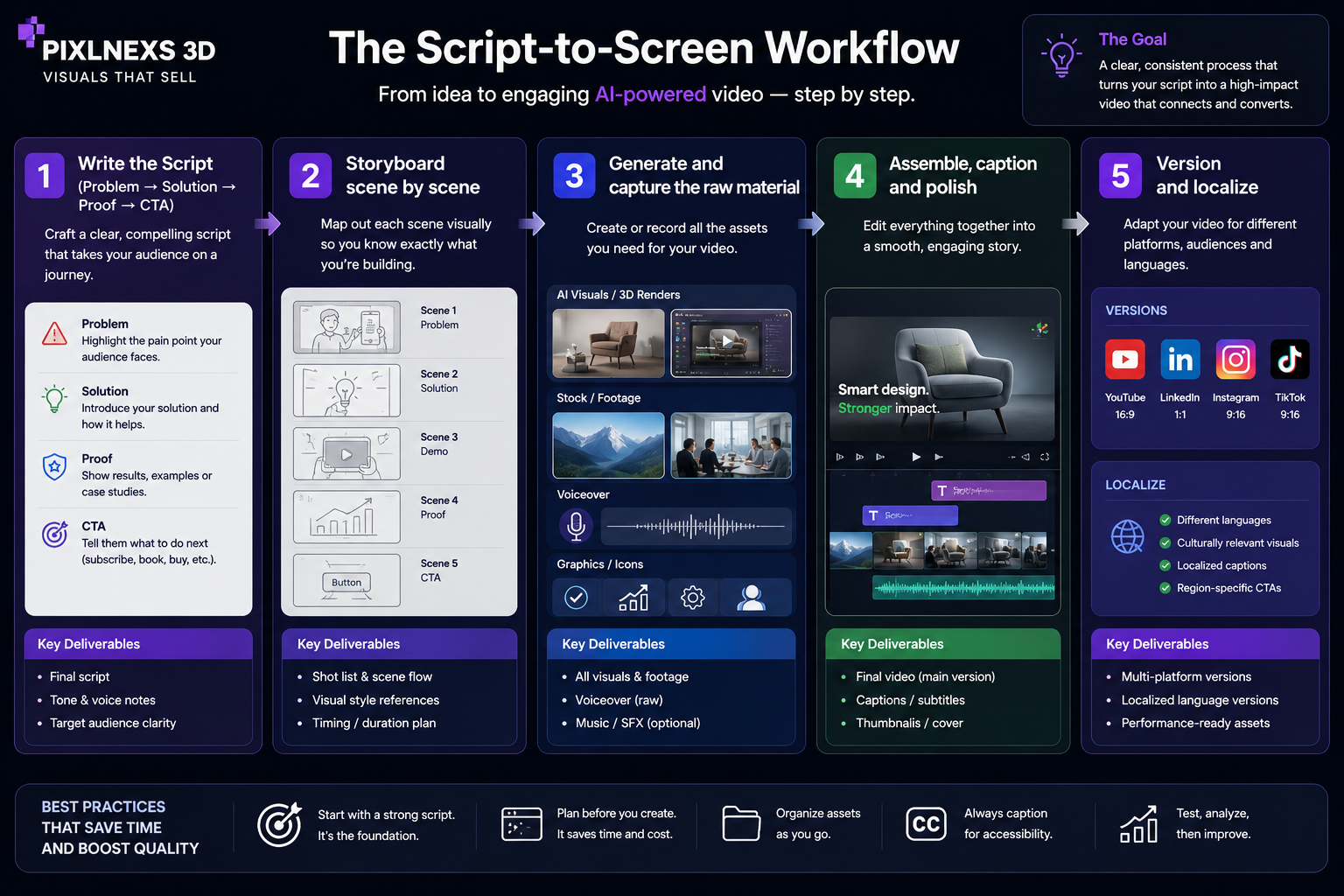
Here is the sequence we follow. It is deliberately script-first, because the script is where 80% of the outcome is decided.
1. Write the script (problem → solution → proof → CTA)
Don’t exceed around 150 words for every minute of video content; therefore, 90 seconds of video should be around 220 to 230 words. The format would be as follows: introduce the problem in five seconds, introduce the product as a solution, use one evidence or differentiator and conclude with one call to action. Don’t fall into the temptation of mentioning all the features. One good story trumps ten poor stories.
2. Storyboard scene by scene
Break the script into beats and decide the visual for each: screen recording, avatar or generated b-roll. This is also where you flag any shot that needs a 3D asset or a custom animation. A rough storyboard prevents expensive re-generation later. The trade-off is real: spend an hour on a storyboard and you save yourself a half-day of re-running clips that never matched the voiceover in the first place.
3. Generate and capture the raw material
Record clean screen captures at a consistent resolution, generate the AI voiceover from your final script and produce any b-roll clips. Generate b-roll in short segments, a few seconds each. It gives you more control and reduces the odds of a single long clip drifting off-model.
4. Assemble, caption and polish
Cut everything together in an editor, add captions (most social viewing is muted, so captions are non-negotiable) layer light background music and apply your brand colors and logo. Then watch it on mute and on a phone, because that’s how most prospects will see it.
5. Version and localize
Produce the aspect ratios you need: 16:9 for site and YouTube, 9:16 for shorts and ads, 1:1 for some feeds. AI voiceover and avatars make multi-language versions far cheaper than re-recording with human talent. For the full end-to-end process, see our complete script-to-screen AI video workflow.
Cost, speed and quality: an honest comparison
The most common question we get is whether AI explainers are “good enough.” The honest answer: for the majority of SaaS use cases, yes, provided the script is strong. Where traditional production still wins is high-stakes brand films and anything requiring a real, recognizable human spokesperson. We compare the two approaches in depth in AI video vs traditional video production.
On cost: a traditional 90-second animated or live-action explainer commonly runs from a few thousand to well into five figures, with turnaround measured in weeks. An AI-produced explainer of comparable utility typically lands in the hundreds-to-low-thousands range and can be drafted in days. Exact numbers depend heavily on tool subscriptions, revision count and how much human editing you add, so treat these as ranges, not guarantees.
Where AI explainers fall short (and how to compensate)
Three honest limitations. First, generated b-roll can produce subtle artifacts. Hands, text and fine logos are still weak spots, so avoid shots that depend on them. Second, AI avatars can feel slightly off in longer takes, so keep avatar segments short. Third, the tools won’t catch a factual error about your own product. A human must verify every claim and every on-screen UI shot before publishing. What actually happens when you skip that last check: you ship a demo where the AI voiceover confidently describes a button that got renamed two releases ago and a prospect notices it before you do.
Choosing tools without overthinking it
The 2026 landscape includes general-purpose generators (Runway, Sora, Veo, Pika) avatar platforms and AI voiceover services. Don’t let tool selection paralyze you. Most teams over-index on picking the “best” model when the script and edit matter more. We break down the leading generators in Runway vs Sora vs Veo vs Pika. If you’d rather skip tooling entirely and have a studio handle production, that’s exactly what we do at store.pixlnexs.com.
A note on accessibility and the open web
Whatever you produce, ship accessible video: real captions, sensible contrast and descriptive transcripts help both viewers and search engines. Google’s guidance on video best practices for search and the broader web.dev resources on performance and media are worth a read before you embed a heavy autoplaying file on your homepage. For general background on the format itself, Wikipedia’s overview of explainer content is a reasonable starting point.
A practical 7-day production plan
For a single SaaS feature explainer, a realistic timeline looks like this. Day 1: lock the script and value proposition. Day 2: storyboard and gather brand assets. Days 3 to 4: capture screens, generate voiceover and b-roll. Day 5: assemble the first cut. Day 6: internal review, fix accuracy and pacing. Day 7: caption, version for each aspect ratio and publish. Aggressive teams compress this into two or three days; the script and review days are the ones you should never skip.
Frequently asked questions
How long should a SaaS explainer video be?
If your video is meant to be shown on the homepage hero, then it should run between 30 and 60 seconds. If it is meant to be shown on the feature page, it could be between 60 and 120 seconds. Short videos addressing only one query in-app/onboarding should run from 15 to 45 seconds.
Are AI explainer videos good enough for a real product launch?
For most SaaS product launch videos, yes, definitely for feature demos and onboarding processes. The key here is the quality of the script and screen captures and not the AI software. Only use traditional video production when you need an important spokesperson.
How much does an AI explainer video cost?
It is extremely variable depending on the tooling, revisions and level of human editing. On average, an AI explanation will cost anywhere between a few hundred to a few thousand dollars, compared to a few thousand to several thousands of dollars for the same production using the conventional way.
Should I use an AI avatar or just voiceover over screen recordings?
For the demonstration part, use screen recordings and AI voiceovers, since it is the actual product and comes across as authentic. If you want to include any human element, like an introductory message from a human being, use avatars; however, keep it short in order to avoid that weird factor.
How do I make the video work in multiple languages?
The use of AI technology in generating voices or avatars is capable of regenerating narration in multiple languages using the same scripts at a lower cost than hiring actors to re-record the videos. Localize your caption and ask a native speaker to check each translation.
Will an AI explainer video help SEO?
Yes, indirectly. Video can add to time on page and engagement, and a video that is well-marked up and captioned is more searchable. Markup your video according to video markup and accessibility best practices, host your video without slowing down your page and combine it with good text.
What’s the single biggest mistake teams make?
Skip the script. Groups hurry through creating their video and have a professional video that fails to explain what the product is and why it’s important. Spend most of your time getting the first 10 seconds and call to action right.
Related guides
- Pixlnexs AI Video & 3D Content Hub
- How to Make an AI Video in 2026: The Complete Script-to-Screen Workflow
- Text-to-Video vs Image-to-Video vs Avatar Video: Which AI Method to Use
- Runway vs Sora vs Veo vs Pika: The 2026 AI Video Tool Showdown
- AI Video vs Traditional Video Production: Cost, Speed and Quality Compared










Leave a Reply