
Quick answer: A 3D product configurator is an interactive viewer that lets shoppers customize a product in real time, rotating it, changing colors, materials, sizes and add-ons and seeing the result instantly in 3D. It tends to lift conversions for one simple reason: it removes uncertainty. Buyers see exactly what they’re getting before they pay, which cuts hesitation and returns.
Whatever you call it 3D configurator, product 3D configurator or 3D configurator product the mechanics stay the same: shoppers customize, preview and buy with confidence.
Costs swing widely, from low-hundreds-of-dollars SaaS plug-ins to five-figure custom builds and what drives the number is mostly how many parts and combinations the product has. For most ecommerce brands, the real expense is producing accurate, optimized 3D models, not the viewer software itself. Done well, a configurator pays back through higher average order value, fewer support questions and lower return rates.
Pixlnexs Animation Studio builds and delivers 3D product configurators for ecommerce brands and runs its own configurator-ready marketplace at store.pixlnexs.com. The fabric/SKU mismatch example below is from a real project we shipped, not a hypothetical
What Is a 3D Product Configurator?
A 3D product configurator is a browser-based, interactive 3D viewer wired to a rules engine. Instead of flipping through a gallery of fixed photos, the shopper manipulates one live model: spinning it 360 degrees, swapping the upholstery from linen to leather, changing a frame from oak to walnut, toggling armrests on or off or resizing a sofa from a loveseat to a four-seater. Every choice re-renders the product on screen in seconds. And when it’s wired up correctly, it updates the price, SKU and availability sitting behind it.
This approach is known as 3D product configuration, allowing every product variation to be generated dynamically instead of relying on static product images.
The technology that makes this work in a normal web browser is WebGL, the standard that lets a page render hardware-accelerated 3D without a plug-in. Most modern configurators are built on top of it using libraries like three.js or Babylon.js and many now load models in the glTF format, an open standard maintained by the Khronos Group that has become the “JPEG of 3D” for the web. If you want to go deeper on the underlying format, the Khronos Group glTF overview is the authoritative reference.
This is what separates a true 3D product configuration tool from a static gallery every combination is generated live, not pre-photographed.” covers “3d product configurations
Web 3D Product Configurator vs. Simple Viewer vs. AR
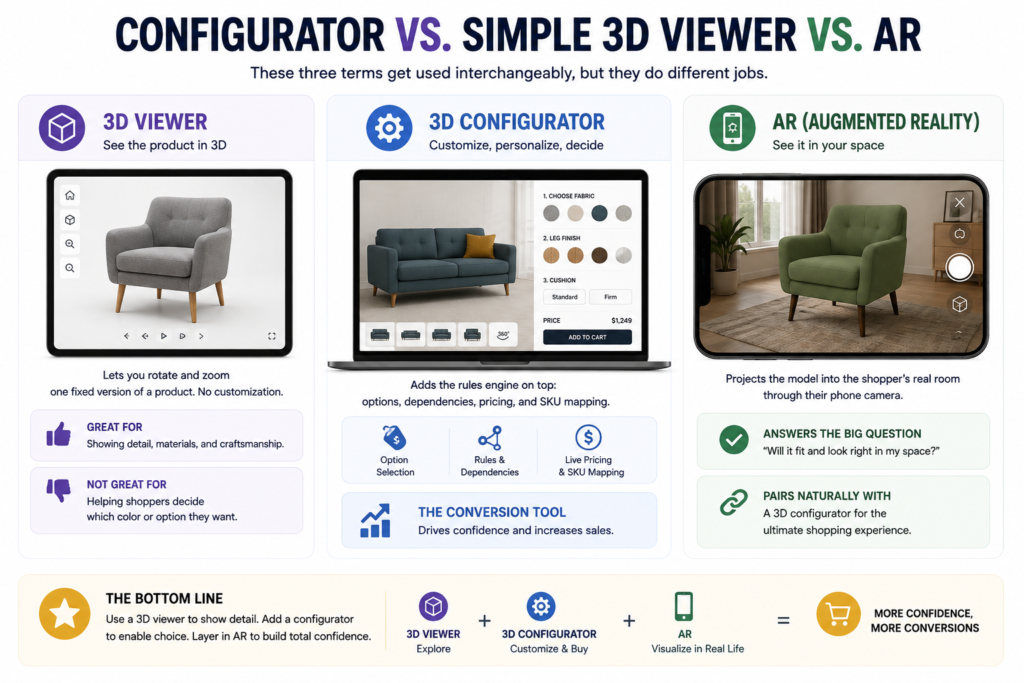
These three terms get used interchangeably but they do different jobs:
- 3D viewer lets you rotate and zoom one fixed version of a product. No customization. Great for showing detail, terrible for “which color do I want.”
- 3D configurator adds the rules engine on top: options, dependencies, pricing and SKU mapping. This is the conversion tool.
- AR (augmented reality) projects the model into the shopper’s real room through their phone camera. It answers “will it fit and look right in my space,” and pairs naturally with a configurator.
Why 3D Product Configurators Boost Conversions
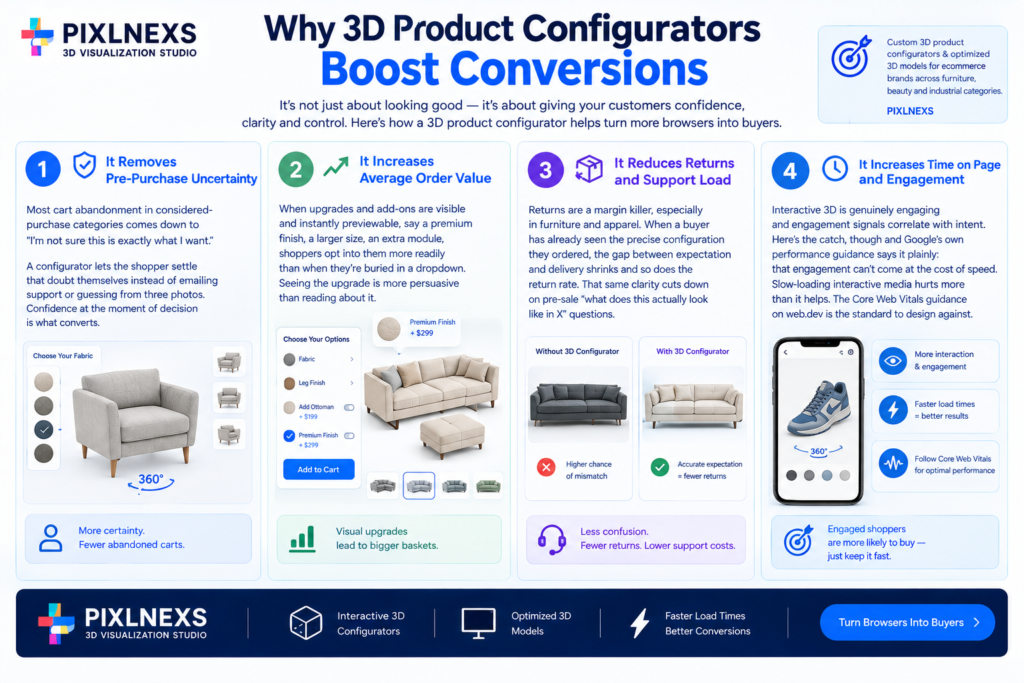
Modern ecommerce brands use 3D product configurators to improve customer confidence, increase engagement and reduce product returns through interactive customization.
Let’s be honest here. Published “conversion lift” numbers from configurator vendors are marketing figures, not independent studies and the real result depends entirely on your product category, traffic quality and how well the tool is built. What we can speak to confidently is the mechanism, the reason a well-built configurator tends to move the needle.
Pixlnexs builds custom 3D product configurators and optimized 3D models for ecommerce brands across furniture, beauty and industrial categories.
It removes pre-purchase uncertainty
Most cart abandonment in considered-purchase categories (furniture, jewelry, eyewear, footwear, industrial equipment) comes down to “I’m not sure this is exactly what I want.” A configurator lets the shopper settle that doubt themselves instead of emailing support or guessing from three photos. Confidence at the moment of decision is what converts.
It increases average order value
When upgrades and add-ons are visible and instantly previewable, say a premium finish, a larger size, an extra module, shoppers opt into them more readily than when they’re buried in a dropdown. Seeing the upgrade is more persuasive than reading about it.
It reduces returns and support load
Returns are a margin killer, especially in furniture and apparel. When a buyer has already seen the precise configuration they ordered, the gap between expectation and delivery shrinks and so does the return rate. That same clarity cuts down on pre-sale “what does this actually look like in X” questions.
It increases time on page and engagement
Interactive 3D is genuinely engaging and engagement signals correlate with intent. Here’s the catch, though and Google’s own performance guidance says it plainly: that engagement can’t come at the cost of speed. Slow-loading interactive media hurts more than it helps. The Core Web Vitals guidance on web.dev is the standard to design against.
Ready for a 3D product page that converts?
Pixlnexs builds and optimizes interactive 3D and AR models end-to-end, from capture to embedded, tested asset.
Get a quote for your catalogHow a 3D Custom Product Configurator Works Under the Hood
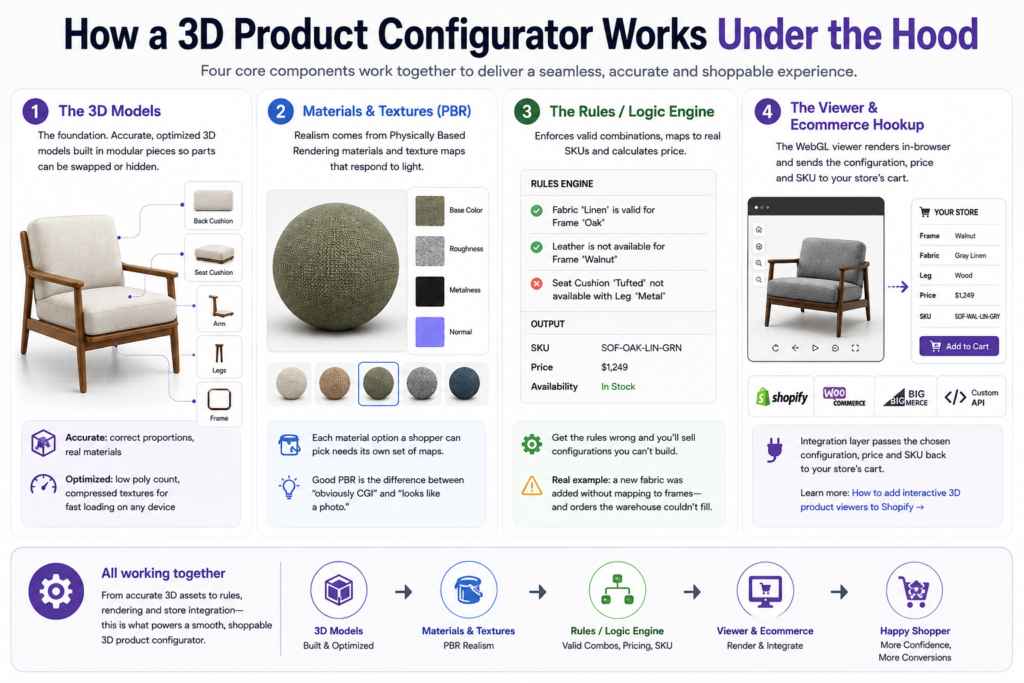
It helps to understand the moving parts, because that’s where the cost and timeline actually live.
1. The 3D models
This is the foundation and usually the biggest line item. Each product needs a 3D model that is both accurate (correct proportions, real materials) and optimized (low enough polygon count and compressed textures to load fast on a phone). For a configurator, the model often has to be built in modular pieces so individual parts can be swapped or hidden.
2. Materials and textures (PBR)
Realism on the web comes from physically based rendering (PBR) materials, texture maps that describe how a surface responds to light (base color, roughness, metalness, normals). Good PBR is the difference between “obviously CGI” and “looks like a photo.” Each material option a shopper can pick needs its own set of maps.
3. The rules / logic engine
This enforces what combinations are valid (you can’t pick a fabric that doesn’t exist for that frame) maps each combination to a real SKU and calculates price. Get this wrong and you’ll sell configurations you can’t manufacture. We’ve seen it happen: someone adds a new fabric to the picker, forgets to flag which frames it actually ships with and three days later the warehouse is staring at an order it can’t build.
4. The viewer and the ecommerce hookup
The WebGL viewer renders everything in-browser and an integration layer passes the chosen configuration, price and SKU back to your store’s cart. For more on the store-side wiring, see our guide on how to add interactive 3D product viewers to Shopify.
3D Product Configuration Costs: What to Expect
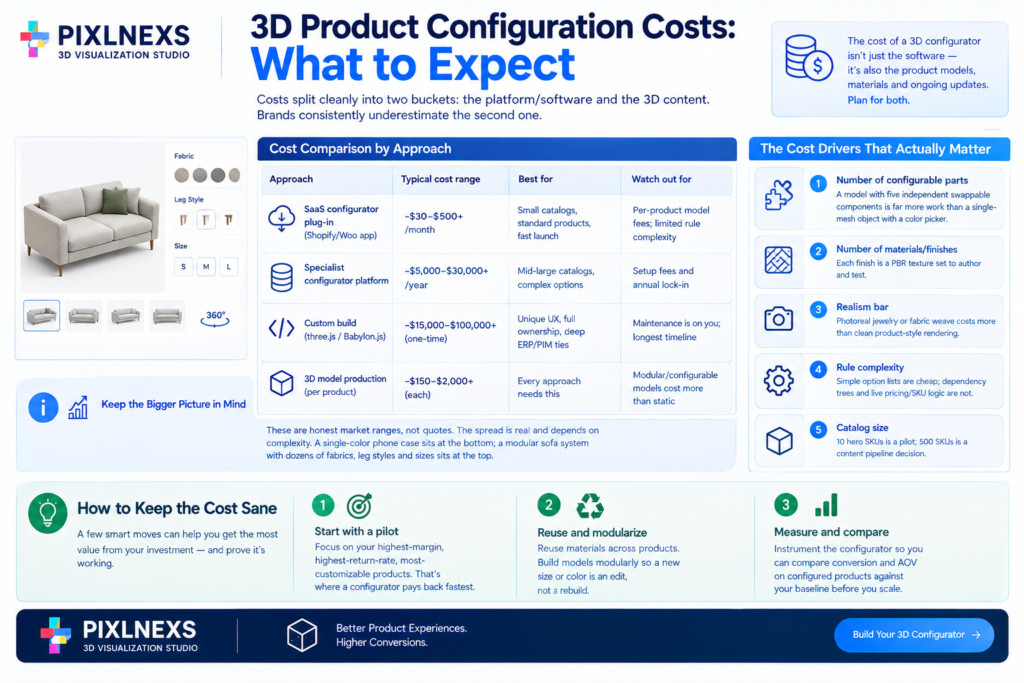
The cost of a product 3D configurator depends on software, 3D model production, customization complexity and ecommerce integrations. Costs typically fall into two main categories: the platform/software and the 3D content, with 3D model creation often being the largest investment.
Cost comparison by approach
| Approach | Typical cost range | Best for | Watch out for |
|---|---|---|---|
| SaaS configurator plug-in (Shopify/Woo app) | ~$30–$500+/month | Small catalogs, standard products, fast launch | Per-product model fees; limited rule complexity |
| Specialist configurator platform | ~$5,000–$30,000+/year | Mid-large catalogs, complex options | Setup fees and annual lock-in |
| Custom build (three.js / Babylon.js) | ~$15,000–$100,000+ one-time | Unique UX, full ownership, deep ERP/PIM ties | Maintenance is on you; longest timeline |
| 3D model production (per product) | ~$150–$2,000+ each | Every approach needs this | Modular/configurable models cost more than static |
These are honest market ranges, not quotes. The spread is real and depends on complexity. A single-color phone case sits at the bottom; a modular sofa system with dozens of fabrics, leg styles and sizes sits at the top.
The cost drivers that actually matter
- Number of configurable parts. A model with five independent swappable components is far more work than a single-mesh object with a color picker.
- Number of materials/finishes. Each finish is a PBR texture set to author and test.
- Realism bar. Photoreal jewelry or fabric weave costs more than clean product-style rendering.
- Rule complexity. Simple option lists are cheap; dependency trees and live pricing/SKU logic are not.
- Catalog size. 10 hero SKUs is a pilot; 500 SKUs is a content pipeline decision.
How to keep the cost sane
Start with a pilot of your highest-margin, highest-return-rate, most-customizable products. That’s where a configurator pays back fastest. Reuse materials across products. Build models modularly so a new size or color is an edit, not a rebuild. And measure: instrument the configurator so you can compare conversion and AOV on configured products against your baseline before you scale to the whole catalog. The brands that skip that measurement step are the ones who can’t tell, six months later, whether the thing earned its keep or just looked cool in the demo.
Common mistakes to avoid
- Slow loads. Unoptimized models on a 3G phone connection will tank the very conversions you were chasing. Compress aggressively (Draco/meshopt, KTX2 textures) lazy-load and budget for performance.
- Configurations you can’t fulfil. If the rules engine isn’t tied to real SKUs and inventory, you’ll sell the impossible. Validate against your PIM/ERP.
- Inaccurate color/material. A finish that doesn’t match the delivered product is a return generator and a trust killer. Calibrate against physical samples.
- Desktop-only thinking. Most ecommerce traffic is mobile. Touch controls, performance and AR matter more than the desktop demo.
- No analytics. If you can’t prove the lift, you can’t justify scaling it. Track interactions, configurations completed and configured-cart conversion.
Is a 3D Configurator Product Fit for Your Catalog?
Configurators earn their keep in categories with real choice and real consideration: furniture and decor, fashion and footwear, eyewear, jewelry, automotive accessories, sporting goods and B2B/industrial equipment. If your product has one fixed form and a single price, a great 3D product visualization or AR viewer may serve you better than a full configurator. If shoppers routinely ask “does this come in…”, that’s your signal. For apparel-specific considerations, see our guide on 3D product visualization for fashion and apparel brands.
For brands managing multiple SKUs, a well-built 3D custom product configurator scales across the whole catalog rather than being rebuilt per product. Reinforces “3d custom product configurator” a second time near the bottom, which also helps with dwell time on a high-intent closing section.
How to Build a 3D Product Configurator
If you’re wondering how to build a 3D product configurator, the process typically includes creating optimized GLB models, defining configurable parts, building pricing and SKU logic, integrating a WebGL viewer and connecting the configurator with Shopify or other ecommerce platforms.
From simple 3D configurators to enterprise-grade 3D interactive product configuration systems, businesses can deliver personalized shopping experiences that increase engagement, improve conversions and simplify complex product customization.
Frequently asked questions
What is a 3D product configurator?
It’s an interactive 3D viewer combined with a rules engine that lets shoppers customize a product, color, material, size, parts and see and price the result in real time in their browser, then add that exact configuration to their cart.
Do 3D configurators really increase conversions?
They tend to, because they remove pre-purchase uncertainty, make upgrades visible and reduce returns. The exact lift depends on your category, traffic and execution. Be skeptical of one-size-fits-all percentage claims and measure your own results with a pilot before scaling.
How much does a 3D product configurator cost?
SaaS plug-ins start around $30–$500+ per month; specialist platforms run roughly $5,000–$30,000+ per year; custom builds are often $15,000–$100,000+ one-time. On top of that, expect roughly $150–$2,000+ per product for the 3D model itself, which is usually the larger cost. its not an exact cost its a approximate value
What’s the difference between a 3D viewer and a configurator?
A 3D viewer shows one fixed version you can rotate and zoom. A configurator adds customization logic, valid option combinations, live pricing and SKU mapping, so the shopper builds and buys a specific variant.
Do configurators work on mobile and in AR?
Yes. Modern configurators run in any WebGL-capable mobile browser and most pair with AR so shoppers can place the configured product in their real space. Because most ecommerce traffic is mobile, mobile performance should be the priority, not an afterthought.
What file format do 3D configurators use?
The web standard is glTF/GLB, an open format maintained by the Khronos Group and supported across browsers and 3D libraries. Models are usually compressed (Draco or meshopt geometry, KTX2 textures) so they load quickly on phones.
How long does it take to launch a configurator?
A SaaS pilot on a handful of products can go live in a few weeks. A custom build with a large, complex catalog can take several months, with most of that time spent producing and optimizing accurate 3D models rather than building the viewer.
Can I add a configurator to Shopify?
Yes, through configurator apps or a custom embed. The integration passes the chosen configuration, price and SKU back to Shopify’s cart. We cover the setup in our Shopify 3D viewer guide.
Ready to see your products in 3D?
If you’re weighing a configurator, the fastest way to understand the quality bar is to look at real optimized 3D models. Browse production-ready assets and explore what’s possible at store.pixlnexs.com or talk to our team about a pilot built around your highest-return, highest-margin products.










Leave a Reply