

Quick answer: AI product videos help ecommerce stores sell more by turning a single product photo or 3D model into scroll-stopping motion. Think hero ads, 360° turntables, lifestyle b-roll, UGC-style clips and how-to demos, all without a film crew, a studio rental, or a two-week turnaround. You generate them with image-to-video and by animating 3D product renders, then cut platform-native versions (9:16 for TikTok and Reels, 1:1 or 16:9 for your product detail page). The conversion lift comes from showing the product in motion and in context, which answers buyer questions that a still image can’t. The biggest unlock, and the one most stores miss, is animating a real 3D model of your actual product, so the motion is accurate instead of an AI hallucination of what your product might look like.
By the Pixlnexs Animation Studio team — we produce AI video and 3D content and run store.pixlnexs.com, so this reflects real production experience.
Why product video moves the needle on conversion
Shoppers can’t touch your product online. Video is the closest substitute for picking it up, turning it over, and seeing how big it really is. A still image freezes one angle and one moment. Motion shows scale, material, mechanism, and use. That’s why a product page with video tends to hold attention longer and pull more visitors toward “add to cart.” The video pre-answers the doubts that otherwise end in a bounce or an abandoned basket.
There are three jobs product video does that photos struggle with. It demonstrates: how a strap clips, how a lid seals, how a fabric drapes. It contextualizes, putting the product on a real desk, in a real kitchen, in a real hand, so buyers can picture it in their own life. And it builds trust, because seeing something move the way you expect quietly signals that the listing is honest. None of this requires a Hollywood budget anymore, which is exactly why generated and 3D-powered video has become a practical lever rather than a luxury.
The five product-video types that actually sell
Not every clip does the same job. Match the format to where the shopper is and what doubt you’re trying to remove.
- Hero ad. The cinematic 5–15 second showpiece, with dramatic lighting, a confident camera move, and the product as the star. This is your top-of-funnel attention grab and the headline asset on a landing page.
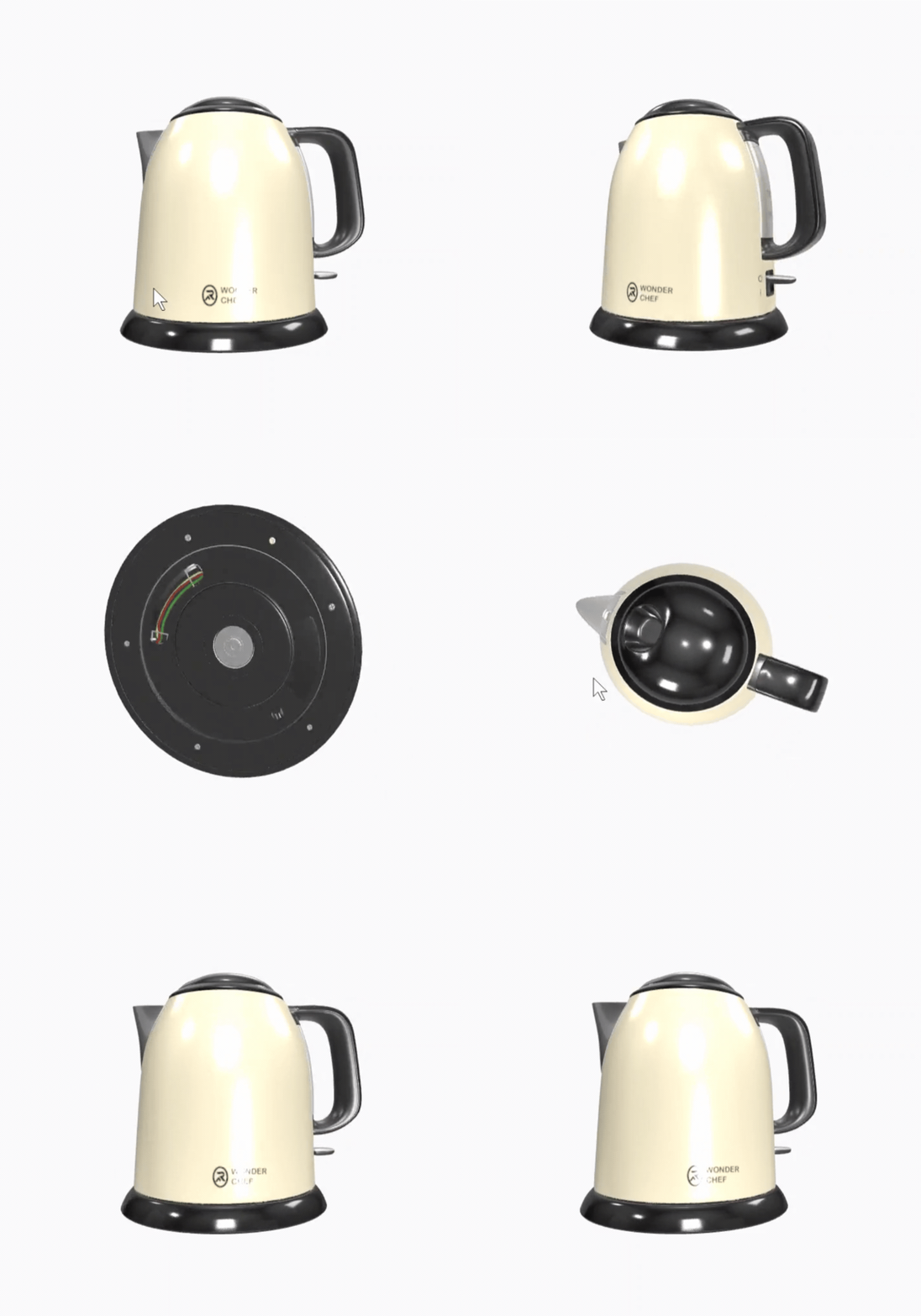
- 360° / turntable. The product rotating cleanly on its axis so buyers see every side. This is the single highest-intent format for the product page, because it directly answers “what does the back look like?” It’s also the format where a real 3D model crushes everything else.
- Lifestyle b-roll. The product living in its natural environment: pouring the coffee, lacing the shoe, lighting the candle. This sells the feeling and the use case more than the spec sheet.
- UGC-style. Authentic, handheld, “a real person showing you this” energy. It converts because it doesn’t look like an ad. Generated UGC-style clips give you that texture without booking creators.
- How-to / demo. The step-by-step that removes friction for considered purchases: assembly, setup, “how it actually works.” Great for reducing returns as much as winning the sale.
How to make them with AI, from a photo or a 3D model
There are two fundamentally different starting points, and the difference matters more than any tool choice.
Image-to-video: fast, flexible, watch the accuracy
You feed a product photo to an image-to-video model and prompt the motion: a slow push-in, a soft rotation, particles drifting, light raking across the surface. It’s fast and cheap and perfect for hero shots and lifestyle moods. The catch is that the model interprets your product. Ask it to spin a bottle and it may invent a label that doesn’t exist or warp the logo on the far side. For mood and atmosphere it’s superb. For anything where the buyer needs to trust the exact geometry, it’s risky. Here’s what actually happens in practice: the front-facing frames look great in the preview, then the moment the camera swings past 90 degrees the back of the product turns into a smear, and you don’t notice until you’re three renders deep. Our full walkthrough of this path lives in how to make an AI video.
Animating a 3D product render: the accurate moat
The alternative is to start from a true 3D model of your product — typically an open standard like glTF, the format maintained by the Khronos Group — then animate the camera and the scene around it. Because the geometry, materials, and branding are baked into the model, every frame is correct. The back really is your product’s back, the logo stays put, the proportions never drift. You get pixel-honest 360° turntables, exploded views for demos, and infinite camera moves, all from one asset, all reusable forever. This is the Pixlnexs difference: we build and animate real product models, so the video isn’t an AI’s guess at your product. It is your product. If you don’t have a model yet, start with our 3D models guide.
The studio workflow, start to finish
Here’s how a clip actually gets made, whether it begins as a photo or a model.
- Brief. Decide the job (hero vs. demo vs. UGC), the placement (ad vs. PDP), and the one doubt this clip removes.
- Source asset. Choose the input: a clean product photo for image-to-video, or a 3D model for accurate animation. If accuracy or 360° is the goal, build the model.
- Motion design. Plan the camera move and pacing. Keep it deliberate. One strong move beats five frantic ones.
- Generate / render. Run the image-to-video pass or render the animated 3D scene. Iterate on prompt and lighting until the product reads true.
- Polish. Color, sound design, captions, brand frame. Sound and on-screen text do most of the heavy lifting on muted social feeds.
- Cut variants. Export every aspect ratio and length you need from the master (see below).
- Ship and measure. Place it, then watch the metric that matters for that placement: view-through on ads, add-to-cart on PDPs.
For the deeper craft behind steps 3–5, see the hub: AI video production.
Platform-native variants: one shoot, every aspect ratio
The same product video should never be posted identically everywhere. Each surface has its own frame, length, and grammar. Generate the master, then cut for each home.
| Placement | Aspect ratio | Best length | Format that wins |
|---|---|---|---|
| TikTok / Reels / Shorts | 9:16 vertical | 6–15s | UGC-style, fast hook, captions |
| Product detail page (PDP) | 1:1 or 16:9 | 10–30s | 360° turntable, demo |
| Paid social feed ad | 1:1 square | 6–10s | Hero ad, lifestyle b-roll |
| YouTube / homepage hero | 16:9 wide | 15–30s | Cinematic hero, brand story |
| Email / collection banner | 16:9 or 1:1 loop | 3–6s loop | Short looping turntable |
Two rules save most of the pain. Frame the product safely in the center so a vertical crop never decapitates it, and put your hook (the product and the value) in the first second, because that’s all you get on a fast feed.
Pairing AI video with interactive 3D on the product page
Video and interactive 3D aren’t rivals. They’re a one-two punch on the PDP. The auto-playing turntable video catches the eye and conveys quality instantly. The interactive 3D viewer below it — often a lightweight web component like Google’s <model-viewer> — lets a serious buyer grab the product, spin it themselves, and zoom into the detail they care about. Video creates desire, interaction closes the doubt. Both can come from the same 3D model you built for the video, which is the real efficiency: one asset powers the ad, the turntable, the demo, and the interactive viewer. That compounding reuse is why starting from a model rather than a photo pays off across the whole funnel.
Cost vs. a traditional product shoot
A conventional shoot means a studio, a photographer or videographer, lighting, props, a stylist, shipping the product, and days of scheduling. Then you pay all of it again for the next product, the next angle, or the next seasonal refresh. Generated and 3D-powered video changes the economics in two ways: the per-clip cost drops sharply, and the marginal cost of variations approaches zero. Once a 3D model exists, a new color, a new background, a new camera move, or a new aspect ratio is a render, not a reshoot. For a catalog that changes often or a store testing many ad creatives, that flexibility is worth more than any single clip. We break the full comparison down in AI video vs. traditional production.
The honest nuance: a traditional shoot still has a place for hero brand moments where a specific human, location, or texture is the whole point. The smart play for most ecommerce stores is hybrid. Use generated and 3D-powered video for the high-volume, high-iteration work, and reserve selective live shoots for the few moments that truly need them. The trade-off worth naming is the upfront cost of the 3D model itself. It’s more expensive than a single photo on day one, and it only starts paying for itself around the third or fourth variant. If you’re going to make exactly one clip of a product you’ll never touch again, image-to-video is the cheaper call.
Common mistakes that quietly kill conversion
- Fake-looking output. The fastest trust-killer. Warped logos, melting edges, physics that feel “off,” six-fingered hands in UGC. If a frame looks wrong, buyers assume the product is wrong too. This is the strongest argument for animating a real 3D model when accuracy matters, because there’s nothing for the AI to hallucinate.
- Brand drift. Generic stock-video energy with the wrong colors, the wrong typeface, a vibe that isn’t yours. Every clip should be unmistakably your brand. Lock the palette, the logo placement, and the tone before you scale output.
- Ignoring mobile. Most ecommerce video is watched on a phone, muted, vertically, in the first second. Designing for a desktop 16:9 player and hoping it survives a crop is how good footage dies. Design vertical-first and caption everything.
- One clip, posted everywhere. The same edit dumped onto every platform ignores that each surface has its own grammar. Cut native variants.
- Motion for its own sake. Frantic spins and effects that don’t help the buyer understand or want the product just add noise. Every move should remove a doubt or build desire.
Frequently asked questions
Can I make a product video from a single photo?
Yes. Image-to-video can turn one clean product photo into a moving hero or lifestyle clip. It’s ideal for mood, atmosphere, and attention-grabbing motion. Just be aware the model interprets unseen angles, so for accurate 360° views or anything where exact geometry matters, animating a 3D model is the safer route.
Why animate a 3D model instead of just using image-to-video?
Because a 3D model carries your product’s real geometry, materials, and branding, every frame is accurate, with no warped logos or invented details. One model gives you turntables, demos, exploded views, infinite camera angles, and an interactive viewer for the product page, all reusable forever. It’s the difference between a guess and the genuine article.
What length and aspect ratio should an ecommerce product video be?
It depends on placement. Go 9:16 vertical and 6–15 seconds for TikTok, Reels and Shorts; 1:1 or 16:9 at 10–30 seconds for product pages; short 3–6 second loops for email and collection banners. Always make the platform-native cut rather than reposting one master everywhere.
Is AI product video cheaper than a traditional shoot?
Generally, yes, and the bigger saving is on variations. After the first asset (especially a 3D model) exists, new colors, backgrounds, camera moves, and aspect ratios are renders rather than reshoots, so the marginal cost of more creative drops toward zero. That’s a major advantage for stores running many ad tests or refreshing catalogs often.
Will AI video look fake to my customers?
It can, if it’s done carelessly, since warped details and off physics destroy trust instantly. The fixes are using a real 3D model where accuracy matters, keeping motion deliberate, and polishing with proper color, sound, and brand framing. Done well, it reads as premium, not artificial.
Related guides
- AI Video Production, the complete hub
- How to Make an AI Video (step by step)
- AI Video vs. Traditional Production
- The Complete 3D Models Guide
Ready to turn your products into video that sells? At Pixlnexs we build and animate real 3D models of your actual products, the moat behind accurate turntables, scroll-stopping hero ads, and interactive product-page viewers that convert browsers into buyers. Explore the studio and start your project at store.pixlnexs.com, and see what generated and 3D-powered video looks like in motion on our channel, @pixlnexsanimationstudio.








Leave a Reply