
Quick answer:AI avatar videos are talking head videos where an AI-created or cloned spokesperson delivers your script through text-to-speech video technology and not by means of camera filming. You choose a digital spokesperson or generate one yourself and enter the script (or import an audio file) and the video gets created instantly. Optimal output quality depends on writing clean scripts, having a good voice, and keeping scene length relatively short. AI avatars are now ready to be used in actual production for explainers, training, onboarding, marketing, localization, and many more purposes at a significantly lower cost than conventional filming methods. However, they do not replace humans in situations where trust and emotions play key roles.
By the Pixlnexs Animation Studio team, we produce AI video and 3D content and run the marketplace at store.pixlnexs.com, so this reflects real production experience.
This is the guide to all that we know about making ai avatar videos and head shots. This is your go-to manual for whenever you have wanted to be able to get a presenter on your screen without even having to hire out a studio, a film crew, and any reshoots at all. We will explore the mechanics behind the technology, where it makes money, where it silently fails, and what makes one video convert while the other falls into the uncanny valley.
What is an AI avatar video?
An AI avatar video uses machine learning to generate a presenter who appears to speak your words. Two distinct technologies usually combine to produce one. First, a synthetic or cloned voice (text-to-speech or voice cloning). Second, a lip-sync model that drives a face to match the audio. The face itself can be a stock “digital actor,” a custom avatar built from footage of a real person, or a fully generated character.
The workflow is deliberately simple. You choose a presenter, write a script, select a voice, and the renderer produces an MP4. Behind that simplicity is a stack doing a lot of work: phoneme alignment, facial-motion prediction, head movement, blink timing, and frame interpolation. The quality jump over the last few years has come mostly from better lip-sync fidelity and more natural voices, the two things audiences notice first.
The three families of talking head AI
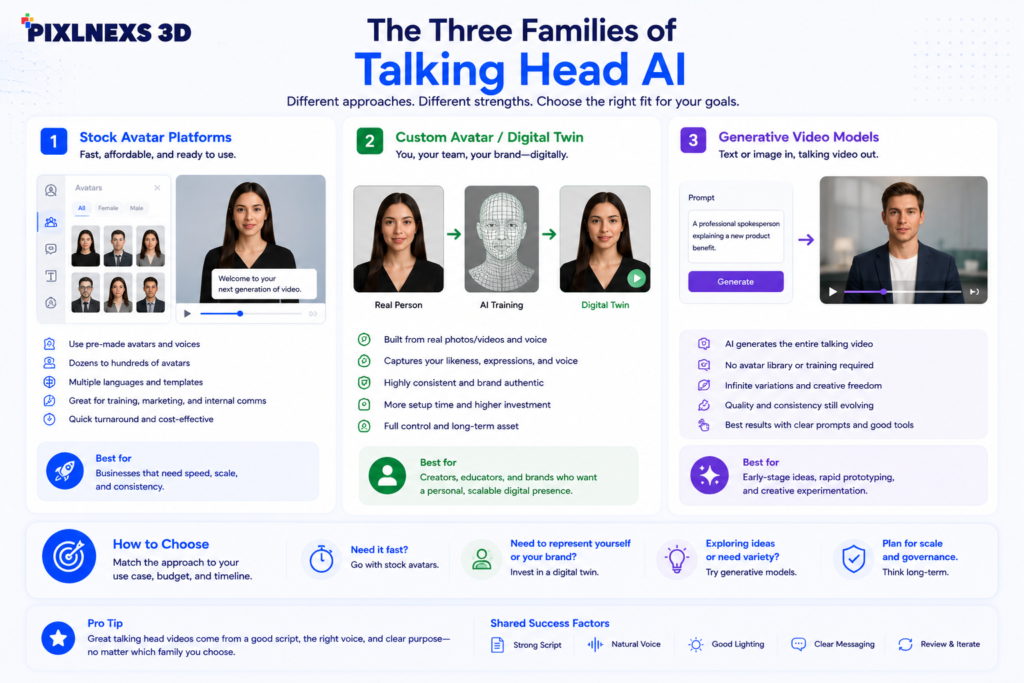
- Stock avatar platforms. Pick a pre-built presenter, type text, render. Fastest path, lowest cost, least uniqueness.
- Custom avatar / digital twin. Record a few minutes of yourself once, then generate unlimited videos as “you.” Strong for personal brands and named spokespeople.
- Generative video models. Newer image-and-audio-to-video systems that animate a single photo or fully invent a character. The most flexible, and the most variable in quality.
How AI avatar video actually works
It helps to understand the pipeline, because every quality problem traces back to one stage of it. Text-to-speech is grounded in the same neural sequence modeling that powers modern language tools; if you want the underlying concept, the speech synthesis overview on Wikipedia is a solid primer. Lip-sync then maps that audio’s phonemes to mouth shapes (visemes) frame by frame, and a motion model adds head tilt, brow movement, and blinks so the face does not look frozen.
For browser-based playback and embedding, the output is almost always standard H.264/H.265 MP4 or WebM, well-supported formats covered in depth on web.dev’s media formats guide. That matters because the most common real-world failure is not the AI at all. It is a 4K master that no one optimized for the web, so the page loads slowly and viewers bounce before the avatar ever speaks.
Why some avatars cross the uncanny valley and others do not
In our production work the difference is rarely the headline “realism” of the model. It is the small things: mismatched audio energy and facial energy, robotic pacing, dead eyes during pauses, and scripts written for the page instead of the ear. A slightly stylized avatar with great voice and pacing almost always outperforms a hyper-real face with stiff delivery. Audiences forgive stylization. They do not forgive wrongness. What actually happens on a static close-up is that the brain locks onto the eyes, and if they go glassy for even a second during a pause, the whole shot reads as fake no matter how clean the lip-sync is.
Where AI avatar video earns its keep
The honest framing: AI avatars win wherever you need volume, consistency, and speed, and they struggle wherever you need raw human trust and spontaneity. Here is how the common use cases sort out.
| Use case | Fit for AI avatar | Why |
|---|---|---|
| Training & onboarding | Excellent | Update a line, re-render, no reshoot. Consistent across modules. |
| Product explainers | Strong | Pairs well with screen capture and motion graphics. |
| Sales & outreach personalization | Strong | Scale a named spokesperson across segments and languages. |
| Localization / dubbing | Excellent | One script, many languages, same face and brand. |
| Social / short-form | Good | Fast iteration; works best with strong hooks and captions. |
| Emotional brand storytelling | Limited | Real humans still win on vulnerability and nuance. |
| Crisis / legal / executive trust | Avoid | Authenticity and accountability matter more than polish. |
If you are deciding whether a specific clip should use an avatar at all, our sibling guide on AI spokesperson videos for sales and onboarding walks through the conversion-side trade-offs in detail.
How to produce a talking head AI video that does not look cheap
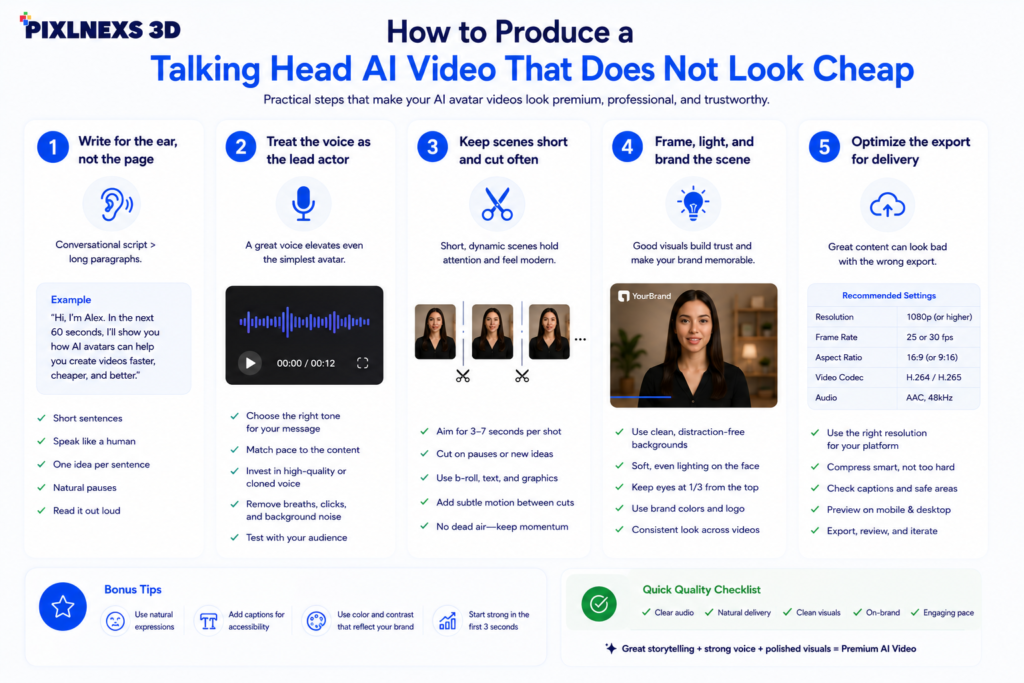
The platform matters less than the inputs. After producing a lot of these, our checklist is consistent regardless of tool.
1. Write for the ear, not the page
Short sentences. One idea per line. Contractions. Read every draft aloud. If you stumble, the avatar will too. Mark deliberate pauses, because synthetic voices rush through punctuation unless you guide them.
2. Treat the voice as the lead actor
Viewers tolerate an imperfect face far longer than an unnatural voice. Spend your effort here: choose a voice with the right energy, adjust speaking rate, and add pacing cues. A cloned voice of a real spokesperson usually beats stock for brand work.
3. Keep scenes short and cut often
Long, static shots of the avatar highlight her flaws. Write your script into small 8-15 second segments, cutting between screen capture, b roll, still images of products or 3D models and allow the avatar to be the human element and the cutaways to give information.
4. Frame, light, and brand the scene
Use a clean background that fits your brand, add lower-thirds and captions (most viewers watch muted), and keep the avatar’s scale consistent. Captions alone meaningfully lift completion rates on social.
5. Optimize the export for delivery
Render a clean master, then export a web-optimized MP4. Match resolution to the placement. A 1080p clip that loads instantly beats a 4K file that buffers.
For a complete step-by-step build, see our spoke guide: How to create a talking-head AI video without a camera.
Choosing a tool or partner
The market splits into self-serve avatar SaaS, voice-cloning specialists, generative video models, and full-service studios. Self-serve is cheapest and fastest for internal content. A studio is worth it when the output is customer-facing, on-brand, and revenue-critical. We compare the leading self-serve options in our spoke article on the best AI avatar generators for business.
What to evaluate
- Lip-sync quality on your actual language and accent. Test, do not trust demos.
- Voice library and cloning. Naturalness and emotional range.
- Custom avatar support if you need a named, owned presenter.
- Rights and consent. Clear ownership of the avatar and voice, and explicit consent for any cloned likeness.
- Editing and integration. Captions, brand kits, multi-scene, API.
- Export control. Resolution, watermark-free, web-ready formats.
One thing the demos never show you: a model that nails English lip-sync can fall apart on a tonal language or a heavy regional accent, so always run your own real script through a trial before you commit. If you want avatars set against custom 3D environments, props, or branded characters, that is exactly where our studio and the asset library at store.pixlnexs.com come in. Talking-head plus production-grade 3D is a combination most self-serve tools cannot deliver alone.
Ethics, disclosure, and consent
This is not optional fine print. If you clone a real person’s face or voice, get explicit, documented consent for the specific uses. Disclose synthetic presenters where audiences could reasonably be misled, especially in news, testimonials, and anything implying a real person said something they did not. Never use a real individual’s likeness without permission. The reputational and legal downside of getting this wrong dwarfs any production savings, and platform terms increasingly require disclosure. Treat synthetic media the way you would treat any powerful tool: with clear rules about who is represented and how.
Costs and realistic expectations
However, we do not offer fixed pricing as it changes all the time; however, the pricing structure remains the same. The subscription to self-service avatar is very affordable compared to video production, and the marginal cost of creating an extra video or adding a new language is negligible after your presenter and branding kit have been created. The only actual expenses are the time spent on writing the script and editing it, not rendering. Be realistic about what you should expect from the AI avatar it will eliminate the need for the camera crew, studio recording and reshooting, but it won’t make the writing unnecessary.
Conclusion
AI avatar videos are no longer just about fun; these videos have become a viable option for creating professional videos efficiently and economically. Regardless of whether you need videos for employee training, product demonstrations, sales presentations, onboarding, and localizing your campaign – AI avatars will save you a significant amount of time without compromising the quality of your content and branding.
Having said that, technology isn’t everything here. Effective videos should have great scripts, natural voices, editing and interesting visuals. Instead of replacing video production, AI avatars are meant to assist the process and make it even more effective.
But if you want professional-looking AI avatars that will reflect your brand’s message and help you achieve measurable results, you’d better find the right combination of technologies and video production experience. At Pixlnexs, we will help you create not just talking-head videos, but videos that will provide you with valuable information, engage your audience, and help you grow your business.
Frequently asked questions
Related guides
- AI Avatars and Talking-Head Videos: The Complete 2026 Guide (hub)
- How to Create a Talking-Head AI Video Without a Camera
- Best AI Avatar Generators for Business in 2026 Compared
- AI Spokesperson Videos for Sales and Onboarding That Actually Convert










Leave a Reply