
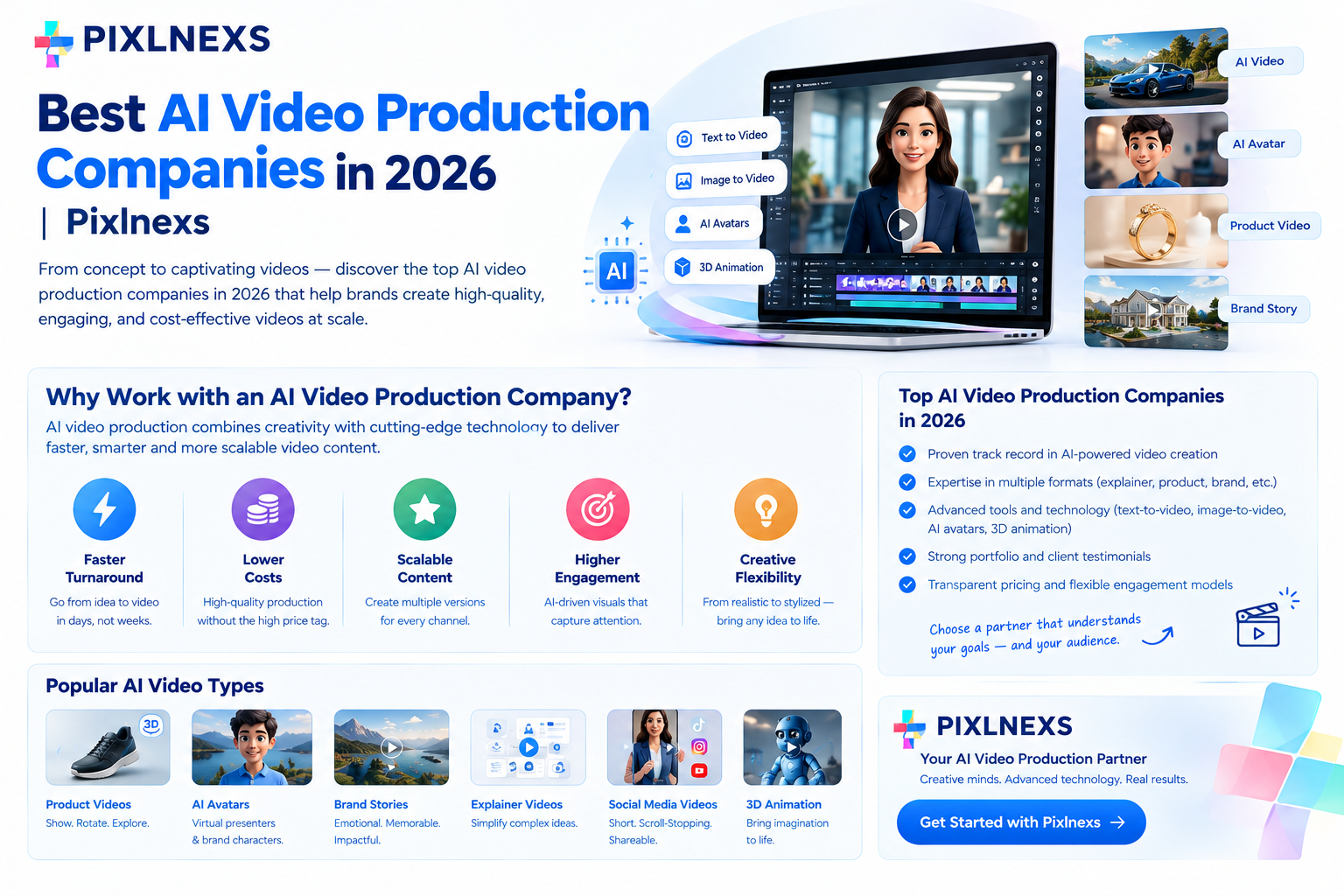
Quick answer: Top-tier AI video production companies in 2026 are hybrid studios that combine generative AI tools with human art direction. to ensure brand consistency, narrative coherence and technical quality. Unlike pure DIY tools, these firms manage the full pipeline from script to final render, offering specialized services in character consistency, lip-sync accuracy and style transfer. The best providers distinguish themselves through transparent pricing models, rapid turnaround times and robust revision policies that protect client assets. When selecting a partner, prioritize studios that demonstrate proven control over AI hallucinations and offer end-to-end localization capabilities for global markets.
By Bali Balaji, Pixlnexs Studio. Pixlnexs builds AI video production pipelines for brands, EdTech platforms and children’s content channels worldwide. Our production team applies the exact vetting checklist and brief template in this article when scoping every new AI animated video project. If you want a free quote on an AI animated video project, our team can turn around a scope document within one business day.
Key Takeaways
- Hybrid is the Standard: Pure AI generation lacks the narrative control required for commercial campaigns. The best 2026 providers use AI for speed and humans for curation.
- Consistency is the Hard Part: The primary technical challenge is maintaining character and style consistency across multiple shots. Look for studios with proprietary pipelines or rigorous manual QA processes.
- Pricing Varies by Complexity: Simple explainer videos cost significantly less than narrative-driven brand films. Hourly rates are becoming rare; project-based or per-minute pricing is the norm. See our full AI animated video cost breakdown for exact ranges.
- Red Flags Exist: Avoid vendors who promise “100% AI” with no human oversight or those who cannot provide clear ownership rights to the generated assets.
- Speed vs. Quality: AI reduces production time from weeks to days, but only if the studio has a mature workflow. Rushed AI outputs often require more revisions, negating time savings.
How to Evaluate an AI Video production Studio
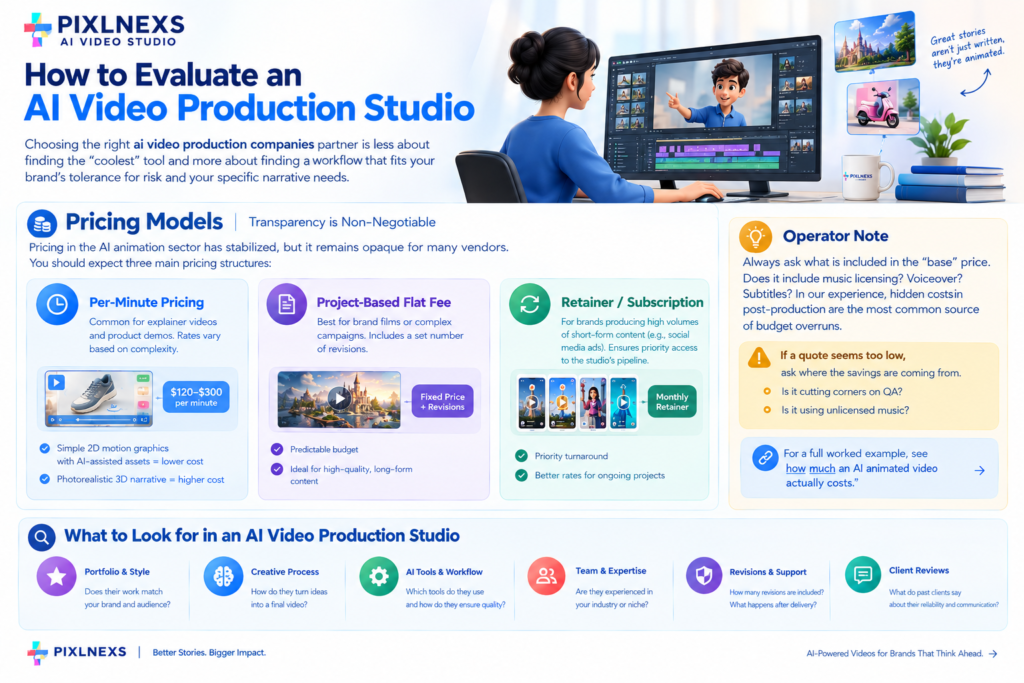
Choosing the right ai video production companies partner is less about finding the “coolest” tool and more about finding a workflow that fits your brand’s tolerance for risk and your specific narrative needs. In 2026, the landscape has matured. The novelty of “AI video” has faded, replaced by a demand for reliability. A studio’s value is no longer just in generating pixels, but in curating them into a coherent story.
Pricing Models: Transparency is Non-Negotiable
Pricing in the AI animation sector has stabilized, but it remains opaque for many vendors. You should expect three main pricing structures:
- Per-Minute Pricing: Common for explainer videos and product demos. Rates vary based on complexity. A simple 2D motion graphics style with AI-assisted asset generation will cost less than a photorealistic 3D narrative.
- Project-Based Flat Fee: Best for brand films or complex campaigns. This model includes a set number of revisions. It is the safest option for clients who want predictable budgets.
- Retainer/Subscription: For brands producing high volumes of short-form content (e.g., social media ads). This ensures priority access to the studio’s pipeline.
Operator Note: Always ask what is included in the “base” price. Does it include music licensing? Voiceover? Subtitles? In our experience, hidden costs in post-production are the most common source of budget overruns. If a quote seems too low, ask where the savings are coming from. Is it cutting corners on QA? Is it using unlicensed music? For a full worked example, see how much an AI animated video actually costs.
Turnaround Time: The New Competitive Edge
AI has compressed production timelines compared to traditional 2D animation, provided the script is finalized before production starts.
However, turnaround time is a double-edged sword. A studio that promises an unusually fast delivery might be skipping the crucial “style lock” phase.This is what’s called the “style lock” phase, where you and the director agree on the visual language before mass generation begins. If you skip this, you will spend days regenerating assets that don’t match the approved look.
What to look for: * Milestone-based delivery: Ask for a storyboard or animatic before full production begins. * Buffer time: A reputable studio will build in buffer time for unexpected AI glitches or client feedback loops. * Parallel processing: Can they work on multiple scenes simultaneously? This is a sign of a mature pipeline. Our own step-by-step process is laid out in from script to screen: the AI animated video workflow.
Style Range: Beyond the “AI Look”
Early AI video had a distinct “shimmer” or uncanny quality. In 2026, that is largely gone but style consistency remains a challenge. A good studio should offer a range of styles, from:
- 2D Vector/Flat: Clean, corporate, easy to localize.
- 3D Photorealistic: High-end, cinematic, expensive.
- Stylized 3D: Pixar-esque, friendly, versatile.
- Anime/Comic: Niche but growing in popularity for specific demographics.
Critical Question: Ask for a “style test.” Send them a reference image or video and ask them to generate a short clip in that style. If they can’t or if the result drifts significantly from the reference, their control over the model is weak.
Revision Policy: Where the Real Work Happens
AI generation is probabilistic. You will get variations. Some will be perfect; some will be unusable. The revision policy determines how much of this chaos you have to manage.
- Unlimited Revisions: Rare and usually a red flag. It suggests the studio is unsure of their output quality or expects you to do the curation work.
- A Small Number of Structured Rounds: The pattern we see work best across client engagements covers:
1. Script/Storyboard approval.
2. Style/Character lock.
3. Rough cut (assembly).
4. Final polish (color, sound, VFX). - Per-Scene Revisions: Some studios charge extra for changes after the “lock” phase. This is fair if the change is significant (e.g., changing the character’s outfit in every scene).
How to Brief an AI Animated Video Studio (Copyable Template)
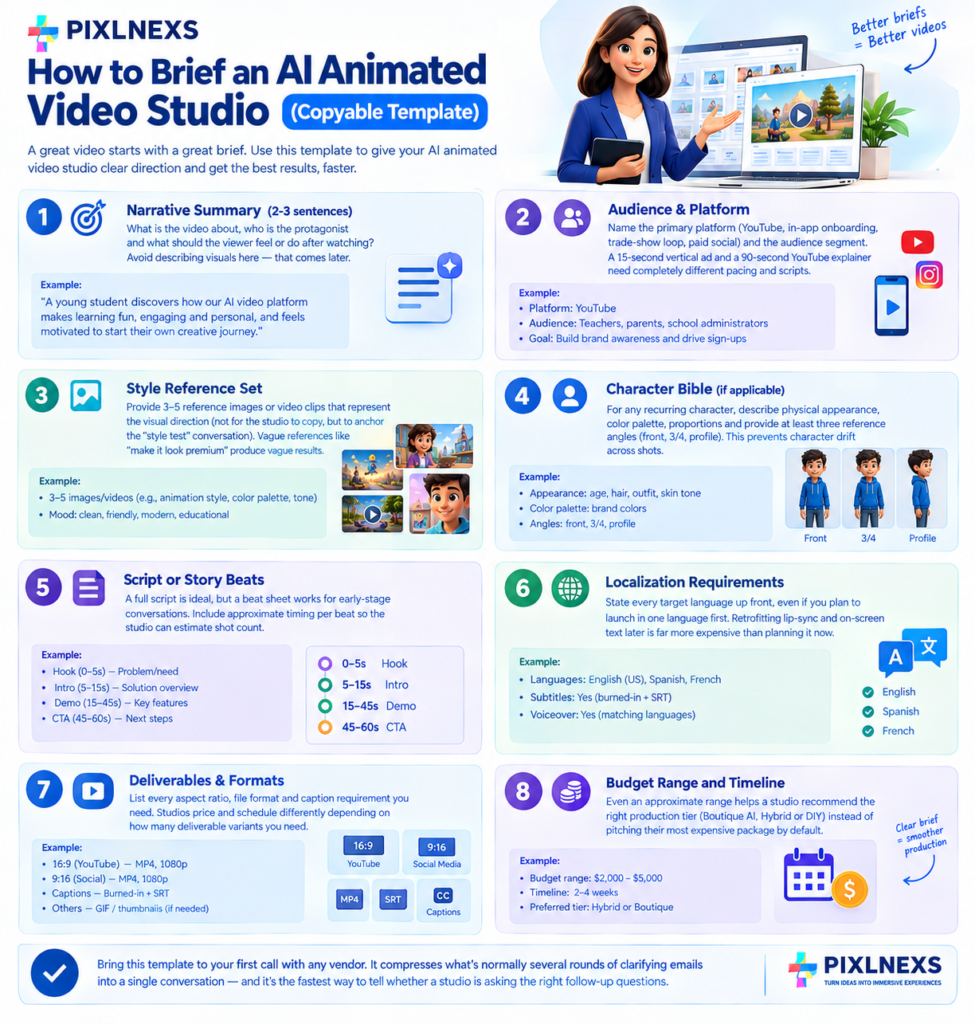
Most failed AI animation projects trace back to a weak brief, not a weak studio. A studio can only be as good as the direction it is given. Below is the exact brief structure Pixlnexs uses to scope new projects copy it into your own document before you contact any vendor.
1. Narrative Summary (2-3 sentences) What is the video about, who is the protagonist and what should the viewer feel or do after watching? Avoid describing visuals here that comes later. This section should read like a logline.
2. Audience & Platform Name the primary platform (YouTube, in-app onboarding, trade-show loop, paid social) and the audience segment. A video built for a 15-second vertical ad needs a completely different pacing script than a 90-second YouTube explainer, even with an identical story.
3. Style Reference Set Provide 3-5 reference images or video clips that represent the visual direction not for the studio to copy, but to anchor the “style test” conversation described earlier in this guide. Vague references like “make it look premium” produce vague results.
4. Character Bible (if applicable) For any recurring character, describe: physical appearance, color palette, proportions and at minimum three reference angles (front, 3/4, profile). This is the single highest-leverage document for preventing character drift across shots.
5. Script or Story Beats A full script is ideal, but a beat sheet works for early-stage conversations. Include approximate timing per beat so the studio can estimate shot count.
6. Localization Requirements State every target language up front, even if you plan to launch in one language first. Retrofitting lip-sync and on-screen text for localization after final render is far more expensive than planning for it. Our multi-language AI animated video localization guide covers how to structure this.
7. Deliverables & Formats List every aspect ratio, file format and caption requirement you need (16:9 master, 9:16 social cut, burned-in captions, SRT files, etc.). Studios price and schedule differently depending on how many deliverable variants you need from a single production.
8. Budget Range and Timeline Even an approximate range helps a studio recommend the right production tier (Boutique AI, Hybrid or DIY) instead of pitching you their most expensive package by default.
Bring this filled-out template to your first call with any vendor. It compresses what is normally several rounds of clarifying emails into a single conversation and it is the fastest way to tell whether a studio is asking the right follow-up questions.
Illustrative Walkthrough: Scoping a School Explainer With the Template
To show the template in action, here is a hypothetical walkthrough (not a real client engagement) for an EdTech buyer scoping a curriculum-aligned explainer series.
- Narrative Summary: A friendly guide character walks a student through a single science concept per episode, ending with a one-question comprehension check.
- Audience & Platform: Middle-school students, viewed inside an EdTech app on tablets meaning text needs to stay large and legible at a small viewport.
- Style Reference Set: Three reference stills in a flat, rounded, non-photorealistic style, chosen because it ages well and won’t look dated in future curriculum cycles.
- Character Bible: The guide character gets a locked color palette and three reference angles before any episode is generated, so the same character can recur across an entire semester’s worth of episodes without drifting in appearance.
- Script or Story Beats: A beat sheet per episode, timed to the length of a single class transition period.
- Localization: Flagged up front for two additional languages the district serves, so subtitle timing is planned into the original edit rather than retrofitted.
- Deliverables: A 16:9 master for the in-app player and a burned-caption 1:1 cut for the district’s internal newsletter.
- Budget Range and Timeline: A per-episode range and a semester-aligned delivery schedule, so the studio can recommend a Boutique AI production tier instead of over-pitching a Hybrid brand-film package that the project does not need.
Filling in every field before the first vendor call is what separates a scoped project from an open-ended one and it is the single fastest way to get an accurate quote instead of a padded one. For a deeper look at this specific vertical, see our guide to curriculum-aligned AI animated explainer videos for schools.
Pro Tip: Define “revision” clearly in the contract. Does a change in dialogue count as a revision? Does a change in background? Clarity here prevents disputes later.
Comparison: Boutique AI vs. Hybrid vs. DIY
Understanding the different types of providers is crucial. Not every project needs a full-service studio and not every studio can handle every project. Here is a breakdown of the three main categories.
| Feature | Boutique AI Studio | Hybrid AI + Traditional Studio | DIY Tool (SaaS) |
|---|---|---|---|
| Best For | High-volume, consistent style, social content | Brand films, complex narratives, multi-format campaigns | Simple explainers, internal comms, budget-constrained |
| Control | High (via prompt engineering & curation) | Very High (human art direction + AI speed) | Low (limited by tool capabilities) |
| Consistency | Moderate to High (depends on pipeline) | High (manual QA ensures coherence) | Low to Moderate (character drift is common) |
| Turnaround | Fast | Medium | Instant to short |
| Cost | Medium | Higher | Low |
| Customization | High (custom styles, characters) | Very High (full creative control) | Low (preset templates) |
| Localization | Often included or easy to add | Usually included | Often an add-on or limited |
| Risk | Medium (AI glitches possible) | Low (human oversight mitigates risk) | High (output may be unusable) |
| Ideal Client | Marketing teams, E-commerce, EdTech | Enterprise brands, Agencies, Film | Startups, SMBs, Individual creators |
The Boutique AI Studio
These are specialized firms that have built their entire workflow around AI tools. They are often smaller, faster and more agile. They excel at producing large volumes of content in a consistent style. Think of them as the “fast fashion” of animation.
Strengths: * Speed. * Cost-effectiveness for high-volume needs. * Deep expertise in specific AI models.
Weaknesses: * May lack the narrative depth for complex stories. * Quality can vary if the team is small and stretched thin. * Limited ability to handle highly custom, non-standard requests.
The Hybrid AI + Traditional Studio
This is the standard most commercial clients converge on. These studios have traditional animation backgrounds but have integrated AI into their pipeline. They use AI for concepting, roughing out shots and generating assets, but humans do the final curation, compositing and quality control.
Strengths: * High quality and consistency. * Strong narrative and creative direction. * Ability to handle complex, multi-layered projects. * Lower risk of “AI artifacts” or hallucinations.
Weaknesses: * Higher cost. * Longer turnaround than pure AI. * May be overkill for simple, low-stakes content.
The DIY Tool (SaaS)
These are self-service generative video platforms. They are powerful, but they require the user to have a high level of technical and creative skill.
Strengths: * Lowest cost. * Instant access. * Full control over the process.
Weaknesses: * Steep learning curve. * Time-consuming to get consistent results. * No built-in narrative structure or scriptwriting. * Limited support for complex workflows (e.g., lip-sync, multi-character scenes).
When to choose which: * Choose Boutique AI if you need many short videos per month in a consistent style. * Choose Hybrid if you are launching a major brand campaign or need a high-end brand film. * Choose DIY if you are testing ideas, have a small budget and have the time to learn the tools.
Red Flags to Avoid
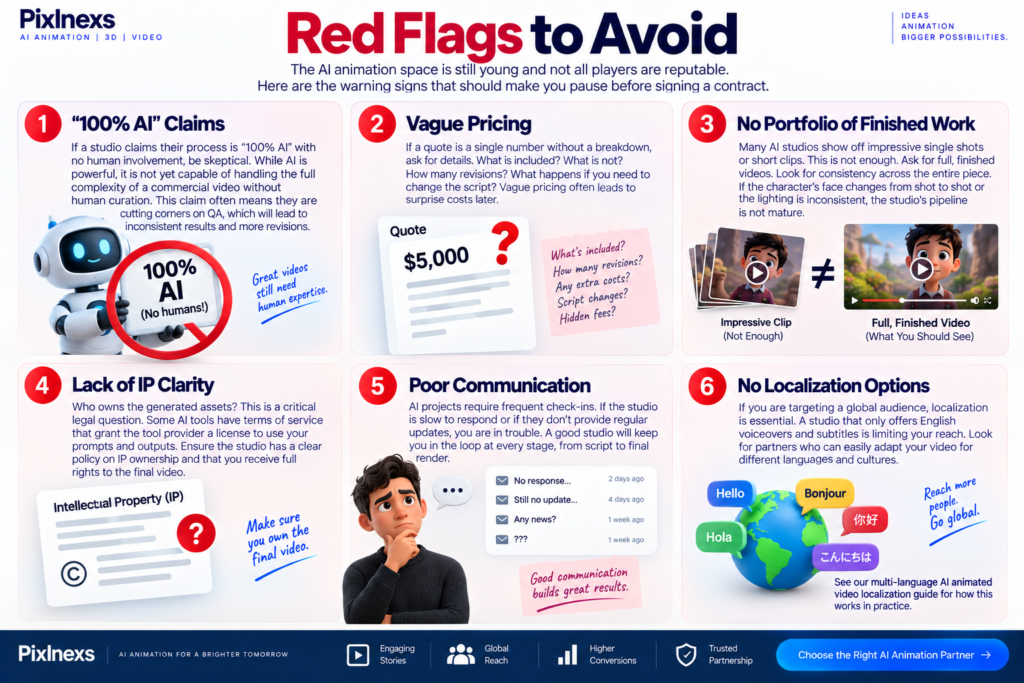
The AI animation space is still young and not all players are reputable. Here are the warning signs that should make you pause before signing a contract.
1. “100% AI” Claims
If a studio claims their process is “100% AI” with no human involvement, be skeptical. While AI is powerful, it is not yet capable of handling the full complexity of a commercial video without human curation. This claim often means they are cutting corners on QA, which will lead to inconsistent results and more revisions.
2. Vague Pricing
If a quote is a single number without a breakdown, ask for details. What is included? What is not? How many revisions? What happens if you need to change the script? Vague pricing often leads to surprise costs later.
3. No Portfolio of Finished Work
Many AI studios show off impressive single shots or short clips. This is not enough. Ask for full, finished videos. Look for consistency across the entire piece. If the character’s face changes from shot to shot or the lighting is inconsistent, the studio’s pipeline is not mature.
4. Lack of IP Clarity
Who owns the generated assets? This is a critical legal question. Some AI tools have terms of service that grant the tool provider a license to use your prompts and outputs. Ensure the studio has a clear policy on IP ownership and that you receive full rights to the final video.
5. Poor Communication
AI projects require frequent check-ins. If the studio is slow to respond or if they don’t provide regular updates, you are in trouble. A good studio will keep you in the loop at every stage, from script to final render.
6. No Localization Options
If you are targeting a global audience, localization is essential. A studio that only offers English voiceovers and subtitles is limiting your reach. Look for partners who can easily adapt your video for different languages and cultures. See our multi-language AI animated video localization guide for how this works in practice.
The Operator’s View: What We See in the Render Queue
As a studio that works daily with AI animation pipelines, we see the real-world challenges that marketing materials often gloss over. Here is what we observe in our render queues and how we handle them.
The Consistency Problem
The most common issue we encounter is character consistency. AI models are probabilistic. If you generate a character in one shot and then generate the same character in the next shot, there is a chance the details will change. The hair might be slightly different. The eyes might be a different color. The clothing might have a different texture.
How we solve it: We use a combination of reference images, LoRA (Low-Rank Adaptation) models and manual retouching. We create a “character bible” for each project, with detailed descriptions and reference images for every angle and expression. We then use these as inputs for the AI generation. Finally, we manually retouch any inconsistencies in post-production. This is time-consuming, but it is necessary for a professional result.
The Lip-Sync Challenge
Lip-sync is another area where AI struggles. While dedicated lip-sync models have improved significantly, they are not perfect. The mouth movements can look robotic or out of sync with the audio.
How we solve it: We use AI for the initial lip-sync, but then we manually adjust the keyframes in our animation software. We also use audio editing to ensure the voiceover is perfectly timed. This hybrid approach gives us the speed of AI with the precision of human animation.
The Style Drift
Style drift is when the visual style of the video changes over time. This can happen if the AI model is not properly constrained. One shot might look like a watercolor painting, while the next looks like a 3D render.
How we solve it: We lock the style early in the process. We create a style guide with specific color palettes, lighting setups and texture references. We then use these as prompts for every shot. We also use color grading in post-production to ensure consistency across the entire video.
The Importance of Human Curation
AI is a tool, not a creator. It can generate many variations, but it cannot decide which one is best. That is the job of the human director. We spend a significant amount of time curating the AI outputs, selecting the best shots and arranging them into a coherent narrative. This curation process is where the real value is added.
Our Workflow: 1. Script & Storyboard: We write the script and create a detailed storyboard. 2. Style Lock: We define the visual style and create reference images. 3. AI Generation: We use AI to generate the initial shots. 4. Curation: We select the best shots and identify any issues. 5. Manual Retouching: We fix any inconsistencies in character, style or lip-sync. 6. Editing & Sound: We assemble the video, add music, sound effects and voiceover. 7. Final QA: We review the final video for any remaining issues.
This workflow is more complex than pure AI, but it produces a much higher quality result. It is the difference between a demo and a professional production. Read the full breakdown in from script to screen: the AI animated video workflow.
Why Hybrid Studios Are Winning in 2026
The market is shifting away from pure AI tools and toward hybrid studios. This is because businesses have realized that AI alone is not enough. They need a partner who can manage the entire process, from creative concept to final delivery.
Hybrid studios offer the best of both worlds: the speed and cost-effectiveness of AI and the quality and control of human expertise. They can handle complex projects that pure AI tools cannot and they can deliver results that meet the high standards of modern marketing.
The Role of AI in the Creative Process
AI is not replacing human creatives; it is augmenting them. It allows directors to explore more ideas, more quickly. It allows artists to focus on the details that matter, instead of spending hours on repetitive tasks. It is a force multiplier, not a replacement.
The Future of AI Animation
As AI models continue to improve, the gap between AI-generated and human-generated content will continue to narrow. However, the need for human curation and direction will remain. The best studios will be those that can use AI to enhance their creative process, not replace it.
Ready to Start Your AI Animated Video?
Ready to start your AI animated video?
Pixlnexs handles script, style lock, AI generation and final QA under one roof. We reply with a turnaround estimate and pricing structure within one business day.
Get a Scoped QuoteFrequently Asked Questions
What is the average cost of an AI animated video?
The cost varies widely based on complexity, length and the studio’s expertise. Simple explainer videos sit at the low end of the market, while high-end brand films cost substantially more. Always get a detailed quote that breaks down the costs for script, animation, voiceover and post-production see our full AI animated video cost breakdown for illustrative ranges.
How long does it take to produce an AI animated video?
Turnaround times have been significantly reduced by AI compared to traditional animation. The timeline depends on the number of revisions, the complexity of the script and the studio’s workload.
Can AI maintain character consistency across multiple shots?
Yes, but it requires a sophisticated pipeline. Simple AI tools often struggle with character consistency, leading to changes in appearance from shot to shot. Professional studios use …techniques like reference images and LoRA (Low-Rank Adaptation) models and manual retouching to ensure consistency.
Who owns the rights to the AI-generated video?
This depends on the contract and the terms of service of the AI tools used. Most reputable studios will grant you full ownership of the final video. However, some AI tools may retain certain rights to the prompts or outputs. Always clarify IP ownership in your contract.
Is AI animation suitable for all types of content?
AI animation is best suited for explainer videos, product demos, social media content and simple narratives. It may not be ideal for highly complex, character-driven stories that require deep emotional nuance. For such projects, traditional animation or a hybrid approach may be more appropriate.
How do I ensure the AI video matches my brand guidelines?
Provide the studio with a detailed brand guide, including color palettes, fonts and visual style references. Work closely with the director to lock the style early in the process. Request a style test before full production begins to ensure the AI output aligns with your brand.
What is the difference between a boutique AI studio and a hybrid studio?
A boutique AI studio builds its entire workflow around AI tools and favors speed and volume. A hybrid studio blends AI generation with human art direction and manual QA, trading some speed for higher consistency and narrative control see the comparison table above for a full breakdown.
Do I need a full studio or can I use a DIY AI video tool myself?
It depends on volume and stakes. If you are producing a handful of low-stakes internal videos and have the time to learn a self-service tool, a DIY platform can work fine. But the moment you need a recurring character to stay consistent across episodes, need multiple languages or the video represents your brand externally, the curation and QA work that a studio provides tends to save more time than it costs especially once you factor in the hours spent regenerating inconsistent shots yourself. Use the brief template above to scope the project either way; it clarifies whether the complexity actually warrants a studio.
Read More
How to Create AI Videos for YouTube Kids Rhymes
AI Video vs Traditional Video Production: Cost, Speed and Quality Compared
How Much Does AI Video Generation Cost in 2026? (Pricing Breakdown)
How to Make AI Video in 2026: The Complete Script to Screen Workflow










Leave a Reply