
Quick answer: AR product visualization lets shoppers point their phone at their floor, table or wall and see a true to scale 3D model of your product placed in their real space. It works through the browser using with AR Quick Look on iOS (USDZ) and Scene Viewer on Android (glTF/GLB) with no app download required.
For its successful shipping you will need one perfect 3D model for each item including GLB and USDZ files, an obvious View in your room button and the correct size measurements embedded in the model. This way will decrease customer doubts about purchasing furniture, decor, electronics, and fashion accessories as customers can get all information on the item before buying it. The difficult part is not adding the AR button but working on the model quality, scale and file weight.
By the Pixlnexs Animation Studio team, we produce AI video and 3D content and run the marketplace at store.pixlnexs.com, so this reflects real production experience.
“Place it in your room” has quietly become a default expectation in online shopping. Buyers who once squinted at a product photo and guessed whether a lamp would dwarf their nightstand can now drop a life size 3D model onto the actual nightstand and walk around it. This guide is the hub for everything we know about shipping AR product visualization that actually converts: the formats, the pipeline, the pitfalls and the realistic effort involved. It links out to deeper spoke guides on the specific file formats and conversions you’ll need along the way.
What AR product visualization actually is
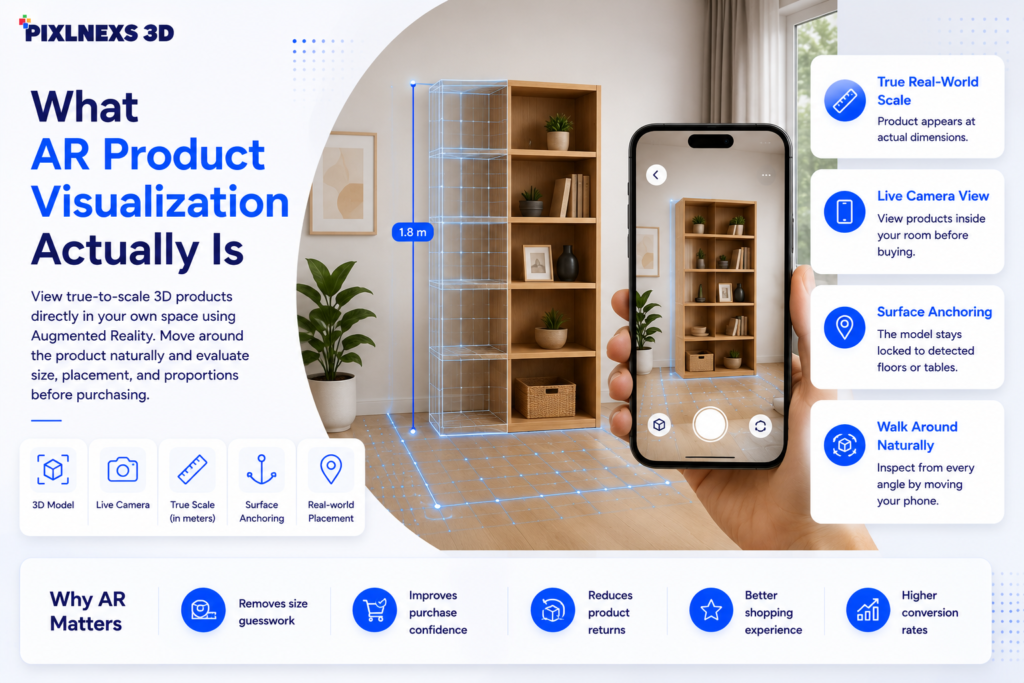
AR product visualization is the technique of rendering a 3D model of a real product, at true real-world scale, composited into a live camera view of the shopper’s environment. The shopper sees the product as if it were physically present. They can move closer, circle it, and judge proportion against the furniture they already own.
The key phrase is true real-world scale. A nice spinning 360 viewer is not AR. It’s a 3D viewer. AR specifically means the model is anchored to a detected surface in the camera feed and sized in meters, so a 1.8-meter bookshelf appears 1.8 meters tall against the shopper’s actual wall. That anchoring and scale is what removes the guesswork that drives a large share of online returns, especially in furniture and home categories.
Web AR versus app-based AR
You have two delivery paths. App-based AR (built with ARKit, ARCore, or Unity) gives you maximum control and effects, but it forces a download and a development team. Web AR runs in the mobile browser with no install and is the right default for almost every e-commerce store. The browser hands off to the device’s native AR system, AR Quick Look on iOS and Scene Viewer on Android, using a single embed. For the vast majority of product catalogs, web AR is the correct, cheaper, faster choice.
How web AR works under the hood
The low-friction way to ship web AR is Google’s open-source <model-viewer> web component. You include a single custom element, point it at your 3D files, and it handles the 3D viewer plus the native AR handoff on both platforms. A minimal embed looks like this:
<model-viewer
  src="armchair.glb"
  ios-src="armchair.usdz"
  ar
  ar-modes="webxr scene-viewer quick-look"
  camera-controls
  alt="A 3D model of an upholstered armchair">
</model-viewer>
The two-file requirement is the part teams underestimate. iOS expects a USDZ file for AR Quick Look; Android and the desktop 3D viewer expect a GLB (binary glTF). You almost always author in glTF/GLB and convert to USDZ. We cover both in depth in the format spokes linked below, including a step-by-step GLB to USDZ conversion walkthrough and the full USDZ for AR Quick Look guide.
glTF is sometimes called “the JPEG of 3D” because it’s the web-native, royalty-free transmission format standardized by the Khronos Group; you can read the formal spec at khronos.org/gltf. USDZ, by contrast, is Apple’s zipped Universal Scene Description package used specifically for iOS AR Quick Look.
Format comparison at a glance
| Format | Primary platform | Role in AR | Typical authoring |
|---|---|---|---|
| GLB / glTF | Android, desktop, WebXR | Scene Viewer + 3D viewer source | Authored / exported directly |
| USDZ | iOS / iPadOS | AR Quick Look source | Converted from GLB |
| USD / USDA | Pipelines, DCC tools | Source scene format | Production / editing |
| FBX / OBJ | None (web AR) | Intermediate only | Modeling import/export |
The production pipeline, step by step
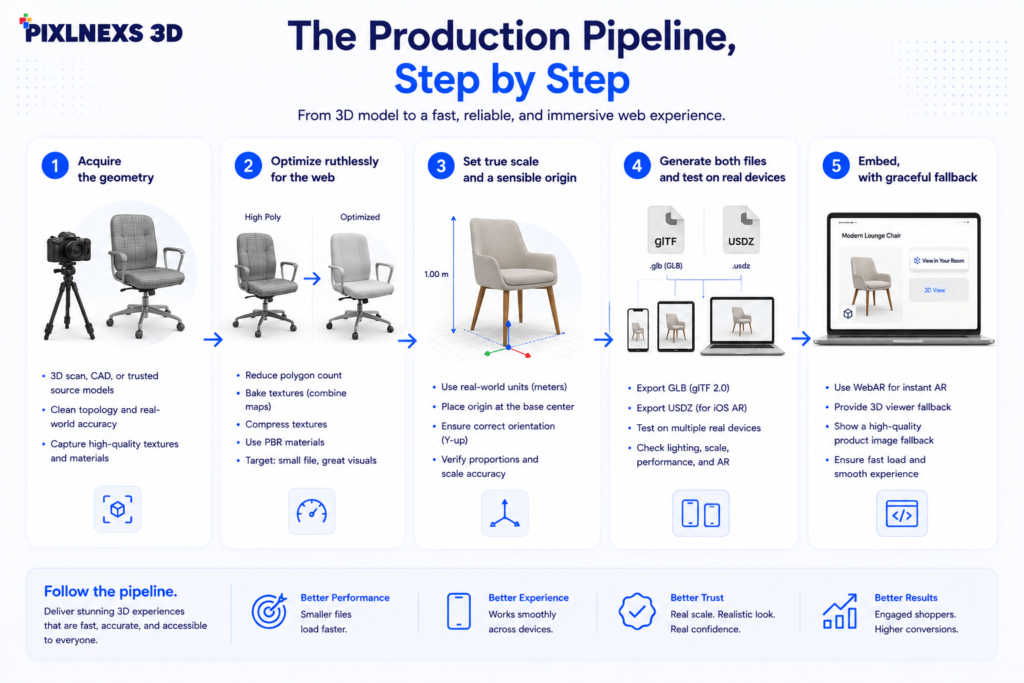
Shipping one AR-ready product is a repeatable pipeline. The button is the last 10% of the work; model quality is the first 90%.
1. Acquire the geometry
You get a 3D model one of three ways: model it from CAD or reference photos, photogrammetry-scan the physical product, or commission/buy a ready-made model. For catalogs with hundreds of SKUs, a mix is common. Scan the hero items, model the simple ones. Marketplaces like store.pixlnexs.com exist precisely to shortcut this step when a suitable model already exists.
2. Optimize ruthlessly for the web
This is where most AR projects succeed or fail. A model that looks gorgeous in a desktop renderer can be a 60 MB monster that never loads on a 4G phone. Targets we work toward for typical product AR:
- File size: aim for well under 10 MB per model; many good product models land in the 2–5 MB range.
- Polygon count: tens of thousands of triangles is plenty for most products; bake fine detail into normal maps instead of geometry.
- Textures: use compressed textures and reasonable resolutions (often 1K to 2K), and apply Draco mesh compression and KTX2/Basis texture compression where supported.
- Materials: use PBR (physically based rendering) materials so the product responds believably to the room’s lighting.
Here’s what actually happens when you skip the compression step: the GLB looks fine on your office wifi, sails through QA, then dies in the field. The shopper on a train with two bars taps “View in your room,” waits, sees a spinner, and leaves. You never find out, because an abandoned AR load doesn’t fire an error. It just quietly underperforms. That gap between “works on my machine” and “works on a 4G phone in a parking lot” is where most of these projects lose their ROI. Google’s web.dev has solid platform guidance on performance budgets and loading; see web.dev for the broader principles that apply directly to heavy 3D assets.
3. Set true scale and a sensible origin
The glTF format is in meters. If the export of the model isn’t to scale, then it will come out as a doll or an oversized version of your object. Check that the bounding box corresponds to the specification for the item and put the origin of the object where it should be sitting or hanging.
4. Generate both files and test on real devices
The process would be export the GLB, convert to USDZ, and run tests both on a real iPhone and a real Android phone, rather than on the desktop application alone. Verify that the AR button appears, the object anchors to the floor, the size feels correct when standing next to the object, and the materials load within two seconds. The tradeoff that should be acknowledged here: device testing is very time-consuming and no one wants to take ownership, yet it is the only place where issues with scale and material will reliably show up. An 8% undersized object cannot be seen on the monitor but will appear instantly when you compare it to a real chair.
5. Embed, with graceful fallback
Add the tag to the product page. For AR-compatible mobile devices, the “View in your room” button appears. Desktop users get an interactive 360-degree view of the model. Always ensure you maintain the default product images for safety purposes.
Where AR visualization pays off most
AR is not equally valuable for every product. It earns its keep where size, fit, or how-it-looks-in-context are the real buying questions.
- Furniture and home decor: the canonical use case, “will this sofa fit and match?”
- Lighting and large appliances: proportion against the room matters enormously.
- Electronics and TVs: screen size on a real wall is hard to imagine from a number.
- Fashion accessories, eyewear, watches: scale and presence on the body or wrist.
- Art, mirrors, and wall pieces: the “does it work above my couch” question.
For low-consideration commodity items, AR rarely justifies the production cost. Spend your model budget on the SKUs where uncertainty is the conversion blocker.
What it realistically does for the business
We want to be honest here rather than quote made-up percentages. Across the industry, retailers consistently report that AR and 3D product views increase engagement time and tend to reduce returns in size-sensitive categories, but the exact lift varies enormously by product, audience, and execution quality. Treat any single headline statistic with skepticism. The defensible claim is directional: when a shopper can verify scale and context before buying, they make fewer wrong-size decisions, and that shows up as fewer returns and higher confidence. Measure it on your own catalog with a clean A/B test before promising a number internally.
Common mistakes that kill AR projects
- Oversized files. A 40 MB model that takes 20 seconds to load is worse than no AR at all.
- Wrong scale. The single most damaging bug, because it instantly destroys trust.
- iOS-only or Android-only. Shipping just USDZ or just GLB silently breaks half your traffic.
- Inaccurate materials. A matte product rendered glossy (or vice versa) makes shoppers distrust the whole experience.
- Hidden AR button. If shoppers can’t find “View in your room,” the asset you paid for goes unused.
- No fallback. Forgetting the desktop 3D view and photo baseline leaves non-AR users with an empty box.
Conclusion
Product visualization through augmented reality is not limited to only the biggest companies any more. Thanks to advanced WebAR technology, even the smallest firms can provide customers with placing of products in the user’s own space without downloading of an app. The main difficulty does not lie in providing AR, but in creating 3D models which are realistic, yet not heavy to load on each device.
The most successful AR experiences start with a production ready 3D model that’s built at true scale, optimized for fast loading and compatible with both GLB and USDZ formats. Once that foundation is in place, the same asset can power interactive product viewers, augmented reality experiences, product videos, marketing campaigns and future digital experiences, giving brands far more value than a single ecommerce feature.
At Pixlnexs, we help businesses build that complete 3D pipeline from professional 3D modeling and optimization to AR-ready assets that work seamlessly across Shopify, ecommerce websites and mobile devices. Whether you are launching your first AR product page or scaling hundreds of products investing in high quality 3D assets today creates a reusable digital foundation that continues to deliver value across your entire marketing and sales ecosystem.
Frequently asked questions
Do shoppers need to download an app to use AR product visualization?
No. Web AR runs in the mobile browser using <model-viewer>, which hands off to AR Quick Look on iOS and Scene Viewer on Android, both built into the operating system. The shopper taps “View in your room” and the native AR experience opens with no install. App-based AR exists but is rarely necessary for e-commerce.
What 3D file formats do I need?
Two: a GLB (binary glTF) for Android, desktop, and WebXR, and a USDZ for iOS AR Quick Look. You typically author in glTF/GLB and convert to USDZ. Shipping only one format breaks AR for roughly half of mobile shoppers, so always produce both.
How big should an AR product model be?
Aim for well under 10 MB per model, ideally in the 2–5 MB range, with tens of thousands of triangles and compressed 1K–2K textures. Use Draco mesh compression and KTX2 texture compression where supported. File weight is the difference between an asset that loads instantly and one shoppers abandon.
Why does my model appear the wrong size in AR?
Almost always a scale or units problem. glTF is defined in meters, so if the model wasn’t exported at real-world dimensions it will appear tiny or giant. Verify the bounding box against the product’s spec sheet and re-export at true scale before converting to USDZ.
Can I reuse one 3D model for AR, a website 3D viewer, and video?
Yes, a well-built, optimized model is reusable. The same GLB powers the on-page 3D spin and (after conversion) AR Quick Look, and the source asset can be rendered into product video or marketing animation. Building once and reusing across channels is the most cost-effective approach.
Does AR product visualization actually reduce returns?
Directionally, yes, in categories where size and fit drive returns, because shoppers verify scale and context before buying. But the magnitude varies widely by product and execution, and you should be wary of any single quoted statistic. Run an A/B test on your own catalog to measure the real effect rather than relying on industry averages.
How long does it take to make one product AR-ready?
It depends mostly on whether the 3D model already exists. If you have a clean, scaled GLB, generating the USDZ and embedding the viewer is a same-day task. If the model must be built or scanned, modeling, texturing, and optimization is the bulk of the timeline, often days per hero product, faster for simple geometry or when sourcing a ready-made model.










Leave a Reply