
Quick answer: The best AI avatar generator for business in 2026 is contingent on what criteria matter most to you. Synthesia wins on enterprise-level polish and language coverage, HeyGen on speed for spokesperson video and avatar cloning, D-ID for minimal effort talking photos and Colossyan on L&D & training. There is no one clear winner. Select based on the use case (L&D, sales, marketing, customer service) the level of realism expected and whether you have API requirements. Most organizations should conduct a small-scale pilot of two tools on actual script and footage first, because output quality can vary greatly depending on your script and footage.
By kishore, the Pixlnexs Animation Studio team, we produce AI video and 3D content and run the marketplace at store.pixlnexs.com, so this reflects real production experience.
Key Takeaways
There is no single best tool the right AI avatar generator depends on your use case, realism bar, API needs and governance requirements.
Synthesia leads for enterprise training and multilingual content at scale.
HeyGen leads for spokesperson, sales and marketing video and fast avatar cloning.
D-ID leads for API-driven, high-volume personalized video generation.
Colossyan leads for L&D, course content and compliance training.
Script quality, not tool choice, is the single biggest driver of output quality a well-written script on any of these tools beats a poorly written one on the “best” tool.
Avatar cloning is a governance commitment, not just a feature documented consent, defined usage scope and a retirement plan are required before you clone anyone’s likeness.
The term “best” is highly relative to the Artificial intelligence avatars software solutions. Following the experience of creating avatar-based videos for onboarding, product explanations and sales purposes, it became clear to us that the software solution itself does not matter as much as the compatibility of that particular solution with the task at hand. While a software solution that can produce impeccable multilingual training materials may appear stiff in a promotional video, another one may be spot-on for a promotional clip but may lack governance for enterprise L&D.
What an AI avatar generator actually does
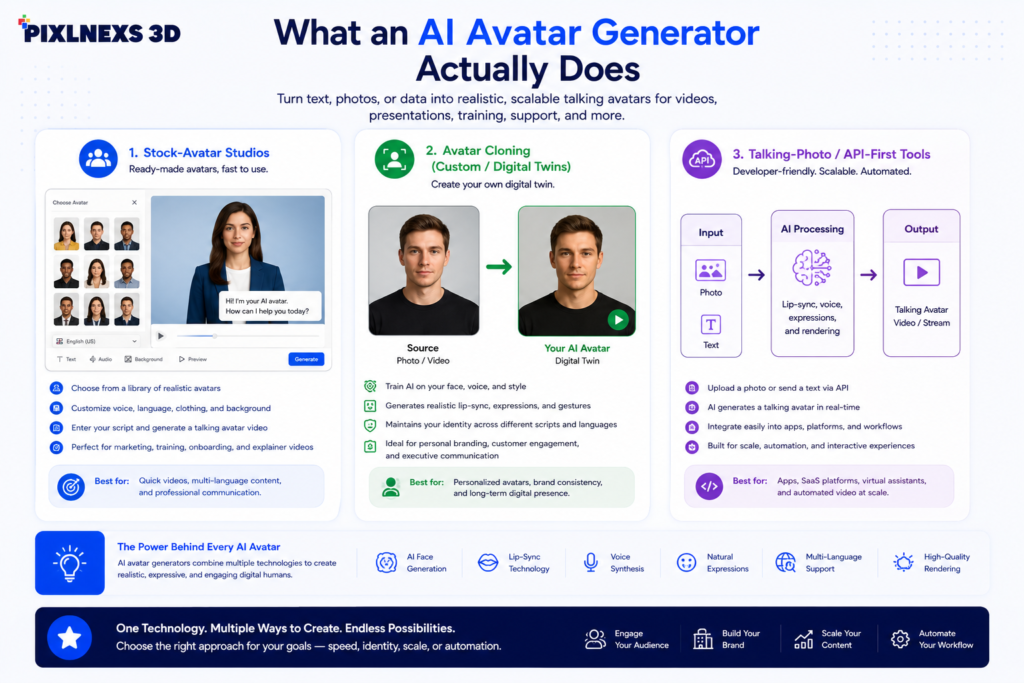
AI Avatars are applications that convert scripts and even videos of a real-life individual into a video presentation by a virtual persona speaking what you have written using lip-synching technology. The field can be categorized into various categories and the choice of the category determines your needs.
Stock-avatar studios
You pick from a library of licensed digital presenters, type or paste a script, choose a voice and language and render. This is the fastest path for teams that don’t want their own face on camera. Synthesia and Colossyan are strong here.
Avatar cloning (custom / digital twins)
You record a short consent video of a real person and the tool builds a reusable likeness that can be driven by any future script. HeyGen and Synthesia both offer this. It’s powerful for putting a CEO or trainer “on camera” at scale but it carries the most consent and brand-risk considerations.
Talking-photo / API-first tools
You animate a single still image into a speaking head, often through an API for programmatic generation at volume. D-ID is the best-known example and is popular with developers embedding avatars into apps and personalized-video pipelines.
The contenders compared
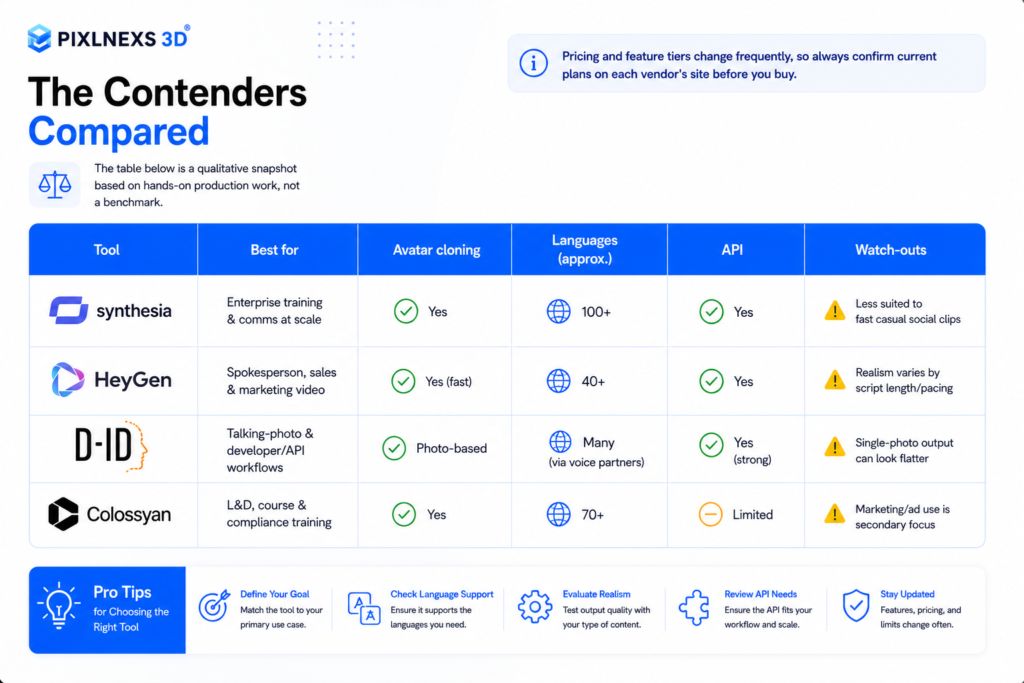
The table below is a qualitative snapshot based on hands-on production work, not a benchmark. Pricing and feature tiers change frequently, so always confirm current plans on each vendor’s site before you buy.
| Tool | Best for | Avatar cloning | Languages (approx.) | API | Watch-outs |
|---|---|---|---|---|---|
| Synthesia | Enterprise training & comms at scale | Yes | 100+ | Yes | Less suited to fast casual social clips |
| HeyGen | Spokesperson, sales & marketing video | Yes (fast) | 40+ | Yes | Realism varies by script length/pacing |
| D-ID | Talking-photo & developer/API workflows | Photo-based | Many (via voice partners) | Yes (strong) | Single-photo output can look flatter |
| Colossyan | L&D, course & compliance training | Yes | 70+ | Limited | Marketing/ad use is secondary focus |
Synthesia
In case your primary requirement includes internal training, policy updating or multilingual corporate communication, Synthesia can be the safest choice by default. It offers great benefits in terms of the range of stock characters, wide support for multiple languages and governance capabilities like workspaces, brand management and review processes. However, one downside is that results produced by Synthesia may lack a scroll-stopping effect characteristic of videos made specifically to attract attention on TikTok.
HeyGen
HeyGen has emerged as the preferred choice for marketing and sales teams due to the fast pace at which it does its ai avatars cloning and how the content generated by it flows naturally as a short-form spokesperson video. It’s always our go-to for videos featuring AI spokespersons and personalized marketing messages. As is the case with all the other tools, the longer and more complex the script, the more problematic things get.
D-ID
D-ID’s sweet spot is programmatic generation. If you’re a developer building personalized video at volume, say thousands of name-customized clips, its API maturity is a genuine differentiator. For one-off marketing videos a full studio tool will usually look richer, because animating a single photo has a lower ceiling than a purpose-built avatar.
Colossyan
Colossyan is deliberately L&D-shaped: scenario branching, conversation-style scenes between two avatars and templates aimed at courseware and compliance. If your buyer is a learning team rather than a marketing team, it deserves a slot in your pilot.
How to choose: a practical decision framework
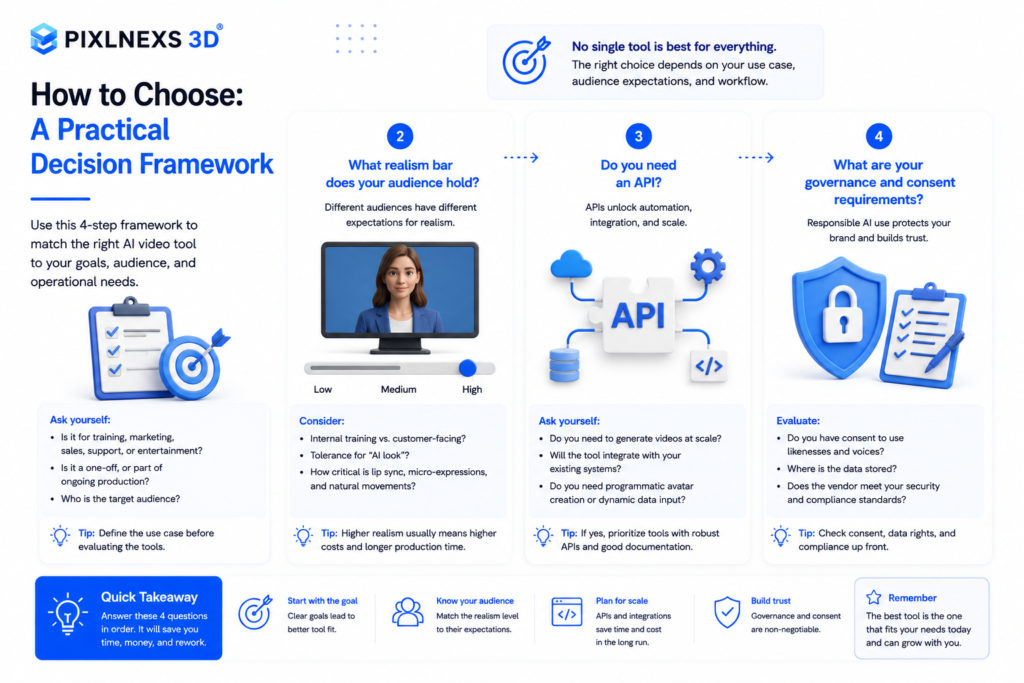
Skip the feature-checklist trap. Answer these four questions in order and the shortlist narrows itself.
1. What’s the job to be done?
Training and internal comms favor Synthesia or Colossyan. Sales, marketing and spokesperson content favor HeyGen. High-volume personalized or in-app video favors D-ID. Mixed needs usually mean two tools, not one compromise tool.
2. What realism bar does your audience hold?
An internal compliance refresher tolerates a slightly synthetic presenter. A premium brand’s homepage hero does not. Be honest about where the “uncanny” threshold sits for your viewers and test on the actual audience if you can.
3. Do you need an API?
If avatars must be generated by a system (CRM-triggered, per-recipient, embedded in a product) API quality and rate limits matter more than the editor UI. This shifts weight toward D-ID and the API tiers of HeyGen and Synthesia.
4. What are your governance and consent requirements?
Cloning a real person’s likeness is a legal and ethical commitment, not just a feature. You need documented consent, clear usage scope and a way to retire a clone. Larger vendors provide consent workflows for exactly this reason, so treat them as a requirement, not a nice-to-have. One thing teams forget: a clone outlives the person’s tenure. When the CEO who recorded it leaves, someone has to remember to pull every video that still has their face on it. For background on how synthetic media and likeness rights are evolving, see the overview on synthetic media.
What actually drives quality (it’s not the brand)
The single biggest lever on a finished avatar video is the script, not the engine. Here’s what we control on every production:
- Write for spoken delivery. Short sentences, one idea per line, contractions. Text written for the eye sounds robotic when an avatar reads it.
- Match voice to brand. A mismatched voice undoes a perfect avatar. Audition several before locking one.
- Keep clips short. Lip-sync and naturalness hold up best under roughly 60 to 90 seconds; break long content into segments.
- Mind accessibility. Captions, transcripts and adequate contrast are non-negotiable for business video. Google’s guidance on web accessibility is a solid baseline for the pages that host these videos.
- Add real production value. A branded intro, lower-thirds, b-roll or 3D elements between avatar shots lifts a clip from “AI demo” to “company asset.” This is where a production partner earns its keep.
Here’s what actually happens on the editing timeline: paste a script that reads beautifully on the page, hit render and the avatar plows through a comma-spliced sentence with zero breath, landing somewhere between an airport announcement and a hostage video. The fix is almost never a better tool. It’s chopping that sentence in half and re-rendering.
If you want the full background on how talking-head avatars work end to end, our complete 2026 guide to AI avatars and talking-head videos is the hub for this topic and our walkthrough on how to create a talking-head AI video without a camera covers the step-by-step.
Build, buy or hire?
Self-serve tools work wonders if you have an internal rhythm and an editor that likes them. However, for launch videos and other marketing campaigns where the avatar appears on the screen along with motion graphics and 3D animation, the tool alone is not enough. That’s the gap we fill, combining avatar generation with scripting, voice direction, branding and 3D production so the result reads as a finished company asset rather than a template. If a clip needs to convert, see how we approach AI spokesperson videos for sales and onboarding that actually convert and browse production-ready assets at store.pixlnexs.com.
Need avatar videos that actually convert?
Pixlnexs combines AI avatar generation with scripting, voice direction, branding and 3D production so the result reads as a finished company asset not a template output.
See Our AI Video Production Book a DemoConclusion
There is no single best AI avatar generator for every business in 2026. The right choice depends on what you’re trying to achieve. If your priority is multilingual employee training, Synthesia is a strong option. For marketing campaigns and AI spokesperson videos, HeyGen often delivers the most natural results. If you need API-driven personalized video generation, D-ID stands out, while Colossyan remains an excellent choice for learning and development.
At Pixlnexs, we have learned that while the software plays an important role in generating a successful AI video, the most significant thing that really matters is writing a great script, visuals, professional editing, branding and production flow. Even the most sophisticated avatar software can never replace good creative vision of the product.
If your aim is to generate AI avatar videos that will be engaging for your audience, reinforce your brand and help you to achieve your business goals, then you will find out that combining professional production process and AI software works the best way.
No matter what kind of videos you need to produce, whether it is training videos, product explainers, presentations, etc. start with creating a pilot video and then evaluate all the options by yourself.


Leave a Reply