
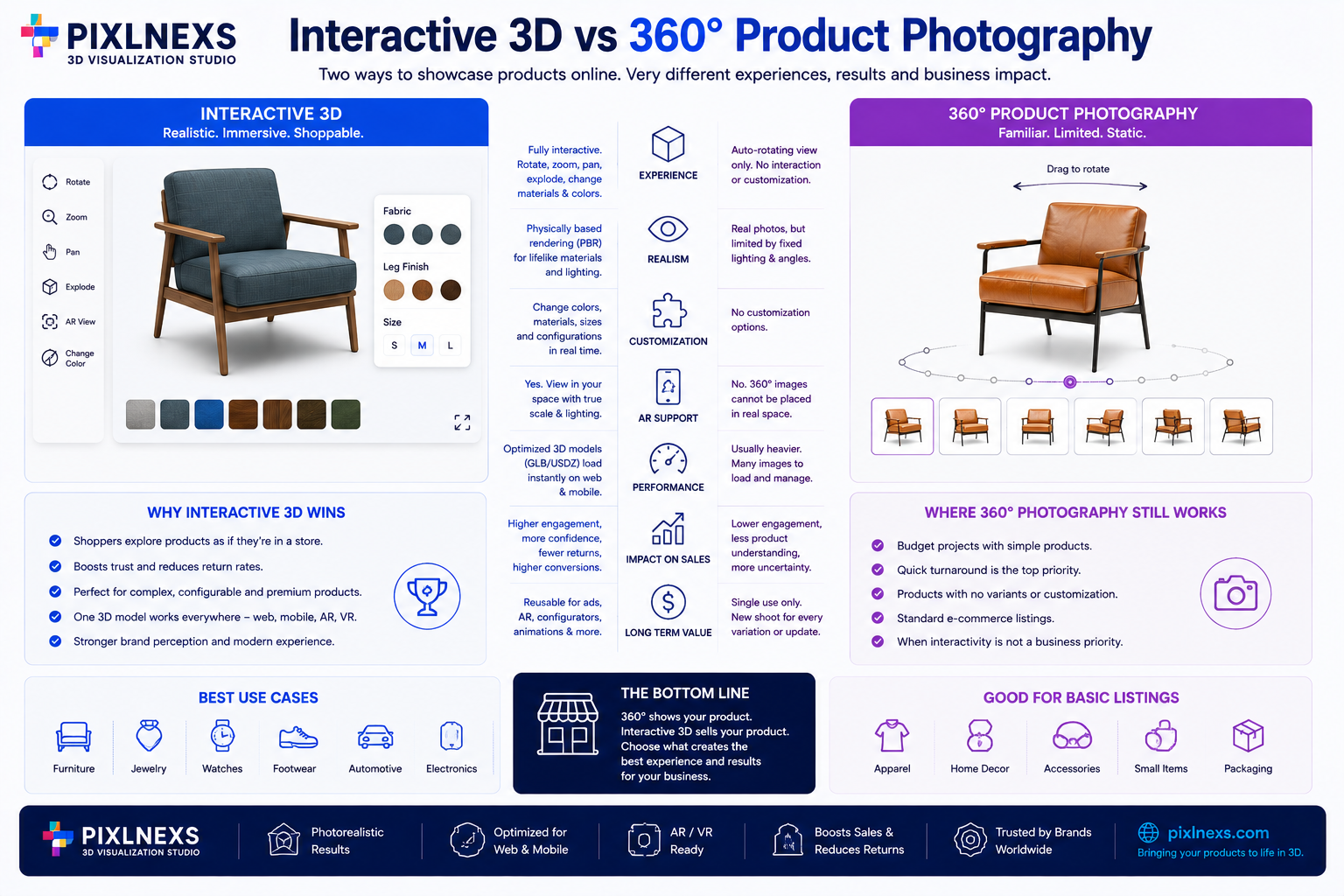
Quick answer: Interactive 3D vs 360 product photography comes down to a trade-off between upfront cost and long-term flexibility. 360° photography is a sequence of real photos stitched into a spinnable loop fast to shoot, cheap per SKU but frozen the moment it’s rendered. Interactive 3D is a rebuilt digital model of the product slower and more expensive to produce the first time but reusable across colors, backgrounds, marketing and AR without a reshoot. For simple, low-cost, low-return-risk products, 360° photography is usually the practical choice; for complex, high-value or configurable products, interactive 3D typically earns back its higher setup cost.
By the Pixlnexs Studio, Bali Balajee team Pixlnexs builds interactive 3D and AR product visualization for eCommerce brands worldwide, helping retailers move beyond flat photography toward digital product experiences that customers can actually manipulate.
Key Takeaways
- 360° photography is a captured medium a fixed sequence of images. It is fast and affordable but cannot be edited without reshooting.
- Interactive 3D is a constructed medium a geometric model with real materials. It costs more upfront but can be recolored, restaged and reused indefinitely.
- Neither format is universally “better.” The right choice depends on product complexity, price point, return-rate sensitivity and how often the catalog changes.
- Interactive 3D is the format that unlocks AR placement, product configurators and cross-channel reuse (ads, social, print) from a single asset.
- 360° photography remains the more scalable option for large catalogs of simple, low-variation SKUs.
What Is 360° Product Photography?
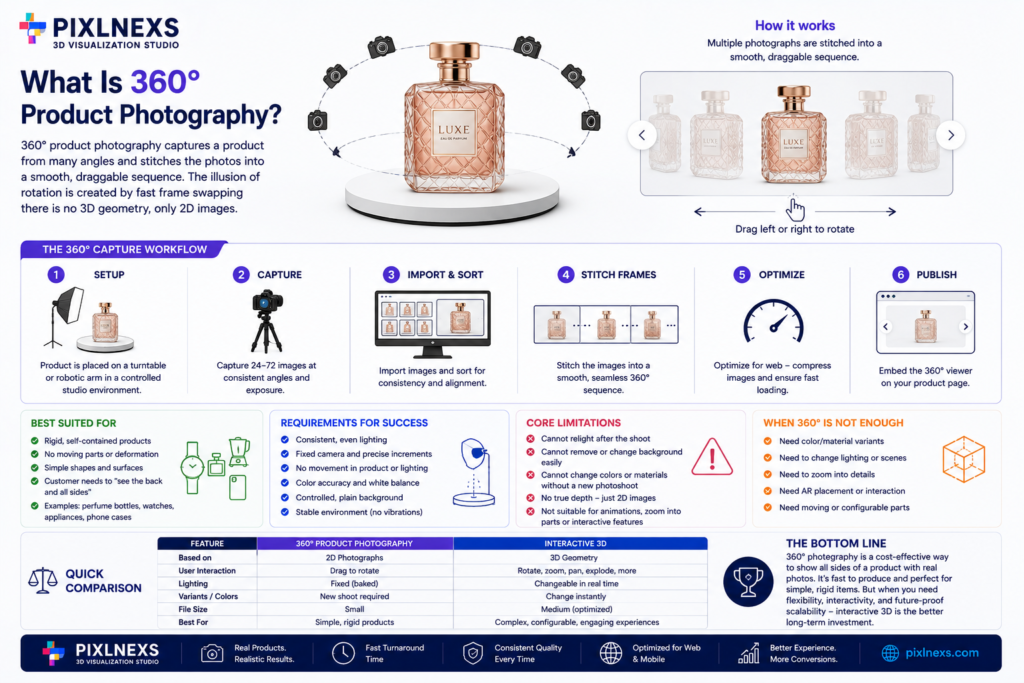
360-degree product photography is a technique where a product is photographed from many angles typically 24 to 72 frames using a turntable or a robotic camera arm, then stitched into a smooth, draggable sequence. The shopper drags the image left or right and the browser swaps between frames fast enough to feel like rotation. The “depth” is an illusion built from real 2D photographs; there is no underlying geometry, only pixels arranged in sequence.
Because it is fundamentally a photography workflow, 360° capture inherits the same discipline as standard product photography: consistent lighting, color accuracy and a controlled studio environment. What it adds is a mechanical requirement the turntable or arm must move in exact, repeatable increments and the lighting must not shift between frames or the loop will flicker and look unprofessional.
360° photography works best on rigid, self-contained products: a perfume bottle, a wristwatch, a small kitchen appliance, a phone case. These products do not deform, do not have moving parts that need separate treatment and do not usually need to be recolored after the shoot. The customer’s main unmet need is simply “let me see the back of it” and 360° photography answers that directly, at a photography-level cost.
The format’s core limitation is that it is a closed loop. Once captured, you cannot relight the scene, cannot isolate the product from its background without expensive rework and cannot swap in a different color variant without a brand-new photo shoot. For a catalog with frequent seasonal color drops, this becomes an operational bottleneck rather than a one-time cost.
What Is Interactive 3D Product Visualization?
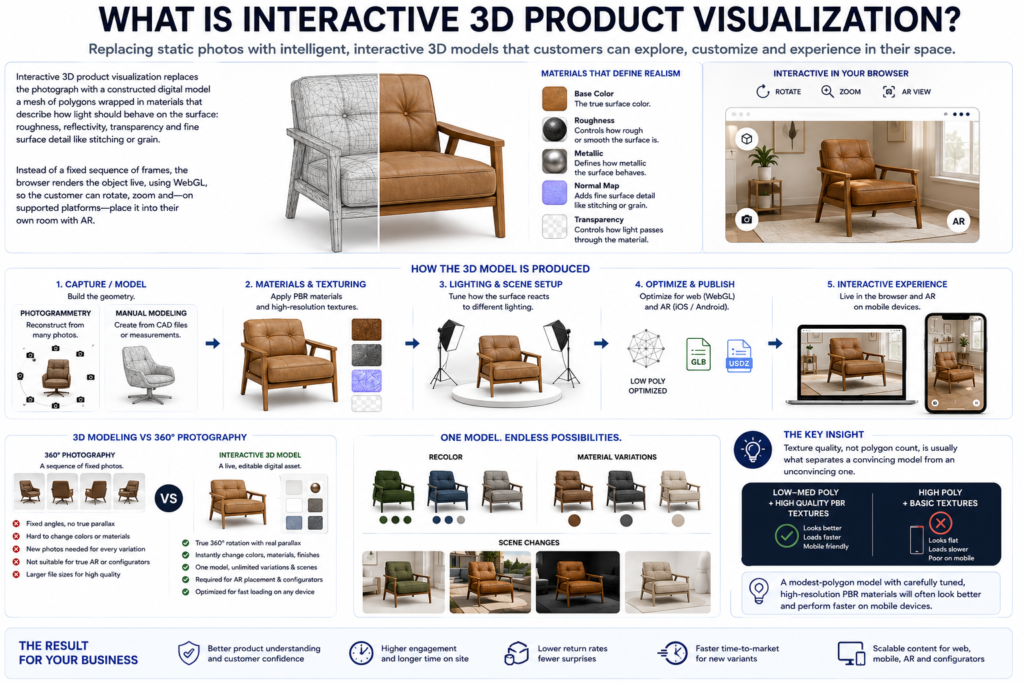
Interactive 3D product visualization replaces the photograph with a constructed digital model a mesh of polygons wrapped in materials that describe how light should behave on the surface: roughness, reflectivity, transparency and fine surface detail like stitching or grain. Instead of a fixed sequence of frames, the browser renders the object live, using WebGL, so the customer can rotate, zoom and on supported platforms place it into their own room with AR.
Producing the model starts either with photogrammetry (reconstructing geometry from many reference photos of the physical product) or manual modeling from CAD files or physical measurements. Once the shape exists, artists apply materials and textures, tuning how the surface reflects a studio light versus daylight versus a phone’s flash. This is the step that determines whether the model reads as “obviously CGI” or as photorealistic.
The defining advantage over 360° photography is that a 3D model is a live, editable asset rather than a frozen render. A single base model can be recolored, given a different material finish or dropped into a different background scene all without touching a camera again. This is also the format required for native AR placement on iOS and Android and for interactive configurators where a shopper picks a color or material and sees the change instantly.
Our production team finds that texture quality, not polygon count, is usually what separates a convincing model from an unconvincing one. A modest-polygon model with carefully tuned, high-resolution physically-based rendering (PBR) materials will often look better and load faster on mobile than a dense, unoptimized mesh with flat textures. That prioritization is one of the first calls we make on any new SKU.
Interactive 3D vs 360° Product Photography: Full Comparison Table
| Dimension | 360° Photography | Interactive 3D |
|---|---|---|
| Setup time | Low a controlled shoot in hours per SKU | Higher days for modeling, texturing, optimization |
| Cost per SKU | Lower upfront | Higher upfront, specialist pricing |
| Reusability across colors | Low new shoot per color | High recolor without reshoot |
| AR compatibility | Limited | Native standard AR input format |
| Typical file weight | Can be heavy | Lighter when optimized |
| Update flexibility | Low reshoot required | High adjustable in software |
| Interaction depth | Rotation only | Rotation, zoom, config, AR |
| Best fit | Simple, rigid, low-variation catalogs | Complex, high-value, configurable products |
The pattern in this table is consistent: 360° photography is a “capture” workflow fast and cheap the first time, expensive to change. Interactive 3D is a “build” workflow slower and costlier the first time, cheap to change afterward. Neither is a strictly better technology; they solve different operational problems.
Original Decision Matrix: Which Format Fits Your Product?
Rather than guessing, we score a product against four factors, each rated 1 (favors 360° photography) to 5 (favors interactive 3D). Add the four scores together.
| Factor | Score 1 | Score 3 | Score 5 |
|---|---|---|---|
| Product complexity | Simple, rigid, single material | Moderate detail, a couple of materials | Complex geometry, multiple materials, moving parts |
| Price point | Under $50 | $50–$200 | Over $200 |
| Return-rate sensitivity | Returns are rare and inexpensive to process | Returns are occasional | Returns are frequent and costly (apparel, footwear, furniture) |
| Configurability | Single fixed variant | A couple of color options | Many colors, materials or add-on parts |
Reading the total:
- 4–10: 360° photography is usually the practical choice. The product is simple enough that the added realism of 3D will not change buying behavior enough to offset the extra cost.
- 11–17: A hybrid approach makes sense 360° photography for the bulk catalog, interactive 3D reserved for hero SKUs or your highest-margin items.
- 18–20: Interactive 3D is very likely worth the investment. The product’s complexity, price and configurability all point toward long-term reuse value that a 360° shoot cannot deliver.
Our production team finds this matrix is most useful for footwear and apparel brands, which routinely score in the 15–20 range because they combine high configurability (color, material) with high return-rate sensitivity. Home electronics brands, by contrast, often land in the 6–12 range, where 360° photography remains the more efficient answer.
Cost and Timeline Differences
Exact pricing varies by studio, artist seniority and product complexity, so the figures below are illustrative ranges rather than fixed quotes treat them as a planning baseline, not a guarantee.
360° photography typically runs from a low hundred-dollar range per SKU for simple products, with a shoot-to-delivery timeline of a few days and minimal ongoing cost unless new angles or colorways are needed.
Interactive 3D typically starts in the high-hundreds to low-thousands per SKU depending on complexity, with a production timeline measured in one to two weeks and low ongoing cost afterward since most future changes (new color, new background, new marketing crop) can be done without remodeling.
The comparison that matters most is total cost of ownership over a product’s lifecycle, not the first invoice. A product that goes through four seasonal colorways will pay for a 360° reshoot four times; a 3D model amortizes that same requirement into a single modeling cost plus lightweight recoloring work.
When 360° Photography Still Wins
Interactive 3D is not the right call for every SKU. 360° photography remains the stronger option when:
- The product is simple and rigid. A bottle, a box or a basic electronic device does not have internal complexity worth modeling.
- The price point is low. If the margin on a $15 item cannot absorb a several-hundred-dollar modeling cost, 360° photography is the financially sound choice.
- The catalog is large and low-complexity. Scaling a photography workflow across hundreds of similar SKUs is more practical than commissioning hundreds of 3D models.
- Technical resources are limited. A 360° viewer is a simple embed; a 3D viewer requires a rendering library and more testing across devices.
- The product has a short shelf life. Limited-run or seasonal items may not exist long enough to earn back a 3D modeling investment.
When Interactive 3D Is Worth the Investment
The reverse holds for products where inspection detail and reuse value are high:
- High-value, complex products watches, electronics with visible internals and designer furniture where customers want to inspect construction quality closely.
- Apparel and footwear, categories with above-average return rates, where seeing texture, drape and fit reduces guesswork before checkout.
- Brands with high SKU velocity, where a reusable base model saves repeated photography costs every time a new colorway launches.
- Brands that need AR placement, since native 3D geometry is a prerequisite for AR Quick Look and Scene Viewer.
- Brands building configurators, where the shopper picks options and expects an instant, accurate visual update.
A Hybrid Path Most Brands Actually Take
In practice, few brands adopt one format exclusively. A common pattern we see in our production queue is: 360° photography across the full catalog for baseline coverage, with interactive 3D reserved for the top 10–20% of SKUs by revenue or return volume. This lets a brand test the impact of 3D on a controlled set of products, measure the change in their own conversion and return data and expand the program only where the numbers justify it rather than converting an entire catalog on faith.
For further background on the underlying rendering concepts, Wikipedia’s overview of 3D rendering is a useful primer on how real-time and pre-rendered graphics differ.
Technical Considerations Before You Commit to Either Format
Beyond the cost and conversion angle, there are practical infrastructure questions that decide how smoothly either format performs once it’s live on your storefront.
Bandwidth and CDN configuration. 360° image sequences and video loops can be surprisingly heavy a smooth 60-frame sequence at high resolution can easily exceed several megabytes per SKU. Interactive 3D files, when properly compressed into GLB or GLTF with Draco or similar mesh compression, are often lighter but they still need correct CDN cache headers so the browser is not re-downloading the same model on every page view. Neither format should be served directly from an unoptimized origin server if you expect meaningful mobile traffic.
Theme and page-builder compatibility. Not every storefront theme has a native slot for either format. 360° viewers are widely supported because they are conceptually just an image gallery with a drag handler. Interactive 3D viewers require a WebGL-capable embed, which is a heavier technical lift on older or highly customized themes. Before committing to a rollout plan, it is worth confirming your theme (or your page builder’s block library) actually supports the embed method you intend to use.
Fallback behavior. A small percentage of visitors will land on your product page with WebGL disabled, an outdated browser or a very low-powered device. A well-built interactive 3D implementation degrades gracefully to a static image rather than showing a blank box or a spinning loader forever. 360° photography rarely has this problem since it is fundamentally still just images.
Team workflow. 360° photography usually slots into an existing photography workflow the same studio, the same team, just a turntable added to the setup. Interactive 3D usually requires either an in-house 3D artist, an outsourced studio or an AI-assisted pipeline, which is a different skill set and a different vendor relationship than most catalog teams already have in place.
Real-World Scenario: Choosing a Format for a Mixed Catalog
Consider a mid-sized home goods brand selling a mix of ceramic mugs, wooden side tables and a signature line of modular shelving units. Running each product through the decision matrix produces three different answers, which is exactly the point of scoring rather than picking one format for the whole catalog.
The ceramic mugs score low simple geometry, a low price point, low return risk and only a handful of color glazes. 360° photography covers this line efficiently and the marginal cost of reshooting a new glaze color is small relative to the item’s margin.
The wooden side tables score in the middle range moderate complexity, a mid-range price point and a modest return rate tied mostly to size misjudgment rather than surface detail. This is a hybrid candidate: 360° photography for the bulk of the range, with interactive 3D reserved for the bestselling table shape so it can also support an AR “see it in your room” feature.
The modular shelving units score high genuinely complex geometry (multiple interlocking parts) a higher price point, meaningful return risk if the customer misjudges how the modules combine and real configurability (finish, module count, add-on components). This is the clearest case for interactive 3D, ideally paired with a configurator that lets the shopper build their own layout before buying.
This kind of SKU-by-SKU triage, rather than a blanket policy, is usually what separates a 3D rollout that pays for itself from one that becomes an expensive experiment nobody revisits.
Measuring the Difference on Your Own Store
Whichever format you choose, the only measurement that matters is what happens on your own product pages, not an industry-wide average. Before rolling a format out broadly, we recommend running it on a small, comparable set of SKUs and tracking three things over a full sales cycle: conversion rate on the product page, return rate for that specific SKU and time spent interacting with the asset (drag/rotate events for 360°, rotate/zoom/AR-launch events for 3D). Comparing those numbers against a similar set of SKUs that did not get the new asset gives you a defensible, store-specific answer instead of a borrowed statistic from someone else’s catalog.
How Pixlnexs Approaches the Format Decision
When a brand comes to us undecided between the two formats, we do not start with a sales pitch for 3D. We start by pulling a sample of the catalog and running it through the same decision matrix described above, scored against the brand’s own return data and price tiers rather than generic assumptions. In our production pipeline, this scoring step routinely changes the initial plan a brand that assumed its entire catalog needed 3D often finds that only a fifth of it actually scores high enough to justify the investment and a brand that assumed 360° photography was “good enough” sometimes discovers its highest-return category is exactly the kind of complex, configurable product that 3D was built for.
From there, the build process differs depending on the format chosen. For 360° photography, we work from the brand’s existing studio setup where possible, adding turntable capture to an established lighting rig rather than building a new pipeline from scratch. For interactive 3D, we typically start with whatever reference material the brand already has product photos, spec sheets or CAD files and assess how much of that can shortcut the modeling process versus how much needs fresh reference capture. A brand with clean CAD files for its hero products can often get to a finished 3D asset noticeably faster than one working purely from marketing photography, because the modeler is not spending time reverse-engineering dimensions from images.
Regardless of the format, we push every asset through the same testing gate before it ships: does it load acceptably on a mid-tier mobile device over a typical mobile connection, does it degrade gracefully if WebGL is unavailable and does it actually answer the specific question that was driving customer hesitation on that product page in the first place. An asset that looks impressive in a demo but fails any of those three checks does not go live.
What happens if I start with 360° photography and later want to move a product to interactive 3D?
You can absolutely upgrade a specific SKU later. The two workflows are independent, so switching a product from 360° photography to interactive 3D simply means commissioning a 3D model for that item and replacing the embed on the product page nothing about your earlier photography investment is wasted, since it can still be reused for marketing, email or social content even after the product page itself moves to 3D. This is exactly why the hybrid rollout approach described earlier tends to work well in practice: it treats the format choice as a per-SKU decision that can evolve as a product’s sales volume or return pattern changes, rather than a one-time, catalog-wide commitment.
Should I ask my agency to just build both formats for every product?
Building both is rarely worth the added cost for most SKUs. Because the two formats serve overlapping purposes letting a shopper inspect a product from multiple angles running both on the same product page usually adds cost and page weight without meaningfully improving the customer’s understanding of the item. The stronger approach is to pick the format that best matches that specific product’s complexity and return-rate sensitivity using the decision matrix above and reserve any double-coverage for a small number of true hero products where the marketing value of having both is deliberate, such as a flagship item featured prominently in paid campaigns. Outside of those specific hero cases, doubling up rarely earns back its added production and page-weight cost.
Where This Fits Into a Broader Product-Page Strategy
Neither format exists in isolation from the rest of the product page. A 360° spin or a 3D viewer sits alongside written copy, size guides, reviews and pricing and its job is to answer one specific class of question: “what does this actually look like from every side and can I trust that what I’m seeing is accurate?” If a product’s real conversion blocker is price sensitivity, shipping cost or unclear sizing, neither format will move the needle much, because it isn’t addressing the actual friction point.
That’s why we recommend starting the format decision with a plain question: what specifically are customers unsure about on this product page today? If support tickets or return reasons point to “I didn’t realize how big it was,” a format that provides accurate scale cues (ideally interactive 3D with AR placement) is a direct fix. If the issue is “the color looked different in person,” better lighting fidelity in either format can help but interactive 3D’s ability to simulate different lighting conditions gives it an edge. If there’s no clear complaint pattern at all, the safest move is often to leave the existing photography alone and focus resources on a product line where the problem is more clearly diagnosed.
This diagnostic step asking what problem the visual asset is actually meant to solve is frequently skipped in favor of “our competitor has 3D, so we need it too.” Skipping it is how brands end up with an expensive 3D catalog that doesn’t move any of their real conversion metrics, because the underlying friction was never about visualization in the first place.
Frequently Asked Questions
Is interactive 3D always better for conversion than 360° photography?
Not necessarily. Conversion impact depends heavily on the product category, price point and how well the existing photography already answers the customer’s questions. For simple, low-consideration purchases, a good 360° photo set may perform just as well as a 3D model. The safest approach is to test on a subset of SKUs and measure your own store’s conversion data rather than assuming either format wins by default.
Can I convert existing 360° photo sets into 3D models later?
Generally, no not automatically. A 360° photo sequence contains only 2D image data, not the underlying geometry or material information a 3D model needs. You can sometimes use the existing photos as photogrammetry input to help build a new 3D model but that is a separate modeling project, not a simple conversion.
Does interactive 3D work on all devices and browsers?
Modern interactive 3D viewers rely on WebGL, which is supported by all current major browsers on desktop and mobile. Very old devices or browsers with WebGL disabled may fall back to a static image. AR placement specifically requires a recent iOS or Android device with ARKit or ARCore support.
How long does a typical 360° photography shoot take per SKU?
For a simple, rigid product, a 360° shoot can often be completed within a few hours, including setup, capture and basic post-production. More complex products with reflective or transparent surfaces take longer because lighting has to be carefully controlled to avoid flicker between frames.
Do I need special software to view interactive 3D models on my site?
No special plugin is required for shoppers. The viewer runs directly in the browser using WebGL, embedded by the store’s theme or a viewer script. What does require setup on the merchant side is choosing a viewer library or app and hosting the optimized model files.
Which format is easier to maintain over time?
Interactive 3D is generally easier to maintain because changes like new colorways, new backgrounds or updated lighting can often be made without remodeling the product from scratch. 360° photography requires a new shoot for most changes, which adds ongoing photography costs every time the product line updates.
Is 360° photography obsolete now that interactive 3D exists?
No. 360° photography remains a practical, cost-effective solution for large catalogs of simple products and it continues to be widely used precisely because it requires no specialized 3D pipeline. The two formats coexist because they solve different problems at different price points and many established eCommerce brands run both simultaneously across different segments of the same catalog rather than treating the choice as an all-or-nothing migration.
Ready to Compare Formats for Your Catalog?
If you are weighing interactive 3D vs 360 product photography for your own catalog, the fastest way to get a real answer is to look at your actual SKUs against the decision matrix above rather than treating either format as a default. Pixlnexs works with eCommerce brands to assess which products justify a 3D build, which are better served by photography and how to phase a rollout so the investment is proven before it scales.
See how interactive 3D product visualization works for eCommerce brands at pixlnexs.com/interactive-3d-ecommerce or read our related breakdown of 3D product model costs to plan your budget before committing to a format.
Not sure which format fits your catalog?
Pixlnexs scores your SKUs against the decision matrix and builds whichever format 360° or interactive 3D actually earns back its cost.
Get your catalog scoredWhether the right next step for your catalog is a pilot batch of interactive 3D models on your top-performing SKUs, a refreshed 360° photography workflow for the rest of the range or a mixed rollout across both, the underlying goal is the same: give shoppers enough confidence in what they’re buying that price and shipping cost become the only remaining objections. Reach out through the page above to talk through where your catalog currently sits on the decision matrix and what a phased plan would look like for your specific SKUs and how quickly a pilot batch could realistically go live once your reference material is ready.










Leave a Reply