
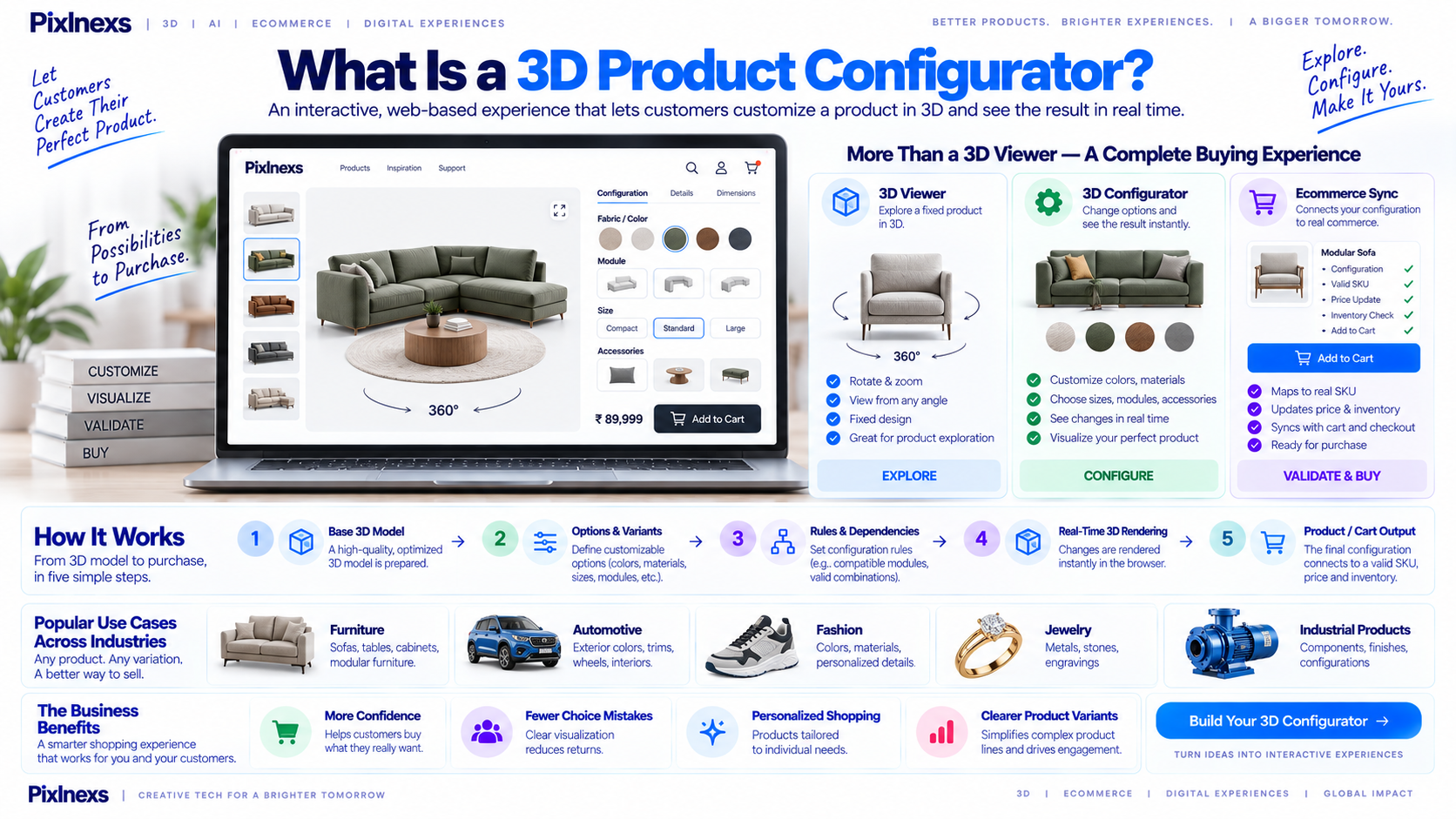
Quick answer: What is 3D product configurator is an interactive web tool that allows customers to customize product attributes like color, material, size and components in real time. Unlike static images or 360-degree spins, this technology renders live changes instantly using WebGL, letting shoppers view their specific configuration from any angle. It bridges the gap between digital browsing and physical inspection and it is aimed at reducing return rates by ensuring the digital preview matches the final delivered item.
By the Pixlnexs Studio Bali Balajee Team. Pixlnexs builds interactive 3D and AR product visualization technology for eCommerce brands worldwide.
Key Takeaways
- Definition: A 3D product configurator is a real-time, interactive tool that lets users customize product variants (color, material, parts) and view the result instantly in 3D.
- Technical Core: It relies on a pipeline of optimized 3D models (GLB/GLTF) configurable material swaps and a WebGL rendering engine.
- Business Impact: It can reduce “expectation gap” returns, support upselling of add-ons and provide accurate visual previews for complex products.
- Not for Everyone: Simple, single-SKU products with no variant complexity rarely justify the development cost. It matters most for furniture, jewelry, automotive and industrial equipment.
- Cost vs. Value: Implementation costs vary widely based on model complexity and integration depth, ranging from simple plugin setups to custom-engineered platforms.
How a 3D Product Configurator Works Technically
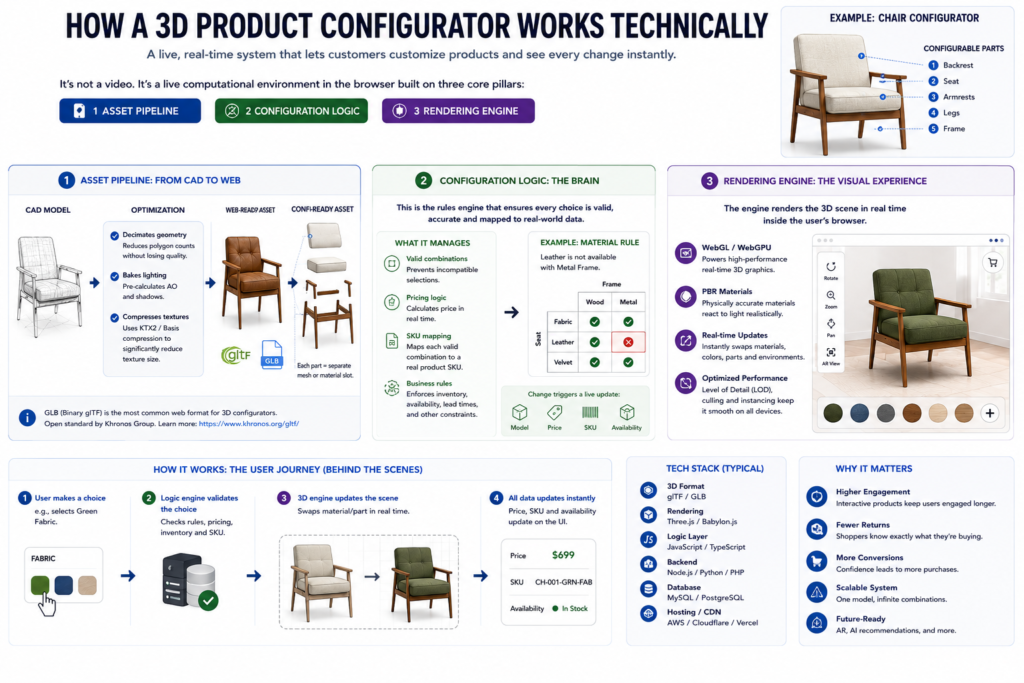
To understand the value of a 3D product configurator, it helps to understand the engineering behind it. It is not a video playing on a loop. It is a live computational environment running directly in the user’s browser.
The system relies on three core pillars: the asset pipeline, the configuration logic and the rendering engine.
The Asset Pipeline: From CAD to Web
The journey begins with a high-fidelity 3D model, often sourced from CAD software like SolidWorks, Rhino or Blender. A raw CAD file is usually too heavy for the web because it contains unnecessary geometry, high-poly counts and uncompressed textures.
The first step is optimization. The model is converted into a web-native format, typically GLB (Binary glTF) or GLTF, an open standard maintained by the Khronos Group and documented at the Khronos glTF overview. During this process, the pipeline typically:
- Decimates geometry: reduces polygon counts without losing visual fidelity.
- Bakes lighting: pre-calculates ambient occlusion and shadows to save real-time processing power.
- Compresses textures: uses KTX2 or Basis Universal compression, which commonly cuts texture size substantially while maintaining quality exact savings vary by asset.
For a configurator, the model is not a single mesh. It is a hierarchy of configurable parts. A chair model, for example, is not one object; it is a seat, a backrest, four legs and a frame. Each part is a separate mesh or a distinct material slot within a mesh. This structure lets the software swap materials or replace entire components without reloading the scene.
Configuration Logic: The Brain
The user interface sends commands to the 3D scene. When a user clicks “Red Leather,” the system executes a logic chain:
- State update: the configurator state object updates the
materialIdfor theseatcomponent tored_leather_v2. - Asset loading: if the new material texture is not already in memory, the system fetches it asynchronously.
- Material swap: the rendering engine binds the new PBR (Physically Based Rendering) material to the seat mesh.
- Validation: the system checks for conflicts. If a user selects a “Glass Top” for a table that only supports “Wood” or “Stone,” the UI disables the glass option or shows a warning.
This logic layer is where the business rules live. It defines which combinations are valid, which are premium upgrades and which are mutually exclusive.
The Rendering Engine: WebGL and Real-Time Performance
The final pillar is the rendering engine. Most modern configurators use WebGL (or the newer WebGPU) to render graphics directly in the browser. Libraries like Three.js, Babylon.js or PlayCanvas provide the API to interact with the GPU.
The engine performs real-time rendering, meaning every frame is calculated on the fly. It handles lighting, shadows, camera controls (orbit, zoom, pan) and post-processing effects such as anti-aliasing.
The target is typically a smooth frame rate on mid-range hardware. If the frame rate drops noticeably, the interaction feels laggy and users lose trust in the tool. This is why asset optimization is critical a poorly optimized model can cause the GPU to choke, leading to stuttering animations and a weaker user experience.
Configurator vs. 3D Viewer vs. 360 Photography
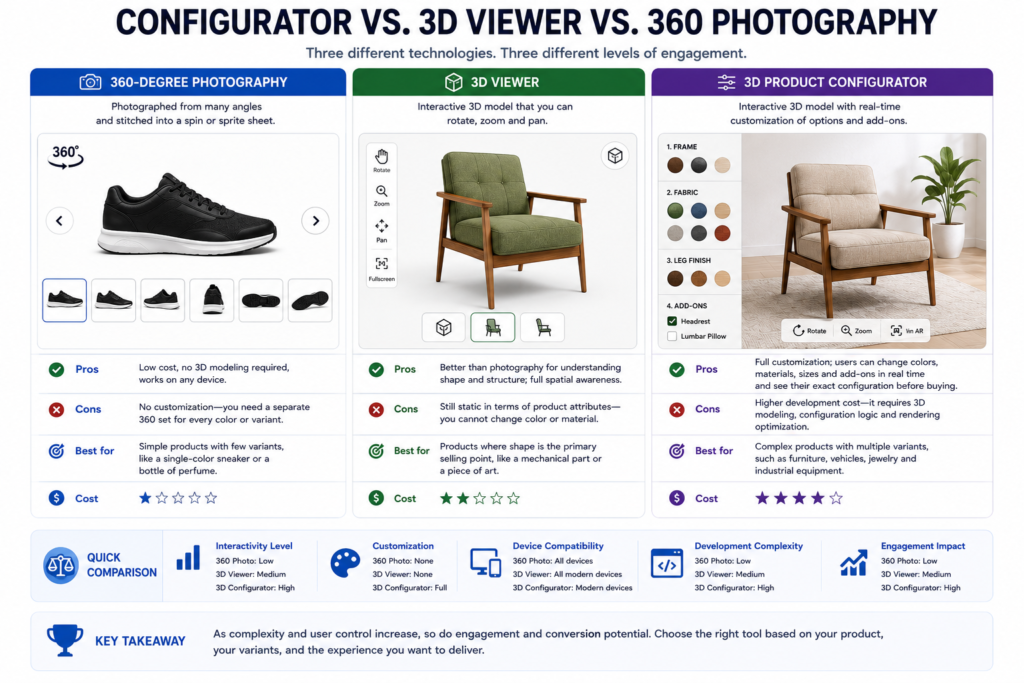
Brands often confuse these three technologies. They get grouped together but they serve different purposes and different levels of engagement.
360-Degree Photography
This is the most basic form of 3D-like presentation. It involves photographing a physical product from many angles and stitching the images into a spin or sprite sheet.
- Pros: low cost, no 3D modeling required, works on any device.
- Cons: no customization you need a separate 360 set for every color or variant.
- Best for: simple products with few variants, like a single-color sneaker or a bottle of perfume.
3D Viewer
A 3D viewer allows users to rotate, zoom and pan a 3D model, providing a full view from any angle, including top-down and bottom-up, which photography cannot achieve.
- Pros: better than photography for understanding shape and structure; full spatial awareness.
- Cons: still static in terms of product attributes you cannot change color or material.
- Best for: products where shape is the primary selling point, like a mechanical part or a piece of art.
3D Product Configurator
A 3D product configurator combines the spatial awareness of a 3D viewer with the interactivity of a customization tool.
- Pros: full customization; users can change colors, materials, sizes and add-ons in real time and see their exact configuration before buying.
- Cons: higher development cost it requires 3D modeling, configuration logic and rendering optimization.
- Best for: complex products with multiple variants, such as furniture, vehicles, jewelry and industrial equipment.
| Feature | 360 Photography | 3D Viewer | 3D Product Configurator |
|---|---|---|---|
| Customization | No | No | Yes |
| Real-time rendering | No (pre-shot) | Yes | Yes |
| Angle freedom | Limited | Full 360° | Full 360° |
| Variant support | One set per variant | One model | Multiple, via logic |
| Relative cost to implement | Low | Medium | High |
| Typical engagement | Low | Medium | High |
If your product has one color and one material, a 3D viewer is usually sufficient. If it has ten colors and five material options, a configurator is the only approach that lets a shopper see their exact combination before buying.
Decision Framework: Who Actually Needs One?
Not every brand needs a 3D product configurator. Building one is a real investment of time and money. The key variable is variant complexity.
If a product has few variants, the cost of a configurator may not be justified. If it has many variants, the ongoing cost of returns and “wrong item” support tickets can exceed the cost of building the tool.
| Seller Type | Real Variant Complexity? | Configurator Value | Verdict |
|---|---|---|---|
| Furniture | Yes (size, fabric, wood, legs) | High | Essential |
| Apparel | Moderate (color, size) | Low–Medium | Optional — 2D swatches often suffice |
| Jewelry | Yes (metal, stone, engraving) | High | Essential |
| Industrial equipment | Yes (components, specs) | Very high | Essential |
| Single-SKU simple products | No | Low | Not recommended |
| Automotive | Yes (paint, trim, wheels) | Very high | Essential |
| Electronics | Moderate (color, storage) | Medium | Optional |
Furniture
Furniture is the classic use case. A sofa can have dozens of combinations: fabric type, fabric color, leg material, leg color and size. Without a configurator, buyers have to guess how a specific fabric-and-leg combination will look. A configurator lets them see the exact combination and sometimes place it in a virtual room via AR to check scale.
Apparel
Apparel is a gray area. Most clothing has limited variant complexity (color and size) and a 2D swatch picker is usually enough. For high-end custom apparel custom sneakers, tailored suits a configurator adds real value by showing stitching, texture and fit. For mass-market apparel, the return on investment is often lower.
Jewelry
Jewelry is highly visual and detail-oriented. Buyers care about stone cut, metal finish and engraving. A configurator lets them swap stones, change metal finishes and preview engravings detail that is difficult to convey with photos alone.
Industrial Equipment
Industrial buyers need to see exactly what they are ordering. A pump, for example, can have different materials, connection types and control panels. A configurator helps ensure the buyer selects the correct configuration, which reduces ordering errors.
Single-SKU Simple Products
If you sell one item with no variants, a configurator is overkill. A 3D viewer or good photography is enough. For more on that distinction, see our guide on interactive 3D product viewer platforms.
Industry Applications: Sporting Goods and Medical Devices
Configurators are not limited to furniture and cars. In sporting goods, custom golf clubs, bicycles and skis rely on the same logic-and-rendering approach a buyer picks a shaft, a frame color or a binding and sees the result immediately. In medical equipment, configurators help clinicians and procurement teams assemble compatible modules for diagnostic devices or fit components for prosthetics. Because the stakes and compliance requirements differ so much between these two verticals, we cover the specific use cases in detail in Interactive 3D for Sporting Goods & Medical Equipment.
Cost and Complexity Tradeoffs
Cost varies widely depending on scope, complexity and integration needs. There is no single price but the main cost drivers are consistent across projects.
Cost Drivers
- 3D modeling: cost depends on the number of SKUs and the complexity of each model.
- Configuration logic: cost depends on the number of attributes and the complexity of the compatibility rules.
- Rendering engine integration: relatively fixed but varies with desired visual quality.
- UI/UX design: depends on the level of customization and brand design requirements.
- Integration: connecting the configurator to your e-commerce platform, PIM and ERP systems is often the most complex and expensive part.
Illustrative Cost Ranges
These are illustrative bands only, not quotes, since actual pricing depends heavily on scope:
- Simple configurator (a few SKUs, simple attributes like color/size): typically a lower five-figure project.
- Mid-range configurator (moderate SKU count, complex attributes): typically a mid five-figure project.
- Enterprise configurator (large SKU count, deep ERP/PIM integration): typically a high five-figure to six-figure project.
Match the complexity of the configurator to the complexity of your product and the needs of your business. Do not over-engineer a simple product and do not under-engineer a complex one.
How Pixlnexs Approaches Building a Configurator
At Pixlnexs, we build 3D product configurators for brands across several industries. Our approach starts with a deep understanding of the product: we work with your product team to define the attributes, rules and pricing logic before any modeling begins. We then create or optimize the 3D models so they are web-ready and performant, build the configuration logic using a flexible rules engine and integrate the configurator with your e-commerce platform so the selected configuration flows into cart and checkout.
In our production pipeline, we have repeatedly run into the same challenge: real-time rendering performance on mobile devices. A model that looks great on a desktop GPU can lag badly on a mid-range phone. Our production team addresses this with a level-of-detail (LOD) system a higher-poly model loads on desktop and a lighter model loads on mobile, so the experience stays smooth across devices. This kind of optimization work is usually invisible to the shopper but it is what keeps a configurator usable instead of frustrating.
Implementation Roadmap
Building a 3D product configurator is a coordinated project across product, design, engineering and marketing. A practical roadmap looks like this:
- Discovery and strategy define success metrics (conversion rate, AOV, return rate), pick one or two hero products to start with and map how users will discover the configurator on the site.
- Product definition and rule engine list every configurable attribute, map dependencies between attributes, define pricing logic and define which combinations are invalid.
- 3D asset creation model or optimize the assets, set up lighting and environment and make sure UV mapping is clean.
- Development and integration build the frontend canvas and controls, build the backend rules engine so validation is not only client-side and connect the configurator to your cart and checkout.
- Testing and QA test every meaningful attribute combination, test performance across devices and network conditions and run user acceptance testing with real shoppers.
- Launch and iteration monitor the KPIs you defined in step one, gather feedback and refine based on data rather than assumptions.
Technical Architecture: Under the Hood
Understanding the technical architecture helps you ask better questions when scoping a project, even if you never touch the code yourself.
The Rendering Layer
The rendering layer draws the 3D model on screen using WebGL, the JavaScript API for interactive 3D graphics in the browser. Three common choices:
- Three.js: the most widely used library for web 3D, with a large community and many plugins.
- Babylon.js: a feature-rich engine with built-in physics and animation tooling.
- PlayCanvas: a free, open-source engine focused on performance and ease of use.
The Rules Engine
The rules engine is the logic layer that decides which attribute combinations are valid, what each option costs and what depends on what.
- Client-side rules give immediate feedback in the browser (for example, graying out an incompatible option the instant it becomes invalid).
- Server-side rules should still enforce the same logic independently, so a shopper cannot manipulate the browser state to get an invalid or mispriced configuration through checkout.
The Data and Integration Layer
Product data, attributes and configuration rules typically live in a Product Information Management (PIM) system or a database, with the configurator reading from it through an API. Webhooks or direct API calls then push the finished configuration into your cart and order system.
Performance Optimization: Keeping the Experience Smooth
A configurator that stutters or takes too long to load will frustrate shoppers regardless of how good the underlying models are. Optimization typically happens on three fronts.
Model Optimization
- Polygon count: lower polygon counts mean less data to process and render.
- Texture compression: compressed textures (KTX2, Basis Universal) reduce file size and speed up loading.
- Level of detail (LOD): switch between high-poly and low-poly versions of a model depending on device capability and distance from camera.
Rendering Optimization
- Frustum culling: only render what is actually visible on screen.
- Occlusion culling: skip rendering objects hidden behind others.
- Draw call batching: combine multiple objects into fewer draw calls to reduce GPU overhead.
Network Optimization
- Lazy loading: load the 3D model only when the shopper scrolls to it or opens it.
- CDN delivery: serve 3D assets from edge locations close to the shopper.
- Browser caching: cache assets so repeat visits load faster.
Accessibility Considerations
A configurator should not lock out shoppers who cannot use a mouse or who rely on assistive technology.
- Keyboard navigation: every control (rotate, select material, confirm) should be reachable and operable by keyboard.
- Screen reader support: provide text alternatives for the model state and the available options, so a screen reader can describe what is selected.
- Color contrast: UI text and controls need sufficient contrast, independent of the 3D scene itself.
- Reduced motion: offer an option to reduce or disable automatic rotation and camera animation for users sensitive to motion.
Common Mistakes to Avoid
- Overcomplicating the interface. Too many simultaneous options overwhelm shoppers. Group related attributes and reveal complexity progressively.
- Ignoring mobile. A configurator that only performs well on desktop will underperform for a large share of traffic.
- Unclear pricing. If the price does not update visibly and immediately as options change, shoppers hesitate.
- Skipping performance budgets. Set a target load time and frame rate before development starts, not after shoppers complain.
- Under-testing combinations. Every valid combination should be tested, not just the ones used in demos.
Measuring Whether a Configurator Is Working
Once a configurator is live, the question shifts from “does it look good” to “is it doing its job.” A few metrics are worth tracking from day one, each compared against a baseline period without the configurator:
- Add-to-cart rate on configurator-enabled products versus the same or comparable products without one.
- Return rate, specifically returns tagged as “wrong option,” “did not match expectations,” or similar reasons.
- Average order value, watching for whether customization and add-on selection increases the size of the average basket.
- Time on page and interaction depth, as a secondary signal useful for spotting confusion (high time, low completion) as much as engagement.
- Support ticket volume related to configuration mistakes or order corrections.
Track these over a long enough window to smooth out seasonal noise and be honest about whether a lift is attributable to the configurator or to something else running at the same time, such as a promotion or a traffic-source shift.
Future Trends in Product Configuration
The technology behind 3D product configurators continues to move quickly. A few directions worth watching:
- AI-assisted recommendation. Suggesting configurations based on a shopper’s browsing or purchase history, rather than presenting every option with equal weight.
- Augmented reality placement. Letting shoppers place the configured product in their own space through a phone camera, which is especially relevant for furniture and large equipment.
- Voice and accessibility-first interaction. Expanding beyond mouse and touch to make configuration usable hands-free.
- Tighter PIM and ERP integration. Reducing the lag between updating a product catalog and having those changes reflected correctly in the configurator’s rules.
None of these replace the fundamentals covered in this article a configurator is only as good as its underlying model quality, rule logic and performance. New interaction layers sit on top of that foundation; they do not substitute for it.
Building In-House vs. Working With a Studio
Once a brand decides a configurator is worth building, the next decision is who builds it.
In-house makes sense when you already have a 3D art team, front-end engineers comfortable with WebGL libraries and a PIM/ERP setup with a documented API. The advantage is direct control over the roadmap; the tradeoff is that 3D rendering, rules-engine design and cross-device performance tuning are specialized skills that take time to build if your team has not done this kind of work before.
Working with a specialist studio makes sense when the priority is speed to a working, well-optimized configurator without hiring a dedicated 3D team. A studio that has already solved problems like mobile LOD switching, texture compression pipelines and PIM integration can usually get from discovery to a launched configurator faster, though you give up some of the day-to-day control you would have with an internal team.
Many brands land on a hybrid: a studio builds and optimizes the initial configurator and asset pipeline, while an internal team takes over ongoing content updates adding new colorways or components once the system is in place. Whichever route you choose, insist on seeing the rules engine and the mobile performance of a comparable, already-shipped configurator before committing, rather than judging solely from a desktop demo reel.
Frequently Asked Questions
What is the difference between a 3D product configurator and a 3D viewer?
A 3D viewer allows users to rotate, zoom and inspect a static 3D model. It is passive the user sees what is there but cannot change it. A 3D product configurator is interactive and dynamic: it lets users modify attributes like color, material or components in real time, with the model updating instantly to reflect those changes.
Do I need to create 3D models from scratch to use a configurator?
Not necessarily. If you already have 3D assets (OBJ, FBX or GLTF files) from a CAD team or a previous 3D project, you can often import and optimize them for web use. If you only have 2D photos, you will need to create 3D models first, through photogrammetry, manual modeling or AI-assisted reconstruction. Manual modeling often produces the cleanest topology for configuration logic.
How long does it take to build a 3D product configurator?
Timelines vary with complexity. A simple configurator with a few attributes and existing 3D models might take a small number of weeks. A mid-range configurator with new modeling and more complex logic often takes a few months. Enterprise systems with deep ERP integration can take considerably longer. The most time-consuming part is usually defining and testing the configuration rules, not the rendering itself.
Can a 3D product configurator work on mobile devices?
Yes but performance optimization is essential. Modern WebGL engines run on mobile but heavy models cause lag and battery drain. Techniques like level-of-detail switching, texture compression and efficient geometry are necessary for a configurator to feel smooth on a mid-range smartphone.
What is the return on investment of a 3D product configurator?
ROI is typically evaluated through average order value, return-rate change and conversion rate, rather than a single universal number. Because personalization can support premium pricing and accurate previews can reduce mismatched-expectation returns, many brands see a positive shift in these metrics but the size of that shift depends heavily on execution and should be measured against your own baseline rather than assumed.
How does a 3D product configurator integrate with my e-commerce platform?
Integration usually happens through an API. The configurator sends the selected configuration SKU, attributes, price to your platform’s cart and checkout system, so the pricing and inventory logic in your store matches what the shopper configured. Platforms like Shopify, Magento and Salesforce Commerce Cloud expose APIs suited to this.
Is a 3D product configurator worth it for a small catalog?
It depends on variant complexity more than catalog size. A small catalog with a handful of highly configurable products (say, made-to-order furniture) can justify a configurator, while a large catalog of single-variant items usually cannot. Use the decision framework earlier in this article rather than catalog size alone and consider starting with your single highest-margin, highest-complexity product line before rolling the tool out across the rest of the catalog.
What file format should the 3D models use?
GLB is the most common choice for web-based configurators because it packages geometry, PBR materials and animation in one efficient binary file. If you also need iOS AR support, you will additionally need a USDZ version of the asset. We cover the technical differences in GLB vs USDZ vs OBJ: 3D File Formats Explained.
Can a 3D product configurator replace product photography entirely?
Rarely and it usually should not try to. A configurator is strongest at showing customization and structure but many shoppers still expect at least one high-quality lifestyle or context photo alongside the interactive model. Most successful implementations pair the configurator with a small set of curated photos rather than removing photography altogether.
What happens if a shopper’s device cannot run WebGL well?
A well-built configurator should detect this and fall back gracefully typically to a static image or a pre-rendered 360 spin of a default configuration rather than showing a broken or blank canvas. Planning this fallback path during the design phase, instead of treating it as an afterthought, avoids a poor experience for the subset of shoppers on older hardware or restrictive browser settings.
Ready to Build Your 3D Product Configurator?
If you are evaluating whether a 3D product configurator makes sense for your catalog, Pixlnexs can help you scope it against your actual variant complexity rather than a generic template. Our team works with you to define requirements, build the 3D assets and ship a configurator that integrates with your existing storefront.
Ready to build your 3D product configurator?
Pixlnexs scopes your project against your actual variant complexity, builds the 3D assets, and integrates the configurator with your storefront.
Talk to Pixlnexs









Leave a Reply