
Low poly vs high poly, The low-poly 3D models utilize the low amount of polygons (usually from several hundreds to several thousands) and utilize the techniques of baking textures and using normal maps to simulate the level of detail in order to ensure the high speed of rendering within real-time engines, games, AR, VR and the web technologies. The high-poly models feature from tens of thousands to millions of polygons and are characterized by the real geometric details; therefore, they suit perfectly for films, cinematics, renders and 3D printing, when the speed of rendering is not an issue.
The correct decision here lies in how the object will be shown and what the budget for its memory/GPU usage is. What the majority of studios do in practice is create objects by sculpting high poly models and baking the details into low poly versions. In case the object should work in real time on a phone/headset/browser at more than 60 frames per second, go for low poly. If it only ever becomes a still frame or a pre-rendered video, high-poly wins.
By the Pixlnexs Animation Studio team, we produce AI video and 3D content and run the marketplace at store.pixlnexs.com, so this reflects real production experience.
Low poly vs high poly is one of the first decisions that shapes an entire 3D pipeline, and getting it wrong costs you. Pick high-poly for a mobile game and your frame rate collapses. Pick low poly for a hero product render and the silhouette looks cheap. This guide walks through what each term actually means, where each one wins, and the bake down workflow that lets you have both. It is written for artists, technical artists, game developers and buyers choosing assets on a marketplace.
What “low poly” and “high poly” actually mean
The words refer to polygon numbers, the number of polygons, typically triangles (since GPUs work with triangles), used for creating the surface of a model. However the labels are relative rather than absolute. For example a low poly hero in today’s video games may be made of 60,000 polygons, whereas 15 years ago such a number was considered high. A low poly prop for a mobile title might sit under 500. Context defines the threshold.
More important than the actual number of polygons is the intention behind it. Low poly models are intended for real-time rendering and thus all information that is not stored in the mesh is faked through texture maps: diffuse or albedo maps, normal maps, roughness, metallic and ambient occlusion maps. In high-poly models, the information is contained in the mesh.
How polygons relate to triangles and vertices
A quad (four-sided polygon) is the artist’s working unit because quads subdivide and deform cleanly. At render time, the GPU triangulates everything, so one quad becomes two triangles. When you see a “tri count,” that is the number the engine cares about. Vertices are the corner points, and vertex count drives much of the actual GPU cost because vertices carry position, normals, UVs and skinning weights. A good rule of thumb: optimize for triangles and vertices, model in quads.
Where low poly wins

Low poly is the default for anything that has to render live. The fewer triangles the GPU has to transform and rasterize per frame the more headroom you have for higher resolution more objects on screen more dynamic lighting and a stable frame rate.
Real time games: mobile, console and PC all have per-frame polygon budgets. Low poly meshes with normal maps deliver the look of detail without the cost.
AR and VR: headsets render the scene twice (once per eye) and demand 72–120 FPS to avoid motion sickness so polygon budgets are tight and low poly is essential.
Web and glTF/GLB delivery: every triangle adds to download size and parse time. The Khronos glTF format is built for efficient real-time transmission and lean meshes load faster.
Crowds and instancing: if you need several hundred instances of an asset, a low tri count adds up to huge cost savings.
Stylized art direction: a low poly, flat shaded look is a style choice, not a technical solution alone.
If you are sourcing assets for an interactive project, this is where being honest about your target platform pays off. A model that is “game-ready” is almost always low poly with baked maps. One thing buyers get burned by: a model can ship a stunning beauty render in its thumbnail while hiding a 2-million-tri sculpt underneath, so check the tri count and the included maps before you commit, not the previewimage. (We go deeper on this in our hub guide linked at the end.)
Where high poly wins

High-poly is for outputs where the GPU is not racing a clock. When a frame can take seconds or minutes to render, you can afford true geometric detail, and it always reads better than a fake.
- Film, TV and cinematics: offline (path-traced) rendering means polygon count is limited by memory and render time, not frame rate. Detail is real.
- Product visualization and advertising: clean curved surfaces (a watch bezel, a car body) need dense geometry to avoid faceting at close range.
- 3D printing: the printer slices actual geometry, so smoothness lives in the mesh. Normal maps mean nothing to a printer.
- Sculpting source, the “high” in a bake: even real-time pipelines start high-poly so detail can be baked down.
- Hero close-ups: when the camera gets within inches, baked detail breaks down and real geometry holds up.
Why high poly does not “just work” everywhere
It is tempting to think you can drop a million-triangle model into a game engine and let the hardware sort it out. In practice you hit several walls at once. VRAM fills up, draw calls and vertex processing spike, file sizes balloon, and animation/skinning gets dramatically more expensive per frame. Modern techniques like virtualized geometry (Unreal’s Nanite, for example) and aggressive LODs push these limits, but they do not erase the underlying cost, and they do not apply to web, most mobile, or many VR contexts.
Side-by-side comparison
| Factor | Low-poly | High-poly |
|---|---|---|
| Typical tri count | Hundreds to ~tens of thousands | Hundreds of thousands to millions+ |
| Best for | Games, AR/VR, web, real-time | Film, renders, print, sculpting source |
| Detail source | Texture & normal maps (faked) | Actual geometry (real) |
| Render context | Real-time (60+ FPS) | Offline / pre-rendered |
| File size | Small | Large |
| GPU/memory cost | Low | High |
| Close-up fidelity | Limited by map resolution | Excellent |
| Animation cost | Cheap to skin & deform | Expensive |
| 3D printing | Faceted unless dense | Smooth |
The workflow that uses both: high-to-low baking
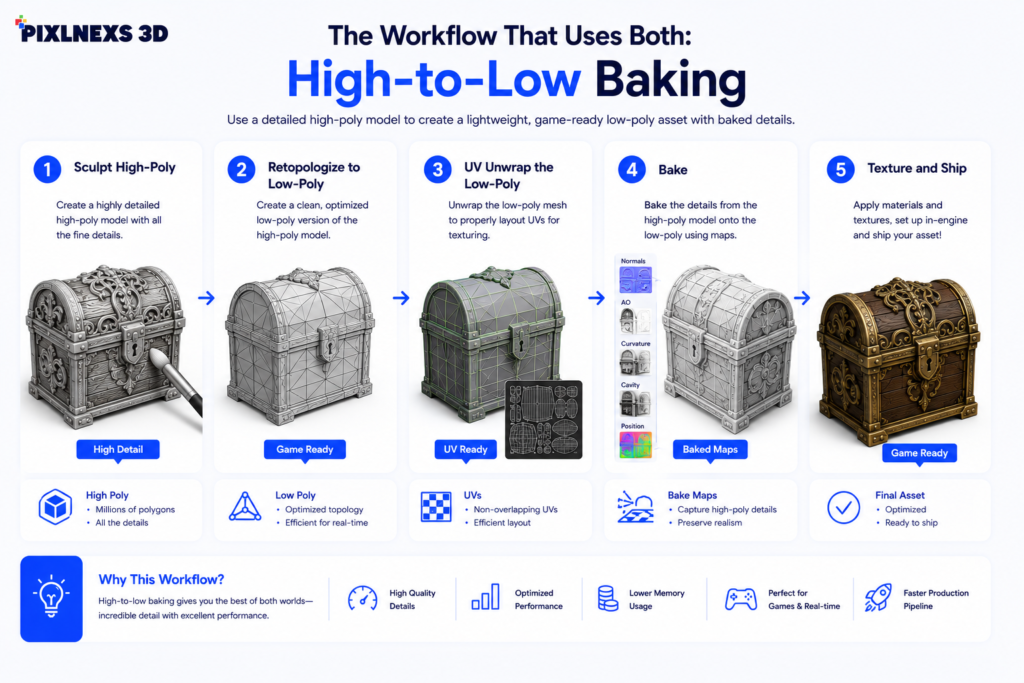
Most professional real-time assets are not low poly OR high poly. They are both, in sequence. The standard pipeline runs like this:
- Sculpt high-poly. Build all the detail you want (pores, scratches, fabric folds) in a sculpting tool, with no concern for polygon count.
- Retopologize to low-poly. Create a clean, lightweight mesh that follows the high poly’s silhouette with good edge flow for deformation.
- UV unwrap the low-poly. Lay out the surface in 2D so textures can be applied without stretching.
- Bake. Project the high-poly’s surface detail onto the low poly’s texture maps, mainly a normal map (which fakes the lighting of the missing geometry) plus ambient occlusion, curvature and others.
- Texture and ship. The low poly mesh now reads like the high-poly under lighting, at a fraction of the cost.
This is why a marketplace asset can look detailed and still be game-ready: the detail lives in the maps, not the mesh. When you buy or sell a model, the quality of the bake (clean normals, no seam artifacts, sensible texel density) matters as much as the tri count. The failure case is easy to spot once you know it. A rushed bake leaves a faint seam line running down a character’s face or a smear where the cage missed the high poly, and no amount of texturing on top will hide it.
LODs: getting the benefits of low poly automatically
Level of Detail (LOD) systems keep several versions of a mesh at decreasing polygon counts and swap to a cheaper one as the object moves away from the camera. This lets you keep high detail up close and drop to low poly at distance. It is a per-object version of the same trade-off, automated by the engine.
How to decide for your project
Ask three questions, in order:
- Is it rendered in real time? If yes, start low poly. If no (stills or pre-rendered video), you can go high poly.
- What is the platform’s budget? Mobile and VR are tightest, PC/console give more room, and web is constrained by download size as much as GPU.
- How close does the camera get, and how much does it deform? Hero close-ups and heavy animation push you toward more geometry, but get it from a clean retopo and good maps, not raw sculpt density.
When in doubt for interactive work, default to a well-baked low poly model. It is far easier to add detail to a clean mesh than to optimize a bloated one after the fact. Browse our 3D model marketplace at store.pixlnexs.com to see how game-ready assets pair low tri counts with high-quality baked maps.
Common mistakes
- Treating tri count as the only metric. Texture resolution, draw calls, material count and bone count all affect real-time cost.
- Shipping the sculpt. Importing the high poly directly into an engine instead of a baked low poly is the most common performance killer.
- Over-optimizing the silhouette. Cutting too many triangles makes round shapes look blocky on the outline, where normal maps cannot help.
- Ignoring the target before modeling. Decide the platform first. It sets the polygon budget that drives every later choice.
Frequently asked questions
Related guides
- Game-Ready 3D Models: What “Game-Ready” Actually Means (cluster hub)
- How to Import a GLB or FBX Into Unreal Engine 5
- How to Import 3D Models Into Unity (GLB, FBX and Best Practices)
Further reading from authoritative sources: the Khronos glTF specification for real-time 3D delivery, normal mapping on Wikipedia, and level of detail (LOD) techniques.










Leave a Reply