
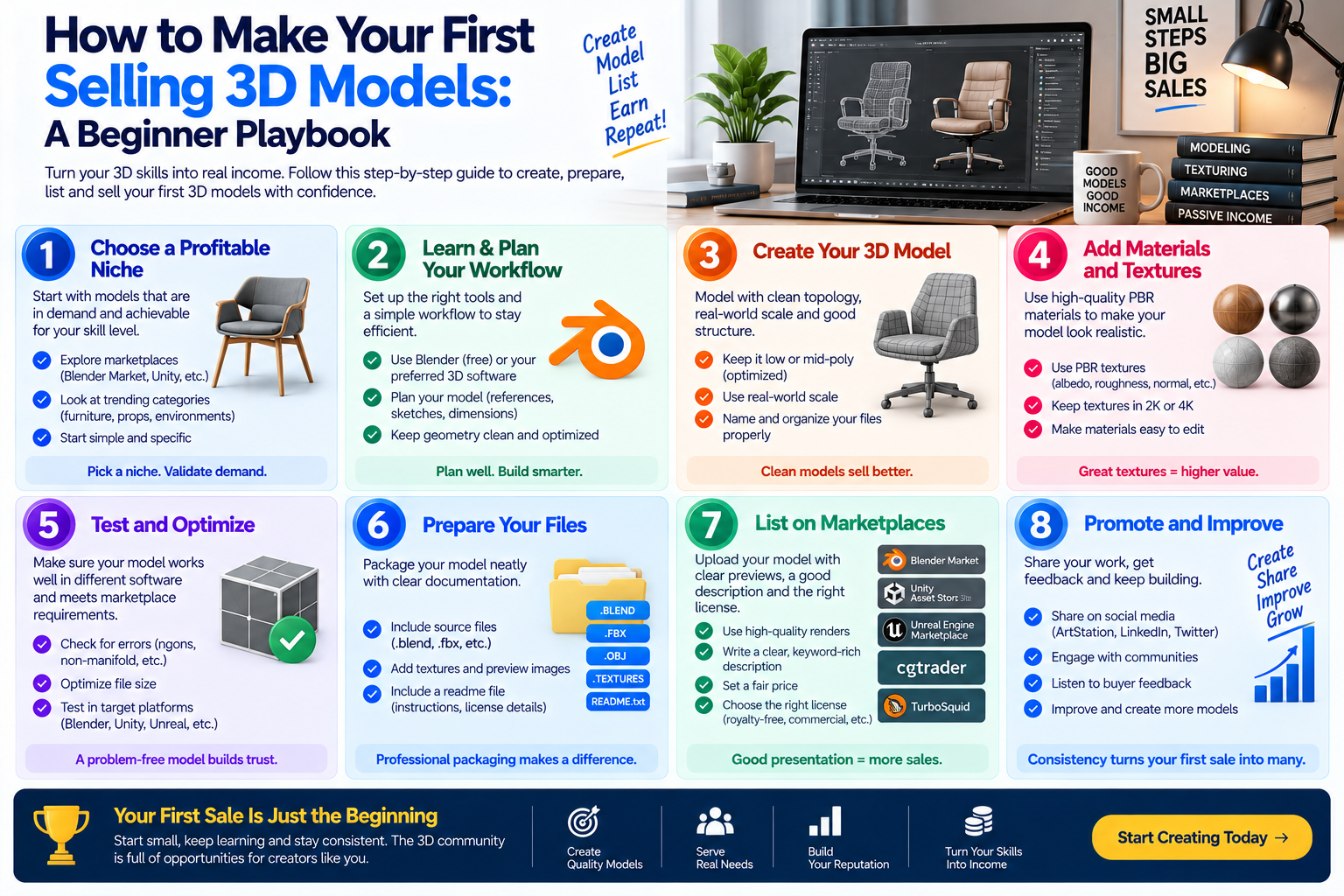
Quick Answer: Your first selling 3d model comes from presenting a market‑ready model, choosing a platform that matches your style, pricing it honestly and promoting it through clear visuals and targeted outreach. Follow a step‑by‑step workflow that prepares the asset, writes a buyer‑focused listing and leverages community channels to attract the right audience.
By Manoj, Pixlnexs Studio. Pixlnexs works with 3D creators preparing assets for marketplace sale and this playbook reflects the preparation and presentation gaps we see most often in a seller’s first listing.
Key Takeaways
- Prepare your model to meet marketplace quality standards before you upload.
- Select a platform whose audience aligns with the type of asset you create.
- Craft titles and descriptions that speak directly to buyer needs.
- Showcase the model with high‑resolution renders, turntables and interactive previews.
- Promote the listing through social groups, forums and personal networks to generate traffic.
Most new 3D artists hit a wall when the first listing receives no clicks, no inquiries and no sales a version of the “discoverability problem” documented across creator marketplaces generally, where a well-made asset can go unseen simply because visibility, not quality, is the bottleneck for a new seller. The frustration often stems from a mismatch between what buyers expect and what the listing delivers. You might have spent hours perfecting a model, only to see it sit unnoticed among thousands of similar assets. The good news is that the gap can be closed with a systematic approach that treats each step preparation, presentation, pricing and promotion as a small project with its own checklist.
Below is a complete playbook that walks you through every decision point, from picking the right marketplace to turning a first buyer into a repeat client. The guidance draws on real‑world workflows used by studios that sell thousands of assets each year and it references the broader ecosystem without exaggerating numbers. Links to related posts are included so you can dive deeper into specific topics when needed.
What common obstacles prevent beginners from making their first sale?
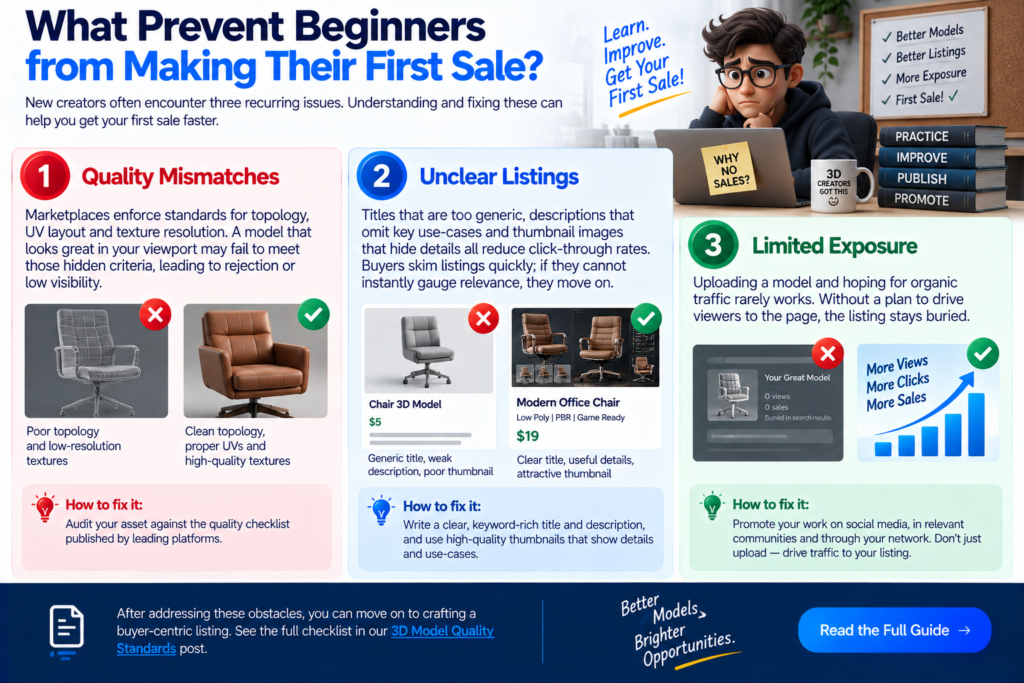
New creators often encounter three recurring issues:
- Quality mismatches – Marketplaces enforce standards for topology, UV layout and texture resolution. A model that looks great in your viewport may fail to meet those hidden criteria, leading to rejection or low visibility.
- Unclear listings – Titles that are too generic, descriptions that omit key use‑cases and thumbnail images that hide details all reduce click‑through rates. Buyers skim listings quickly; if they cannot instantly gauge relevance, they move on.
- Limited exposure – Uploading a model and hoping for organic traffic rarely works. Without a plan to drive viewers to the page, the listing stays buried.
Addressing each obstacle requires a focused effort. The first step is to audit your asset against the quality checklist published by leading platforms such as the one outlined in our 3D Model Quality Standards post. After confirming compliance, you can move on to crafting a buyer‑centric listing.
Which marketplace aligns best with a debut listing for a specific asset type?
Choosing a platform is not a one‑size‑fits‑all decision. Different sites attract distinct buyer segments:
- Generalist stores (e.g., TurboSquid, CGTrader) host a broad range of categories and are good for models that have universal appeal, such as furniture or low‑poly game assets.
- Specialty hubs (e.g., Sketchfab, Blender Market) focus on interactive previews or community‑driven content, making them ideal for stylized characters or assets that benefit from real‑time viewing.
- Studio‑run storefronts provide full control over branding and pricing but require you to generate traffic independently.
Our Best Marketplaces to Sell 3D Models in 2026 guide offers a side‑by‑side comparison of traffic volume, fee structures and audience demographics. For a first sale, many creators find success on a platform that balances moderate competition with an engaged buyer base. If your model is a high‑detail architectural prop, a marketplace known for interior visualization may give you a quicker response than a generic game asset store.
| Marketplace Type | Example Platforms | Best For | Traffic Style |
|---|---|---|---|
| Generalist stores | TurboSquid, CGTrader | Universal appeal assets (furniture, low-poly props) | High volume, broad competition |
| Specialty hubs | Sketchfab, Blender Market | Stylized or interactive-preview assets | Moderate volume, engaged niche audience |
| Studio-run storefronts | Your own site | Full branding and pricing control | Low volume until you build your own traffic |
Action checklist
- List the primary use‑case of your model (e.g., AR, game, visualization).
- Match that use‑case to the marketplace audience described in the comparison guide.
- Create a test account on the top two candidates and review the onboarding process; a smooth upload experience often signals good support for new sellers.
How should you prepare your 3D model to meet buyer expectations before uploading?
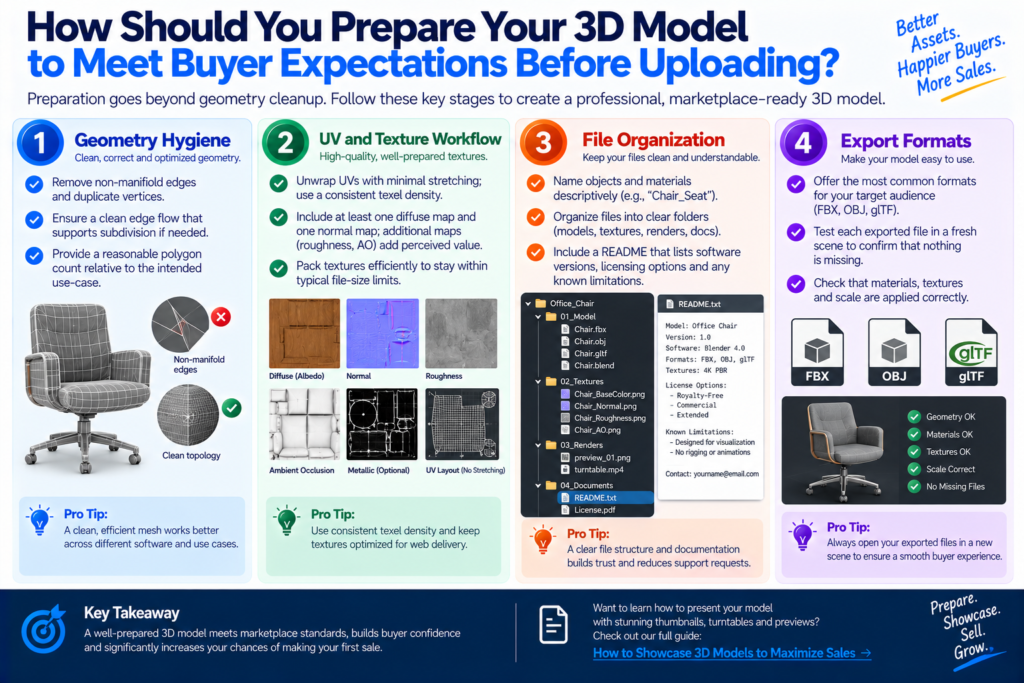
Preparation goes beyond geometry cleanup. Consider the following stages:
1. Geometry hygiene
- Remove non‑manifold edges and duplicate vertices.
- Ensure a clean edge flow that supports subdivision if needed.
- Provide a reasonable polygon count relative to the intended use‑case.
2. UV and texture workflow
- Unwrap UVs with minimal stretching; use a consistent texel density.
- Include at least one diffuse map and one normal map; additional maps (roughness, AO) add perceived value.
- Pack textures efficiently to stay within typical file‑size limits.
3. File organization
- Name objects and materials descriptively (e.g., “Chair_Seat”).
- Include a README that lists software versions, licensing options and any known limitations.
4. Export formats
- Offer the most common formats for your target audience (FBX, OBJ, glTF).
- Test each exported file in a fresh scene to confirm that nothing is missing.
The How to Showcase 3D Models to Maximize Sales post dives deeper into visual preparation but the core principle is to eliminate any friction a buyer might encounter when importing your asset.
What elements make a product title and description compelling for potential buyers?
A title functions as a searchable headline. It should contain the most relevant keywords without becoming a keyword‑stuffed string. Structure it as follows:
- Primary keyword (e.g., “Low‑Poly Medieval Sword”).
- Key attribute (e.g., “Game‑Ready”).
- Target platform or format if relevant (e.g., “FBX”).
The description expands on the title by answering the buyer’s mental checklist:
- What is the asset? – Briefly restate the object and its style.
- Intended use – Mention whether it fits games, VR, product visualization, etc.
- Technical specs – Polygon count range, texture resolutions, included maps.
- Compatibility – List supported software and any required plugins.
- Licensing – Summarize the license type (link to the detailed guide on licensing).
Writing in a conversational tone helps. Imagine you are answering a buyer’s question in a forum; clarity beats cleverness. Avoid vague adjectives that do not convey measurable information.
Example title: “Low‑Poly Medieval Sword – Game‑Ready FBX, 1.2k Polys, PBR Textures”
Example opening sentence: “This stylized sword is perfect for indie games that need a quick‑to‑render melee weapon without sacrificing visual impact.”
Which visual assets most effectively showcase a 3D model to drive clicks?
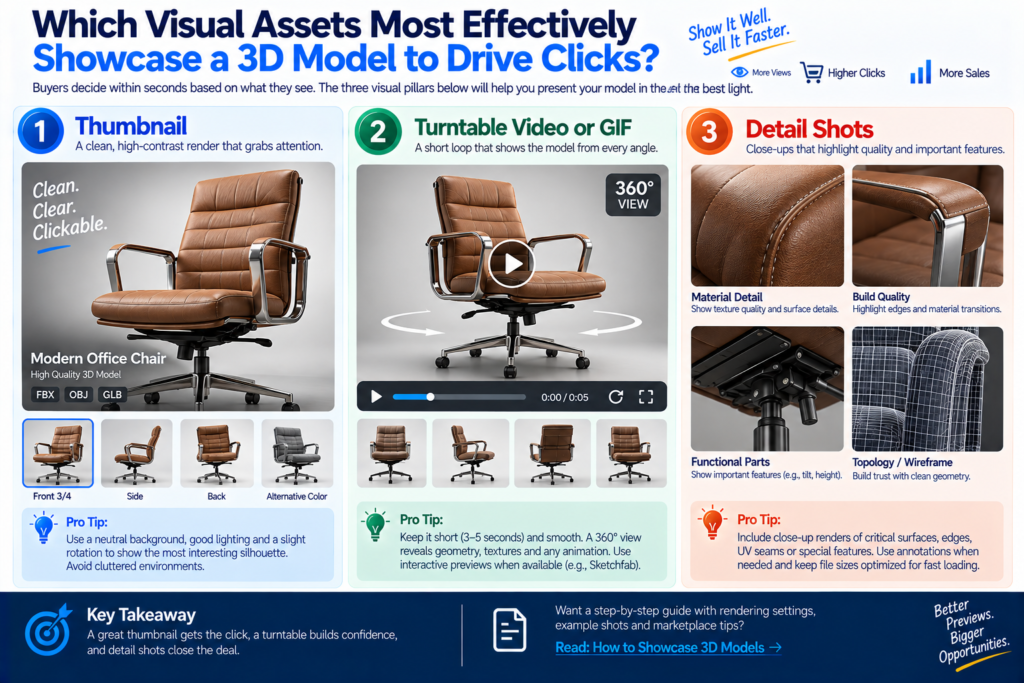
Buyers decide within seconds based on what they see. The three visual pillars are:
1. Thumbnail
A clean, high‑contrast render that isolates the model against a neutral background. Use a slight rotation that reveals the most interesting silhouette. Avoid cluttered environments that hide details.
2. Turntable video or GIF
A short loop (3–5 seconds) that spins the model 360°. This reveals geometry, texture quality and any animation if present. Platforms that support interactive previews (e.g., Sketchfab) allow buyers to rotate the model themselves, which can dramatically increase engagement.
3. Detail shots
Close‑up renders of critical surfaces edges, material transitions, UV seams. Pair these with annotations if the model includes special features like a hidden compartment.
When creating these assets, keep file sizes reasonable to ensure quick loading on marketplace pages. Our How to Showcase 3D Models guide provides step‑by‑step settings for popular rendering engines.
How can you set a price that feels fair to buyers while respecting the value of your work?
Pricing is a blend of market research and personal valuation. Start by reviewing similar assets on your chosen marketplace look at the price range for comparable polygon counts, texture quality and licensing terms. Avoid copying exact numbers; instead, note the general band (e.g., “most low‑poly weapons sit in the low‑to‑mid range”).
Next, consider your investment:
- Time spent – Estimate the hours you devoted to modeling, UV mapping and texturing.
- Skill level – If you are still building a portfolio, a modest price can encourage early adopters.
- Licensing – Royalty‑free licenses typically command higher upfront fees than limited‑use licenses.
A useful tactic is to launch with a slightly lower price and monitor buyer behavior. If the model sells quickly, you can raise the price on future listings. Conversely, if sales are slow, revisit the visual assets or description before adjusting the price downward.
Our dedicated post on pricing strategies, How to Price Your 3D Models, walks through a stepwise method for setting and revising prices without relying on hard numbers.
What promotional tactics can you employ to bring traffic to a brand‑new listing?
Organic traffic is rarely enough for a first sale. Combine these low‑cost tactics:
- Social media teasers – Share a short GIF of the turntable on platforms like Twitter, Instagram and LinkedIn, tagging relevant hashtags (#3DAssets, #GameDev).
- Community forums – Participate in discussion boards (e.g., Polycount, Blender Artists) and, when appropriate, link to your listing in response to requests for assets.
- Cross‑promotion – If you have a portfolio website, embed a “Buy Now” button that redirects to the marketplace page.
- Email outreach – Identify small indie studios or freelancers who might need your asset and send a brief, personalized note with a direct link.
- Discount codes – Offer a limited‑time coupon for first‑time buyers; many marketplaces let you create promo codes that automatically apply at checkout.
Measure the impact of each channel by checking referral analytics provided by the marketplace (if available) or by using URL shorteners that track clicks. Adjust your effort toward the channels that generate the most interest.
How should you handle buyer inquiries to build confidence and close the sale?
Prompt, courteous communication can turn a hesitant visitor into a buyer. Follow these guidelines:
- Respond quickly – Aim for a response within a few hours during business days.
- Confirm understanding – Restate the buyer’s question to show you grasp the need.
- Provide concrete answers – If a buyer asks about texture resolution, give the exact pixel dimensions.
- Offer additional assets – Suggest complementary models (e.g., a matching shield) that could be bundled for a discount.
- Clarify licensing – Direct the buyer to the licensing post for detailed explanations, ensuring they know what they can do with the asset.
A professional tone, combined with clear information, reduces friction and often leads to positive reviews, which in turn improve future sales.
What post‑sale steps turn a first buyer into a repeat customer?
After the transaction, the relationship can continue in several ways:
- Deliver promptly – Ensure the download links work and that all promised files are included.
- Follow‑up email – Thank the buyer, ask if the asset met expectations and invite feedback.
- Offer support – Provide a brief window for technical assistance (e.g., fixing import issues).
- Suggest upgrades – If you later release a higher‑resolution version or an animation variant, let the buyer know they can upgrade at a discounted rate.
- Encourage reviews – A satisfied buyer who leaves a positive rating boosts visibility for all your listings.
Maintaining a reputation for reliability is especially important on platforms where buyer trust drives discovery.
How can you track progress and refine your approach for future listings?
Treat each listing as an experiment. Keep a simple spreadsheet or note‑taking app that records:
- Marketplace used
- Asset type and price
- Date of upload
- Number of views, clicks and sales
- Sources of traffic (social, forum, direct)
- Buyer feedback
Review the data monthly. Look for patterns such as “models with turntable GIFs receive more clicks” or “pricing slightly above the median yields comparable sales volume but higher revenue per sale.” Use those insights to tweak future assets perhaps investing more time in lighting for renders or adjusting the price band.
The overarching pillar article, How to Sell 3D Models Online: The Complete Guide for 3D Artists and Studios, provides a broader roadmap that ties together marketplace selection, branding and long‑term growth.
Frequently Asked Questions
Q: Do I need a professional 3D software license to start selling?
A: Many artists begin with free or low‑cost tools such as Blender, which can produce market‑ready assets. The key is to ensure the exported files meet the technical requirements of the chosen marketplace.
Q: How important is an animated preview for static models?
A: While animation is not required for every asset, a short rotation or camera fly‑through can dramatically increase engagement. Platforms that support interactive viewers let buyers explore the model themselves, which often leads to higher conversion.
Q: Should I sell the same model on multiple marketplaces?
A: Yes, cross‑listing expands exposure, but be mindful of each platform’s exclusivity policies. Some sites require exclusive rights for a period; always check the terms before uploading the same file to another marketplace.
Q: What licensing options should I offer on my first listing?
A: Providing at least two tiers a standard royalty-free license and a more restrictive commercial license covers a broader range of buyer needs without overwhelming a first-time buyer with too many choices. See our dedicated guide on licensing your 3D models for the full breakdown of each type.
Q: How do I handle copyright concerns when using reference images?
A: Use reference images for inspiration only,
and build all geometry and textures yourself or from royalty-free sources. When in doubt, seek permission from the rights holder or substitute a public-domain reference instead.
Q: How long does it typically take to make a first sale after listing?
A: There’s no fixed timeline it depends heavily on the marketplace’s existing traffic, how well the listing follows the preparation and promotion steps above,
and how competitive the asset category is. Treat the first few weeks as data-gathering rather than a verdict on the model itself.
Ready to launch your first sale?
Start by auditing your model against the quality checklist, choose the marketplace that fits your niche, and craft a listing that speaks directly to the buyer’s needs or let Pixlnexs help you get your assets marketplace-ready from the start.
Talk to PixlnexsRead the full pillar guide on selling 3D assets for a broader strategic view.
3D Model Quality Standards post →
Best Marketplaces to Sell 3D Models guide →
Licensing Your 3D Models: Royalty-Free vs Editorial vs Commercial Explained










Leave a Reply