
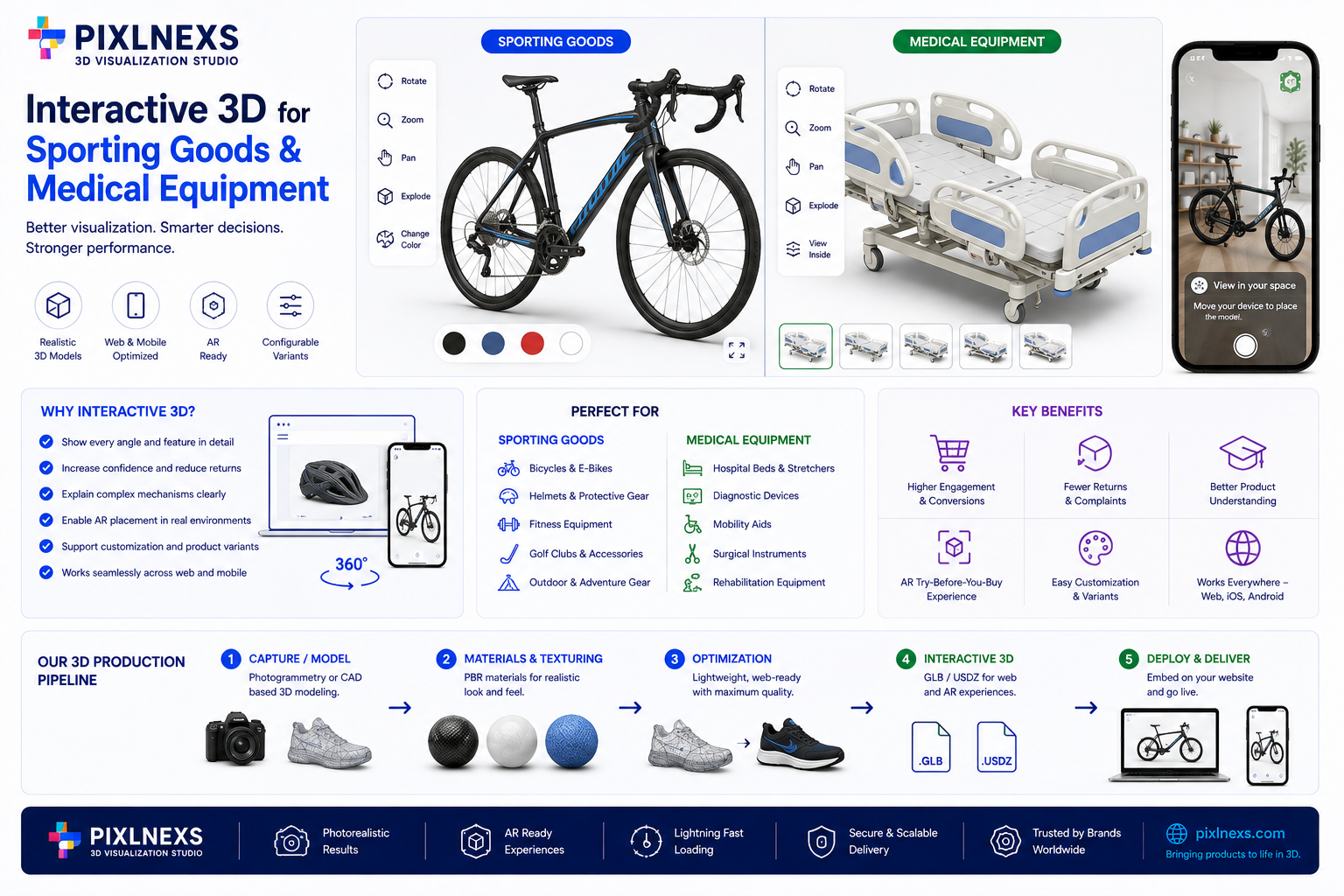
Quick answer: 3d visualization for sporting goods and medical equipment refers to real-time 3D web viewers, augmented reality overlays and interactive configurators that let buyers inspect, customize and evaluate high-precision products before purchase. These tools address friction points specific to technical verticals verifying fit, understanding mechanical assemblies and confirming compliance features by replacing static images with interactive geometry. The goal is to help spec-heavy buyers, from athletes to clinicians, make an informed decision the way they would during a physical inspection.
By Bali Balaji, Pixlnexs Studio Team. Pixlnexs develops interactive 3D and AR product visualization for brands selling technical, spec-heavy products.
Key Takeaways
- Vertical-specific needs. Sporting goods and medical devices require different 3D features: sports buyers care about fit and performance simulation, medical buyers care about dimensional accuracy and material transparency.
- Return reduction. Interactive 3D lets buyers verify dimensions and fit, which matters most for protective gear and orthotics where sizing is complex.
- Technical buyer confidence. Spec-heavy purchases benefit from zoom, rotation and component isolation the same steps a buyer would take during a physical inspection.
- Performance is not optional. Web-based 3D has to load quickly and run smoothly on mobile or the tool works against you instead of for you.
- Configurability drives value. Interactive configurators let buyers customize products such as bike components or prosthetic joints, which supports higher engagement and order value.
Vertical-Specific Use-Case Breakdown
The general idea of 3d product visualization sporting goods often gets lumped together with generic e-commerce 3D but the technical requirements shift considerably once you move into medical equipment. A golf club head and a surgical scalpel share a need for precision but the buyer’s intent and the information they need differ.
In sporting goods, the focus is usually on performance, fit and customization the buyer wants to optimize their game or workout. In medical equipment, the focus is on safety, compliance and precise fit the buyer is a clinician, procurement officer or patient making a higher-stakes decision.
.table-box { border: 1px solid #d6e4ff; border-radius: 8px; padding: 20px; margin: 32px 0; overflow-x: auto; background: #ffffff; } .table-box table { width: 100%; border-collapse: collapse; font-size: 15px; } .table-box th { background-color: #1a73e8; color: #ffffff; text-align: left; padding: 12px 14px; font-weight: 600; } .table-box td { padding: 12px 14px; border-bottom: 1px solid #eef2f9; color: #333333; } .table-box tr:last-child td { border-bottom: none; } .table-box tr:nth-child(even) td { background-color: #f8fafd; }| Vertical | Example Product | Key 3D Feature Needed | Buyer Concern Addressed |
|---|---|---|---|
| Golf equipment | Driver / iron set | Component isolation, material highlighting | Verifying loft, lie angle and material without disassembly |
| Bicycles | Road / mountain bike | Interactive configurator | Component compatibility and visualizing the final build |
| Protective gear | Helmets / pads | AR try-on, fit simulation | Checking fit to reduce sizing-related returns |
| Fitness equipment | Adjustable dumbbells / benches | Assembly visualization | Understanding mechanical assembly and plate compatibility |
| Surgical instruments | Scalpels / forceps | High-fidelity detail zoom | Inspecting joint articulation and finish |
| Diagnostic devices | Ultrasound probes / monitors | Component and port layout view | Understanding connectivity for clinical workflow integration |
| Prosthetics / orthotics | Knee braces / limbs | Custom-fit visualization | Verifying anatomical alignment and adjustment range |
Golf Equipment: Precision and Performance
Golf buyers are often serious enthusiasts who care about weight distribution, sole grind and face milling details a static image cannot convey. Interactive 3D lets a buyer rotate the club head to inspect the sole grind, zoom on the face and isolate the hosel to see how the adjustment mechanism works. That level of detail builds confidence in the engineering of the product.
Bicycles: The Complexity of Configuration
A single bike model can have hundreds of valid configurations across frame size, wheels, drivetrain, brakes and handlebars. A static spec sheet is easy to misread. An interactive configurator lets a buyer select components and see compatibility warnings in real time, which reduces incompatible orders and lets the buyer visualize the final look of a custom build.
Protective Gear: Fit Is Safety
In protective gear, fit is a safety issue, not just a comfort one. AR try-on lets a buyer project a helmet or pad onto their own body through a phone camera for a rough sense of fit and scale, while a 3D viewer can show internal padding and adjustment mechanisms for a closer look at how the product conforms to the body.
Fitness Equipment: Assembly and Durability
For adjustable equipment such as dumbbells or benches, buyers worry about joint stability and how components lock together. A 3D viewer can show the internal locking mechanism of a plate system, addressing the concern that parts might come loose during use. For larger items, showing footprint in a virtual room helps buyers confirm the equipment will fit their space.
Surgical Instruments: Trust in Precision
Surgical buyers surgeons or procurement staff need to verify joint articulation, blade finish and material grade against their technical requirements. High-fidelity 3D allows extreme zoom without losing detail, which matters for inspecting micro-textures or joint smoothness that a photo would blur.
Diagnostic Devices: Integration and Workflow
Buyers of diagnostic devices need to understand how a device fits physically and electronically into an existing clinical setup. A 3D viewer showing port layout, cable routing and physical dimensions helps a buyer picture the device in their own workflow before committing to a purchase.
Prosthetics and Orthotics: Personalized Fit
Prosthetics and orthotics are inherently personalized. Buyers often patients or caregivers need to understand adjustment mechanisms and range of motion. Interactive 3D can show hinge movement or socket fit, which helps convey functional benefit in a way a still photo cannot.
Why 3D Visualization for Sporting Goods and Medical Equipment Works
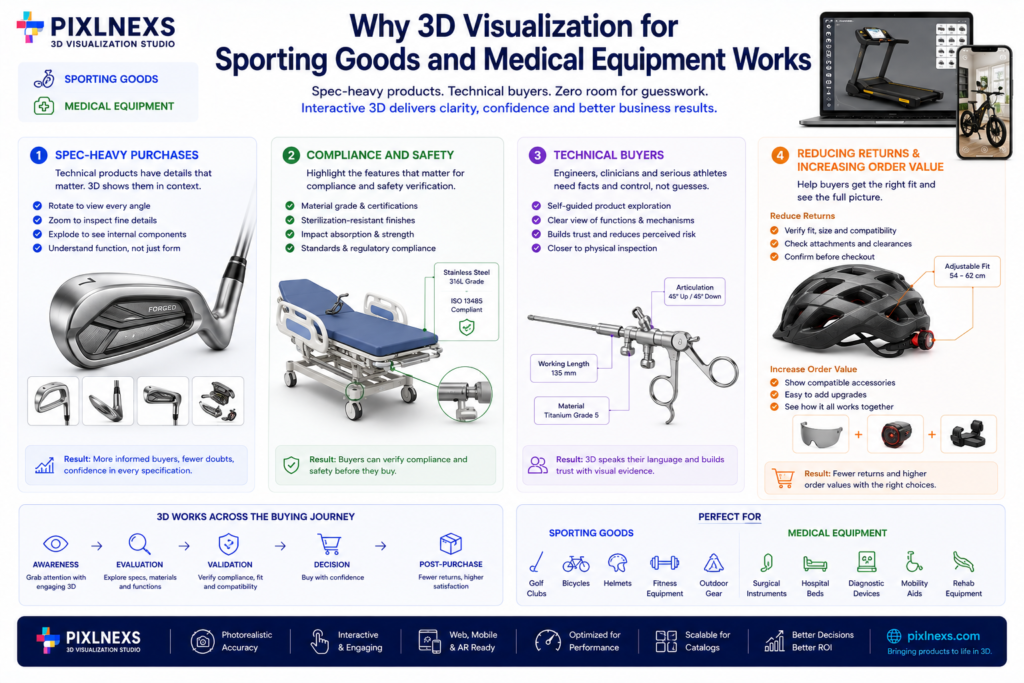
3D visualization can help almost any product category but sporting goods and medical equipment stand out for a specific reason: spec-heavy purchases, compliance requirements and technical buyers.
Spec-Heavy Purchases
A golf club is defined by loft, lie angle and material. A surgical instrument is defined by blade length, articulation and material grade. Static images and text descriptions often fail to convey these specifications in context. Interactive 3D lets a buyer rotate to see angles, zoom to inspect materials and interact with components to understand function which is closer to how a technical buyer actually evaluates a product in person.
Compliance and Safety
In the medical sector, verifying compliance with safety and regulatory standards is part of the buying decision. Interactive 3D can highlight the features that matter for that verification material grade, sterilization-resistant finish or the impact-absorbing structure inside a helmet helping the buyer confirm the product meets their requirements before purchase.
Technical Buyers
Buyers in these verticals are frequently engineers, clinicians or serious athletes who are evaluating a rational, technical decision rather than an emotional one. Interactive 3D speaks that language: it gives them the visual evidence and control they would otherwise only get from a physical inspection, which builds trust and lowers the perceived risk of the purchase.
Reducing Returns and Increasing Order Value
Returns in these verticals are frequently tied to fit or compatibility issues. Letting a buyer verify fit or component compatibility before checkout addresses that directly. On the other side of the ledger, configurators can support higher order values by making it easy for a buyer to add compatible components or upgrades once they can see exactly how those choices fit together.
Comparison of Visualization Approaches
Not all 3D visualization tools are the same. The three common approaches 3D viewers, AR try-on and configurators have different strengths and the right choice depends on the product and the buyer.
.table-box { border: 1px solid #d6e4ff; border-radius: 8px; padding: 20px; margin: 32px 0; overflow-x: auto; background: #ffffff; } .table-box table { width: 100%; border-collapse: collapse; font-size: 15px; } .table-box th { background-color: #1a73e8; color: #ffffff; text-align: left; padding: 12px 14px; font-weight: 600; } .table-box td { padding: 12px 14px; border-bottom: 1px solid #eef2f9; color: #333333; } .table-box tr:last-child td { border-bottom: none; } .table-box tr:nth-child(even) td { background-color: #f8fafd; }| Approach | Best For | Strengths | Weaknesses |
|---|---|---|---|
| 3D Viewer | Spec-heavy products, technical buyers | High detail, component isolation, zoom | No fit simulation, limited interactivity |
| AR Try-On | Fit-critical products, consumer goods | Real-world scale, fit visualization, engagement | Limited detail, needs camera access |
| Configurator | Customizable products, complex assemblies | Real-time customization, compatibility checks | Complex to build, needs a robust data structure |
3D Viewer
Best for golf equipment, surgical instruments and diagnostic devices anywhere the buyer’s main need is to inspect detail rather than customize or check fit on their body.
AR Try-On
Best for protective gear, fitness equipment and consumer sporting goods where fit against the body or in a room is the primary question a buyer needs answered.
Configurator
Best for bicycles, prosthetics orthotics and customizable fitness equipment products where the buyer is actively assembling a specific combination of compatible parts.
The Production Pipeline: Operator Insights
Creating high-fidelity 3D assets for these verticals is not just a matter of scanning a product. It is a process spanning photography or capture, modeling, texturing and optimization and it is easy to underestimate how many of these steps are specific to the vertical.
Asset Acquisition
The first step is acquiring the physical product, often shipping it to a studio or using a portable capture setup. For sporting goods, this can mean capturing the product in multiple configurations a bike with and without accessories, for example. For medical equipment, it can mean capturing in a controlled, sterile-adjacent environment to preserve accuracy.
3D Modeling
Modeling can use photogrammetry building a model from many photos or manual modeling in 3D software. Photogrammetry is fast but can be difficult to clean up; manual modeling is slower but gives more control over topology. Complex products often use a hybrid: photogrammetry for the base shape, manual modeling for fine detail.
Texturing and Materials
Materials must be accurate to the real product. For medical equipment, this often means matte, clinical-looking finishes that convey precision. For sporting goods, materials need to be vibrant and true to the product’s actual color and finish.
Optimization
The final step is optimizing for the web: reducing polygon count, compressing textures and validating that the model loads and renders smoothly. This step is where a beautiful desktop model either becomes usable on a phone or does not.
First-Hand Experience
In our studio, the clearest lesson has been that communication with the product team matters more than visual polish. We have had to rebuild models after realizing the initial version prioritized visual appeal over the functional detail the buyer actually needed for example, a bike model that looked impressive but did not let a buyer isolate individual components to verify compatibility. The model has to serve the buyer’s evaluation process, not just look good in a render.
Technical Requirements for Web-Based 3D
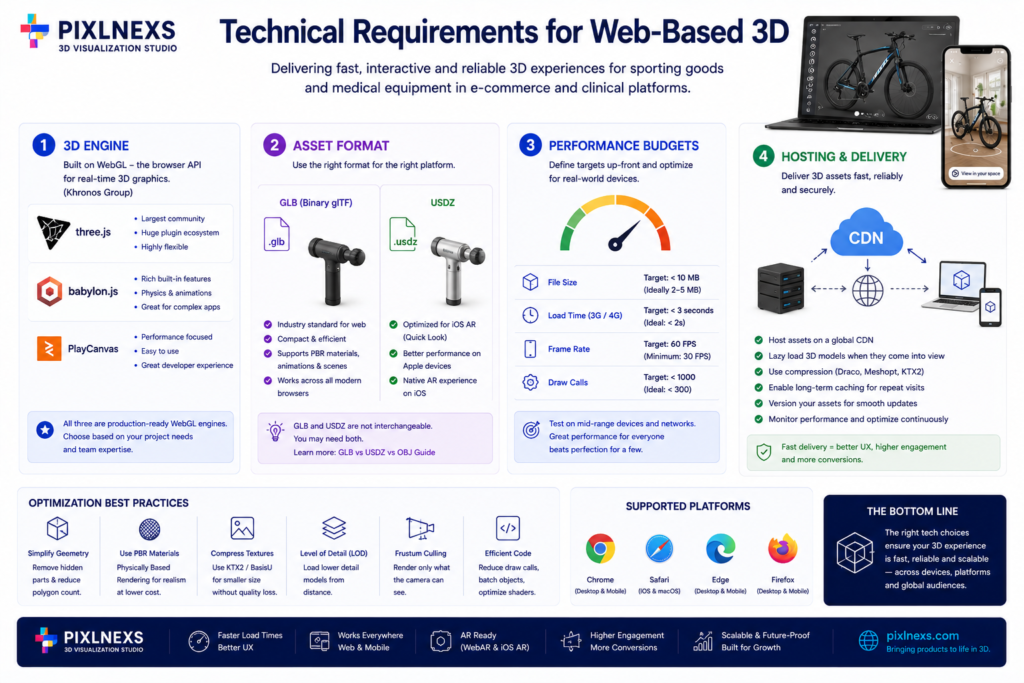
Delivering a reliable 3D visualization experience in these verticals requires attention to the rendering engine, hosting and integration with the storefront or clinical procurement portal.
3D Engine
Common choices include Three.js, Babylon.js and Play Canvas, all built on WebGL, the browser API for real-time 3D graphics documented by the Khronos Group. Three.js has the largest community and plugin ecosystem; Babylon.js includes more built-in physics and animation tooling; PlayCanvas is designed around performance and simplicity.
Asset Format
GLB (Binary glTF) is the standard container for web-delivered 3D, bundling geometry, PBR materials and animation in one file. If the audience includes iOS users expecting AR Quick Look, you will also need a USDZ version of the same asset the two formats are not interchangeable. We cover this in detail in GLB vs USDZ vs OBJ: 3D File Formats Explained.
Performance Budgets
Set a performance budget before development starts: a target file size, a target load time on a mid-range connection and a target frame rate on a mid-range phone. Without a stated budget, it is easy to ship a visually stunning model that performs poorly for a meaningful share of visitors.
Hosting and Delivery
Serve 3D assets from a CDN, use lazy loading so the model only loads when a shopper reaches it and cache aggressively for repeat visits the same principles that apply to image-heavy e-commerce pages apply here, just with larger individual assets.
Compliance and Trust Considerations for Medical Equipment
Medical equipment sits in a category where visualization has to support, not replace, the documentation a buyer or regulator actually relies on.
- 3D visualization is a sales and comprehension aid, not a regulatory submission. It helps a buyer understand a device faster; it does not substitute for the technical specifications, certifications or clinical documentation that govern the actual purchase and use decision.
- Material and finish accuracy matters more than stylization. A device rendered with an inaccurate finish or exaggerated detail can create a mismatch between expectation and the delivered product, which is a bigger problem in a clinical setting than in general retail.
- Keep claims inside the visualization conservative. Avoid implying compliance or certification status through the 3D presentation itself; that information belongs in the product’s actual documentation, linked clearly alongside the viewer.
Cost Considerations by Vertical
Cost drivers differ across sporting goods and medical equipment, mainly because of what each vertical needs the visualization to actually do.
| Cost Driver | Sporting Goods Impact | Medical Equipment Impact |
|---|---|---|
| 3D modeling complexity | Moderate most gear has fewer moving parts | Often higher internal mechanisms and articulation matter |
| Material accuracy | Important for perceived quality | Critical inaccurate finish undermines trust |
| Configuration logic | High for bikes and customizable gear | Moderate fewer consumer-style variant combinations |
| Compliance-related review | Low | Adds a review cycle with the product/clinical team |
| AR try-on development | Common for protective gear and apparel-adjacent items | Less common fit is usually assessed clinically |
These are relative comparisons, not fixed prices the actual cost of any single project depends on the number of SKUs, existing 3D asset availability and how deep the e-commerce or procurement integration needs to go.
Common Mistakes in These Verticals
- Treating sporting goods and medical visualization as the same problem. The buyer’s evaluation process, risk tolerance and vocabulary differ enough that a template built for one rarely transfers cleanly to the other.
- Prioritizing visual polish over functional detail. A stunning render that does not let a buyer isolate the one component they care about (a hinge, a grind, a port) fails the actual use case.
- Skipping mobile testing. A significant share of sporting goods traffic, in particular, is mobile. A viewer that only performs well on desktop underperforms for a large part of the audience.
- Not involving the technical or clinical team early. For medical equipment, a 3D asset built without input from the product engineering or clinical team is more likely to contain a subtle inaccuracy that undermines buyer trust once noticed.
- Ignoring the fallback experience. Assuming every visitor’s device and browser can run the 3D viewer smoothly, without a tested fallback to a static image, risks a broken experience for an unpredictable slice of traffic.
Integrating 3D Visualization Into Sales and Procurement Workflows
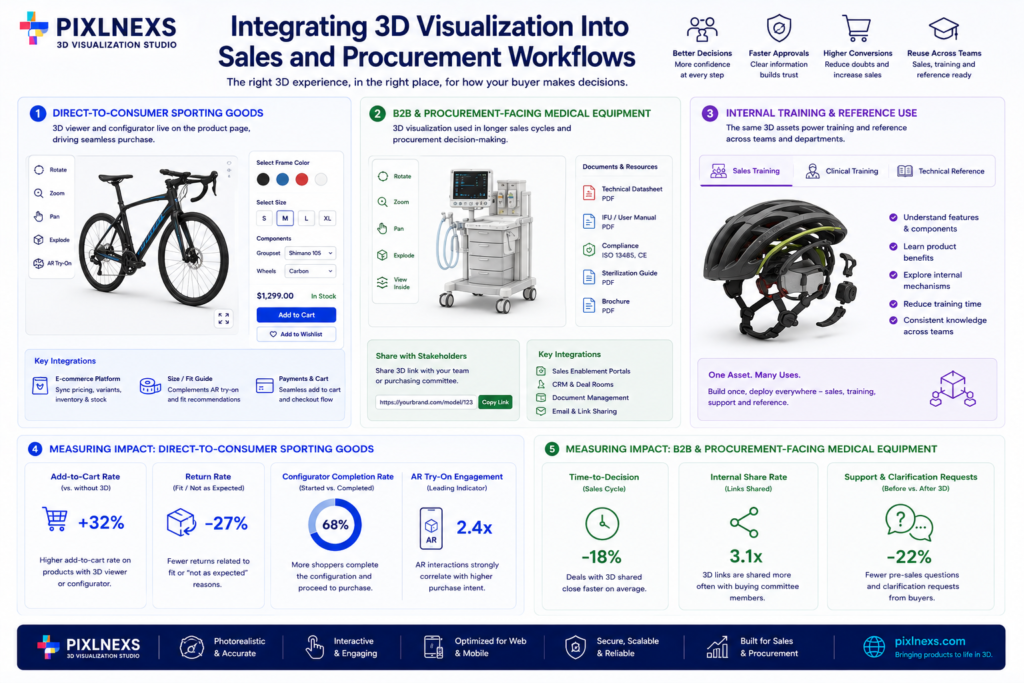
The visualization does not exist in isolation it has to fit into how the buyer actually makes a decision.
Direct-to-Consumer Sporting Goods
For a brand selling directly to consumers, the 3D viewer or configurator usually lives on the product page itself, feeding directly into the cart. The key integration points are the e-commerce platform’s product data (so variant pricing and stock stay in sync with what the configurator shows) and, where relevant, a size or fit guide that complements rather than duplicates the AR try-on experience.
B2B and Procurement-Facing Medical Equipment
For medical and industrial equipment sold through a procurement process, the visualization more often lives on a distributor site or a sales-enablement portal used during a longer sales cycle. Here, the integration priority shifts toward shareability a link a sales rep can send a purchasing committee and toward pairing the 3D view with the actual technical documentation and compliance materials the buyer will need to make a final decision, rather than routing directly to a cart.
Internal Training and Reference Use
In both verticals, the same 3D assets built for buyer-facing visualization often get reused internally for training a sales team on product features or for a clinical team learning a new device’s components before it arrives on site. Building the asset with this secondary use in mind from the start avoids duplicating modeling work later.
Measuring Impact in These Verticals
Because the buyer profile and sales cycle differ so much between sporting goods and medical equipment, the metrics worth tracking differ too.
For Direct-to-Consumer Sporting Goods
- Add-to-cart rate on products with a 3D viewer or configurator versus comparable products without one.
- Return rate, specifically returns attributed to fit or “not as expected” reasons, which interactive 3D is most likely to influence.
- Configurator completion rate the share of shoppers who start configuring a product and actually finish, versus abandoning partway through.
- AR try-on engagement, where relevant, as a leading indicator of purchase intent for fit-sensitive categories like protective gear.
For B2B and Procurement-Facing Medical Equipment
- Time-to-decision across the sales cycle, comparing deals where the 3D asset was shared against those where it was not.
- Internal share rate how often a sales rep sends the 3D link to other stakeholders in a purchasing committee, which signals whether the asset is actually useful in the buying process.
- Support and clarification requests before and after introducing 3D visualization, as a proxy for whether the tool is reducing the number of follow-up questions a buyer needs answered before committing.
Choosing Between a 3D Viewer, AR and a Configurator: A Practical
Checklist
When deciding which approach fits a specific product, work through these questions in order:
- Does the buyer need to verify fit against their own body or space? If yes, AR try-on is likely worth the investment; if no, skip it.
- Does the product have multiple genuinely independent, combinable attributes not just color and size but attributes that interact with each other, like drivetrain and wheel size on a bike? If yes, a configurator is likely justified.
- Is the buyer’s main need to inspect construction, material and detail rather than customize or check fit? If yes, a 3D viewer alone is probably sufficient and building more than that adds cost without adding buyer value.
- Does the purchase involve a compliance or clinical review step? If yes, make sure the visualization links clearly to the actual documentation rather than trying to replace it.
- What device will the buyer most likely use? A procurement officer reviewing on a work laptop has different performance constraints than a consumer browsing on a phone during a commute design the fallback experience around the realistic primary device.
Running through this checklist before development starts tends to prevent the most expensive mistake in this space: building the wrong type of tool for how the buyer actually evaluates the product. It is also worth revisiting the checklist periodically as a product line evolves a bike model that started with a handful of colorways can grow into a genuinely configurable platform within a year or two, at which point the visualization approach that made sense at launch may no longer be the right fit.
Ready to Bring Interactive 3D to Your Product Line?
Whether you sell golf clubs, bicycles, protective gear or diagnostic equipment, the right visualization approach depends on your specific buyer’s evaluation process not a generic template. Pixlnexs works with technical and spec-heavy sellers to figure out whether a 3D viewer, AR try-on or a full configurator fits your product, then builds and optimizes it.
.cta-box { background: #f4f8ff; border: 1px solid #d6e4ff; border-radius: 8px; padding: 28px 32px; margin: 32px 0; text-align: center; } .cta-box h3 { margin: 0 0 10px; font-size: 22px; color: #1a1a1a; } .cta-box p { margin: 0 0 18px; font-size: 16px; color: #444444; } .cta-box a { display: inline-block; background-color: #1a73e8; color: #ffffff !important; text-decoration: none; font-weight: 600; padding: 12px 28px; border-radius: 6px; transition: background-color 0.2s ease; } .cta-box a:hover { background-color: #1558b0; color: #ffffff !important; }Selling technical or spec-heavy products?
Pixlnexs builds the right visualization tool 3D viewer, AR try-on or full configurator for how your buyers actually evaluate a purchase.
Talk to PixlnexsFrequently Asked Questions
What is the difference between 3D visualization for sporting goods and for medical equipment?
Sporting goods visualization typically emphasizes performance, fit and personalization helping an athlete or enthusiast picture their exact build or gear. Medical equipment visualization emphasizes dimensional accuracy, material transparency and integration into a clinical workflow, since the buyer is evaluating a higher-stakes, more technical purchase.
Do I need AR for a sporting goods product or is a 3D viewer enough?
It depends on whether fit against the body or in a physical space is the buyer’s main question. For protective gear or large fitness equipment, AR try-on directly answers a fit or scale question a photo cannot. For products like golf clubs or surgical instruments, where the main question is detail and construction rather than fit, a 3D viewer is usually sufficient.
Can interactive 3D reduce returns for protective gear?
It can help, mainly by letting a buyer check internal padding, adjustment mechanisms and approximate fit before ordering, which addresses one of the more common reasons protective gear gets returned. It will not eliminate fit-related returns entirely, since actual fit still varies by individual but it narrows the gap between what a buyer expects and what arrives.
Is a 3D configurator necessary for bicycles or can a spec sheet work?
A spec sheet can work for simple builds but as the number of compatible and incompatible component combinations grows, a configurator becomes more valuable because it can enforce compatibility rules in real time and let the buyer see the finished build rather than mentally assembling it from a list.
How do you keep 3D models accurate for medical devices?
Accuracy comes from careful capture (consistent lighting, sufficient reference photography or scanning) a texturing pass that matches real material finishes rather than a stylized look and a review step with the product or clinical team before the asset goes live, since a visually inaccurate model can create a mismatch between expectation and the delivered device.
What happens if a 3D viewer performs poorly on older devices?
A well-built implementation should degrade gracefully falling back to a static image or a lower-detail model rather than failing outright so that buyers on older hardware or slower connections still get a usable, if simpler, experience instead of a broken page.
Who typically buys interactive 3D for these verticals the brand or the retailer?
Both, depending on the sales channel. Sporting goods brands often build 3D visualization directly into their own direct-to-consumer product pages. Medical equipment sellers more often build it for a procurement-facing portal or a distributor site, where the buyer is a clinician or purchasing officer rather than a consumer.
Does interactive 3D help with B2B sales of medical or industrial equipment?
Yes, in a different way than consumer e-commerce. B2B buyers often need to verify compatibility with existing systems, confirm dimensions for installation and share the visualization internally with colleagues who were not part of the original demo. A well-built 3D viewer supports all three without requiring a repeat in-person demonstration for every stakeholder.
How is a 3D asset for medical equipment different to build than one for sporting goods?
The core pipeline capture, model, texture, optimize is the same but the review process differs. A sporting goods asset is usually signed off once it looks and performs well. A medical equipment asset typically needs an additional check from the product engineering or clinical team to confirm that the finish, proportions and visible mechanisms match the real device closely enough not to mislead a buyer during evaluation.
Should the 3D viewer link out to certifications or technical specs?
Yes, especially for medical and industrial equipment. The viewer should sit alongside not instead of links to the actual datasheet, certification or compliance documentation the buyer needs to make a final decision. Treating the 3D view as one input among several, rather than as the sole basis for a purchase decision, keeps the tool in its proper role as a comprehension aid.










Leave a Reply