
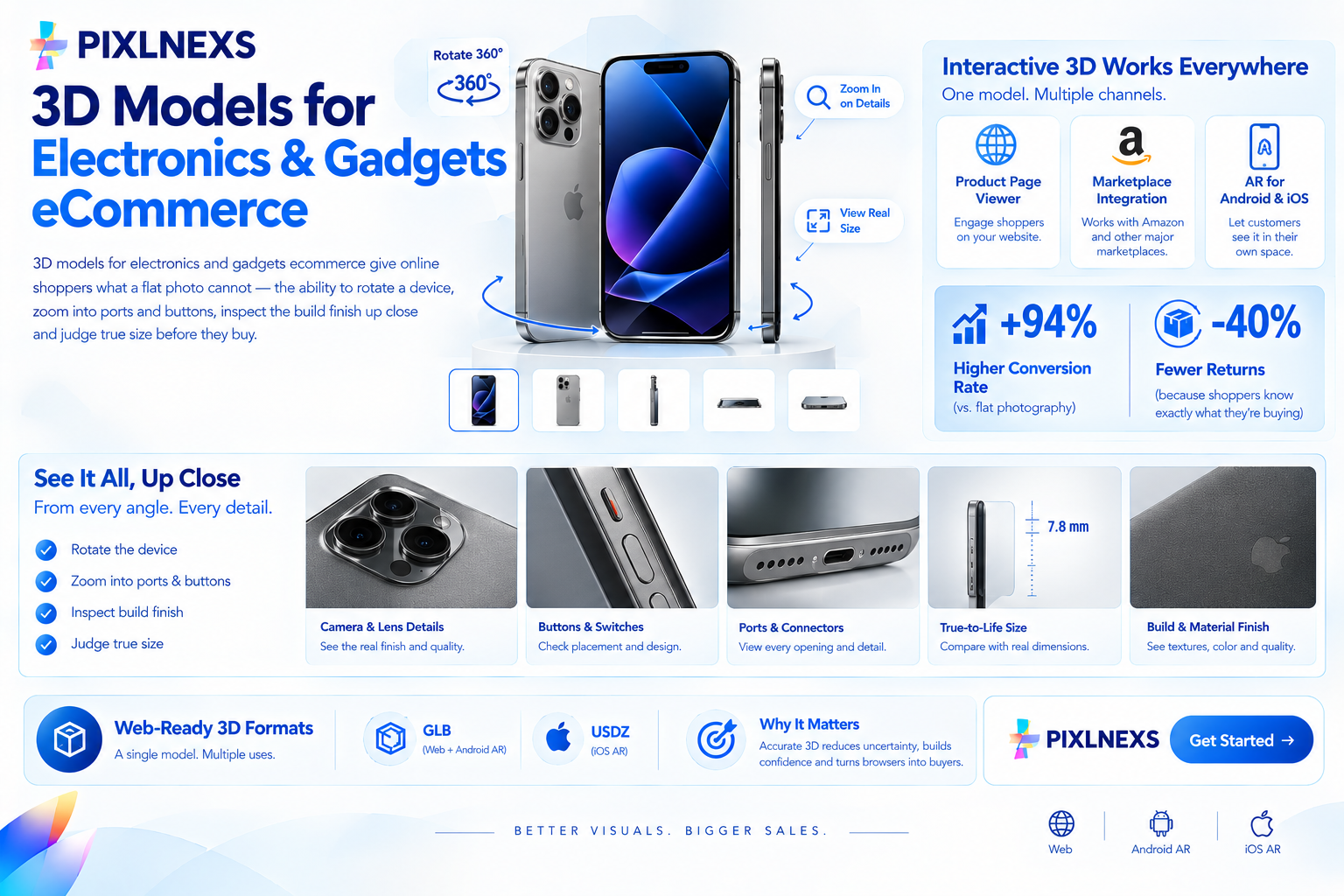
Quick Answer: 3D models for electronics and gadgets ecommerce give online shoppers what a flat photo cannot the ability to rotate a device, zoom into ports and buttons, inspect the build finish up close and judge true size before they buy. A web-ready GLB file loads in a product page viewer, embeds on marketplaces like Amazon and acts as the AR asset for Android and iOS. Industry and Shopify data put the conversion lift from interactive 3D at around 94% higher than flat photography, with up to 40% fewer returns because a shopper who has inspected a product in full 3D arrives at checkout knowing exactly what they are buying.
By Manoj, Pixlnexs Studio. Pixlnexs builds web-optimized 3D and AR product visualization for electronics and gadget brands and this guide reflects the pipeline, deliverables and intake requirements our production team runs on every device, peripheral and accessory we model.
Key Takeaways
- Electronics buyers have specific pre-purchase questions that flat photography consistently fails to answer port locations, button placement, connector types, finish quality and true size are the top five.
- Interactive 3D converts at markedly higher rates than static product photography. Industry benchmarks put the lift at around 94% higher conversion and up to 40% fewer returns on product pages with an interactive 3D viewer.
- A single GLB file is the source for your web viewer, your AR placement, your rendered product images and your hero image all from one production run rather than separate shoots and separate assets.
- Port and connector accuracy is the highest-stakes element of electronics 3D modeling a USB-C port rendered as slightly the wrong shape or size is immediately noticeable to anyone who uses the product category regularly.
- Material accuracy for electronics finishes brushed aluminum, matte plastic, glossy glass, soft-touch rubberized coatings requires specific PBR material setups to read correctly. A matte device that renders with plastic-like specularity looks cheaper than the real product.
- One base model can cover color variants of the same device without re-modeling from scratch color and finish swaps use variant texture sets from one source geometry.
- Start with one bestseller. The before-and-after on your own highest-traffic product page is the most reliable validation for your specific audience.
Why Electronics and Gadgets Brands Need Interactive 3D
Electronics is one of the highest-consideration purchase categories in ecommerce. A shopper buying a pair of wireless earbuds, a smart home device, a laptop stand or a mechanical keyboard is making a decision that combines aesthetic preference, technical specification and tactile expectation and they are making it from a product page.
Flat product photography covers one of those three. A good photo communicates aesthetic impression from one angle under controlled lighting. It tells the shopper nothing reliable about the placement of the charging port relative to the headphone jack, the actual texture of the back panel, whether the build feels premium or hollow or whether the device is the size of a credit card or the size of a paperback book.
These are not abstract concerns. They are the specific questions that generate pre-sale support tickets, drive “not what I expected” return requests and create the confidence gap that separates a browser from a buyer. Interactive 3D for electronics exists precisely to close that gap to give a shopper the inspection experience they would have in a physical store, on a product page.
The Conversion and Return Case
The measurable case for interactive 3D in electronics is consistent across independent studies and first-party platform data. Shopify’s merchant data and industry research point to roughly a 94% higher conversion rate for product pages with an interactive 3D viewer compared to static photography alone and up to 40% fewer returns driven by expectation mismatches.
For electronics specifically, the return categories that interactive 3D most directly addresses are: wrong size or form factor (the device was bigger or smaller than expected), finish or color disappointment (the matte gray looked silver in the photo) and port confusion (the buyer assumed a port was present or in a specific location based on a partial view in a photo). An accurate 3D model built to real-world dimensions and correct PBR materials eliminates all three of these causes at once.
What Interactive 3D Actually Shows a Buyer
Every port, connector, button and control, visible from any angle the shopper chooses. A buyer who wants to check whether the device has a 3.5mm jack can rotate the model to the relevant face and look. A buyer who wants to verify the cable routing on the back of a monitor stand can zoom into that area. No static image set covers these use cases as efficiently.
Real size and proportions relative to known objects, through AR placement. A device placed in AR at true-to-life scale next to a real surface or object the shopper already knows gives them an accurate size reference that no dimensions table achieves with the same immediacy.
Finish and material accuracy matte versus gloss, soft-touch versus hard plastic, brushed aluminum versus painted metal under standardized lighting rather than the flattering or misleading lighting of a styled photo shoot.
Color variant accuracy across multiple colorways, each rendered from the same geometry with a swapped material set, ensuring consistency between the “Space Gray” and “Silver” versions of the same device rather than relying on separate photography sessions with varying white balance.
How 3D Models for Electronics Ecommerce Are Created
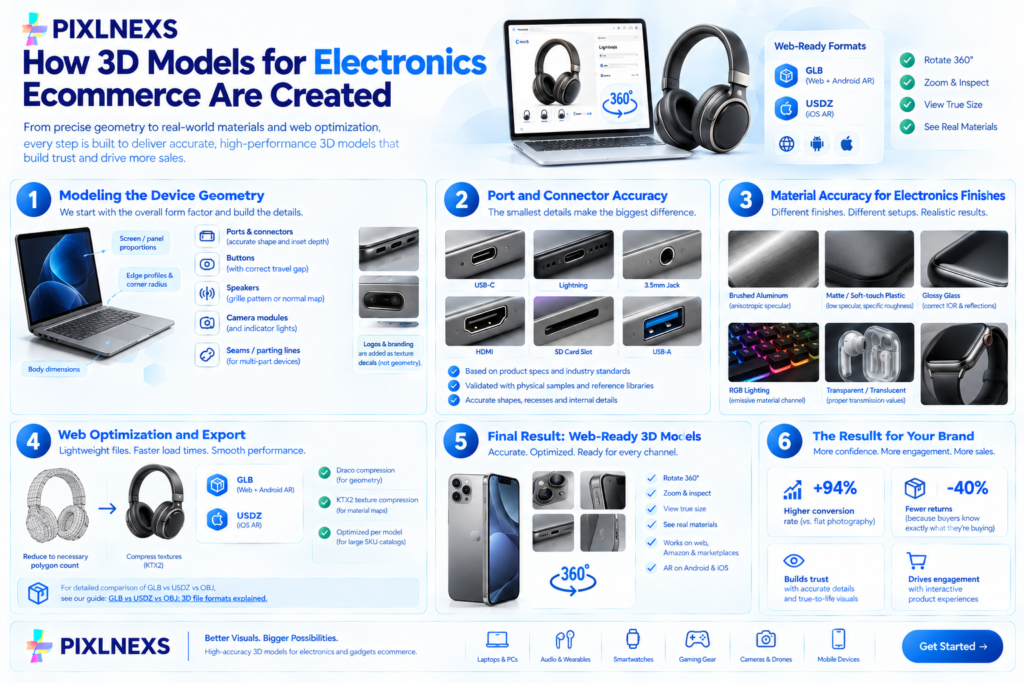
Electronics 3D modeling is one of the more technically demanding product categories, because the purchasers are technically literate. A shopper who knows the product category well enough to be comparing spec sheets will also notice if the USB-C port is slightly the wrong shape, if the power button sits 2mm too high or if the speaker grille pattern does not match the real device. Accuracy is not optional it is what separates a model that builds trust from one that undermines it.
Modeling the Device Geometry
Electronics modeling starts from the overall form factor: the body dimensions, screen or panel proportions, edge profiles and corner radius. For devices with complex industrial design laptops with tapered chassis, earbuds with organic curved housings, smartwatches with both flat and curved display surfaces the geometry requires careful reference work from multiple angles to capture the real form accurately.
Secondary elements follow: ports and connectors (each modeled to its correct shape and inset depth), buttons (with accurate travel gap from the surface), speakers (with correct grille pattern either modeled as geometry or as a normal-mapped texture depending on scale and prominence), camera modules, indicator lights and any structural seams or parting lines that are visible in the real product.
Logos and branding marks on the body are handled as texture decals rather than geometry, to keep polygon count efficient while maintaining visual accuracy at the level of detail a shopper would inspect from.
Port and Connector Accuracy
This is the highest-stakes element of electronics 3D modeling and the one where low-quality models fail most visibly. A USB-C port is a very specific shape the internal receptor, the outer housing, the recessed inset and a port rendered as a generic rectangular hole reads immediately as wrong to anyone who has ever plugged in a cable. The same applies to Lightning connectors, 3.5mm jacks, HDMI ports, SD card slots and proprietary connector formats.
We reference port and connector specifications from the product’s own technical documentation and cross-reference against publicly available connector standards where relevant. For high-volume or repeating connector types (USB-C, USB-A, HDMI) we maintain library assets that have been built and validated against physical samples, which speeds up delivery without sacrificing accuracy.
Material Accuracy for Electronics Finishes
Electronics products use a more varied set of surface finishes than almost any other product category and each requires a specific PBR material setup to render correctly.
Brushed aluminum has directional specular response the highlight follows the grain direction. A brushed panel rendered with isotropic specularity looks like a matte plastic version of the real thing, not an aluminum one. Correctly, this requires an anisotropic material or a custom specular map that encodes the grain direction.
Matte soft-touch plastic and rubberized coatings need very low specularity and specific roughness values. This finish is common on gaming peripherals, earbuds and budget audio equipment. Rendered with the wrong roughness, it looks either like wet rubber or like ABS plastic neither of which matches the tactile premium feel this finish is specifically chosen to communicate.
Glossy glass panels rear panels on phones, touchscreen surfaces, camera covers need a glossy specularity with an appropriate IOR (index of refraction) so they pick up environmental reflections in the viewer the way real glass does, rather than looking like a flat lacquered surface.
RGB lighting on gaming peripherals and keyboards requires an emissive material channel so the lighting effect reads correctly in the viewer without washing out the surrounding geometry.
Transparent plastics and translucent indicator windows need proper transmission values so they read as genuinely translucent rather than opaque.
Web Optimization and Export
Electronics models are optimized using the same pipeline every web-ready 3D product requires: polygon count reduced to what the geometry actually needs, textures compressed and the final file exported to GLB for the web and Android AR, with a USDZ companion file for iOS AR Quick Look. Draco compression is applied to geometry and KTX2 texture compression is applied to material maps as standard. For electronics brands with a large SKU catalog a peripheral brand selling ten keyboard variants, five mouse variants and three headset variants efficient per-model optimization is critical to keeping product page load times within acceptable bounds across the whole range.
For the technical detail of why GLB is the right format for web and Android delivery and when USDZ is required for iOS, see our guide on GLB vs USDZ vs OBJ: 3D file formats explained.
What You Get
Every model ships as a complete, ready-to-use asset set not a raw 3D file for your team to process but a finished, tested, platform-ready deliverable.
One web-ready GLB file per product, optimized for your storefront’s 3D viewer and for Android AR via Google Scene Viewer.
3 high-quality rendered product images generated directly from the same 3D source, so your product photos and your interactive viewer are always consistent. No separate photography session is needed for the standard product gallery these renders are production quality and are generated from exactly the geometry and materials in the viewer.
1 enhanced hero image a polished, campaign-ready render for your main product page, ad creative or press kit.
A USDZ companion file for iOS AR Quick Look on iPhone and iPad, so the same model works across both major mobile platforms without a separate build.
Turnaround is typically about 4 working days per product for a single-color, standard-complexity device. More complex electronics with multiple sub-assemblies, RGB effects or high connector count may take slightly longer we quote timeline alongside price when we receive the brief.
| Deliverable | Format / Spec | Where It Is Used |
|---|---|---|
| Web-ready 3D model | GLB (glTF 2.0), optimized for web and Android AR | Product page viewer, AR placement, marketplace embeds |
| iOS AR companion file | USDZ | iOS AR Quick Look on iPhone and iPad |
| Rendered product images | 3 high-quality stills generated from the 3D model | Gallery images, marketplace listings, social |
| Hero image | 1 enhanced, campaign-ready render | Main product page, ads, social creative |
| Turnaround | Approximately 4 working days per product | Per-SKU delivery schedule |
What We Need From You
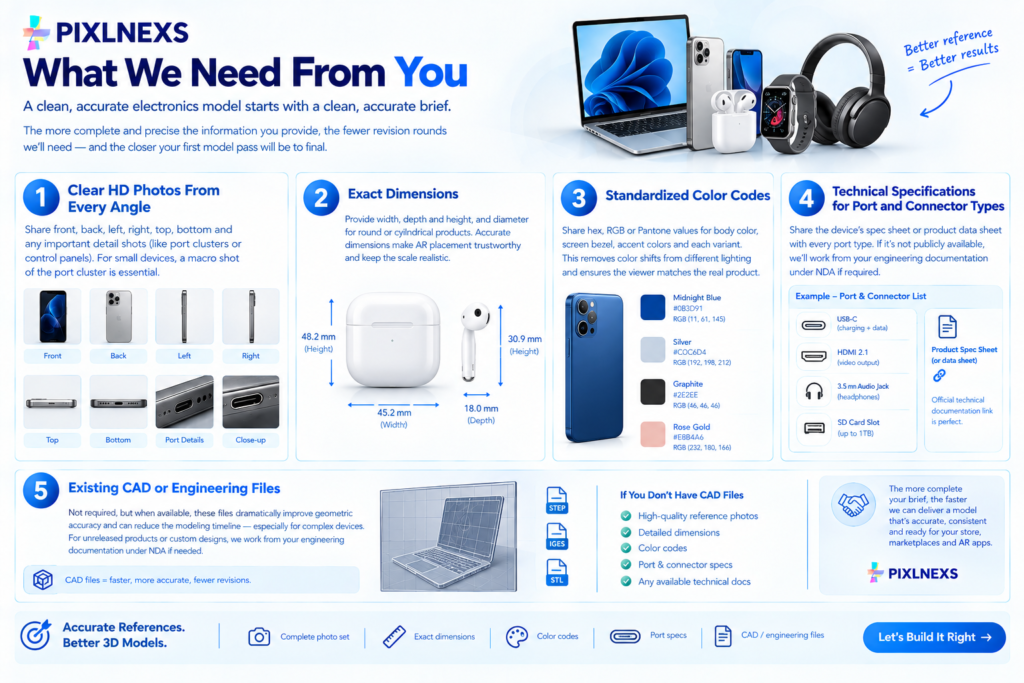
A clean, accurate electronics model starts with a clean, accurate brief. The most common cause of avoidable revision rounds is an incomplete intake missing dimensions, a single reference photo that hides two of the device’s faces or color codes that are not supplied. Providing the following upfront means the first model pass is closer to final.
Clear HD Photos From Every Angle
Front, back, left side, right side, top, bottom and any detail shots of port clusters or control panels that are important to show in the viewer. For small devices, a macro shot of the port cluster is often the most important reference we get, because standard product photos rarely show connector shapes with enough resolution to model from. The more complete the reference, the fewer assumptions in the model.
Exact Dimensions
Width by depth by height and diameter for round or cylindrical products. For electronics in particular, exact dimensions are what make AR placement trustworthy. A pair of wireless earbuds that appears the size of golf balls in AR undermines the entire use case. Shoppers who know the product category already have a mental model of how large a device should be an inaccurate scale is immediately obvious.
Standardized Color Codes
Hex, RGB or Pantone for the body color, screen bezel, accent colors and any variant colorways. Electronics photography is notoriously susceptible to color shifts depending on the shooting environment a “midnight blue” device can photograph anywhere from nearly black to medium navy depending on the light used. A color code eliminates this ambiguity and ensures the viewer matches the real product, not the photo.
Technical Specifications for Port and Connector Types
The device’s own spec sheet or product data sheet, listing every port by type, is the most useful document for accurate connector modeling. If this is publicly available (which it usually is for consumer electronics), a link to the product’s official technical documentation is sufficient. If the device is a new or unreleased product, we work from your own engineering documentation under NDA if required.
Existing CAD or Engineering Files
These are not required but when available they dramatically improve geometric accuracy and can reduce the modeling timeline for complex devices. If you have an engineering CAD file for the housing, we can reference it directly rather than working from photographic reconstruction. For unreleased products or custom industrial designs, this is often the most efficient path.
Start With One Product
The lowest-risk way to begin a 3D rollout for an electronics range is not to commit the full catalog upfront. It is to start with your highest-traffic product your bestselling device, your hero SKU see the model quality on your own product page, measure the before-and-after impact on conversion and returns over four to six weeks and then scale from a position of validated results.
We do not offer free samples. The first model you commission is a paid deliverable, produced to exactly the same quality standard as every model that follows it. It is simply model number 1 of your batch, not a trial or a demo. This keeps the first result representative of ongoing production quality rather than being a polished showcase piece that does not reflect what you get at scale.
Why Starting Small Works
You validate quality on real production work with real stakes, not on a sales asset prepared specifically to impress. You get a direct before-and-after comparison on your own highest-traffic product page, with your own traffic, in your own conversion funnel. You can measure the actual impact on sales and returns before committing budget to a full range rollout. Scaling to the rest of the catalog then follows a proven process rather than a first-time one the brief format, the file delivery structure, the integration approach and the quality benchmark are all established from model number 1.
Common Pitfalls in Electronics 3D Modeling
Inaccurate Port Geometry
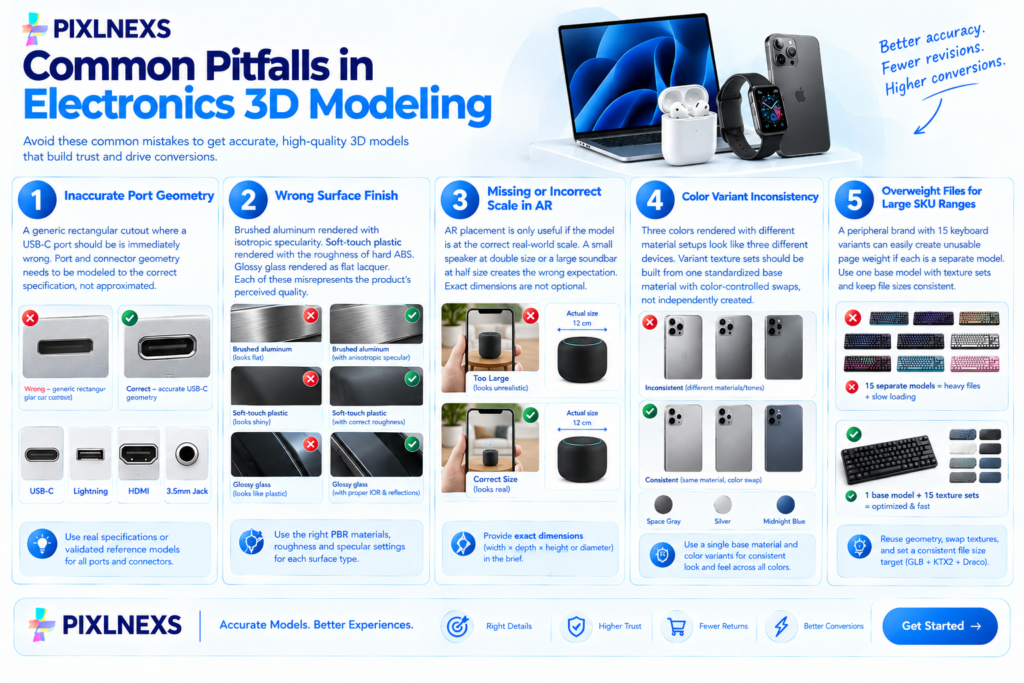
The most visible failure mode in electronics 3D. A generic rectangular cutout where a USB-C port should be is immediately wrong to anyone who uses USB-C daily which is most of the target audience for consumer electronics. Port and connector geometry needs to be modeled to the correct specification, not approximated.
Wrong Surface Finish
Brushed aluminum rendered with isotropic specularity. Soft-touch plastic rendered with the roughness of hard ABS. Glossy glass rendered as flat lacquer. Each of these misrepresents the product’s perceived quality in a direction that is worse than the real thing the model looks cheaper than the device it represents, which is the opposite of what a product visualization is supposed to achieve.
Missing or Incorrect Scale in AR
AR placement is only useful if the model is at the correct real-world scale. A small Bluetooth speaker placed in AR at double its actual size or a large soundbar placed at half its actual size, gives the shopper information that is worse than no AR at all it creates an expectation that will definitely be wrong when the product arrives. Exact dimensions in the brief are not optional.
Color Variant Inconsistency
A device available in Space Gray, Silver and Midnight Blue rendered with three different material setups built independently tends to look like three slightly different devices rather than one device in three colors. Variant texture sets should be built from one standardized base material with color-controlled swaps, not independently created.
Overweight Files for Large SKU Ranges
A peripheral brand with 15 keyboard variants, each built as an independent model, can easily accumulate per-page weight that makes their catalog page unusable on mobile. The fix is efficient reuse: one base keyboard model, 15 color variant texture sets, each exported at the same file size target. Treating each variant as a completely independent model build is the most common cause of catalog-scale performance problems in electronics 3D.
How AR Placement Works for Electronics
AR placement anchors the 3D model at its real-world dimensions in the camera feed. A wireless speaker modeled at its actual dimensions 180mm wide, 80mm tall appears at that size when placed on a real desk or shelf, which lets a shopper hold their phone up and see whether the speaker fits where they are planning to put it, next to the monitor or on the bedside table.
For iOS, AR Quick Look launches automatically when a shopper taps a product in Safari on iPhone or iPad. For Android, Google Scene Viewer launches from Chrome. Neither requires an app download. For the full comparison of how these two AR delivery systems work and when to use each, see our guide on native app AR vs WebAR for ecommerce.
The critical requirement for AR to be useful for electronics is scale accuracy. Shoppers in this category have strong existing reference points for how large a device should be they have probably held similar products and they have a clear mental model of what “normal laptop size” or “normal earbuds size” looks like. A model that is 15% too large or too small in AR is immediately wrong, which damages trust rather than building it.
SEO and Page Performance Considerations
Adding an interactive 3D viewer to an electronics product page affects performance and this is worth addressing honestly rather than assuming 3D is always a net positive for page speed scores.
An unoptimized 3D model or a model loaded eagerly at page render rather than lazily when the shopper reaches the product section can significantly hurt Largest Contentful Paint (LCP) and Core Web Vitals scores. A correctly implemented viewer loads lazily: it initializes after the main page content has rendered and only when a shopper scrolls to or interacts with the product. This means a shopper who bounces without scrolling sees no performance cost.
For electronics brands with long product catalog pages a full range of monitors, a keyboard and mouse lineup, a headset series lazy loading is particularly important because multiple viewer instances loading simultaneously is a genuine performance risk. We provide lazy loading guidance alongside every GLB delivery and the most common viewer implementations including Google model-viewer, Shopify’s native 3D support and major WooCommerce viewer plugins all support lazy loading natively when configured correctly.
When done correctly, interactive 3D tends to improve the engagement metrics that matter for ecommerce product pages: time on page increases, bounce rates from product pages often decrease and returns fall, which reduces negative signals associated with high return rates. For the full pre-launch testing process to confirm a viewer is performing correctly before going live, see our guide on how to test 3D and AR product pages before launch.
Comparison: 3D Models vs. Traditional Product Photography for Electronics
Traditional product photography for electronics serves some purposes very well: lifestyle and in-context imagery communicates brand positioning and premium feel in ways that a 3D viewer in isolation does not. But for the product inspection use case “what does this device actually look like, where are the ports, what is the finish like and how big is it?” 3D modeling consistently outperforms static photography, because photography is a fixed output produced at one moment in time, from a set of angles chosen by the photographer.
A photo shoot for a new keyboard produces a set of hero shots, gallery images and lifestyle images. If a new colorway launches mid-season, a new shoot is needed. If the design is revised, the existing photography is wrong. If a shopper wants to see the underside of the device, there may or may not be a shot of it in the gallery depending on what the photographer chose to capture.
A 3D model gives the shopper any angle they want, at any zoom level, at any point in the product lifecycle. The same model that was built for the product launch can produce new renders for a promotional campaign, be used in AR placement on a retailer’s app and serve as the source file for future colorway variants at a fraction of the cost of commissioning new photography for each use case.
For the full comparison of 3D product visualization against traditional photography across cost, reusability and buyer experience, see our guide on 3D product visualization vs product photography.
Scaling From One SKU to a Full Catalog
Once the pilot model has been delivered and validated on your live product page, scaling to a full electronics range follows a repeatable process.
Shared Base Models for Product Families
If your range includes multiple color or finish variants of the same device the same keyboard in Black, White and Silver, for example the base geometry is modeled once and variant texture sets handle the color differences. The additional cost per color variant is significantly lower than the base model, because the geometry, UV mapping and port modeling are already complete.
Different form factors within a range a full-size keyboard and a tenkeyless version need their own model builds, since the geometry is genuinely different. However, shared elements like keycap modeling, stabilizer detail and port cluster work are often reusable between related models in the same product family, which speeds up the second model build.
Delivery Cadence for Large Ranges
For electronics brands with 20 or more SKUs to convert, we work to an agreed delivery cadence typically batches of 5 to 10 models per week with each batch signed off before the next begins. This lets your development team integrate new GLB files progressively, test each one on the store and catch integration issues early rather than dealing with them across a simultaneous 30-model push.
Quality Consistency Across a Large Range
Quality drift is a real risk in large catalog 3D rollouts: the first few models receive the most scrutiny and look excellent, while later models in the range receive lighter review and subtle inconsistencies accumulate. We address this by establishing a reference quality standard from the first approved model and checking all subsequent models against it before delivery, not just against the brief.
Conclusion
For electronics and gadgets brands, the move from static product photography to interactive 3D modeling is a direct response to the specific questions that drive the electronics purchasing decision port location, build finish, real size, color accuracy and the kind of detailed inspection that a product page photo cannot provide. A shopper who has rotated a device, checked every port, verified the finish matches the described colorway and placed the product in AR at real scale is a shopper who arrives at checkout with less uncertainty.
Pixlnexs builds these models to production standard for electronics brands at any scale, from a single device to a full peripheral lineup. Every model ships as a web-ready GLB, a USDZ companion, 3 rendered images and a hero image from one production run, typically in about 4 working days per product.
Send us one product photo and we will get you an exact quote.
See your electronics product in 3D starting at one SKU
Send one product photo and we will get you an exact quote. No free samples your first model is produced exactly like every model after it, so what you see is what you scale.
Get a Quote for Interactive 3D Talk to Our TeamFrequently Asked Questions
Does interactive 3D actually increase conversion for electronics products?
Yes, when the model is accurate and the viewer is correctly implemented. The 94% conversion lift figure comes from Shopify’s own merchant data and is widely cited in the 3D commerce industry as a directional benchmark. The actual lift for any specific product and audience will vary which is why starting with one bestseller and measuring before-and-after on your own traffic is the right approach rather than assuming a specific number.
What file format will I receive for my product models?
A web-ready GLB (the binary packaging of glTF 2.0) for your storefront’s 3D viewer and Android AR via Scene Viewer, plus a USDZ file so the same model works in iOS AR Quick Look. For a full explanation of these formats and when each is used, see our guide on GLB vs USDZ vs OBJ: 3D file formats explained.
Can you model products with RGB lighting effects?
Yes. RGB lighting is handled using an emissive material channel in the GLB, which allows the lighting effect to glow visibly in the viewer. Static RGB displays (a fixed color) are straightforward. Animated RGB sequences require animated material support in the viewer we can discuss the specific technical requirements for your viewer implementation if animated effects are a requirement.
Do you need CAD files to build an accurate model?
No, though they help. Most electronics models are built successfully from clear reference photos, exact dimensions and the product’s published technical specifications. CAD files improve geometric accuracy and can reduce the modeling timeline for complex devices they are worth supplying if you have them but are not a prerequisite for starting.
How many color variants can one base model support?
There is no practical upper limit on color variants from a single base model each variant is a texture swap rather than a separate model build. The per-variant cost is significantly lower than the base model cost. For a device available in five colors, the total cost is considerably less than five times the single-model cost.
Can the rendered images replace our existing product photography?
For product-inspection purposes gallery images, marketplace listings, product page thumbnails yes, the rendered images are production quality and are consistent with the interactive viewer since they come from the same source geometry. For lifestyle or in-context imagery, traditional photography is still appropriate.
How does the model work on Amazon and other marketplaces?
The GLB file can be used to generate the rendered images and hero image that appear in marketplace listings these are standard still images, not interactive viewers, since most marketplaces do not yet support interactive 3D natively in their product listings. The interactive viewer and AR experience lives on your own product page. The same model is the source for both the marketplace stills and the viewer.
What if I have an unreleased or NDA-protected product?
We work under NDA for new and unreleased products regularly. Brief us with whatever reference material you can share under the terms of the NDA engineering CAD files, renders or physical samples where these can be shared and we handle the project under confidentiality from intake through delivery.










Leave a Reply